1. Танилцуулга
Худалдан авалт хийсэнд баярлалааasing the VIVIBRIGHT GP100UP LED Projector. This manual provides essential information for the safe and efficient operation of your device. Please read it thoroughly before use and retain it for future reference.
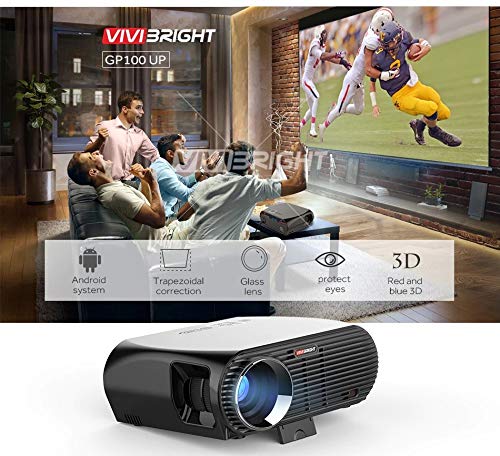
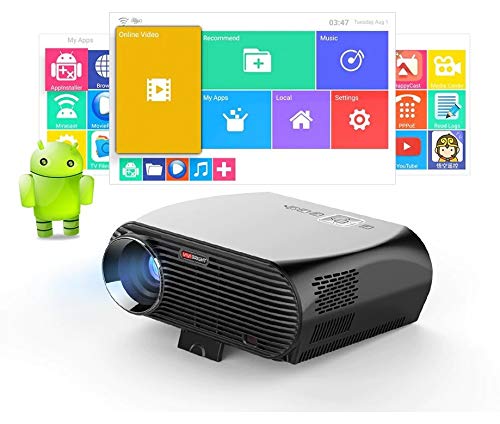
The VIVIBRIGHT GP100UP is an Android 6.0-based LED projector featuring built-in Wi-Fi and Bluetooth, designed for home theater and office presentations. It supports Full HD content and offers a bright projection experience.
2. Аюулгүй байдлын мэдээлэл
- Эрчим хүчний хангамж: Зөвхөн заасан тэжээлийн адаптерийг ашиглана уу. Боть байгаа эсэхийг баталгаажуулна ууtage нь таны орон нутгийн цахилгаан хангамжтай таарч байна.
- Агааржуулалт: Агааржуулалтын нүхийг хааж болохгүй. Хэт халалтаас сэргийлэхийн тулд проекторын эргэн тойронд хангалттай агаарын урсгалыг хангана.
- Шингэний нөлөөлөл: Проекторыг ус болон бусад шингэнээс хол байлга. Дулаан орчинд ажиллуулж болохгүй.amp орчин.
- Цэвэрлэгээ: Disconnect power before cleaning. Use a soft, dry cloth. Avoid liquid or aerosol cleaners.
- Объект оруулах: Never insert objects of any kind into the projector openings as they may touch dangerous voltage цэгүүд эсвэл богиносгосон хэсгүүд.
- Үйлчилгээ: Энэ бүтээгдэхүүнд өөрөө үйлчлэх гэж бүү оролдоорой. Бүх засвар үйлчилгээг мэргэшсэн үйлчилгээний ажилтнуудад хандаарай.
- Нүд хамгаалах: l байх үед проекторын линз рүү шууд харж болохгүйamp асаалттай байна. Хурц гэрэл нь нүдийг гэмтээж болно.
3. Багцын агуулга
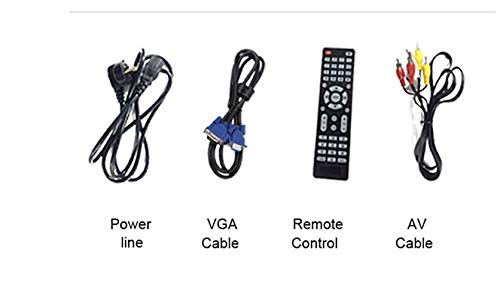
Доор жагсаасан бүх зүйл таны багцад байгаа эсэхийг шалгаарай.
- VIVIBRIGHT GP100UP Projector
- Цахилгаан кабель
- VGA кабель
- АВ кабель
- Алсын удирдлага
- Хэрэглэгчийн гарын авлага (энэ баримт бичиг)
Зураг 3.1: Included accessories with the VIVIBRIGHT GP100UP projector, including power cable, VGA cable, remote control, and AV cable.
4. Бүтээгдэхүүн дууссанview
4.1. Проекторын хэмжээсүүд
Зураг 4.1: Урд ба дээд view of the VIVIBRIGHT GP100UP projector with approximate dimensions: 11 inches (length), 8.85 inches (width), and 4 inches (height).
4.2. Оролт/гаралтын портууд
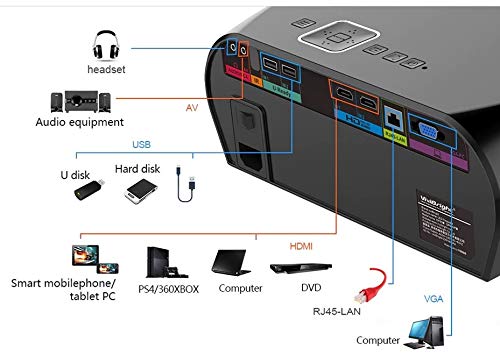
Проектор нь гадаад төхөөрөмжүүдийг холбоход зориулсан хэд хэдэн порттой:
Зураг 4.2: Detailed diagram of the projector's rear panel, illustrating connectivity options including headset, audio equipment (AV), USB ports for U disk and hard disk, HDMI ports, RJ45-LAN, and VGA port.
- HDMI: Connect to Blu-ray players, gaming consoles, laptops, or other HDMI-enabled devices.
- USB: For connecting USB drives (U disk) or external hard drives.
- OF: Нийлмэл видео болон стерео аудио ашиглан хуучин төхөөрөмжүүдийг холбоход зориулагдсан.
- VGA: For connecting to computers or laptops with a VGA output.
- RJ45-LAN: Утастай сүлжээний холболтод зориулагдсан.
- Чихэвчний Жак: Гадаад чихэвч эсвэл чанга яригчийг холбох зориулалттай.
4.3. Алсын удирдлага
The included remote control allows for convenient operation of the projector.
Зураг 4.3: Remote control layout with key functions: ON/OFF, Volume Up/Down, OK, Menu, Home, Speed, Mute, Back, Mouse Mode, and the USB receiver.
- ON/OFF: Power on or off the projector.
- Эзлэхүүн +/-: Аудио дууны хэмжээг тохируулна уу.
- БОЛЖ БАЙНА УУ: Сонголтыг баталгаажуулна уу.
- Цэс: Проекторын тохиргоонд хандах.
- Нүүр хуудас: Return to the main Android interface.
- Буцах: Өмнөх дэлгэц рүү буцах.
- Хулганы горим: Activate/deactivate air mouse function (if applicable).
- Дууг хаах: Дууны дууг хаах эсвэл нээх.
5. Тохиргоо
5.1. Байрлуулах
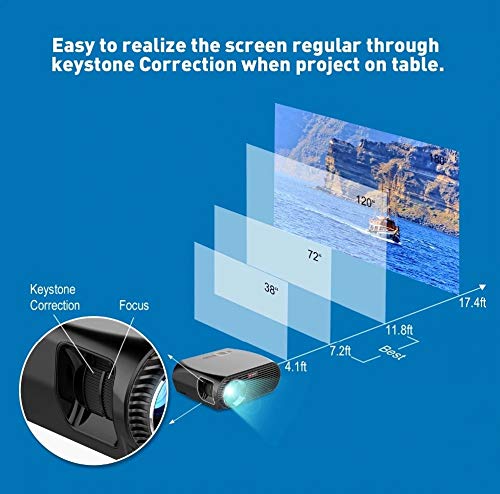
Place the projector on a stable, flat surface or mount it to the ceiling. Ensure there are no obstructions to the lens or ventilation ports. The optimal projection distance for a clear image is between 1 to 5 meters.
Зураг 5.1: Illustration of projection distances and corresponding screen sizes, along with the location of the keystone correction and focus rings on the projector.
- For a 72-inch screen, the recommended distance is approximately 7.2 feet (2.2 meters).
- For a 120-inch screen, the recommended distance is approximately 11.8 feet (3.6 meters).
5.2. Эрчим хүчний холболт
- Цахилгааны кабелийг проекторын тэжээлийн оролтод холбоно.
- Цахилгааны кабелийн нөгөө үзүүрийг тохирох цахилгаан залгуурт холбоно.
- Проектор дээрх тэжээлийн заагч гэрэл асах ёстой.
5.3. Анхаарал төвлөрүүлэх ба гол чулууг засах
After powering on, adjust the image for clarity and proper geometry.
- Фокус: Төсөөлсөн дүрс тод, тод болтол линзний ойролцоох фокусын цагиргийг эргүүлнэ.
- Түлхүүр чулууны залруулга: If the projected image appears trapezoidal (wider at the top or bottom), use the keystone correction ring or lever (usually located near the focus ring) to adjust the image until it is rectangular. The GP100UP supports +/- 15 degrees vertical keystone correction.
6. Ашиглалтын заавар
6.1. Initial Power On and Android Interface
Press the power button on the projector or remote control to turn on the device. The projector will boot into its Android 6.0 operating system interface.
Зураг 6.1: The VIVIBRIGHT GP100UP projector in operation, highlighting its Android system capabilities and other features.
Navigate the Android interface using the remote control. You can access pre-installed applications, settings, and media files.
6.2. Гадаад төхөөрөмжүүдийг холбох
To project content from external sources:
- Connect your device (e.g., laptop, gaming console, USB drive) to the appropriate port on the projector (HDMI, USB, AV, VGA).
- On the projector's Android interface, navigate to the "Input Source" or "Source" option.
- Select the corresponding input source (e.g., HDMI1, USB, AV, VGA) to display content from your connected device.
6.3. Wireless Connectivity (Wi-Fi, Bluetooth, Screen Mirroring)
The GP100UP supports various wireless functions:
- Wi-Fi:
- Go to "Settings" on the Android interface.
- "Wi-Fi"-г сонгоод асаана уу.
- Choose your desired network and enter the password to connect.
- Bluetooth:
- Go to "Settings" on the Android interface.
- Select "Bluetooth" and turn it on.
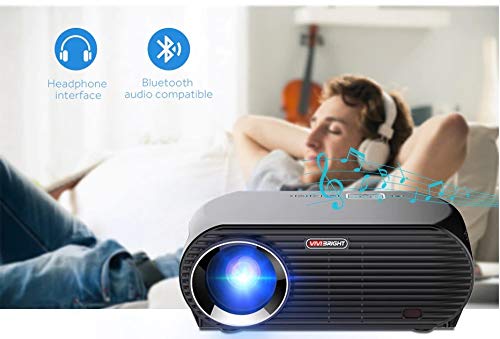
- Pair with Bluetooth audio devices like headphones or speakers.
Зураг 6.2: The projector's Bluetooth audio compatibility, allowing connection to wireless headphones or speakers.
- Screen Mirroring (Miracast/Airplay/DLNA):
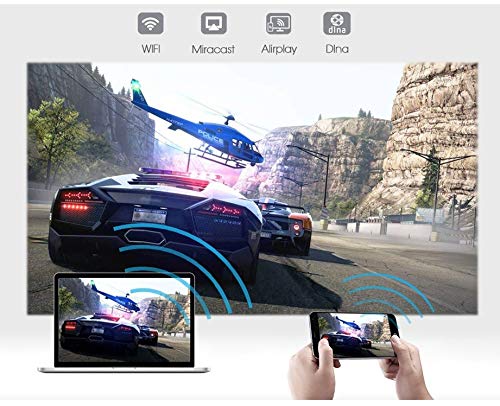
The projector supports mirroring content from compatible smartphones, tablets, and laptops via Wi-Fi, Miracast, Airplay, and DLNA.
- Ensure both your device and the projector are connected to the same Wi-Fi network.
- On the projector's Android interface, open the relevant screen mirroring application (e.g., Miracast, Airplay, DLNA).
- On your smartphone/tablet/laptop, activate its screen mirroring function (e.g., "Screen Mirroring," "Smart View," "Cast," "AirPlay").
- Select the projector from the list of available devices to begin mirroring.

Зураг 6.3: Wireless screen mirroring capabilities, enabling content from mobile devices and laptops to be displayed on the projector.
7. Засвар үйлчилгээ
7.1. Линзийг цэвэрлэх
Use a soft, lint-free cloth specifically designed for optical lenses. Gently wipe the lens to remove dust or smudges. Avoid using abrasive materials or harsh chemicals.
7.2. Проектор C-г цэвэрлэхasing
Проекторын гадна талыг зөөлөн, хуурай даавуугаар арчина. Зөрүүд тэмдгийн хувьд бага зэрэг damp cloth can be used, followed by a dry cloth. Ensure no liquid enters the ventilation openings.
7.3. Air Filter (if applicable)
While LED projectors typically have sealed optical engines, regularly check ventilation openings for dust accumulation. Use a soft brush or compressed air to clear any blockages.
8. Алдаа засах
| Асуудал | Боломжит шалтгаан | Шийдэл |
|---|---|---|
| Зураг харагдахгүй байна |
|
|
| Зураг бүдэг байна |
|
|
| Зураг нь трапец хэлбэртэй байна |
|
|
| Дуу алга |
|
|
| Wi-Fi/Bluetooth connection issues |
|
|
9. Техникийн үзүүлэлтүүд
| Онцлог | Дэлгэрэнгүй |
|---|---|
| Загварын дугаар | GP100UP |
| Дэлгэцийн технологи | LCD |
| Төрөлхийн тогтоол | 1280x800dpi (WXGA) |
| Гэрэлтүүлэг | 3500 люмен |
| Ялгаатай харьцаа | 1000:1-2000:1 |
| Гэрлийн эх үүсвэр | LED |
| Амьдралын гэрлийн эх үүсвэр | Not specified (typically 20,000+ hours for LED) |
| Проекцийн зай | 1-5 м |
| Төлөвлөсөн хэмжээ | 40-300 inches (Best image size: 72-120 inches) |
| Дэлгэцийн хэмжээ | 4:3/16:9 |
| Тулгуур чулууг засах | Manual Correction, +/- 15 degrees (vertical) |
| Систем | Android 6.0.1, CPU: Quad core ARM Cortex-A53 |
| Санах ой (RAM/ROM) | RAM: 1G / ROM: 8G |
| Утасгүй холболт | Wi-Fi, Bluetooth, DLNA, Miracast, Airplay |
| Оролтын портууд | HDMI, USB, AV, VGA, RJ45-LAN |
| Эрчим хүчний хангамж | Хувьсах гүйдэл 90-240 В, 50/60 Гц |
| Эрчим хүчний хэрэглээ | 140 Вт |
| Хэмжээ (ойролцоогоор) | 37 x 30.5 x 15.9 см |
| Жин (ойролцоогоор) | 2.6 кг |
| 3D функц | Red-blue 3D |
10. Баталгаат хугацаа ба дэмжлэг
The VIVIBRIGHT GP100UP Projector comes with a 1 жилийн баталгаат хугацаа худалдан авсан өдрөөс. Энэхүү баталгаа нь ердийн ашиглалтын үеийн үйлдвэрлэлийн согогийг хамарна.
For technical support, warranty claims, or service inquiries, please contact your retailer or the official VIVIBRIGHT customer service channel. Please have your product model number (GP100UP) and proof of purchase ready when contacting support.


