1. Танилцуулга
The Alpine X308U Mech-Less Navigation Receiver is designed to provide advanced smartphone integration and a reliable built-in navigation system for your vehicle. This manual provides essential information for the proper installation, operation, and maintenance of your device.
Гол онцлогууд:
- 8-inch WVGA High-Resolution Capacitive Touch Display
- Compatibility with Apple CarPlay and Android Auto
- Embedded Navigation with 3D & 2D mapping and Pinch-to-Zoom interface
- Bluetooth hands-free calling and audio streaming
- Built-In HD Radio Tuner and SiriusXM Satellite Radio readiness
- Multiple connectivity options including HDMI input/output and USB
- Advanced audio tuning features: 9-band parametric EQ and 6-channel time correction
- Support for FLAC, AAC, MP3, WMA, HE-AC Playback
- Accessory Control Ready (KAC-001 Required) and iDatalink Maestro Module compatibility
2. Бүтээгдэхүүн дууссанview

Зураг 2.1: Урд View with Navigation Display. This image shows the Alpine X308U unit with its 8-inch high-resolution capacitive touch display active, presenting a detailed 3D navigation map. The screen displays street names, distances, and navigation icons, demonstrating the unit's integrated GPS capabilities. Control buttons are visible along the bottom edge of the screen.

Зураг 2.2: Урд View with Media Interface. This image illustrates the Alpine X308U's user interface for media playback and radio tuning. The display shows current FM radio frequency (105.8 MHz), preset stations, and options for HDMI, Music, Pandora, and Bluetooth Audio. Album art and song information are also visible, highlighting the unit's multimedia capabilities.

Figure 2.3: Audio Settings Interface. This image displays the "BASS ENGINE SQ" audio adjustment screen on the Alpine X308U. Users can select from various sound presets like Standard, Punch, Rich, Mid Bass, and Low Bass, and adjust levels for Bass Engine, Navi Audio, and Back Audio. This interface demonstrates the unit's comprehensive audio customization options.

Зураг 2.4: Арын самбарын холболтууд. Энэ зураг нь дэлгэрэнгүй мэдээллийг өгдөг view of the rear panel of the Alpine X308U, highlighting its various input and output ports. Visible connections include GPS antenna input, USB ports, HDMI In, HDMI Out, and the main wiring harness connector. A cooling fan is also visible on the left side, indicating thermal management features.
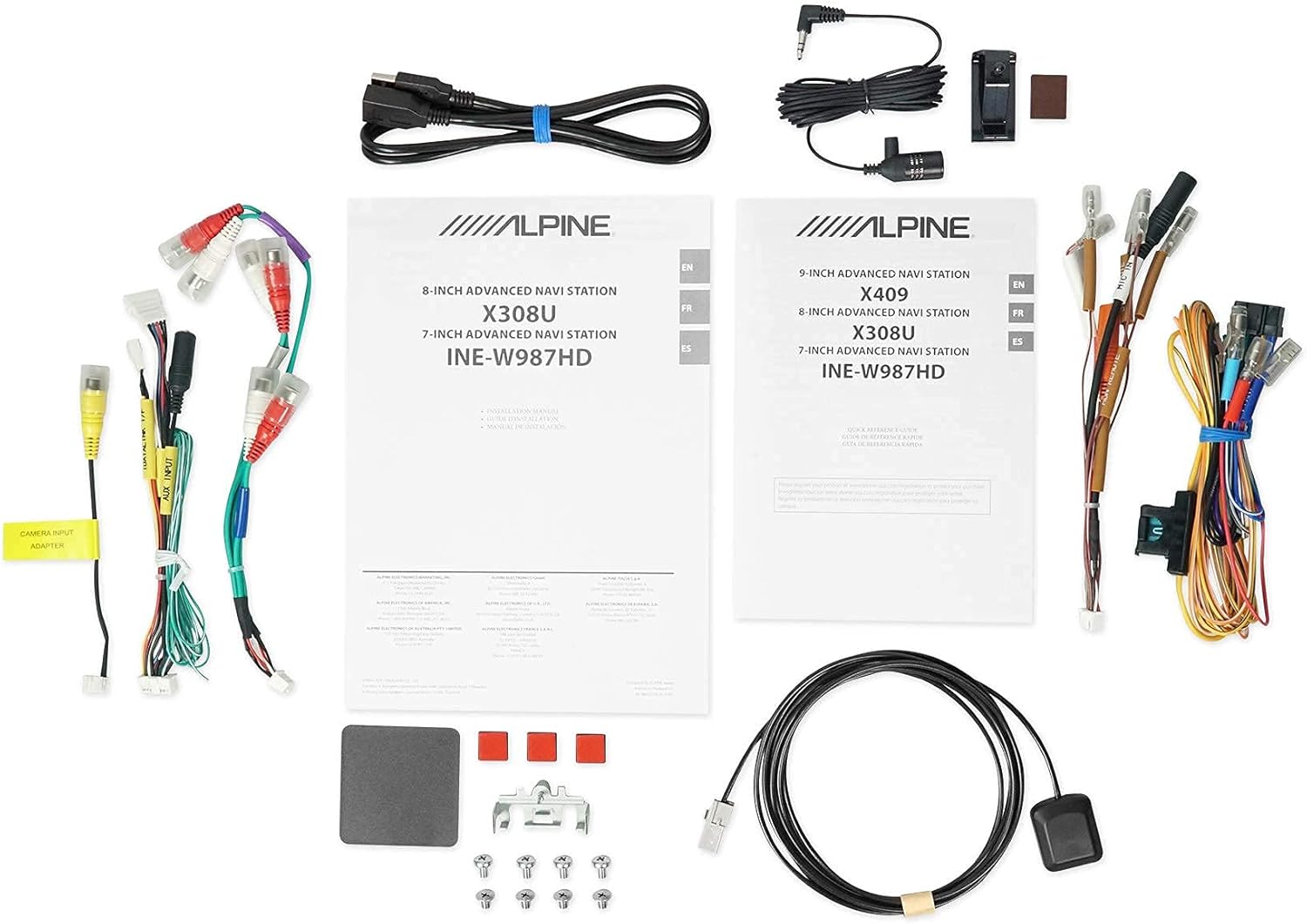
Зураг 2.5: Оруулсан бүрэлдэхүүн хэсгүүд. This image displays a selection of cables and accessories that come with the Alpine X308U unit. These include various wiring harnesses, RCA cables for audio/video connections, a USB extension cable, and a GPS antenna. These components are essential for the proper installation and functionality of the receiver.
3. Тохиргоо ба суурилуулалт
Proper installation is crucial for the optimal performance of your Alpine X308U. It is highly recommended that installation be performed by a qualified professional car audio installer.
3.1. Суулгахаас өмнөх шалгах хуудас:
- "Хайрцагт юу байгаа вэ" хэсэгт жагсаасан бүх бүрэлдэхүүн хэсгүүд байгаа эсэхийг шалгаарай.
- Цахилгааны ажил эхлэхийн өмнө машины сөрөг зайны терминалыг салга.
- Review your vehicle's specific wiring diagrams and dash disassembly instructions.
3.2. Утас холболтууд:
Connect the main wiring harness to the vehicle's power, ground, and speaker wires. Utilize the provided connectors for a secure fit. Refer to the wiring diagram included with your unit for specific color codes and pin assignments.
- Эрчим хүчний холболтууд: Connect the yellow wire (constant 12V), red wire (switched 12V), and black wire (ground).
- Илтгэгчийн гаралт: Connect the speaker wires to the corresponding vehicle speakers. Ensure correct polarity.
- HDMI оролт/гаралт: Use the HDMI ports for connecting external video sources or outputting video to a rear entertainment system. Note that HDMI output functionality may be limited to specific Alpine accessories.
- USB оруулах: Connect USB devices for media playback or smartphone integration (CarPlay/Android Auto).
- Камерын оролт: Ар талыг холбоно уу -view camera to the dedicated input for enhanced safety. The unit supports up to 3 cameras with the optional KCX-C250MC Multi-camera selector.
- Урьдчиланamp Гаралт: Utilize the 6-channel pre-amp гадаад холбох гаралт ampамьдрагчид.
- GPS антена: GPS-ийн антенныг тодорхой газар байрлуул view of the sky for optimal navigation performance.
3.3. Төхөөрөмжийг суурилуулах:
Securely mount the X308U in your vehicle's dashboard using the provided mounting hardware. Ensure adequate ventilation around the unit to prevent overheating.
4. Ашиглалтын заавар
4.1. Үндсэн ажиллагаа:
- Асаах/унтраах: Төхөөрөмжийг асаах эсвэл унтраахын тулд цахилгаан товчийг (ихэвчлэн урд самбар дээр байрладаг) удаан дарна уу.
- Дууны хяналт: Adjust volume using the dedicated volume buttons or on-screen controls.
- Мэдрэгчтэй дэлгэцийн интерфейс: Navigate through menus and select functions by tapping icons on the capacitive touch display. The unit supports 4-Way Swipe Action Control.
- Цэсийн товчлуур: Access the main menu to switch between different sources and settings.
4.2. Навигацийн систем:
- Accessing Navigation: Tap the "Navigation" icon on the main menu.
- Очих газрууд: Use the on-screen keyboard to input addresses, points of interest, or select from recent destinations.
- Газрын зураг View: Switch between 2D and 3D map views. Use pinch-to-zoom gestures to adjust the map scale.
- Дуут заавар: Follow spoken turn-by-turn directions for guidance.
4.3. Smartphone Integration (CarPlay & Android Auto):
- Ухаалаг утсаа холбох: Connect your compatible iPhone or Android phone to the unit's USB port using a certified USB cable.
- CarPlay/Android Auto-г идэвхжүүлэх: Once connected, the respective interface will automatically launch or prompt you to activate it on the screen.
- Апп ашиглах: Access supported navigation, music, messaging, and communication apps directly from the unit's display.
4.4. Bluetooth Functions:
- Төхөөрөмжийг холбох: Go to the Bluetooth settings menu, enable pairing mode on the X308U, and search for the unit on your smartphone. Select "Alpine X308U" and confirm the pairing code.
- Гар чөлөөтэй дуудлага: Make and receive calls directly through the unit's microphone and vehicle speakers.
- Аудио дамжуулалт: Хосолсон ухаалаг утаснаасаа хөгжим дамжуулах боломжтой.
4.5. Аудио тохиргоо:
- Тэгшитгэл: Access the 9-band parametric EQ to fine-tune audio frequencies.
- Цагийн засвар: Adjust the sound stage for optimal listening position using the 6-channel time correction feature.
- TuneIt App: For advanced audio tuning and sharing settings, download and use the Alpine TuneIt App on your smartphone.
5. Засвар үйлчилгээ
Regular maintenance ensures the longevity and optimal performance of your Alpine X308U.
- Дэлгэц цэвэрлэх: Use a soft, lint-free cloth specifically designed for electronic screens to gently wipe the display. Do not use abrasive cleaners or solvents.
- Ерөнхий цэвэрлэгээ: Keep the unit free from dust and debris. Use a soft, dry cloth to wipe the exterior.
- Програм хангамжийн шинэчлэлтүүд: Periodically check the Alpine website for firmware updates to ensure your unit has the latest features and bug fixes. Follow the instructions provided with the update carefully.
- Байгаль орчны нөхцөл: Төхөөрөмжийг хэт өндөр температурт, нарны шууд тусгалд удаан хугацаагаар өртөхөөс зайлсхий.
6. Алдаа засах
If you encounter issues with your Alpine X308U, refer to the following common troubleshooting steps before contacting support.
| Асуудал | Боломжит шалтгаан | Шийдэл |
|---|---|---|
| Цахилгаан байхгүй/нэгж асахгүй байна. | Цахилгааны холболт тасарсан, гал хамгаалагч шатсан, машины аккумляторын асуудал. | Check all power wiring connections. Inspect and replace any blown fuses. Ensure vehicle battery is charged. |
| Чанга яригчаас дуу гарахгүй. | Speaker wires disconnected, incorrect audio settings, unit in mute mode. | Verify speaker wire connections. Check audio settings (e.g., fader/balance, EQ). Ensure unit is not muted. |
| Navigation not working or inaccurate. | GPS antenna not properly connected or obstructed, outdated map data. | GPS антенн найдвартай холбогдсон бөгөөд тунгалаг эсэхийг шалгаарай view of the sky. Check for available map updates. |
| Bluetooth төхөөрөмж хослохгүй. | Device not in pairing mode, incorrect pairing procedure, interference. | Хоёр төхөөрөмж хослох горимд байгаа эсэхийг шалгаарай. Өмнөх хосуудыг устгаад дахин оролдоно уу. Нэгж рүү ойрт. |
| Мэдрэгчтэй дэлгэц хариу өгөхгүй байна. | Түр зуурын програм хангамжийн алдаа, дэлгэцийн тохируулга шаардлагатай. | Perform a soft reset (refer to manual for specific method). If issue persists, contact support. |
7. Техникийн үзүүлэлтүүд
| Онцлог | Дэлгэрэнгүй |
|---|---|
| Загварын дугаар | X308U |
| Дэлгэцийн хэмжээ | 8 инч (диагональ 21 см) |
| Дэлгэцийн төрөл | WVGA High-Resolution Capacitive Touch Display |
| Хамгийн их цахилгаан гаралт | 50 Watts x 4 channels |
| CTA-2006 Power Rating | 18 Watts x 4 channels |
| Урьдчиланamp Гаралт | 3 (4-Volt) |
| Холболтын технологи | Bluetooth, USB, HDMI |
| Газрын зургийн төрөл | Satellite, North America (Built-in 3D & 2D Navigation) |
| Бүтээгдэхүүний хэмжээс | 12 x 12 x 12 инч |
| Зүйлийн жин | 6.4 фунт |
| Оруулсан бүрэлдэхүүн хэсгүүд | HDMI input, USB input, composite A/V input, rear-view camera input, HDMI output, 6-channel preamp outputs, USB source |
8. Баталгаат хугацаа ба дэмжлэг
Энэ бүтээгдэхүүн нь үйлдвэрлэгчийн баталгаат хугацаатай. Баталгаат хугацаа болон хамрах хүрээний дэлгэрэнгүй мэдээлэл зэрэг тодорхой нөхцөл, болзлыг худалдан авалттайгаа хамт ирсэн баталгаат картаас үзнэ үү.
Хэрэглэгчийн дэмжлэг:
For technical assistance, troubleshooting beyond this manual, or warranty claims, please contact Alpine customer support. Visit the official Alpine webхамгийн сүүлийн үеийн холбоо барих мэдээлэл, тусламжийн эх сурвалжийг авах сайт.
Тэмдэглэл: Баталгаат хугацааг баталгаажуулахын тулд худалдан авалтын баримтаа хадгална уу.


