Танилцуулга
Welcome to the user manual for your Picun Elite P80S Wireless Headset. This guide provides detailed instructions for setup, operation, maintenance, and troubleshooting to ensure you get the most out of your device. Please read this manual thoroughly before using the headset.
Багцын агуулга
- Picun Elite P80S Headset
- Detachable AUX Microphone
- USB цэнэглэгч кабель
- AUX Cable for Wired Transmission

Image: Picun Elite P80S Wireless Headset with detachable microphone, showcasing its design and included microphone.
Бүтээгдэхүүн дууссанview
Headset Components and Controls
The Picun Elite P80S headset features an ergonomic design with easy-to-access media buttons for various functions. These include controls for music playback, call management, vibration mode, LED light display, and volume adjustments.

Image: The Picun Elite P80S Wireless Headset shown in its folded configuration, highlighting its portable design.

Image: The Picun Elite P80S Wireless Headset displayed on a stand, providing a clear view of its over-ear design, earcups, and adjustable headband.
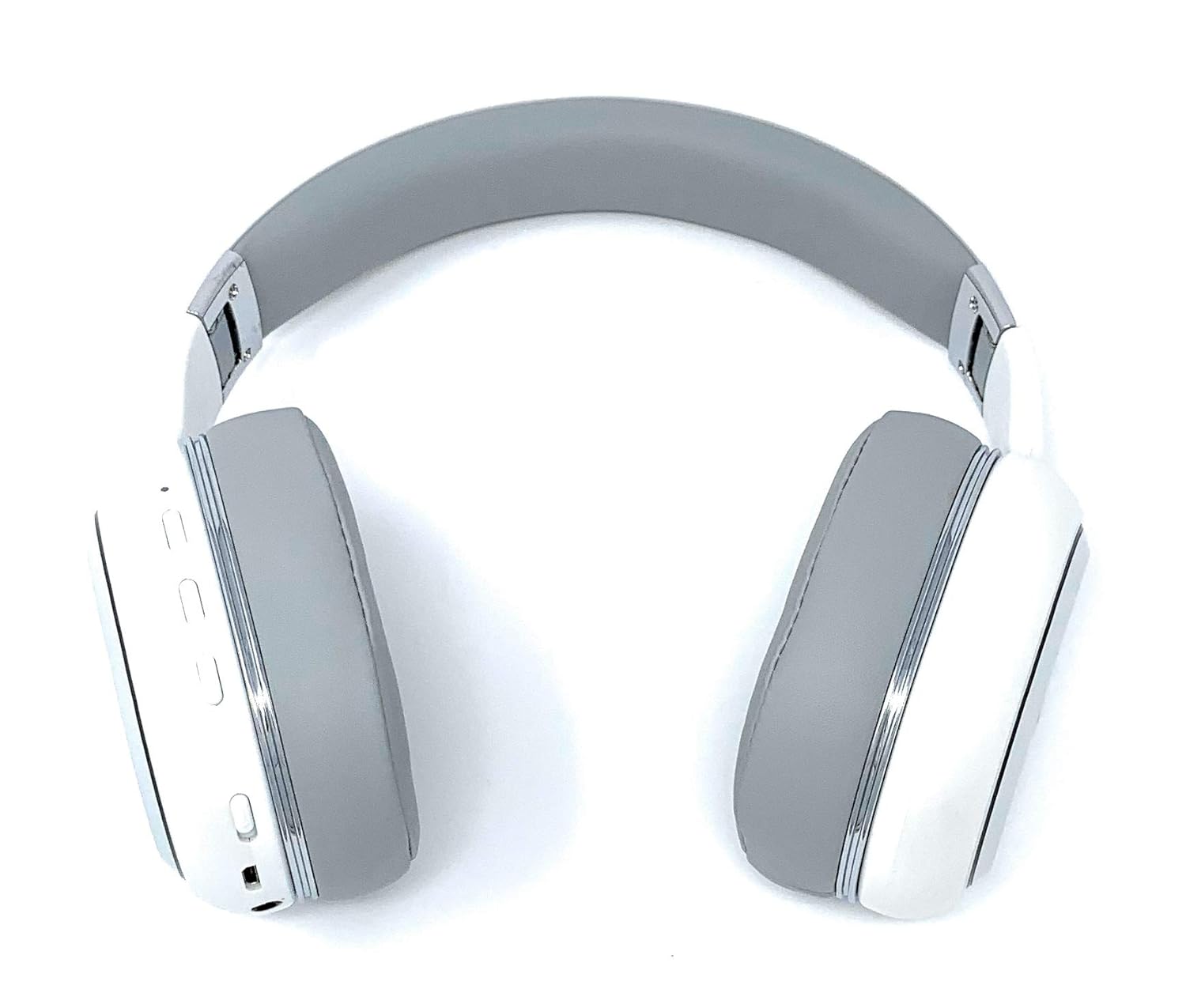
Image: A rear perspective of the Picun Elite P80S Wireless Headset, illustrating the placement of control buttons on the earcup.

Image: A detailed close-up of the right earcup hinge and the 'R' indicator on the Picun Elite P80S Wireless Headset, showing construction details.
Тохиргоо
Чихэвчийг цэнэглэж байна
Before initial use, fully charge the headset. Use the provided USB charging cable with any compatible USB adapter or device.
- Connect the USB charging cable to the headset's charging port.
- USB кабелийн нөгөө үзүүрийг тэжээлийн эх үүсвэрт холбоно уу.
- A full charge provides approximately 40 hours of game time or 60 hours of music/media playback in wireless mode.
Bluetooth хослуулах
To connect your headset wirelessly:
- Чихэвчийг унтраасан эсэхийг шалгаарай.
- LED заагч анивчих хүртэл асаах товчийг удаан дарж, хослуулах горимыг зааж өгнө.
- Төхөөрөмж дээрээ (ухаалаг утас, таблет, компьютер) Bluetooth-г идэвхжүүлж, боломжтой төхөөрөмжүүдийг хайж олоорой.
- Select "Picun P80S" from the list of found devices.
- Once connected, the LED indicator will show a steady light or flash slowly.
Утастай холболт
For a wired connection, use the provided AUX cable:
- Connect one end of the AUX cable to the headset's AUX port.
- Connect the other end to your audio device's 3.5mm audio jack.
- The headset can be used indefinitely in wired mode, regardless of battery charge.
Микрофон залгах
The headset includes a detachable microphone for clear communication:
- Locate the microphone port on the headset.
- Gently insert the detachable microphone into the port until it clicks into place.
- The microphone is designed to reduce ambient noise for high-definition vocals.
Ашиглалтын заавар
Асаах/унтраах
- Асаах: LED заагч асах хүртэл цахилгаан товчийг хэдэн секундын турш дарна уу.
- Унтраах: Press and hold the power button for a few seconds until the LED indicator turns off.
Хөгжим тоглуулах
- Тоглуулах/түр зогсоох: Тоглуулах/Түр зогсоох товчийг нэг удаа дарна уу.
- Дараагийн дуу: Press and hold the 'Volume Up' button.
- Өмнөх бичлэг: Press and hold the 'Volume Down' button.
Дуудлага удирдах
- Дуудлагад хариулах/дуусах: Multi-function товчийг нэг удаа дарна уу.
- Дуудлагаас татгалзах: Олон үйлдэлт товчлуурыг 2 секундын турш барина уу.
Dual Shock/Vibration Mode
This mode enhances audio with deep bass and vibrations, ideal for music, movies, and gaming.
- Идэвхжүүлэх/Идэвхгүй болгох: Use the dedicated 'Vibration/Dual Shock Mode On-Off toggle switch' on the headset.
LED гэрлийн дэлгэц
The headset features an LED light display.
- Асаах/унтраах: Use the dedicated 'LED Light Display On-Off button' on the headset.
Дууны хяналт
- Эзлэхүүнийг нэмэгдүүлэх: Press the 'Volume Up' button.
- Эзлэхүүнийг бууруулах: Press the 'Volume Down' button.
Засвар үйлчилгээ
Цэвэрлэгээ
- Чихэвчийг зөөлөн, хуурай даавуугаар арчина.
- Зүлгүүрийн цэвэрлэгч, уусгагчийг бүү ашигла.
- Цэнэглэх порт болон аудио залгууруудыг тоос шороо, хог хаягдлаас цэвэр байлга.
Хадгалах
- Чихэвчийг нарны шууд тусгал, хэт температураас хол, сэрүүн, хуурай газар хадгална.
- When not in use for extended periods, ensure the headset is fully charged before storing.
Алдааг олж засварлах
Хүч чадалгүй
- Чихэвч бүрэн цэнэглэгдсэн эсэхийг шалгаарай.
- Verify the charging cable and power source are functioning correctly.
Дуу байхгүй
- Чихэвч болон холбогдсон төхөөрөмжийнхөө дууны түвшнийг шалгана уу.
- If using Bluetooth, ensure the headset is properly paired and connected.
- If using a wired connection, ensure the AUX cable is securely plugged into both the headset and the audio source.
- Өөр аудио эх сурвалж эсвэл төхөөрөмжөөр туршиж үзээрэй.
Bluetooth холболтын асуудал
- Чихэвчийг холбох горимд байгаа эсэхийг шалгаарай (LED анивчдаг).
- Төхөөрөмж дээрээ Bluetooth-ийг унтрааж, асаана уу.
- Төхөөрөмж дээрх өмнөх Bluetooth холболтуудыг устгаад, дахин холбож үзнэ үү.
- Ensure the headset is within the effective range of your Bluetooth device.
Үзүүлэлтүүд
| Онцлог | Тодорхойлолт |
|---|---|
| Загварын нэр | Elite P80S |
| Холболтын технологи | Bluetooth |
| Утасгүй холбооны технологи | Bluetooth |
| Оруулсан бүрэлдэхүүн хэсгүүд | Headset, Detachable AUX Microphone, USB Charging Cable, AUX Cable for Wired Transmission |
| Насны хүрээ (Тодорхойлолт) | Насанд хүрсэн |
| Материал | Хуурамч арьс |
| Хяналтын төрөл | Дууны хяналт, Алсын удирдлага |
| Кабелийн онцлог | Салдаг |
| Зүйлийн жин | 820 гр (0.82 килограмм) |
| Зүйлүүдийн тоо | 1 |
| Онцлог шинж чанар | Дуу чимээг арилгах |
| Үйлдвэрлэгч | Пикун |
| Техник хангамжийн платформ | Тоглоомын консол |
| Микрофоны формат | Built-In, Detachable AUX Microphone |
| Батерей шаардлагатай | Үгүй (Дотоод цэнэглэдэг батерей) |
| Form Factor | Чихний дээгүүр |
| Өнгө | Цагаан |
| Дуу чимээний хяналт | Идэвхтэй дуу чимээг арилгах |
| Чихэвчний үүр | 3.5 мм Жак |
Баталгаат хугацааны мэдээлэл
The Picun Elite P80S Wireless Headset is covered by a manufacturer's warranty. For specific details regarding warranty terms, duration, and claims process, please refer to the warranty policy provided at the time of purchase or contact Picun customer support.
Хэрэглэгчийн дэмжлэг
If you encounter any issues not covered in this manual or require further assistance, please contact Picun customer support through their official website or the contact information provided with your product packaging. Please have your product model (P80S) and purchase details ready when contacting support.


