1. Бүтээгдэхүүн дууссанview
The Schneider SC600SND is a versatile 2.0 channel soundbar designed to enhance your audio experience. It offers a total output power of 30W (15W x 2) and supports multiple connectivity options including Bluetooth, HDMI (ARC), Optical, and Aux. A unique feature of this soundbar is its convertible design, allowing it to be used as a single horizontal unit or split into two vertical speaker columns.

Image 1.1: The Schneider SC600SND Soundbar in its standard monoblock configuration.
2. Тохиргоо
2.1 Савлах ба байрлуулах
Carefully remove all components from the packaging. Ensure you have the soundbar unit, remote control, and 3.5mm Jack cable.
The SC600SND soundbar offers two primary placement options:
- Monoblock Configuration: Use the soundbar as a single horizontal unit, ideal for placing below your television.
- Split Column Configuration: The soundbar can be separated into two vertical speaker columns. This allows for flexible placement on either side of your television or entertainment unit. To split, gently twist and pull the two halves apart at the central connection point. Attach the provided bases to each column for stability.

Image 2.1: Detail of the central connection point, allowing the soundbar to be split into two columns.
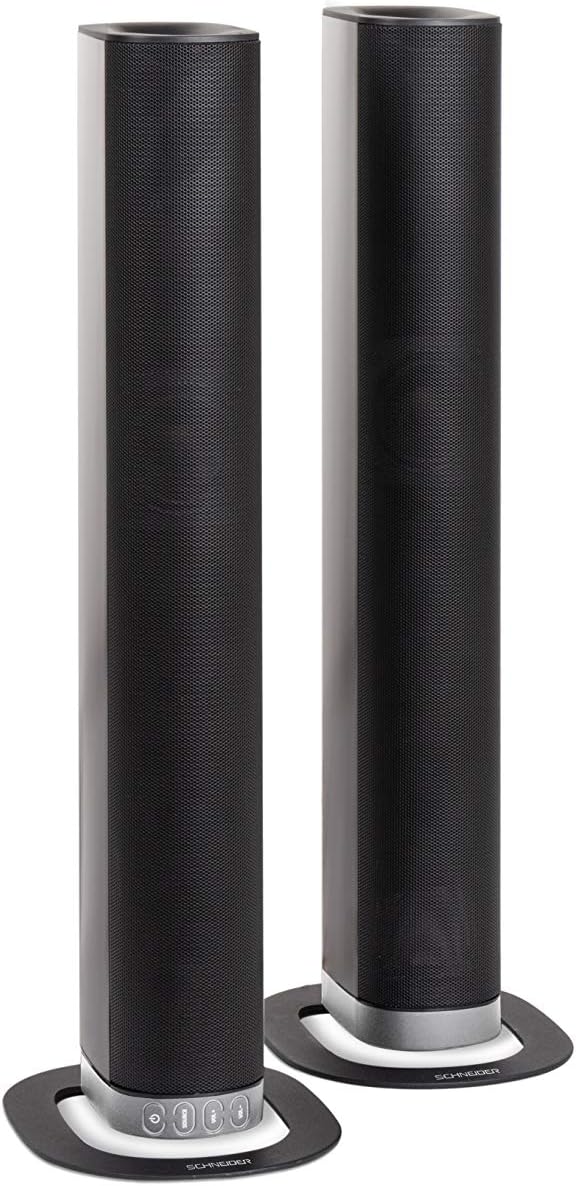
Image 2.2: The soundbar configured as two independent vertical speaker columns.
2.2 Цахилгаан тэжээлд холбогдох
Connect the power cable to the soundbar's power input and then to a suitable wall outlet. The soundbar will enter standby mode.
2.3 Аудио холболт
Аудио эх сурвалжаа холбохын тулд дараах аргуудын аль нэгийг сонгоно уу.
- HDMI (ARC): For optimal audio quality and control, connect an HDMI cable from the soundbar's HDMI ARC port to your TV's HDMI ARC port. This allows your TV remote to control the soundbar's volume.
- Оптик: Connect an optical cable from the soundbar's OPTICAL input to your TV's optical output.
- AUX: Use the included 3.5mm Jack cable to connect the soundbar's AUX input to the headphone jack or audio output of your device (e.g., TV, smartphone, MP3 player).
- Bluetooth: For wireless connection, refer to the Bluetooth pairing instructions in the Operating section.
3. Ашиглалтын заавар
3.1 Асаах/унтраах
дээр дарна уу Хүч төхөөрөмжийг асаах эсвэл унтраахын тулд дууны самбар эсвэл алсын удирдлага дээрх товчлуурыг дарна уу.
3.2 Эх сурвалж сонгох
дээр дарна уу ЭХ СУРВАЛЖ button on the soundbar or the remote control to cycle through the available input sources: Bluetooth (BT), HDMI (ARC), Optical, and AUX.

Image 3.1: On-unit control buttons for power, source selection, and volume adjustment.
3.3 Дууны хяналт
-г ашиглана уу VOL+ болон VOL- buttons on the soundbar or remote control to adjust the volume. Press the ЗУРАГ Аудиог түр зуур чимээгүй болгохын тулд алсын удирдлага дээрх товчийг дарна уу.
3.4 Bluetooth холболт
- Select Bluetooth as the source input. The soundbar will enter pairing mode, indicated by a flashing LED.
- Мобайл төхөөрөмж дээрээ (ухаалаг утас, таблет гэх мэт) Bluetooth-ийг идэвхжүүлж, боломжтой төхөөрөмжүүдийг хайж олоорой.
- Select "SC600SND" from the list of devices.
- Once paired, the LED indicator on the soundbar will stop flashing and remain solid. You can now play audio wirelessly from your device.
3.5 Дууны горимууд
The remote control includes dedicated buttons for different sound modes to optimize your listening experience:
- МЭДЭЭ: Enhances vocal clarity for news broadcasts and dialogue.
- КИНО: Provides a more immersive soundstagкинонд зориулсан e.
- ХӨГЖИМ: Хөгжим тоглуулахад зориулж аудиог оновчтой болгодог.

Image 3.2: The included remote control with dedicated buttons for power, source, volume, mute, and sound modes.
4. Засвар үйлчилгээ
Дууны самбарынхаа урт наслалт, оновчтой ажиллагааг хангахын тулд дараах засвар үйлчилгээний удирдамжийг дагана уу.
- Цэвэрлэгээ: Use a soft, dry cloth to clean the exterior surfaces of the soundbar. Do not use liquid cleaners, aerosols, or abrasive materials, as these can damage the finish or internal components.
- Агааржуулалт: Ensure that the soundbar's ventilation openings are not blocked. Proper airflow prevents overheating.
- Хадгалах: If storing the soundbar for an extended period, disconnect it from power and store it in a cool, dry place, away from direct sunlight and extreme temperatures.
- Харьцуулах: Avoid dropping or subjecting the soundbar to strong impacts.
5. Алдаа засах
If you encounter issues with your SC600SND soundbar, refer to the following common problems and solutions:
- Эрчим хүчгүй:
- Цахилгааны кабель нь дууны самбар болон ажиллаж байгаа цахилгаан залгуурт найдвартай холбогдсон эсэхийг шалгаарай.
- Цахилгаан залгуур ажиллаж байгаа эсэхийг өөр төхөөрөмжид залгаж шалгана уу.
- Дуугүй:
- Verify that the correct input source (HDMI, Optical, AUX, Bluetooth) is selected on the soundbar.
- Increase the volume on both the soundbar and your connected audio source (e.g., TV, smartphone).
- Дууны самбарыг хаагаагүй эсэхийг шалгаарай.
- Check all audio cables for secure connections and damage. Try a different cable if possible.
- If using HDMI ARC, ensure your TV's HDMI ARC function is enabled in its settings.
- Poor Sound Quality / Distorted Audio:
- Adjust the volume levels to avoid distortion.
- Try switching between the different sound modes (NEWS, MOVIE, MUSIC) to see if one improves the audio for your content.
- Ensure the soundbar is placed on a stable surface and not vibrating excessively.
- If using Bluetooth, ensure your device is within range and there are no obstructions causing interference.
- Bluetooth холболтын асуудал:
- Ensure the soundbar is in Bluetooth pairing mode (flashing LED).
- Make sure your device's Bluetooth is enabled and it is searching for new devices.
- Төхөөрөмжөө дууны самбар руу ойртуулна уу.
- Хэрэв өмнө нь хослуулсан бол төхөөрөмжийг салгаад дахин хослуулахыг оролдоорой.
- Алсын удирдлага ажиллахгүй байна:
- Алсын удирдлага дахь батерейг шалгаж, солино уу.
- Алсын удирдлага болон дууны самбарын мэдрэгчийн хооронд ямар нэгэн саад бэрхшээл байхгүй эсэхийг шалгаарай.
- Алсын удирдлагыг дууны самбар руу шууд чиглүүл.
6. Техникийн үзүүлэлтүүд
| Онцлог | Тодорхойлолт |
|---|---|
| Загварын дугаар | SC600SND |
| Сувгууд | 2.0 |
| Гаралтын хүч | 30 Вт (15 Вт x 2) |
| Холболтын технологи | Bluetooth, HDMI (ARC), Optical, Aux |
| Утасгүй холбоо | Bluetooth |
| Хяналтын арга | Алсын удирдлага |
| Чанга яригчийн төрөл | Дууны самбар |
| Чанга яригчийн хэмжээ | 2 инч |
| Эрчим хүчний эх үүсвэр | Цахилгаан кабель |
| Product Dimensions (Monoblock) | 80.5 x 6.2 x 9 см |
| Бүтээгдэхүүний жин | 2.5 кг |
| Оруулсан бүрэлдэхүүн хэсгүүд | Remote Control, 3.5mm Jack Cable |
| Өнгө | Хар |
7. Баталгаат хугацаа ба дэмжлэг
7.1 Хязгаарлагдмал баталгаат хугацаа
This Schneider SC600SND Soundbar is covered by a Limited Warranty. Please refer to the warranty card included with your product or contact your retailer for specific terms and conditions regarding warranty coverage and duration.
7.2 Хэрэглэгчийн дэмжлэг
For technical assistance, troubleshooting beyond this manual, or warranty claims, please contact the retailer where you purchased the product or visit the official Schneider webтусламжийн мэдээлэл авах сайт.


