Танилцуулга
This manual provides essential information for setting up, operating, maintaining, and troubleshooting your VAIO SX12 laptop. Please read this manual thoroughly to ensure proper use and to maximize the performance and longevity of your device.

Зураг 1: Урд view of the VAIO SX12 laptop with the screen open.
Тохиргоо
1. Савлах, анхны үзлэг
Carefully remove all components from the packaging. Verify that all items listed in the 'What's in the Box' section are present and undamaged. If any items are missing or damaged, contact customer support.
- VAIO SX12 Laptop
- Хувьсах гүйдлийн адаптер
- Цэвэрлэгээний даавуу
2. Хувьсах гүйдлийн адаптерийг холбох
Connect the AC adapter to the power input port on the laptop and then plug the adapter into a wall outlet. The battery will begin charging automatically.
3. Анхдагч асаалттай
Press the power button located on the top right of the keyboard. The laptop will boot up and guide you through the initial Windows 10 Pro setup process.
Ажиллаж байна
1. Гар болон мэдрэгчтэй самбар
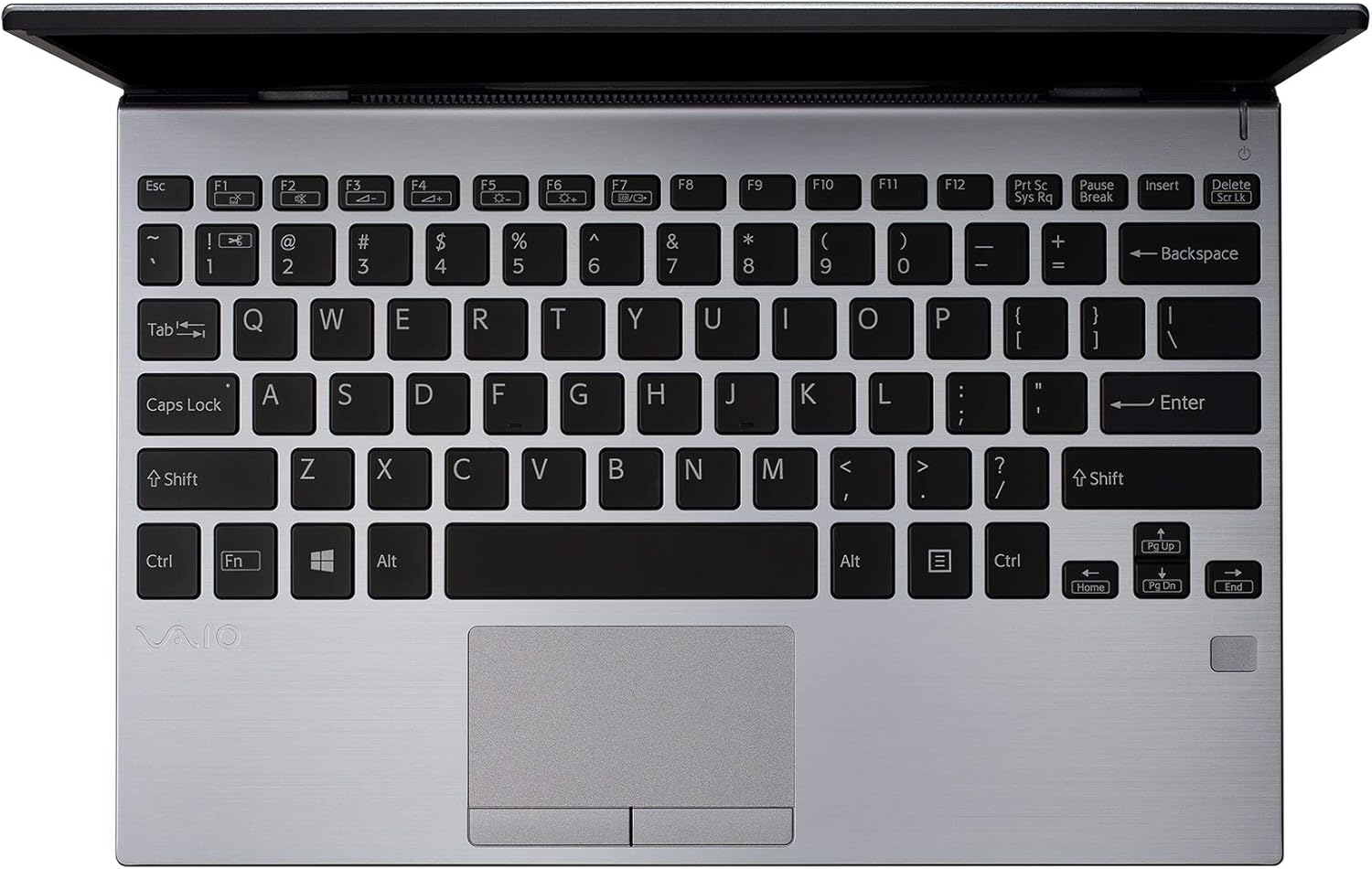
Зураг 2: Дээрээс доош view of the VAIO SX12 keyboard and touchpad.
The VAIO SX12 features a full-sized keyboard and a precision touchpad. Familiarize yourself with the function keys (F1-F12) which control various system settings such as screen brightness, volume, and wireless connectivity.
- Функцийн товчлуурууд: Use the 'Fn' key in combination with F1-F12 for secondary functions.
- Мэдрэгч самбар: Supports multi-touch gestures for scrolling, zooming, and navigating.
2. Захын төхөөрөмжүүдийг холбох
The VAIO SX12 offers a variety of ports for connecting external devices.

Зураг 3: Зүүн тал view of the VAIO SX12, showing the power input, USB ports, HDMI, Ethernet, and VGA ports.

Зураг 4: Баруун тал view of the VAIO SX12, showing the SD card slot, USB ports, and audio jack.
- USB портууд: Connect USB devices such as external drives, keyboards, or mice.
- HDMI порт: Гадаад дэлгэц эсвэл проектортой холбогдоно уу.
- VGA порт: Connect to older external displays or projectors.
- Ethernet порт: Утастай сүлжээнд холбогдоно уу.
- SD картны үүр: Өгөгдөл дамжуулахын тулд SD карт оруулна уу.
- Аудио Жак: Чихэвч эсвэл гадаад чанга яригчийг холбоно уу.
Засвар үйлчилгээ
1. Зөөврийн компьютер цэвэрлэх
- Use the provided cleaning cloth or a soft, lint-free cloth to wipe the screen and exterior surfaces.
- Хүчтэй химийн бодис, зүлгүүрийн цэвэрлэгч, уусгагчийг бүү ашигла.
- Зөөврийн компьютерээ цэвэрлэхийн өмнө унтрааж, залгуураас нь салгасан эсэхээ шалгаарай.
2. Зайны арчилгаа
- Зайны ашиглалтын хугацааг уртасгахын тулд зайгаа ойр ойрхон бүрэн цэнэггүй болгохоос зайлсхий.
- Зөөврийн компьютерээ удаан хугацаагаар ашиглаагүй бол сэрүүн, хуурай газар хадгална уу.
- The battery is internal and not user-replaceable. Contact authorized service for battery replacement.
3. Програм хангамжийн шинэчлэлтүүд
Хамгийн сайн гүйцэтгэл болон аюулгүй байдлыг хангахын тулд үйлдлийн систем болон драйверын шинэчлэлтүүдийг тогтмол шалгаж, суулгаарай.
Алдааг олж засварлах
1. Зөөврийн компьютер асахгүй байна
- Хувьсах гүйдлийн адаптер нь зөөврийн компьютер болон ажиллаж байгаа цахилгааны залгуурт найдвартай холбогдсон эсэхийг шалгаарай.
- Өөр төхөөрөмжийг залгах замаар цахилгааны залгуур ажиллаж байгаа эсэхийг шалгана уу.
- Хэрэв батерей бүрэн дууссан бол асаахаасаа өмнө дор хаяж 30 минутын турш цэнэглэхийг зөвшөөрнө үү.
2. Дэлгэцийн асуудлууд
- If the screen is blank, try adjusting the brightness using the function keys.
- If an external monitor is connected, ensure the display output is correctly configured (e.g., duplicate, extend).
- Зөөврийн компьютераа дахин эхлүүлнэ үү.
3. Peripheral Not Recognized
- Захын төхөөрөмж зөв порттой зөв холбогдсон эсэхийг шалгаарай.
- Try connecting the peripheral to a different port or another computer to rule out device malfunction.
- Драйверын асуудлуудыг Windows дээрх төхөөрөмжийн менежерээс шалгана уу.
Үзүүлэлтүүд
| Онцлог | Тодорхойлолт |
|---|---|
| Загварын нэр | VAIO SX12 |
| Загварын дугаар | VJS121C11L |
| Процессор | Intel Core i5-8265U (3.9 GHz max) |
| RAM | 8 ГБ LPDDR3 |
| Хатуу диск | 512 GB PCIe SSD |
| Үйлдлийн систем | Windows 10 Pro |
| Дэлгэцийн хэмжээ | 12.5 инч |
| Дэлгэцийн нягтрал | 1920 x 1080 пиксел (Full HD) |
| График карт | Нэгдсэн Intel график |
| Утасгүй холболт | 802.11a/b/g/n/ac, Bluetooth |
| USB 3.0 портууд | 4 |
| Зүйлийн жин | 1.97 фунт |
| Бүтээгдэхүүний хэмжээс | 11.3 x 8 x 0.62 инч |
| Өнгө | Мөнгө |
| Батерей | 1 лити ион батерей (дагсан) |
Баталгаат болон дэмжлэг
For warranty information and technical support, please refer to the documentation included with your product or visit the official VAIO support webсайт. Худалдан авалтын баримтаа баталгаат нэхэмжлэлд зориулж худалдан авалтын баталгаа болгон хадгална уу.


