1. Танилцуулга
This manual provides detailed instructions for the proper use and maintenance of your ELECTROPRIME SK-892 Mini Digital Voice Recorder. Please read this manual thoroughly before operating the device to ensure optimal performance and longevity. Keep this manual for future reference.
2. Бүтээгдэхүүн дууссанview
The ELECTROPRIME SK-892 is a compact and portable digital voice recorder designed for discreet audio capture and playback. It features 8GB of internal storage and a simple one-switch operation.
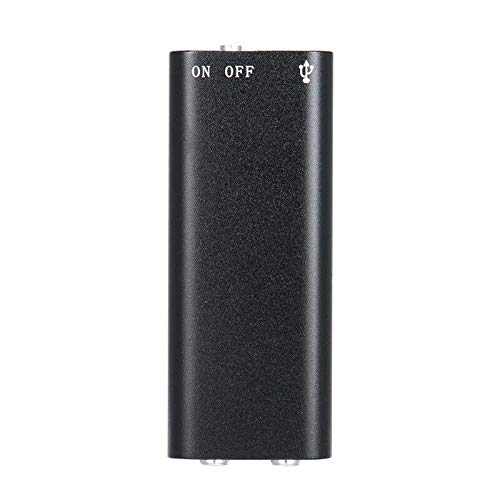
Зураг 2.1: Топ view of the ELECTROPRIME SK-892 Mini Digital Voice Recorder, highlighting the ON/OFF switch and the USB port for connectivity.
Төхөөрөмжийн бүрэлдэхүүн хэсгүүд:
- ON/OFF унтраалга: Controls power and recording functions.
- USB порт: Used for charging the device and connecting to a computer for data transfer.
- Чихэвчний залгуур (3.5 мм): For audio playback using earphones.
- Заагч гэрэл: Статусын талаарх санал хүсэлтийг өгдөг (жишээ нь, бичлэг хийх, цэнэглэх).
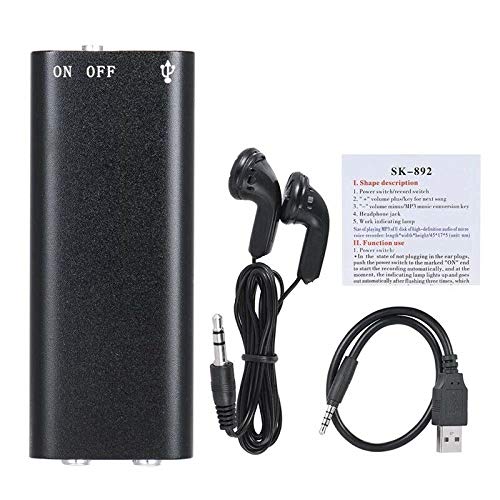
Зураг 2.2: The SK-892 recorder shown with its accessories, including wired headphones and a USB charging/data cable. The small instruction card is also visible.
3. Тохиргоо
3.1 Төхөөрөмжийг цэнэглэх
- Connect the small end of the provided USB cable to the USB port on the recorder.
- Connect the other end of the USB cable to a powered USB port on a computer or a USB wall adapter (not included).
- The indicator light will illuminate during charging. Once fully charged, the light may change color or turn off.
- Бүрэн цэнэглэхэд ихэвчлэн 2-3 цаг зарцуулдаг.
3.2 Анхдагч асаалттай
To power on the device, slide the ON/OFF switch to the "ON" position. The indicator light will briefly flash, indicating the device is ready for operation.
4. Ашиглалтын заавар
4.1 Аудио бичлэг хийх
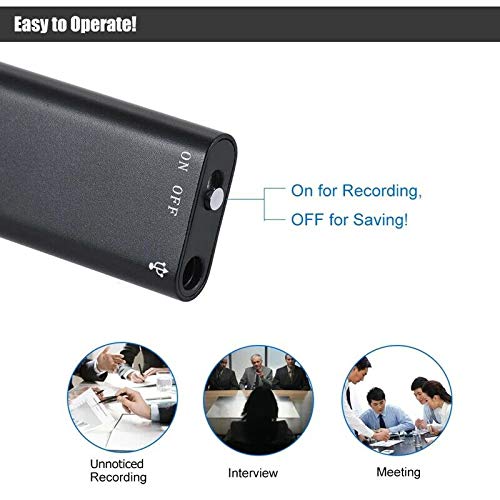
Зураг 4.1: Detail of the SK-892's ON/OFF switch, illustrating its dual function for initiating recording and saving files.
- Төхөөрөмж хангалттай цэнэглэгдсэн эсэхийг шалгаарай.
- To begin recording, slide the ON/OFF switch to the "ON" position. The device will automatically start recording. The indicator light will typically flash or remain steadily lit during recording, then turn off to indicate discreet operation.
- To stop recording and save the audio file, slide the ON/OFF switch to the "OFF" position. The indicator light will flash a few times and then turn off, confirming the recording has been saved and the device is powered down.
Жич: Ensure the switch is fully in the "OFF" position to properly save your recordings and prevent data loss.
4.2 Бичлэгүүдийг тоглуулах
- Connect the provided headphones (or your own 3.5mm headphones) to the headphone jack on the recorder.
- Slide the ON/OFF switch to the "ON" position. The device will typically begin playing the most recent recording or cycle through recordings.
- Further controls for playback (e.g., next track, volume) may be available through the connected headphones if they feature inline controls, or by briefly toggling the ON/OFF switch (refer to the small instruction card for specific playback controls if available).
- To stop playback, slide the ON/OFF switch to the "OFF" position.
4.3 Компьютерт холбогдох
To transfer recordings to your computer or manage files:
- Ensure the recorder is powered "OFF".
- Бүртгэгдсэн USB кабелийг ашиглан бичигчийг компьютерт холбоно уу.
- Your computer should recognize the device as a removable disk (similar to a USB flash drive).
- Navigate to the device's storage to access your recorded audio files (usually in a folder named "RECORD" or similar).
- Та хуулах, зөөх, устгах боломжтой files шаардлагатай бол.
- Safely eject the device from your computer before disconnecting the USB cable to prevent data corruption.
5. Засвар үйлчилгээ
- Төхөөрөмжийг хуурай байлга. Чийг эсвэл шингэн зүйлд өртөхөөс зайлсхий.
- Төхөөрөмжийг зөөлөн, хуурай даавуугаар цэвэрлэ. Химийн хүчтэй бодис, зүлгүүрийн цэвэрлэгч хэрэглэж болохгүй.
- Төхөөрөмжийг унагах эсвэл хүчтэй цохилтод оруулахаас зайлсхий.
- Төхөөрөмжийг ашиглаагүй үед сэрүүн, хуурай газар хадгална.
- Батерейны эрүүл мэндийг хадгалахын тулд төхөөрөмжийг байнга ашигладаггүй байсан ч тогтмол цэнэглээрэй.
6. Алдаа засах
| Асуудал | Боломжит шийдэл |
|---|---|
| Төхөөрөмж асахгүй байна. | Ensure the device is fully charged. Connect to a USB power source and check the indicator light. |
| Cannot record audio. | Check if the device has sufficient battery. Ensure the ON/OFF switch is moved fully to the "ON" position. Verify there is enough free storage space. |
| Recordings are not saving. | Ensure the ON/OFF switch is moved fully to the "OFF" position to properly save the file. Do not disconnect power during recording or saving. |
| Cannot hear playback. | Ensure headphones are securely connected. Check headphone functionality with another device. Verify the device is powered "ON" for playback. |
| Төхөөрөмжийг компьютер танихгүй байна. | Ensure the recorder is powered "OFF" before connecting to the computer. Try a different USB port or cable. Restart your computer. |
7. Техникийн үзүүлэлтүүд
- Загвар: SK-892
- Санах ойн хадгалах багтаамж: 8 ГБ
- Аудио формат: MP3
- Техник хангамжийн интерфейс: USB
- Тохиромжтой төхөөрөмжүүд: MP3 Player (for playback)
- Үйлдвэрлэгч: ЭЛЕКТРОПРАЙМ
- Барааны дугаар: ASHA20BEBUBEB19894
8. Баталгаат хугацаа ба дэмжлэг
For warranty information or technical support, please refer to the documentation included with your purchase or contact ELECTROPRIME customer service through their official channels. Please have your model number (SK-892) and purchase details ready when contacting support.
Нэмэлт тусламж авахыг хүсвэл зочилж болно ELECTROPRIME brand page on Amazon.


