Танилцуулга
This manual provides comprehensive instructions for the proper use and maintenance of your ELECTROPRIME 8GB Rechargeable USB LCD Digital Voice Recorder, Model ASH20BEBUBEB26998. Please read this manual thoroughly before operating the device to ensure optimal performance and longevity. Keep this manual for future reference.
Бүтээгдэхүүн дууссанview
The ELECTROPRIME Digital Voice Recorder is a compact and versatile device designed for high-quality audio recording and MP3 playback. It features an LCD screen for easy navigation, 8GB of internal storage, and a rechargeable battery.
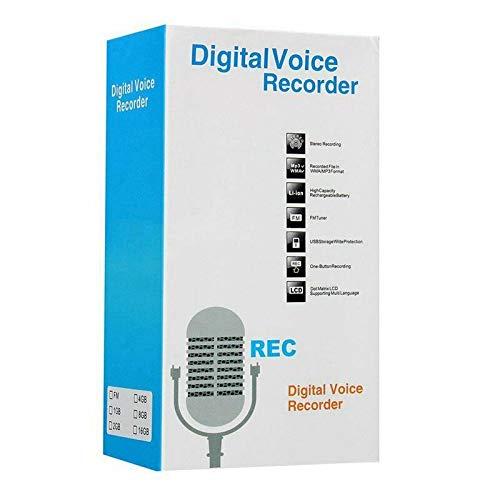
Figure 1: ELECTROPRIME Digital Voice Recorder with included accessories, including earphones, USB cable, and telephone adapter.
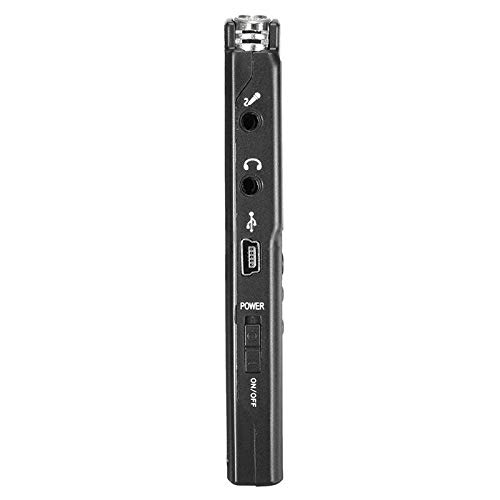
Зураг 2: Хажуу тал view of the recorder, highlighting the USB port, headphone jack, microphone input, and power switch.
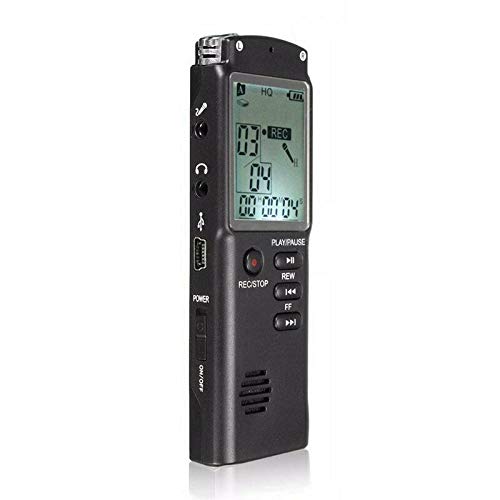
Зураг 3: Урд view of the recorder, displaying the LCD screen with recording information and control buttons.
Тохиргоо
- Төхөөрөмжийг цэнэглэж байна: Connect the recorder to a computer's USB port or a USB wall adapter using the provided USB cable. The LCD screen will indicate charging status. A full charge typically takes 2-3 hours.
- Асаах/унтраах: Locate the ON/OFF switch on the side of the device. Slide it to the "ON" position to power on and to the "OFF" position to power off.
- Анхны тохиргоо: Upon first power-on, you may need to set the date and time. Use the navigation buttons (REW, FF) and Play/Pause button to adjust and confirm settings.
Ашиглалтын заавар
Аудио бичиж байна
- Бичлэг хийж эхлэх: With the device powered on, press the REC/STOP button once. The LCD will display "REC" and a timer, indicating that recording has started.
- Бичлэгийг түр зогсоох: Бичлэг хийх явцад товчийг дарна уу ТОГЛОХ/ЗОГСООХ button to pause. Press it again to resume.
- Бичлэгийг зогсоох: дээр дарна уу REC/STOP button again to stop recording. The recording will be saved automatically.
Бичлэгийг дахин тоглуулж байна
- Бичлэгт хандах: In standby mode, use the REW or FF buttons to navigate through your saved recordings.
- Тоглуулах/түр зогсоох: дээр дарна уу ТОГЛОХ/ЗОГСООХ button to start playback of the selected recording. Press again to pause.
- Дууны хэмжээг тохируулах: Use the volume control buttons (if present, typically on the side or via menu) to adjust playback volume.
Шилжүүлж байна FileКомпьютер дээр
- Холбох: Connect the recorder to your computer using the USB cable.
- Хандалтын төхөөрөмж: Бичигч нь таны компьютер дээр зөөврийн диск шиг харагдах болно.
- Шилжүүлэх: Open the drive, locate your audio files (usually in a folder like "RECORD" or "VOICE"), and copy them to your computer.
Using as an MP3 Player
Төхөөрөмж MP3 аудио тоглуулахыг дэмждэг. MP3 дамжуулах files to the device's internal storage via USB connection. Use the REW болон FF buttons to select tracks and ТОГЛОХ/ЗОГСООХ тоглуулахыг хянах.
Засвар үйлчилгээ
- Цэвэрлэгээ: Төхөөрөмжийн гадна талыг цэвэрлэхийн тулд зөөлөн, хуурай даавуу ашиглаарай. Шингэн цэвэрлэгч эсвэл уусгагч хэрэглэж болохгүй.
- Батерейны арчилгаа: To prolong battery life, avoid fully discharging the device frequently. Charge the device regularly, even if not in use for extended periods.
- Хадгалах: Төхөөрөмжийг нарны шууд тусгал, хэт температур, өндөр чийгшилээс хол, сэрүүн, хуурай газар хадгална.
- Нөлөөлөлөөс зайлсхийх: Төхөөрөмжийг уналт, нөлөөллөөс хамгаалж, дотоод эд ангиудыг гэмтээж болно.
Алдааг олж засварлах
| Асуудал | Боломжит шийдэл |
|---|---|
| Төхөөрөмж асахгүй байна. | Ensure the battery is charged. Connect to a USB power source and try again. Check the ON/OFF switch position. |
| Cannot record audio. | Check if the device has sufficient memory. Delete old files if necessary. Ensure the microphone is not obstructed. |
| Төхөөрөмжийг компьютер танихгүй байна. | Try a different USB port or cable. Ensure the device is powered on when connected. Restart your computer. |
| Дууны чанар муу. | Ensure the recording environment is quiet. Keep the device close to the audio source. Check recording settings (if adjustable). |
Үзүүлэлтүүд
- Брэнд: ЭЛЕКТРОПРАЙМ
- Загварын дугаар: ASH20BEBUBEB26998
- Санах ойн хадгалах багтаамж: 8 ГБ
- Аудио формат: MP3
- Техник хангамжийн интерфейс: USB
- Тохиромжтой төхөөрөмжүүд: MP3 тоглуулагч
- Эрчим хүчний эх үүсвэр: Цэнэглэдэг батерей (USB цэнэглэгч)
Баталгаат болон дэмжлэг
Specific warranty information for this product is not provided in the available documentation. For warranty claims or technical support, please contact your retailer or the manufacturer, ELECTROPRIME, directly. Retain your proof of purchase for any warranty-related inquiries.
For further assistance, please refer to the official ELECTROPRIME webсайт эсвэл харилцагчийн үйлчилгээний хэлтэстэй холбогдоно уу.