Танилцуулга
This manual provides comprehensive instructions for the setup, operation, and maintenance of your waveshare 7-inch Capacitive Touch LCD Display Kit for Raspberry Pi 4 Model B. Please read this manual thoroughly before use to ensure proper functionality and to maximize your product experience.
Багцын агуулга
Доор жагсаасан бүх зүйл таны багцад байгаа эсэхийг шалгаарай.
- 7-inch Capacitive Touch LCD Display
- Raspberry Pi 4 Model B (4GB RAM version)
- MicroSD Card (pre-loaded with system, typically 16GB)
- USB цахилгаан хувиргагч
- USB-A to USB-C Cable (for power)
- HDMI Cable (Micro HDMI to Standard HDMI)
- USB-A to Micro USB Cable (for touch functionality)
- Acrylic Case components (top, bottom, side panels, stand)
- Суурилуулах тоног төхөөрөмж (эрэг, тулгуур)
- MicroSD карт уншигч

Image: All components included in the waveshare 7-inch Display Kit, including the LCD, Raspberry Pi 4, cables, power adapter, acrylic case parts, and a microSD card with reader.
Тохируулах заавар
Follow these steps to assemble and set up your display kit:
- Prepare the Raspberry Pi: Insert the provided MicroSD card into the Raspberry Pi 4 Model B.
- Mount the Raspberry Pi: Secure the Raspberry Pi 4 to the back of the 7-inch LCD display using the provided standoffs and screws. Ensure proper alignment with the display's connectors.
- Дэлгэцийн кабелийг холбох:
- Connect one end of the Micro HDMI cable to the Raspberry Pi's Micro HDMI port and the other end to the display's HDMI input.
- Connect the USB-A to Micro USB cable from a USB 2.0 port on the Raspberry Pi to the Micro USB port on the display. This provides power for the display's backlight and enables touch functionality.
- Assemble the Acrylic Case: Carefully attach the acrylic case components around the assembled display and Raspberry Pi. Refer to the case assembly diagram for correct orientation.
- Эрчим хүчийг холбох: Plug the USB power adapter into a wall outlet and connect the USB-A to USB-C cable to the Raspberry Pi's USB-C power input.
- Анхны ачаалах: The system should power on automatically. The display will show the boot sequence.

Image: The fully assembled waveshare 7-inch Display Kit, showing the Raspberry Pi 4 mounted behind the screen, connected with cables, and powered by an adapter.
Үйл ажиллагаа
Once the display kit is powered on, the pre-installed operating system (typically Raspbian) will boot. You can interact with the system using the capacitive touch screen.
- Мэдрэгчийн функц: The 7-inch display supports up to five-point capacitive touch when running Raspbian. For other supported operating systems like Ubuntu, Kali, or WIN10 IoT, it typically supports single-point touch.
- Дагалдах төхөөрөмжүүдийг холбох: Use the USB ports on the Raspberry Pi to connect a keyboard, mouse, or other USB devices as needed.
- Сүлжээний холболт: The Raspberry Pi 4 supports Gigabit Ethernet and 2.4/5GHz Wi-Fi for internet access.
- Аудио гаралт: Audio can be output via the 3.5mm audio jack or HDMI.
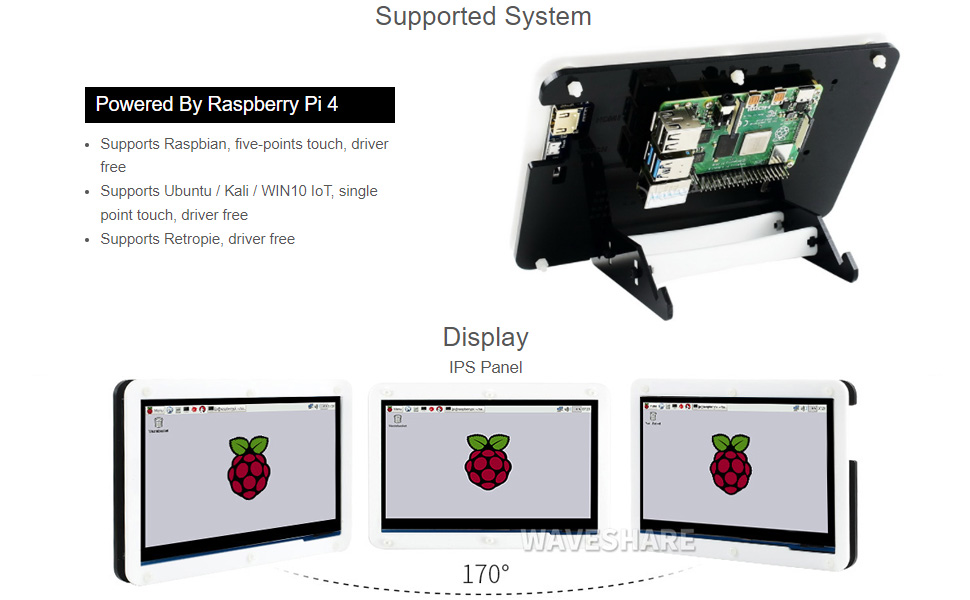
Image: A hand interacting with the capacitive touch screen, demonstrating its functionality with a graphical user interface.
Дэмжигдсэн үйлдлийн системүүд
The waveshare 7-inch Display Kit is compatible with various operating systems for the Raspberry Pi 4 Model B:
- Raspbian: Supports five-point touch, driver-free.
- Ubuntu / Kali / WIN10 IoT: Supports single-point touch, driver-free.
- Retropie: Driver-free support.

Image: Visual representation of the display showing different viewing angles and indicating support for various operating systems like Raspbian, Ubuntu, Kali, and Windows 10 IoT.
Гол онцлогууд
- 7 инчийн IPS дэлгэц: Өргөн viewing angle with 1024x600 resolution.
- Capacitive Touch: Supports 5-point touch (with Raspbian) for intuitive interaction.
- Integrated Raspberry Pi 4: Powered by Broadcom BCM2711B0 Quad-core 64-bit SoC.
- Санах ой: 4 ГБ LPDDR4 RAM.
- Холболт: Dual-band 2.4/5GHz Wi-Fi, Bluetooth 5.0, Gigabit Ethernet.
- Портууд: 2x USB 3.0, 2x USB 2.0, 2x Micro HDMI (up to 4Kp60), 4-pole stereo audio, 2-lane MIPI DSI display port, 2-lane MIPI CSI camera port, 40-pin GPIO header.
- Эрчим хүчний оролт: USB-C 5V/3A.
- Хадгалах: Micro SD картны үүр.

Image: Detailed diagram of the Raspberry Pi 4 Model B board, highlighting its processor, RAM, various ports (USB, HDMI, Ethernet, GPIO), and wireless capabilities.
Засвар үйлчилгээ
- Цэвэрлэгээ: Use a soft, dry cloth to clean the display and case. For stubborn smudges on the screen, a slightly damp, хөвөнгүй даавууг ашиглаж болно. Зүлгүүрийн цэвэрлэгч эсвэл уусгагчаас зайлсхий.
- Програм хангамжийн шинэчлэлтүүд: Regularly update the operating system and installed software on your Raspberry Pi to ensure optimal performance and security.
- Байгаль орчны нөхцөл: Operate the device in a clean, dry environment. Avoid extreme temperatures, direct sunlight, and high humidity.
- Эрчим хүчний менежмент: Always shut down the Raspberry Pi gracefully through the operating system before disconnecting power to prevent data corruption.
Алдааг олж засварлах
- Дэлгэцийн гаралт байхгүй байна:
- Ensure the Micro HDMI cable is securely connected to both the Raspberry Pi and the display.
- Verify the Raspberry Pi is receiving power (check the power LED on the Pi).
- Confirm the MicroSD card is properly inserted and contains a valid operating system image.
- Touch screen not responding:
- Check that the USB-A to Micro USB cable is connected from the Raspberry Pi to the display.
- Ensure the operating system supports touch functionality and that necessary drivers (if any, though typically driver-free for supported OS) are loaded.
- Restart the Raspberry Pi.
- System not booting:
- Confirm the power supply is adequate (5V/3A recommended for Raspberry Pi 4).
- Re-flash the operating system image onto the MicroSD card.
- Сул холболт, гэмтсэн эд анги байгаа эсэхийг шалгана уу.
Техникийн үзүүлэлтүүд
| Дэлгэцийн хэмжээ | 7 инч |
| Шийдвэр | 1024 x 600 |
| Самбарын төрөл | IPS |
| Төрөл дээр хүрнэ үү | Capacitive (5-point with Raspbian, 1-point with others) |
| Процессор | Broadcom BCM2711B0, Quad-core 64-bit SoC |
| RAM | 4 ГБ LPDDR4 |
| Хадгалах | 16 GB MicroSD Card (included) |
| Утасгүй холболт | 2.4/5GHz Wi-Fi, Bluetooth 5.0 |
| Утастай холболт | Гигабит Ethernet |
| Видео гаралт | 2x Micro HDMI (up to 4Kp60) |
| Аудио гаралт | 4-pole stereo audio jack |
| USB портууд | 2х USB 3.0, 2х USB 2.0 |
| Эрчим хүчний оролт | USB-C 5V/3А |
| Хэмжээ (багц) | 9.06 x 6.69 x 2.76 инч |
| Зүйлийн жин | 1.43 фунт |

Image: Technical drawing showing the dimensions of the 7-inch display in millimeters and illustrating the two available stand angles (45° and 60°) for the acrylic case.
Баталгаат болон дэмжлэг
For warranty information and technical support, please refer to the official waveshare webсайт эсвэл харилцагчийн үйлчилгээтэй шууд холбогдоно уу. Худалдан авалтын баримтаа аливаа баталгаат нэхэмжлэлийг худалдан авсан баримт болгон хадгална уу.
Онлайн нөөцүүд: For additional documentation, tutorials, and community support, visit the waveshare official webсайт.


