Танилцуулга
This manual provides detailed instructions for the operation, maintenance, and troubleshooting of your Radioddity GA-510 10-Watt Ham Radio. The GA-510 is a high-power, dual-band handheld two-way radio designed for long-range communication, featuring a robust build and versatile programming options. Please read this manual thoroughly before using the device to ensure safe and optimal performance.
Хайрцагт юу байна
Upon opening your Radioddity GA-510 package, you should find the following components:
- 1x Radioddity GA-510 Radio
- 2х 2200 мАч батерей
- 1x Хос зурвасын антенн
- 1x Programming Cable (CH340, compatible with Windows 11 or previous systems)
- 1x Ширээний цэнэглэгч
- 1х адаптер
- 1х бүсний хавчаар
- 1х бугуйн оосор
- 1x Earpiece
- 1x хэрэглэгчийн гарын авлага (энэ баримт бичиг)

Figure 1: All components included in the Radioddity GA-510 package.
Бүтээгдэхүүний онцлог
- Tri-Power & Long Range: Offers 10W, 5W, and 1W power modes for optimized communication range and quality in various environments.
- Хялбар програмчлал: Supports both manual keypad programming and PC programming via the included CH340 cable, compatible with Windows 11 and earlier systems.
- Өргөтгөсөн зай: Comes with two 2200mAh high-capacity batteries, providing up to 12 hours of continuous operation at 10W, 24 hours at 5W/1W, and 96 hours on standby.
- Dual Band, Dual Watch, Dual Display: Allows monitoring of two frequencies simultaneously with a clear dual-line display.
- Удаан эдэлгээтэй барилга: Features a solid and rugged design suitable for business and outdoor use, including construction sites, security work, and survival rescue.
- CHIRP Compatible: Full compatibility with CHIRP programming software, ensuring flexible and easy channel management.

Figure 2: The Radioddity GA-510 includes two 2200mAh batteries for extended use.
Product Layout and Components
Familiarize yourself with the various parts of your Radioddity GA-510 radio:
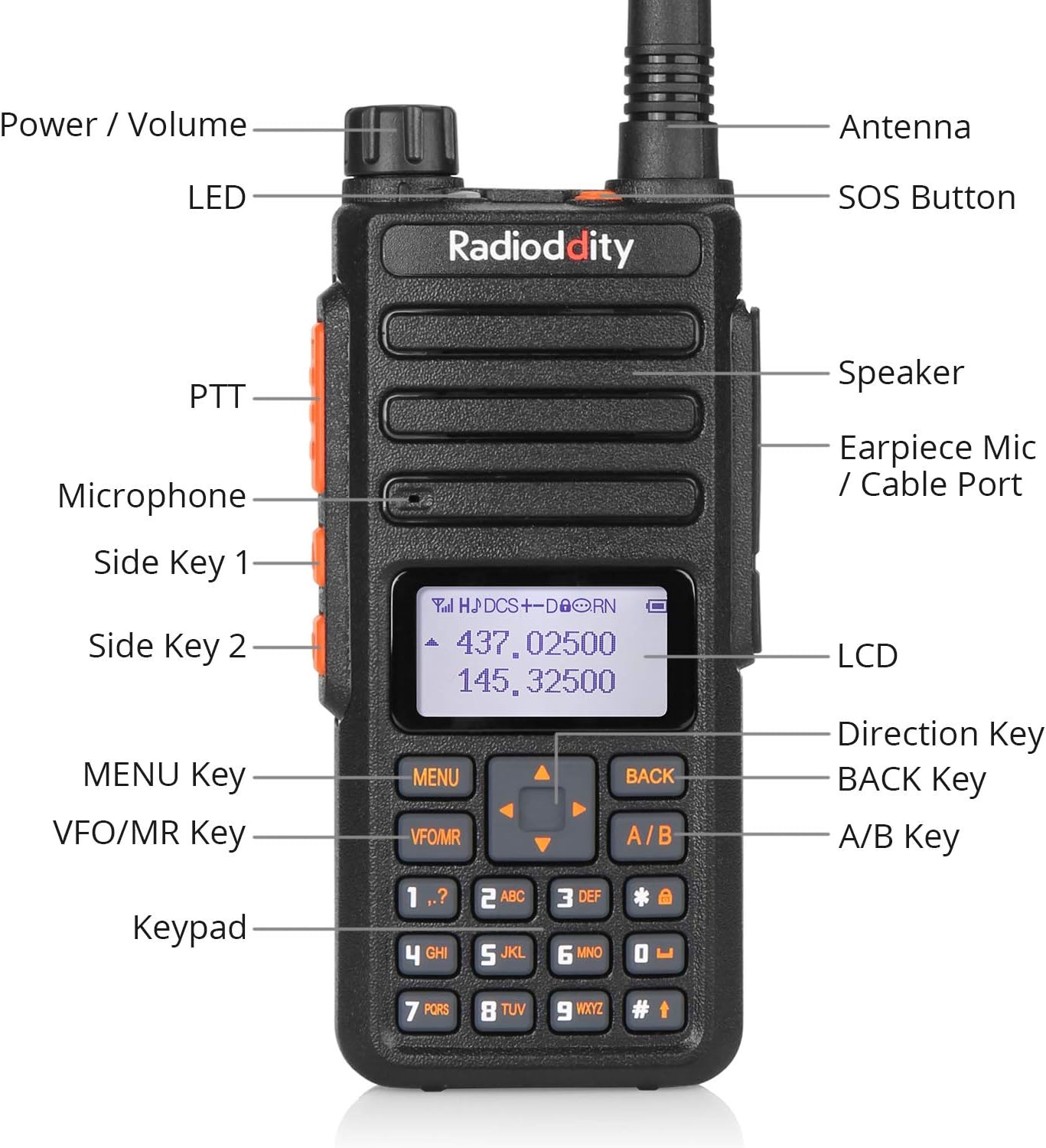
Figure 3: Labeled diagram of the Radioddity GA-510's external components.
- Эрчим хүч / Дууны бариул: Радиог асаах/унтраах, дууны хэмжээг тохируулахын тулд эргүүлнэ.
- LED үзүүлэлт: Displays status (e.g., transmitting, receiving, charging).
- SOS товчлуур: Activates the emergency alarm function.
- Антен: Connects to the radio for signal transmission and reception. The GA-510 uses an SMA-F antenna.
- Илтгэгч: Аудио гаргана.
- Чихэвчний микрофон / кабелийн порт: Standard 2-pin Kenwood-style port for accessories like earpieces or programming cables.
- PTT (товшиж ярих) товч: Дамжуулахын тулд удаан дарна уу.
- Микрофон: Captures your voice during transmission.
- Side Key 1 & 2: Програмчлагдах функцийн товчлуурууд.
- LCD: Liquid Crystal Display showing frequency, channel, and status information.
- Чиглэлийн түлхүүр: Navigates menus and adjusts frequencies.
- ЦЭС Түлхүүр: Радиогийн цэсний системд ханддаг.
- VFO/MR Key: Давтамжийн горим (VFO) болон Сувгийн горим (MR) хооронд шилждэг.
- БУЦАХ түлхүүр: Exits menus or cancels operations.
- A/B түлхүүр: Switches between the upper and lower display frequencies in dual watch mode.
- Товчлуур: Шууд давтамжийн оролт, суваг сонгох, цэсний навигацид ашиглагддаг.

Зураг 4: Нарийвчилсан views of the radio's robust construction and key interfaces.
Тохиргоо
- Батерейг суулгах: Align the battery pack with the grooves on the back of the radio and slide it upwards until it clicks into place. To remove, press the release latch and slide the battery downwards.
- Антеныг холбох: Screw the included dual-band antenna clockwise onto the SMA-F connector at the top of the radio until it is finger-tight. Do not overtighten.
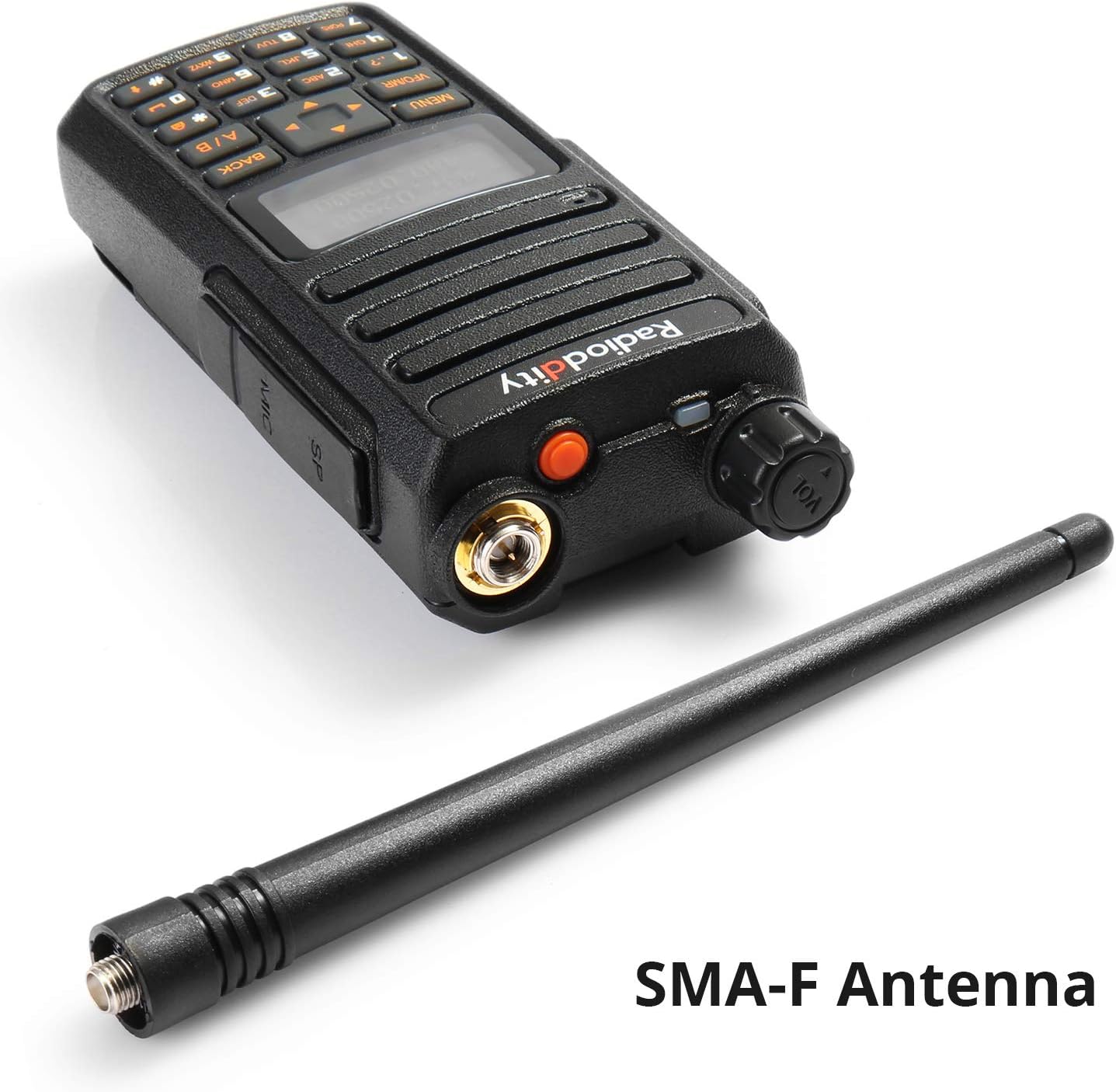
Figure 5: SMA-F Antenna connection point.
- Батерейг цэнэглэх:
- Connect the AC adapter to the desktop charger base.
- Place the radio with the battery installed (or just the battery) into the charging slot.
- The LED indicator on the charger will show charging status (typically red for charging, green for fully charged).
- Бүрэн цэнэглэхэд ойролцоогоор 4-5 цаг зарцуулагдана.
- Install Belt Clip and Wrist Strap: Attach the belt clip to the designated slot on the back of the radio using the provided screws. Secure the wrist strap to the loop on the top side of the radio.
- Programming (Optional but Recommended):
While basic settings can be adjusted via the keypad, advanced programming and channel management are best done using a computer and the included CH340 programming cable. The Radioddity GA-510 is fully compatible with CHIRP software.
- Connect the programming cable to the radio's earpiece/mic port and to a USB port on your computer.
- Install the necessary drivers for the CH340 cable if prompted by your operating system.
- Download and install CHIRP software from its official webсайт.
- Follow the instructions within CHIRP to read from and write to your radio, managing frequencies, tones, and other settings.
Video 1: Demonstrates the Radioddity GA-510's features, including its 10W high power output, SOS alarm, solid build, and compatibility with CHIRP programming. This video highlights key operational aspects and durability.
Ашиглалтын заавар
- Асаах/унтраах ба дууны түвшин: Rotate the Power/Volume knob clockwise to turn the radio on and increase volume. Rotate counter-clockwise to decrease volume and turn off.
- Давтамж/Сувгийн сонголт:
- VFO горим (давтамжийн горим): дээр дарна уу VFO/MR key to enter VFO mode. Directly input frequencies using the keypad. Use the Direction keys to fine-tune.
- MR горим (Сувгийн горим): дээр дарна уу VFO/MR key to enter MR mode. Use the Direction keys or keypad to select a stored channel.
- Дамжуулах (PTT): Дамжуулахын тулд товчийг удаан дар PTT button on the left side of the radio. Speak clearly into the microphone. Release the PTT button to receive.
- Хос цагны функц: The GA-510 supports dual watch, allowing you to monitor two frequencies simultaneously. Press the А/Б key to switch between the upper and lower display frequencies for active transmission.
- SOS дохиолол: Яаралтай үед товчийг дараад барина уу SOS товчлуур (orange button on top) to activate an audible alarm. Release to stop.
- Цэсийн навигаци: дээр дарна уу Цэс key to enter the main menu. Use the Direction keys to scroll through options. Press Цэс сонголтыг дахин сонгохын тулд, мөн БУЦАХ гарах.
- Сканнердах функцууд: The radio supports various scanning functions (e.g., frequency scan, channel scan, CTCSS/DCS scan). Refer to the detailed menu options for configuration.

Figure 6: The Radioddity GA-510 in use during outdoor activities and urban communication.
Засвар үйлчилгээ
- Цэвэрлэгээ: Зөөлөн ашиглах, damp радиогийн гадаргууг цэвэрлэх даавуу. Химийн хүчтэй бодис, зүлгүүрийн цэвэрлэгч хэрэглэж болохгүй.
- Батерейны арчилгаа:
- Зайг хэт цэнэглэх эсвэл бүрэн цэнэглэхээс зайлсхий.
- Ашиглаагүй үед батерейг сэрүүн, хуурай газар хадгална.
- Хэрэв та батерейг удаан хугацаагаар хадгалах бол хүчин чадлынхаа 50% орчимд цэнэглээрэй.
- Антен: Ensure the antenna is securely attached but not overtightened. Avoid bending or stressing the antenna excessively.
- Хадгалах: When not in use for long periods, store the radio in a dry, dust-free environment away from direct sunlight and extreme temperatures.
Алдааг олж засварлах
| Асуудал | Боломжит шалтгаан | Шийдэл |
|---|---|---|
| Радио асахгүй байна. | Батерей дууссан эсвэл зөв суулгаагүй байна. | Зайг цэнэглэх эсвэл зөв дахин суулгана уу. |
| Дамжуулах, хүлээн авах боломжгүй. | Буруу давтамж/суваг, антенн холбогдоогүй, батерей бага эсвэл хэт чанга дуугарсан байна. | Verify frequency/channel, ensure antenna is connected, charge battery, adjust squelch level. |
| Дууны чанар муу. | Low signal strength, incorrect CTCSS/DCS settings, or damaged earpiece/mic. | Move closer to the other radio, check CTCSS/DCS settings, try a different earpiece/mic. |
| CHIRP-тэй холбоотой програмчлалын асуудлууд. | Incorrect cable drivers, wrong COM port selected, or radio not in programming mode. | Reinstall CH340 drivers, verify COM port in device manager, ensure radio is on and connected. |
If you encounter issues not listed here or require further assistance, please contact Radioddity customer support.
Үзүүлэлтүүд
- Барааны жин: 10.6 унц
- Бүтээгдэхүүний хэмжээ: 1.18 x 2.17 x 10.55 инч (D x W x H)
- Загварын дугаар: Radioddity GA-510
- Батерей: 2 Lithium Ion batteries required (included), 2200mAh capacity each
- Дэлгэцийн төрөл: LCD
- Өнгө: Хар
- Сувгийн тоо: 128
- Давтамжийн хүрээ: 144-148MHz (VHF), 420-450MHz (UHF)
- Хамгийн их ярих хүрээ: 12 Mile (Note: Actual range varies significantly based on terrain and obstructions)
- Тохируулагч технологи: VHF, UHF
- Ботьtage: 7.4 вольт
- Усны эсэргүүцлийн түвшин: Усны хамгаалалттай

Figure 7: Physical dimensions and weight of the Radioddity GA-510.
Баталгаат болон дэмжлэг
The Radioddity GA-510 comes with an 18-month warranty and lifetime support.
For technical assistance, warranty claims, or any other inquiries, please visit the official Radioddity store or contact their customer service directly.


