1. Танилцуулга
This manual provides detailed instructions for the installation, operation, and maintenance of your Lorex D841A82B Series 8 Channel 4K HD Digital Video Recorder (DVR). This DVR is designed to provide high-resolution surveillance with advanced features such as 4K recording, person/vehicle detection, and smart home integration. Please read this manual thoroughly before using the product to ensure proper setup and functionality.
2. Багцын агуулга
Verify that all items listed below are included in your product packaging. If any items are missing or damaged, please contact Lorex customer support.
- Lorex D841A82B Series DVR
- HDMI кабель
- Эрчим хүчний адаптер
- Ethernet кабель
- USB хулгана
- Хурдан эхлүүлэх гарын авлага (энэ гарын авлага)
3. Бүтээгдэхүүн дууссанview

Figure 3.1: Front Panel of the Lorex D841A82B DVR. This image displays the front of the DVR unit, featuring the "4K Ultra HD DVR" label, a central circular button, and a USB port for connecting a mouse or other peripherals.

Figure 3.2: Side Panel with Ventilation. This image shows the side of the DVR, highlighting the ventilation grilles designed for heat dissipation, crucial for continuous operation.
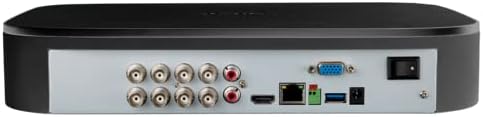
Зураг 3.3: Арын самбарын холболтууд. This image illustrates the rear panel of the DVR, displaying various input/output ports including BNC connectors for cameras, audio inputs/outputs, HDMI, VGA, Ethernet, USB ports, and the power input with an on/off switch.
4. Үндсэн шинж чанарууд
- 4K Ultra HD бичлэг: Capable of recording up to 4K (8MP) resolution on all channels, providing detailed video footage.
- Нарийвчилсан хөдөлгөөн илрүүлэх: Reduces false alarms with intelligent person and vehicle detection, sending push notifications when relevant motion is detected (available on up to 4 channels).
- Ухаалаг гэрийн нийцтэй байдал: Integrates with Amazon Alexa and Google Assistant for hands-free voice control, and Chromecast for viewing live or recorded video on your TV.
- Lorex Home Mobile Application: Алсын зайнаас ажиллахыг зөвшөөрдөг viewing and control of active deterrence features from a smartphone or tablet.
- Орон нутгийн хадгалах сан: Equipped with a pre-installed 2TB security-grade hard drive, ensuring secure local storage without monthly cloud fees. Expandable up to 10TB.
- Ухаалаг хайлт: Filter motion events to quickly review footage.
- Паник товчлуур: Located on the DVR, activates lights and sirens on connected cameras for immediate response.
- 24/7 Хяналт: Designed for continuous operation and reliable surveillance.
5. Тохируулах гарын авлага
5.1 Анхны холболтууд
- Камеруудыг холбох: Connect your analog HD security cameras to the BNC video input ports on the rear of the DVR. Ensure connections are secure.
- Монитортой холбогдох: Use the provided HDMI cable to connect the DVR's HDMI output port to an HDMI input on your TV or monitor. Alternatively, use a VGA cable for VGA monitors.
- USB хулганыг холбоно уу: Plug the included USB mouse into one of the USB ports on the DVR (front or rear).
- Сүлжээнд холбогдох (заавал биш боловч санал болгож байна): Алсын хувьд viewing and smart features, connect the DVR to your router using the supplied Ethernet cable.
- Эрчим хүчийг холбох: Connect the power adapter to the DVR's power input and then plug it into a power outlet. Turn on the DVR using the power switch on the rear panel.
5.2 Анхны тохиргооны шидтэн
Upon first power-up, the DVR will guide you through a setup wizard. Follow the on-screen prompts to:
- Аюулгүй нууц үг үүсгэнэ үү.
- Огноо, цагийн тохиргоог тохируулна уу.
- Set up network parameters (if not automatically detected).
- Adjust recording preferences.
It is crucial to complete these steps to ensure your system is secure and functioning correctly.
6. Ашиглалтын заавар
6.1 Амьд View
Анхны тохиргооны дараа DVR шууд дамжуулалтыг харуулах болно view from all connected cameras on your monitor.
- Ганц камер View: Камерын дурын тэжээл дээр давхар товшино уу view үүнийг бүтэн дэлгэцээр харах боломжтой. Олон камер руу буцахын тулд дахин давхар товшино уу view.
- Дижитал томруулах: Бүтэн дэлгэцээр view, use the digital zoom function to magnify specific areas of interest.
6.2 Бичлэг хийх, тоглуулах
The DVR is configured for continuous recording by default. You can adjust recording schedules and motion detection settings via the main menu.
- Access Playback: Шууд дээр хулганы баруун товчийг дарна уу view screen and select "Playback" from the menu.
- Search Footage: Use the date and time filters to locate specific recordings. The Smart Search feature allows filtering by motion events.
- Export Footage: Connect a USB flash drive to a USB port on the DVR to export selected video clips.
6.3 Lorex Home Mobile Application
Download the Lorex Home app from your smartphone's app store.
- Бүртгэл үүсгээд нэвтэрнэ үү.
- Add your DVR by scanning the QR code displayed on the DVR's monitor (found in the network settings) or by manually entering the device ID.
- Нэгэнт холбогдсон бол та боломжтой view live feeds, play back recordings, receive push notifications, and control active deterrence features remotely.
6.4 Ухаалаг гэрийн интеграци
The Lorex D841A82B DVR supports integration with Amazon Alexa, Google Assistant, and Chromecast.
- Дуут удирдлага: Enable the Lorex skill/action in your smart home app (Alexa or Google Home). Use voice commands to view camera feeds on compatible smart displays or TVs (e.g., "Alexa, show me the front door camera").
- Chromecast: Link your Lorex account to Google Home and cast live or recorded video directly to a Chromecast-enabled display.
7. Засвар үйлчилгээ
7.1 Хатуу дискний менежмент
The DVR's hard drive is designed for continuous operation. When the hard drive is full, the system will automatically overwrite the oldest recordings.
- Чухал хүнсний зүйлсээ тогтмол нөөцлөхtage to an external storage device.
- Check the hard drive status periodically through the DVR's system settings to ensure optimal performance.
7.2 Цэвэрлэгээ
To maintain the DVR's performance and longevity:
- Wipe the exterior of the DVR with a soft, dry cloth.
- Ensure ventilation openings are clear of dust and debris to prevent overheating. Do not use liquid cleaners or aerosol sprays directly on the unit.
7.3 Програм хангамжийн шинэчлэлтүүд
Lorex periodically releases firmware updates to improve performance and add new features. Check the Lorex support website for the latest firmware for your model and follow the provided instructions for updating.
8. Алдаа засах
If you encounter issues with your Lorex D841A82B DVR, refer to the following common troubleshooting steps.
| Асуудал | Боломжит шалтгаан | Шийдэл |
|---|---|---|
| Монитор дээр видео гаралт байхгүй. | Суларсан HDMI/VGA кабель, буруу дэлгэцийн оролт, DVR асаалттай биш байна. | Check cable connections. Ensure monitor is set to the correct input source. Verify DVR power. |
| Камерын зураг байхгүй. | Loose BNC cable, camera power issue, camera malfunction. | Check BNC connections. Ensure cameras are receiving power. Test camera with another channel or DVR if possible. |
| Cannot connect to Lorex Home app. | No network connection, incorrect device ID, firewall settings. | Verify DVR is connected to the internet. Double-check device ID. Ensure router/firewall allows DVR access. |
| Хөдөлгөөн илрүүлэх дохиолол хэт олон удаа гарч ирдэг эсвэл ажиллахгүй байна. | Sensitivity settings, detection zone configuration. | Adjust motion detection sensitivity and detection zones in the DVR settings. Ensure person/vehicle detection is enabled for relevant channels. |
For further assistance, please contact Lorex customer support.
9. Техникийн үзүүлэлтүүд
| Онцлог | Дэлгэрэнгүй |
|---|---|
| Загварын дугаар | D841A82B |
| Видео сувгууд | 8 суваг |
| Бичлэгийн нягтрал | Up to 4K (8MP) Ultra HD |
| Хатуу дискний хэмжээ | 2 ТБ (урьдчилан суулгасан), 10 ТБ хүртэл өргөтгөх боломжтой |
| Холболтын технологи | Ethernet, HDMI |
| Тохиромжтой төхөөрөмжүүд | Cameras, Smartphone, Tablet, Television |
| Бүтээгдэхүүний хэмжээс | 13.25 x 16 x 5.5 инч |
| Зүйлийн жин | 6.41 фунт |
10. Тохиромжтой камерууд
The D841B series DVR is compatible with a wide range of Lorex cameras. Below is a list of compatible camera models:
- LW2287, LW2297, LW4211B
- C841CA, LAB243
- LBV1511, LBV1521B, LBV2521, LBV2531, LBV2561U, LBV2711, LBV2723, LBV4711, LBV8531B, LBV8451XB, LBV8721AB
- LEV2750AB, LEV4712
- LZV2722, LZV2925
- C241XC-E, C241DA-E, C581CB, C581CD, C581DA, C861CF, C861CH, C861XC-E, C881DA, C882DA
11. Дэмжлэг ба баталгаа
For technical support, product registration, and warranty information, please visit the official Lorex website or contact Lorex customer service directly. Keeping your product registered helps ensure you receive timely updates and support.
Лорекс Webсайт: www.lorex.com


