Танилцуулга
The Perel EDIN305N is a 230V 16A 3600W DIN-rail mount digital weekly timer designed for indoor use. This device allows for precise, programmable control of electrical circuits, enabling automatic switching ON and OFF of connected appliances or lighting systems over a weekly cycle. It features a clear digital display and multiple programming options to suit various scheduling needs.
Аюулгүй байдлын урьдчилан сэргийлэх арга хэмжээ
АНХААРУУЛГА: Electrical installation should only be performed by a qualified electrician. Incorrect wiring can lead to electric shock, fire, or damage to the device and connected equipment. Always disconnect power at the main circuit breaker before installation or maintenance.
- Ensure the power supply matches the device's specifications (230V~50Hz).
- 16A / 3600W-ийн хамгийн их ачааллын багтаамжаас хэтрүүлж болохгүй.
- This device is designed for indoor use only. Avoid exposure to moisture, dust, or extreme temperatures.
- Төхөөрөмжийг өөрөө нээх, засах гэж бүү оролдоорой. Бүх үйлчилгээг мэргэшсэн боловсон хүчинд шилжүүлээрэй.
- Хүүхдийн гар хүрэхгүй газар хадгална.
Бүтээгдэхүүн дууссанview
The Perel EDIN305N digital timer consists of a main body with a digital display, control buttons, and terminal blocks for electrical connections. A transparent cover protects the display and buttons.
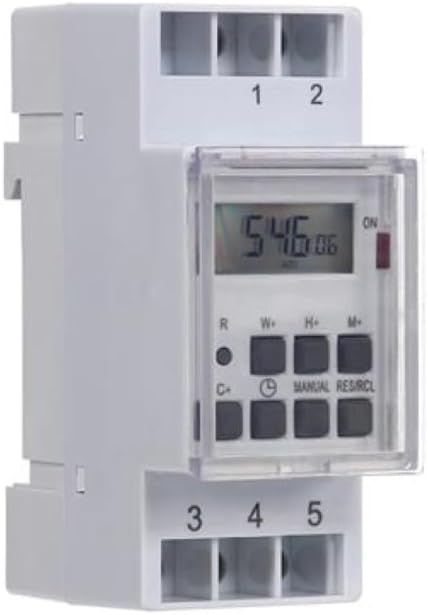
Зураг 1: Урд view of the Perel EDIN305N Digital Weekly Timer. The image displays the LCD screen, control buttons (R, W+, H+, M+, C+, Clock, Manual, RES/RCL), and numbered terminal blocks (1, 2 at the top, 3, 4, 5 at the bottom).
Хяналтын товчлуурууд:
- R: Reset button (recessed).
- W+: Weekday setting.
- H+: Цагийн тохиргоо.
- М+: Minute setting.
- C+: Clear program.
- Цагны дүрс: Used to set current time and day, and to exit programming mode.
- ГАРЫН АВЛАГА: Manual override for ON/AUTO/OFF modes.
- RES/RCL: Reset/Recall program.
Терминал блокууд:
- 1 оны 2-р сарын XNUMX Power supply input (N, L).
- 3, 4, 5: Output terminals for controlled circuit (Common, Normally Open, Normally Closed).
Техникийн үзүүлэлтүүд
| Параметр | Үнэ цэнэ |
|---|---|
| Загварын дугаар | EDIN305N |
| Ботьtage | 230V~50Hz |
| Макс. Одоогийн | 16 А |
| Макс. Хүч | 3600 Вт |
| Тохиргооны тоо | 7 (АСААХ/УНТРААХ хөтөлбөрүүд) |
| Суурилуулах төрөл | DIN-Төмөр зам |
| Хэмжээ (L x W x H) | 2.36 x 3.54 x 1.57 инч (60 x 90 x 40 мм) |
| Жин | 0.12 кг (4.2 унц) |
| Материал | Хуванцар |
| Өнгө | Цагаан |
| Батерей шаардлагатай | No (internal battery for memory backup) |
Суурилуулалт
1. Холбох
The Perel EDIN305N is designed for DIN-rail mounting. Securely attach the timer to a standard 35mm DIN-rail within an electrical enclosure. Ensure sufficient space for wiring and ventilation.
2. утас
ЧУХАЛ: Ensure power is disconnected at the main circuit breaker before proceeding with wiring. Follow local electrical codes and regulations.
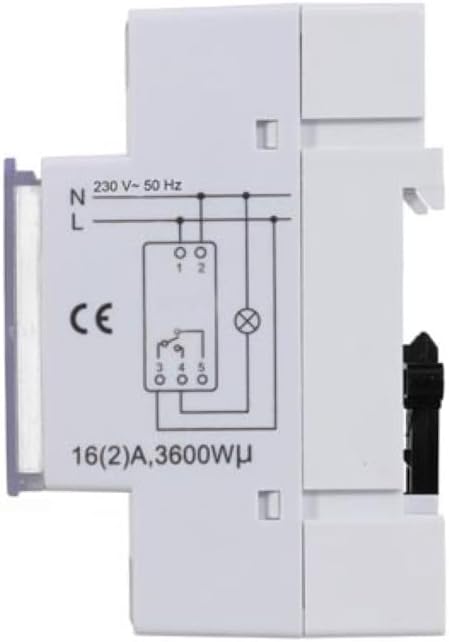
Зураг 2: Хажуу тал view of the Perel EDIN305N Digital Weekly Timer showing the electrical wiring diagram. It illustrates connections for Neutral (N), Live (L), and the output contacts (1, 2, 3, 4, 5) for controlling a load.
Refer to the wiring diagram (Figure 2) and the terminal block labels on the device:
- Connect the Neutral (N) wire of your 230V AC supply to terminal 1.
- Connect the Live (L) wire of your 230V AC supply to terminal 2.
- For the controlled circuit:
- Terminal 3: Common contact for the relay output.
- Terminal 4: Normally Open (NO) contact. The circuit connected here will be ON when the timer is active.
- Terminal 5: Normally Closed (NC) contact. The circuit connected here will be OFF when the timer is active.
- Connect the load (e.g., light, appliance) between the Live (L) supply and either terminal 4 (for NO operation) or terminal 5 (for NC operation), with terminal 3 connected to the Live (L) supply. Alternatively, connect the load between terminal 4 or 5 and the Neutral (N) supply, with terminal 3 connected to the Live (L) supply. Consult a qualified electrician for specific load wiring configurations.
Анхны тохиргоо ба ажиллагаа
1. Power On and Reset
After wiring and restoring power, the display will illuminate. If the display is blank or shows erratic characters, press the recessed R (Reset) button using a pointed non-metallic object (e.g., a pen tip). This will clear all settings and restore default values.
2. Одоогийн цаг, өдрийг тохируулах
- -г удаан дар Цагны дүрс товч.
- барьж байхдаа Цагны дүрс товчийг дарна уу W+ to set the current day of the week (1=Monday, 7=Sunday).
- барьж байхдаа Цагны дүрс товчийг дарна уу H+ to set the current hour (0-23).
- барьж байхдаа Цагны дүрс товчийг дарна уу M+ to set the current minute (0-59).
- -г суллана Цагны дүрс товч. Цаг болон өдрийг тохируулсан.
3. АСААХ/УНТРААХ Циклийг Програмчлах
Таймер нь 7 хүртэлх АСААХ/УНТРААХ програмыг дэмждэг. Хөтөлбөр бүр АСААХ болон УНТРААХ хугацаанаас бүрдэнэ.
- дээр дарна уу Цагны дүрс button once to enter programming mode. The display will show "1 ON".
- дарна уу W+ to select the day(s) for this program. You can choose a single day, a block of days (e.g., Mon-Fri), or all days.
- дарна уу H+ to set the ON hour for program 1.
- дарна уу M+ to set the ON minute for program 1.
- дээр дарна уу Цагны дүрс button again. The display will show "1 OFF".
- Repeat steps 2-4 to set the OFF day(s), hour, and minute for program 1.
- To set additional programs (2-7), press the Цагны дүрс button to cycle through "2 ON", "2 OFF", etc., and repeat the setting process.
- Хүссэн бүх програмаа тохируулсны дараа товчийг дарна уу ГАРЫН АВЛАГА Програмчлалын горимоос гарч, одоогийн цагийн дэлгэц рүү буцахын тулд товчийг дарна уу.
4. Гараар хүчингүй болгох
дээр дарна уу ГАРЫН АВЛАГА button repeatedly to cycle through the operating modes:
- АСААЛТ: The output is continuously ON, overriding all programs.
- АВТО: The timer operates according to the programmed ON/OFF cycles.
- Унтрааж байна: The output is continuously OFF, overriding all programs.
Ensure the timer is set to АВТО for programmed operation.
5. Clearing Programs
To clear a specific program:
- Enter programming mode by pressing the Цагны дүрс button until the desired program number (e.g., "3 ON") is displayed.
- дээр дарна уу C+ button. This will clear both the ON and OFF times for that specific program.
- Repeat for other programs as needed.
- дарна уу ГАРЫН АВЛАГА програмчлалын горимоос гарах.
To clear all programs and reset the device, use the recessed R (Reset) button.
Засвар үйлчилгээ
- Төхөөрөмжийг зөөлөн, хуурай даавуугаар цэвэрлэ. Зүлгүүрийн цэвэрлэгч, уусгагчийг бүү ашигла.
- Ensure the transparent cover is closed to protect the display and buttons from dust and splashes.
- Regularly check electrical connections for tightness, especially in high-vibration environments.
Алдааг олж засварлах
| Асуудал | Боломжит шалтгаан | Шийдэл |
|---|---|---|
| Дэлгэц хоосон байна. | No power supply; internal battery depleted. | Check power connections (terminals 1 & 2). Ensure main power is ON. If power is present, press the R (Reset) button. The internal battery recharges when connected to power. |
| Timer not switching ON/OFF as programmed. | Incorrect program settings; timer in manual ON/OFF mode. | Verify program settings (time, day, ON/OFF). Ensure the timer is in АВТО дээр дарж горим ГАРЫН АВЛАГА товч. |
| Connected appliance not receiving power. | Incorrect wiring; appliance fault; timer fault. | Check wiring according to Figure 2. Test the appliance directly. If wiring and appliance are fine, the timer may be faulty. |
| Buttons unresponsive or display erratic. | Software glitch; low internal battery. | хонхойсон хэсгийг дарна уу R (Reset) button. Ensure the timer has been connected to power for at least 24 hours to fully charge the internal battery. |
Устгах
Do not dispose of this product with general household waste. This electronic device contains materials that can be recycled. Please dispose of it at a designated collection point for electrical and electronic equipment waste, in accordance with local regulations.
Баталгаат болон дэмжлэг
Perel products are manufactured to high quality standards. For warranty information, technical support, or service inquiries, please refer to the documentation provided with your purchase or contact your local Perel distributor or retailer. Please have your model number (EDIN305N) and purchase details ready when contacting support.


