1. Танилцуулга
This manual provides detailed instructions for the Amazon Basics Aluminum Type-C Docking Station. This device expands the connectivity of your USB-C enabled laptop or tablet, offering a wide range of ports for various peripherals and external displays. Please read this manual thoroughly before use to ensure proper operation and to maximize the product's functionality.
2. Бүтээгдэхүүний онцлог
- 11-in-1 Олон Порттой Дизайн: Integrates Mini DisplayPort, HDMI, VGA, 3 USB-A ports, Ethernet, SD/TF card reader, 3.5mm audio jack, and a Type-C charging port (PD 100W).
- Өндөр нарийвчлалтай видео гаралт: Supports Ultra HD 4K output via Mini DisplayPort/HDMI and Full HD 1080P via VGA, allowing for mirroring or extending your display to HDTVs, monitors, or projectors. Note: 4K resolution is supported at 30Hz refresh rate.
- Хурдан өгөгдөл дамжуулах: Three USB 3.0 A ports provide data transfer speeds up to 5Gbps, backward compatible with USB 2.0/1.0.
- Тогтвортой сүлжээний холболт: 1000Mbps RJ45 Ethernet port ensures a fast and reliable wired network connection.
- Universal Card Reader: Integrated SD and TF slots allow simultaneous reading of universal SD and Micro SD memory cards.
- Эрчим хүчний хангамж: Type-C charging port supports Power Delivery (PD) up to 100 watts for charging your host device.
- Аудио холболт: 3.5mm audio jack for headphones or speakers.
- Удаан эдэлгээтэй барилга: Features an aluminum pedestal-style housing for enhanced durability and heat dissipation.
3. Багцын агуулга
- Amazon Basics Aluminum Type-C Docking Station
- Хэрэглэгчийн гарын авлага
4. Бүтээгдэхүүн дууссанview болон Портын зохион байгуулалт
Familiarize yourself with the various ports and their functions on your docking station.

Зураг: Ойролцоогоор view of the Amazon Basics Type-C Docking Station's ports, including Ethernet, Mini DisplayPort, HDMI, VGA, and USB-C.
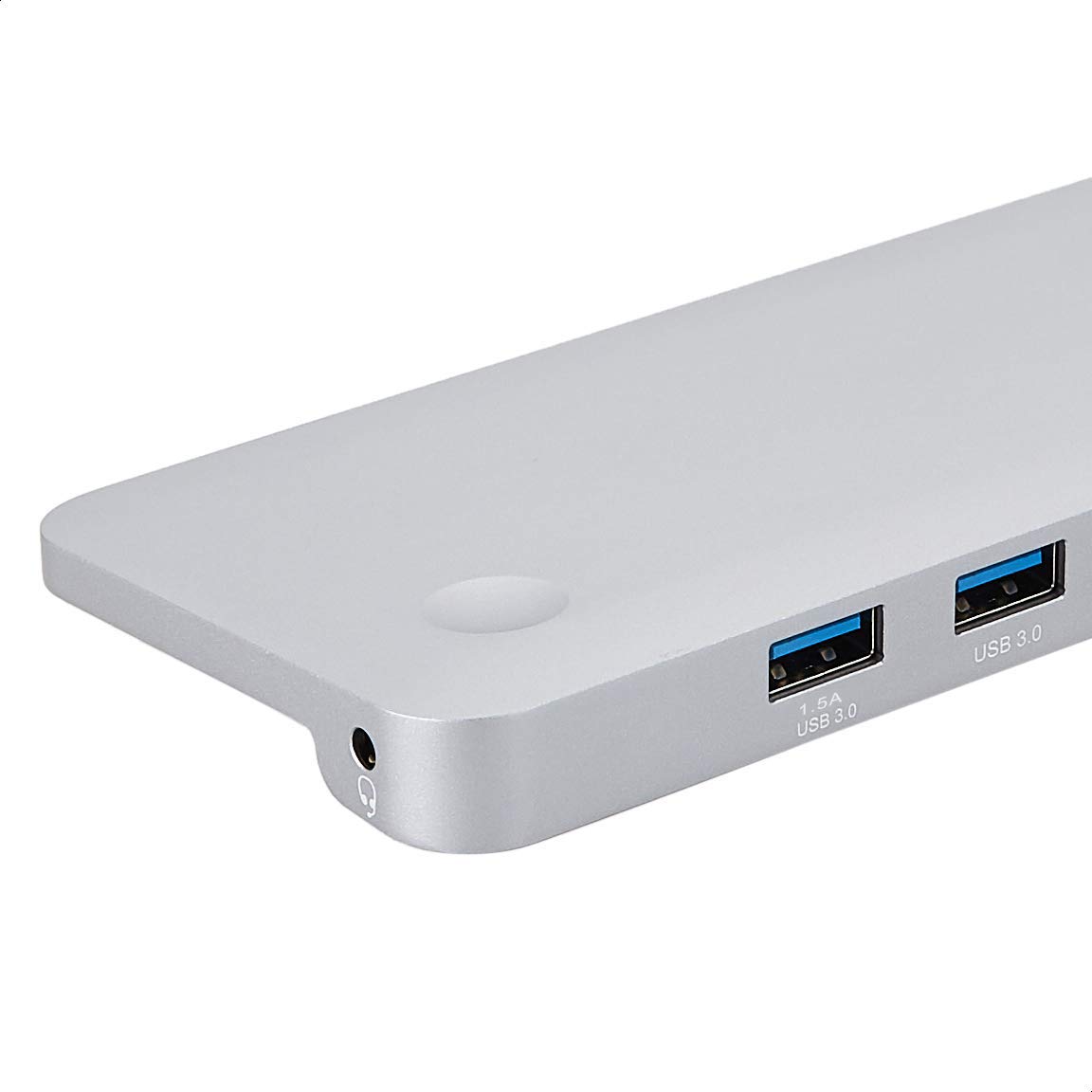
Зураг: Нарийвчилсан view of the USB 3.0 ports and 3.5mm audio jack on the Amazon Basics Type-C Docking Station.
- USB-C хост холбогч: Connects to your laptop or tablet's USB-C port.
- USB 3.0 портууд (x3): For connecting USB devices such as external hard drives, keyboards, mice, or USB flash drives.
- SD картны үүр: Стандарт SD санах ойн картуудыг унших зориулалттай.
- TF картын үүр (Micro SD): Micro SD санах ойн картуудыг уншихад зориулагдсан.
- RJ45 Ethernet порт: Утастай сүлжээний холболтод зориулагдсан.
- Mini DisplayPort: Гадаад дэлгэцтэй холбогдоход зориулагдсан.
- HDMI порт: Гадаад дэлгэцтэй холбогдоход зориулагдсан.
- VGA порт: Гадаад дэлгэцтэй холбогдоход зориулагдсан.
- 3.5 мм аудио залгуур: Чихэвч эсвэл чанга яригчийг холбоход зориулагдсан.
- USB-C PD цэнэглэх порт: For connecting a USB-C power adapter to charge your host device and power the docking station.
5. Тохируулах заавар
Док станцаа тохируулахын тулд дараах алхмуудыг дагана уу:
- Хост төхөөрөмжид холбогдох: Plug the integrated USB-C host connector cable from the docking station into an available USB-C port on your laptop or tablet. Ensure your host device's USB-C port supports DisplayPort Alt Mode (DP Alt Mode) for video output functionality.
- Цахилгааныг холбох (заавал биш боловч санал болгож байна): If your host device requires charging or if you are connecting power-intensive peripherals, connect your USB-C power adapter (up to 100W) to the USB-C PD Charging Port on the docking station. This will charge your host device and provide stable power to the docking station and connected peripherals.
- Дагалдах төхөөрөмжүүдийг холбох: Connect your desired peripherals (e.g., external monitors, USB devices, Ethernet cable, SD/TF cards, audio devices) to the corresponding ports on the docking station.

Image: Amazon Basics Type-C Docking Station connected to a laptop, with multiple peripherals like a USB drive and external display cables plugged in.
6. Ашиглалтын заавар
6.1. Видео гаралт
- Connect your monitor or projector to the HDMI, Mini DisplayPort, or VGA port.
- Your operating system should automatically detect the external display. You may need to adjust display settings (e.g., extend, duplicate) in your computer's display preferences.
- The docking station supports 4K resolution at 30Hz refresh rate via HDMI and Mini DisplayPort. For optimal performance, ensure your display and cables support the desired resolution and refresh rate.
- Dual video display is supported, allowing you to mirror or expand your screen across multiple monitors.
6.2. USB Data Transfer
- Plug your USB devices into the USB 3.0 ports.
- The ports support data transfer speeds up to 5Gbps.
6.3. Ethernet холболт
- Connect an Ethernet cable from your router or modem to the RJ45 Ethernet port on the docking station.
- Your computer should automatically establish a wired network connection.
6.4. SD/TF карт уншигч
- Insert your SD or TF (Micro SD) card into the corresponding slot.
- The cards will appear as removable drives on your computer, allowing you to access and transfer files. Хоёр үүрийг нэгэн зэрэг ашиглаж болно.
6.5. Аудио гаралт
- Connect your headphones or speakers to the 3.5mm audio jack.
- You may need to select the docking station as the default audio output device in your computer's sound settings.
6.6. Цахилгаан дамжуулах (PD)
- Connect your laptop's USB-C power adapter to the USB-C PD Charging Port on the docking station.
- This port supports up to 100W power delivery to charge your host device while using the docking station.
7. Тохиромжтой байдал
This docking station is compatible with a wide range of USB-C enabled devices, including but not limited to:
- MacBook Pro 2018/2017/2016
- iPad Pro 2018
- Mac mini 2018
- MacBook Air
- iMac 2017
- Samsung Note9
- HUAWEI MateBook X
- Dell XPS 13
- ThinkPad
- Chromebook
Чухал: This product functions only with computers that support DisplayPort Alt Mode (DP Alt Mode) via their USB-C port. Please verify your computer's specifications for compatibility before use.
8. Алдаа засах
- Дэлгэцийн гаралт байхгүй:
- Таны хост төхөөрөмжийн USB-C порт нь DisplayPort Alt горимыг дэмжиж байгаа эсэхийг шалгаарай.
- Check all cable connections (USB-C to host, video cable to monitor).
- Verify the external monitor is powered on and set to the correct input source.
- Компьютерээ дахин эхлүүлээд үзээрэй.
- 4K Resolution Not Working at 60Hz:
- This docking station supports 4K resolution at a maximum refresh rate of 30Hz. If your monitor is set to 4K@60Hz, it will not display correctly. Adjust your display settings to 4K@30Hz or a lower resolution with a higher refresh rate if desired.
- USB төхөөрөмжүүдийг танихгүй эсвэл салгахгүй байна:
- Ensure the docking station is receiving sufficient power. Connect a USB-C power adapter to the PD port if you are using multiple power-intensive USB devices.
- Try connecting the USB device directly to your computer to confirm it is functional.
- Reconnect the docking station to your computer.
- Ethernet-ээр дамжуулан сүлжээнд холбогдоогүй байна:
- Док станц болон чиглүүлэгч/модемийн аль алинд нь Ethernet кабелийн холболтыг шалгана уу.
- Verify your network settings on your computer.
- Таны чиглүүлэгч/модем зөв ажиллаж байгаа эсэхийг шалгаарай.
- Аудио гаралт байхгүй:
- Ensure your headphones or speakers are properly connected to the 3.5mm audio jack.
- Check your computer's sound settings and select the docking station as the default audio output device.
- Хост төхөөрөмж цэнэглэгдэхгүй байна:
- Ensure a compatible USB-C power adapter is connected to the docking station's USB-C PD Charging Port.
- Таны хост төхөөрөмж USB-C Power Delivery-г дэмждэг эсэхийг шалгана уу.
- Цахилгаан адаптер болон кабелийг гэмтсэн эсэхийг шалгана уу.
9. Техникийн үзүүлэлтүүд
| Онцлог | Тодорхойлолт |
|---|---|
| Брэнд | Амазоны үндэс |
| Загварын дугаар | UTC-DOCK01-PRO |
| Өнгө | Саарал |
| Хэмжээ (LxWxH) | 28 x 7.5 x 1.4 Centimeters (11.02 x 2.95 x 0.55 Inches) |
| Зүйлийн жин | 317 гр (0.32 килограмм) |
| Нийт портууд | 11 |
| USB портууд | 3 x USB 3.0 Type-A |
| Видео гаралтын портууд | 1 x HDMI, 1 x Mini DisplayPort, 1 x VGA |
| HDMI нягтрал | 4K @ 30 Гц хүртэл |
| Mini DisplayPort Resolution | 4K @ 30 Гц хүртэл |
| Ethernet порт | RJ45 Гигабит Этернет (10/100/1000Mbps) |
| Карт уншигч | SD and TF (Micro SD) slots, simultaneous read |
| Аудио порт | 3.5mm Аудио Жак |
| USB-C PD цэнэглэх порт | 100 ватт хүртэл |
| Тоног төхөөрөмжийн интерфейс | Ethernet, HDMI, Mini DisplayPort, VGA, USB-A, USB-C, SD/TF, Audio |
10. Засвар үйлчилгээ
- Цэвэрлэгээ: Док станцыг цэвэрлэхдээ зөөлөн, хуурай даавуу ашиглаарай. Шингэн цэвэрлэгч эсвэл аэрозоль хэрэглэхээс зайлсхий.
- Хадгалах: Төхөөрөмжийг нарны шууд тусгал, хэт температураас хол, сэрүүн, хуурай газар хадгална.
- Харьцуулах: Төхөөрөмжийг унагах эсвэл хүчтэй нөлөөнд оруулахаас зайлсхий. Док станцыг задлах эсвэл өөрчлөхийг бүү оролдоорой.
11. Аюулгүй байдлын мэдээлэл
- Keep the device away from water, fire, and high humidity environments.
- Төхөөрөмжийг хэт өндөр температурт бүү гарга.
- Зөвхөн тохирох тэжээлийн адаптер болон кабелийг ашигла.
- Хүүхдийн гар хүрэхгүй газар хадгална.
- If the device is damaged or malfunctions, discontinue use immediately and contact customer support.
12. Баталгаат хугацаа ба дэмжлэг
This Amazon Basics product comes with a 1 жилийн хязгаарлагдмал баталгаат хугацаа from the date of purchase. This warranty covers manufacturing defects and workmanship under normal use. It does not cover damage caused by misuse, accident, modification, or unauthorized repair.
For warranty claims, technical support, or further assistance, please contact Amazon Basics customer service through your Amazon purchase history or the official Amazon Basics support channels.


