Танилцуулга
This manual provides detailed instructions for the proper setup, operation, and maintenance of your ZZIPP TXZZ580 UHF 48-Channel Wireless Microphone System. Please read this manual thoroughly before using the product to ensure optimal performance and longevity.
Бүтээгдэхүүн дууссанview
Хайрцагт юу байна
- Two Handheld Microphones (Transmitters)
- Хүлээн авагчийн нэгж
- Хүлээн авагчийн цахилгаан адаптер
- Аудио холболтын кабель
- Хэрэглэгчийн гарын авлага
Гол онцлогууд
- UHF утасгүй технологи
- Сонгох боломжтой 48 суваг
- Manual and IR Configuration
- Designed for Karaoke and other vocal applications
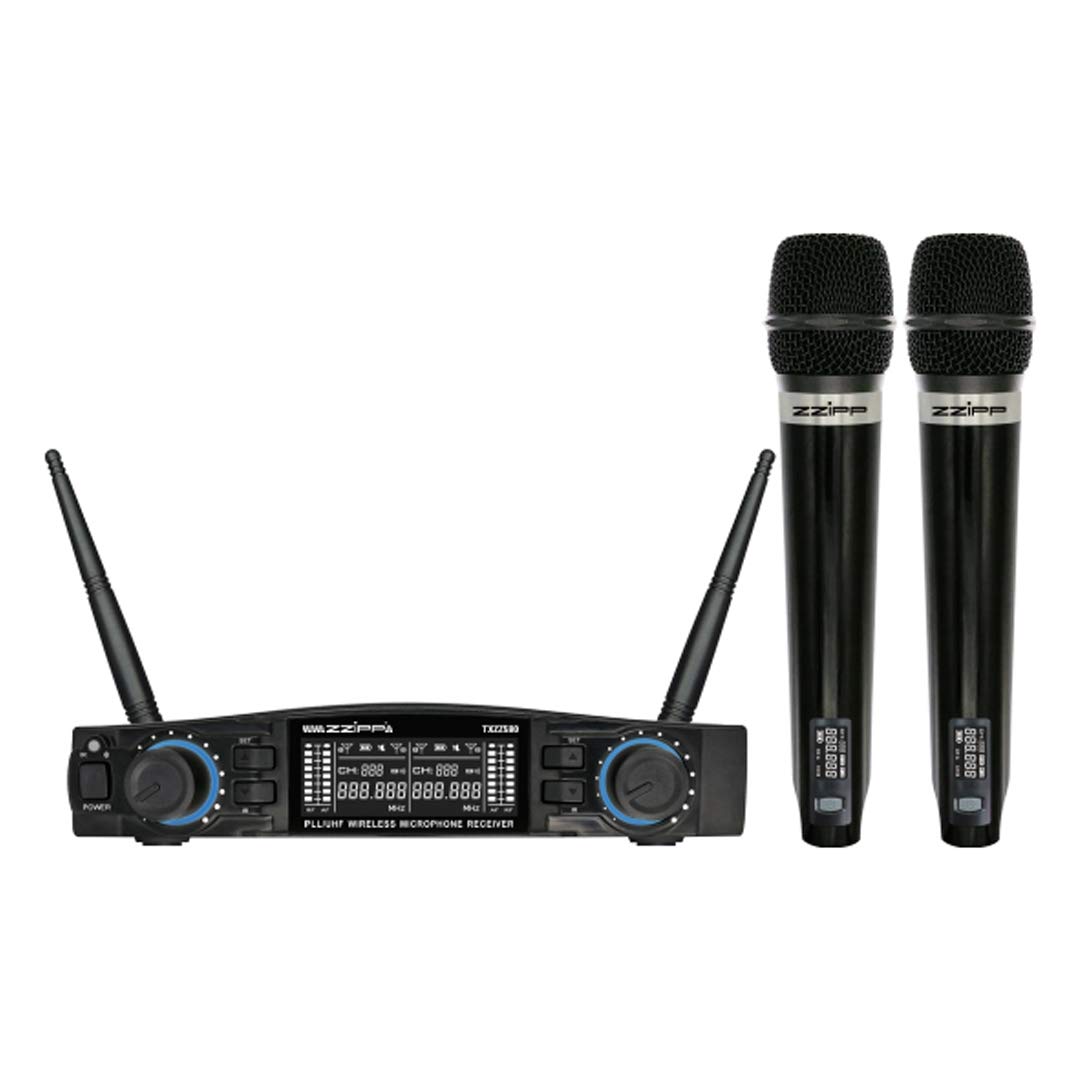
Зураг 1: Дууслааview of the ZZIPP TXZZ580 Wireless Microphone System, showing the receiver unit and two handheld microphones.
Тохиргоо
- Бүрэлдэхүүн хэсгүүдийг задлах: Сав баглаа боодолоос бүх зүйлийг болгоомжтой авч хая.
- Хүлээн авагчийн байршил: Place the receiver unit on a stable surface, away from potential sources of interference such as computers, Wi-Fi routers, or other wireless devices. Ensure good line-of-sight to the area where the microphones will be used.
- Эрчим хүчийг холбох: Connect the provided power adapter to the receiver's DC input and then plug it into a suitable power outlet.
- Аудио гаралтыг холбох: Connect the receiver's audio output (e.g., 3.5mm Jack) to the input of your mixer, amplifier, or sound system using the supplied audio cable.
- Install Batteries in Transmitters: Open the battery compartment of each handheld microphone and insert the required batteries (typically AA, not always included). Observe correct polarity.
- Асаах: Turn on the receiver unit and then each handheld microphone.
- Channel Synchronization (Manual/IR):
- Гарын авлагын тохиргоо: Refer to the receiver's display and controls to manually select a desired channel for each microphone. Ensure each microphone is set to a unique channel to avoid interference.
- IR Synchronization: For automatic synchronization, align the IR sensor on the microphone with the IR sensor on the receiver. Activate the IR sync function on the receiver, and the microphone will automatically pair to the selected channel.
- Туршилтын дуу: Speak into each microphone to test the audio output through your sound system. Adjust volume levels as needed.
Ашиглалтын заавар
Асаах/унтраах
- Хүлээн авагч: Төхөөрөмжийг асаах эсвэл унтраахын тулд урд самбар дээрх асаах товчийг дарна уу.
- Микрофонууд: Press and hold the power button on the microphone handle until the display illuminates (on) or turns off (off).
Сувгийн сонголт
The system offers 48 UHF channels. If you experience interference, change the operating channel. This can be done manually on the receiver and then synchronized with the microphone via IR, or directly on the microphone if it supports manual channel adjustment.
Дууны хяналт
Adjust the output volume for each microphone using the dedicated volume knobs on the receiver's front panel. Further volume adjustments can be made on your connected mixer or ampнастан.
Хэрэглээний зөвлөмжүүд
- Maintain a clear line of sight between the microphones and the receiver for optimal signal quality.
- Хүлээн авагчийг хөндлөнгийн нөлөөлөл үүсгэж болзошгүй том металл объект эсвэл бусад электрон төхөөрөмжийн ойролцоо байрлуулахаас зайлсхий.
- Regularly check microphone battery levels to prevent unexpected power loss during use.
- For best sound quality, hold the microphone approximately 2-6 inches from your mouth.
Засвар үйлчилгээ
Зай солих
When the microphone's battery indicator shows low power, replace the batteries immediately. Always use fresh batteries of the correct type (e.g., AA). Remove batteries if the microphones will not be used for an extended period to prevent leakage.
Цэвэрлэгээ
Clean the receiver and microphones with a soft, dry cloth. Do not use liquid cleaners or solvents, as these can damage the finish or internal components. For microphone grilles, a soft brush can be used to remove debris.
Хадгалах
Store the system in a cool, dry place, away from direct sunlight and extreme temperatures. If possible, use the original packaging or a protective case for transport and storage.
Алдааг олж засварлах
| Асуудал | Боломжит шалтгаан | Шийдэл |
|---|---|---|
| Микрофоноос дуу гарахгүй |
|
|
| Хөндлөнгийн оролцоо эсвэл статик |
|
|
| Богино үйл ажиллагааны хүрээ |
|
|
Үзүүлэлтүүд
- Брэнд: ZZIPP
- Загвар: TXZZ580
- Өнгө: Хар
- Утасгүй төрөл: UHF
- Сувгийн тоо: 48
- Холболт: 3.5 мм Жак
- Эрчим хүчний эх үүсвэр: Corded Electric (for receiver)
- Онцлог шинж чанар: Manual and IR Configuration
- Зөвлөмж болгож буй хэрэглээ: Караоке
- Оруулсан бүрэлдэхүүн хэсгүүд: Two Handheld Microphones, Receiver
Баталгаат болон дэмжлэг
Баталгаат хугацаатай холбоотой мэдээлэл, техникийн дэмжлэг эсвэл үйлчилгээний лавлагаа авахыг хүсвэл худалдан авалттайгаа хамт ирсэн баримт бичгийг үзэх эсвэл жижиглэн худалдаачинтайгаа холбогдоно уу. Баталгаат хугацаатай холбоотой нэхэмжлэл гаргахын тулд худалдан авалтын баримтаа хадгална уу.


