1. Танилцуулга
This manual provides detailed instructions for the installation, operation, and maintenance of your Anlapus 1080p HD-TVI Surveillance Camera. Please read this manual thoroughly before using the product to ensure proper function and safety.
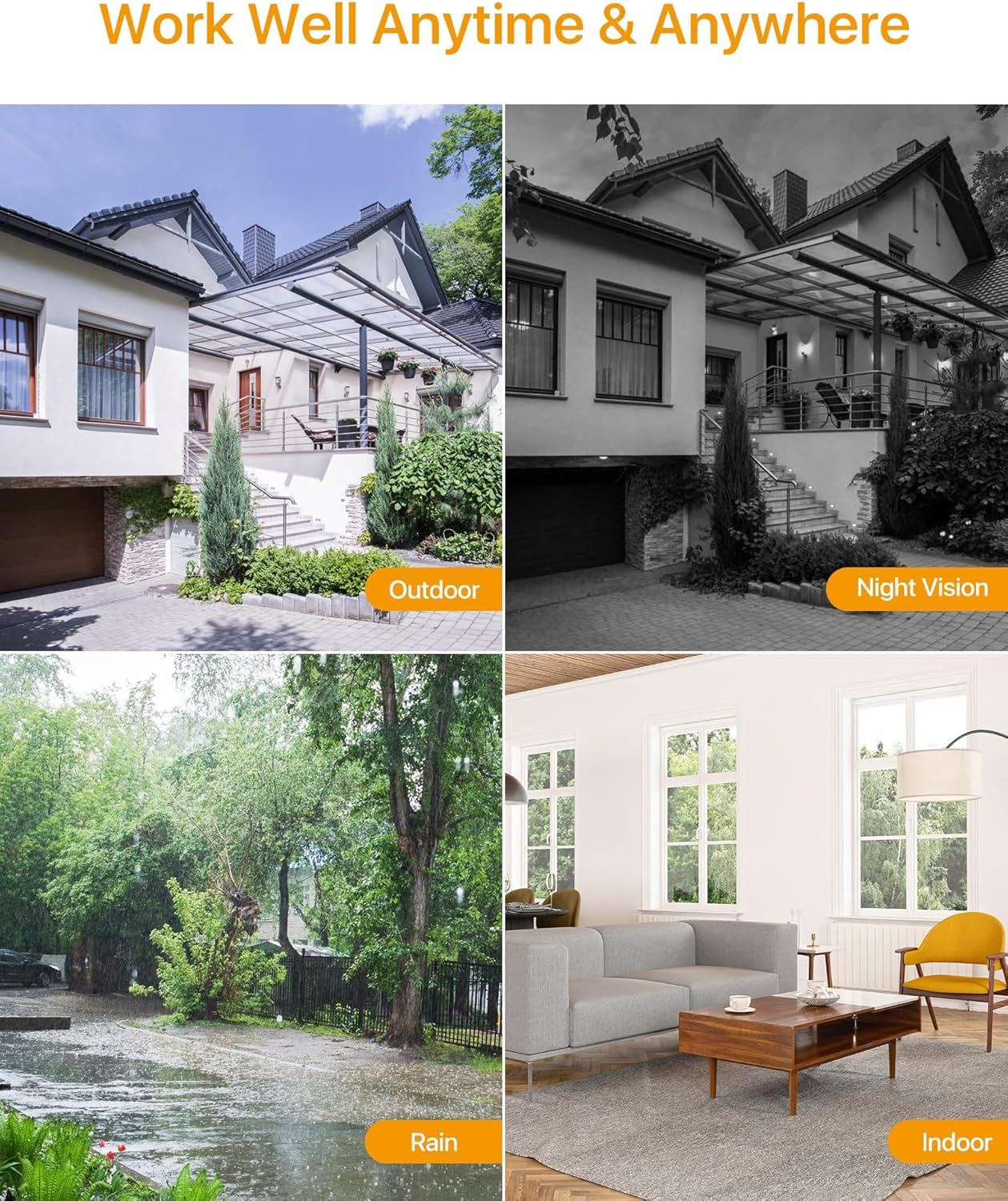
The Anlapus HD-TVI camera is designed for both indoor and outdoor surveillance, offering high-definition video quality and robust performance in various environmental conditions.
2. Багцын агуулга
Доор жагсаасан бүх зүйл таны багцад байгаа эсэхийг шалгаарай. Хэрэв ямар нэгэн зүйл дутуу эсвэл эвдэрсэн бол хэрэглэгчийн дэмжлэгтэй холбоо барина уу.
- 4 x Anlapus 1080p HD-TVI Cameras
- 4 x BNC Video Cables
- 1 х цахилгаан хангамж
- 1 x 1-to-4 Power Splitter Cable
- 4 ширхэг анхааруулах наалт
- 4 x Mounting Screw Bags (including screws and wall plugs)
- 4 x Mounting Hole Templates
- 1 x хурдан эхлүүлэх гарын авлага
3. Бүтээгдэхүүний онцлог
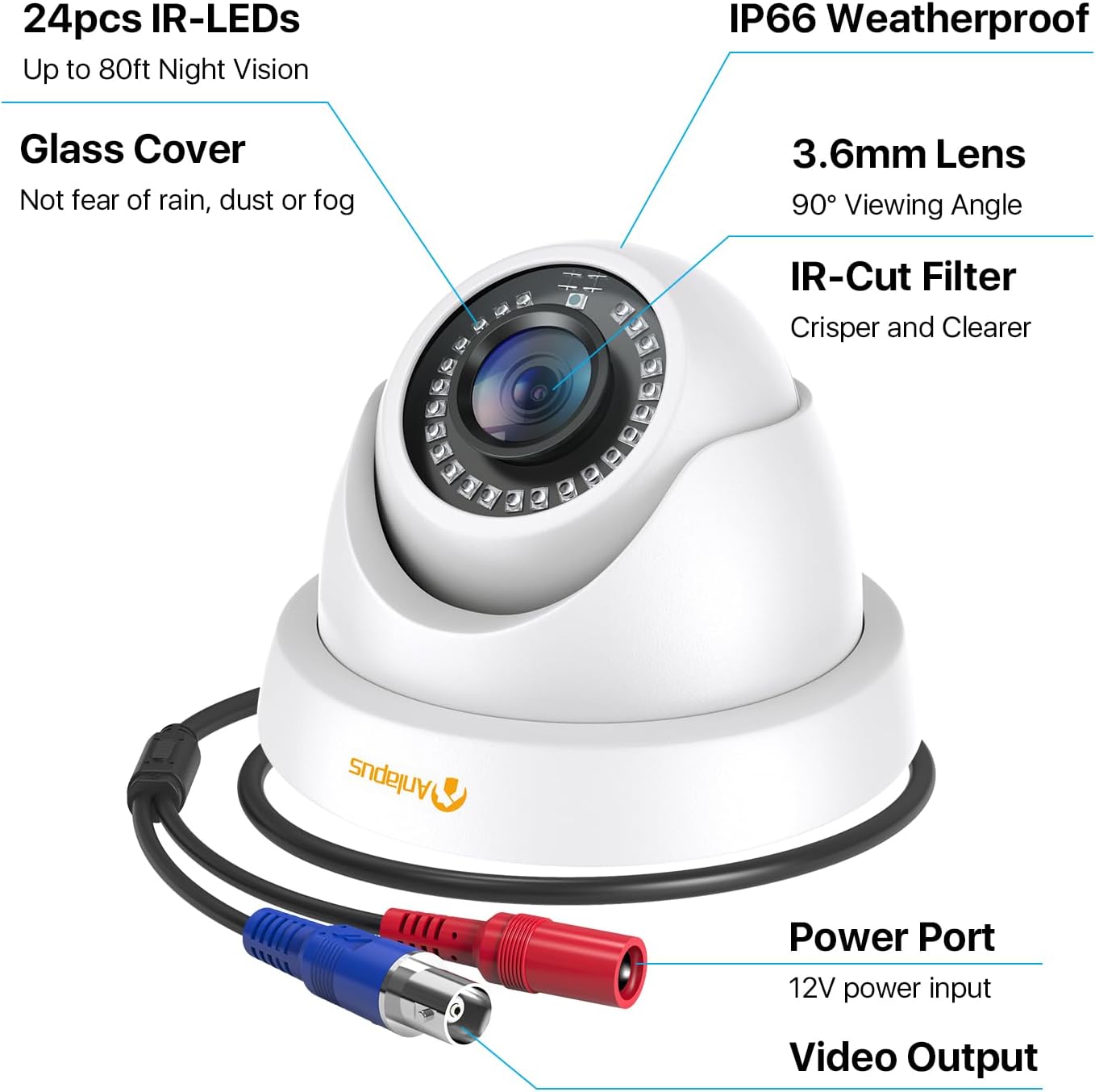
- 1080p HD нягтрал: Тодорхой, нарийвчилсан видео бичлэгийг өгдөгtage (1920x1080 пиксел).
- Өргөн Viewөнцөг Equipped with a 3.6mm lens, offering a 90-degree field of view.
- HD-TVI Compatibility: Designed to work with HD-TVI DVRs. Ensure your DVR supports HD-TVI technology.
- Нарийвчилсан шөнийн хараа: Features 24 IR-Cut LEDs for up to 24 meters (80 feet) of clear black and white night vision.
- IP66 Цаг агаарын хамгаалалтын үнэлгээ: Robust metal housing ensures protection against dust and water, suitable for both indoor and outdoor use in various weather conditions.
- Уян хатан бэхэлгээ: Features a 3-axis adjustable bracket for ceiling or wall mounting, allowing 360-degree horizontal and 180-degree vertical adjustment.




4. Тохиргоо ба суурилуулалт
4.1 Суулгахаас өмнөх шалгах хуудас
- Ensure your DVR is compatible with HD-TVI cameras.
- Plan the camera placement to cover desired surveillance areas.
- Ensure power outlets are accessible for the camera power supply.
- Gather necessary tools: drill, screwdriver, ladder (if mounting high).
4.2 Камер суурилуулах
- Select a suitable mounting location (wall or ceiling) that provides the desired viewing angle and is within reach of the BNC cable and power supply.
- Use the provided mounting hole template to mark the drill points on the surface.
- Тэмдэглэгдсэн байрлалд туршилтын цооног өрөмдөх.
- Insert the wall plugs into the drilled holes (if mounting on masonry or drywall).
- Өгөгдсөн боолтыг ашиглан камерын суурийг гадаргуу дээр бэхлэнэ үү.
- Adjust the camera angle using the 3-axis bracket. The bracket allows for 360-degree horizontal rotation and 180-degree vertical tilt. Tighten the adjustment screws once the desired angle is achieved.
4.3 Камерыг холбох
Refer to the connection diagram below for proper wiring.
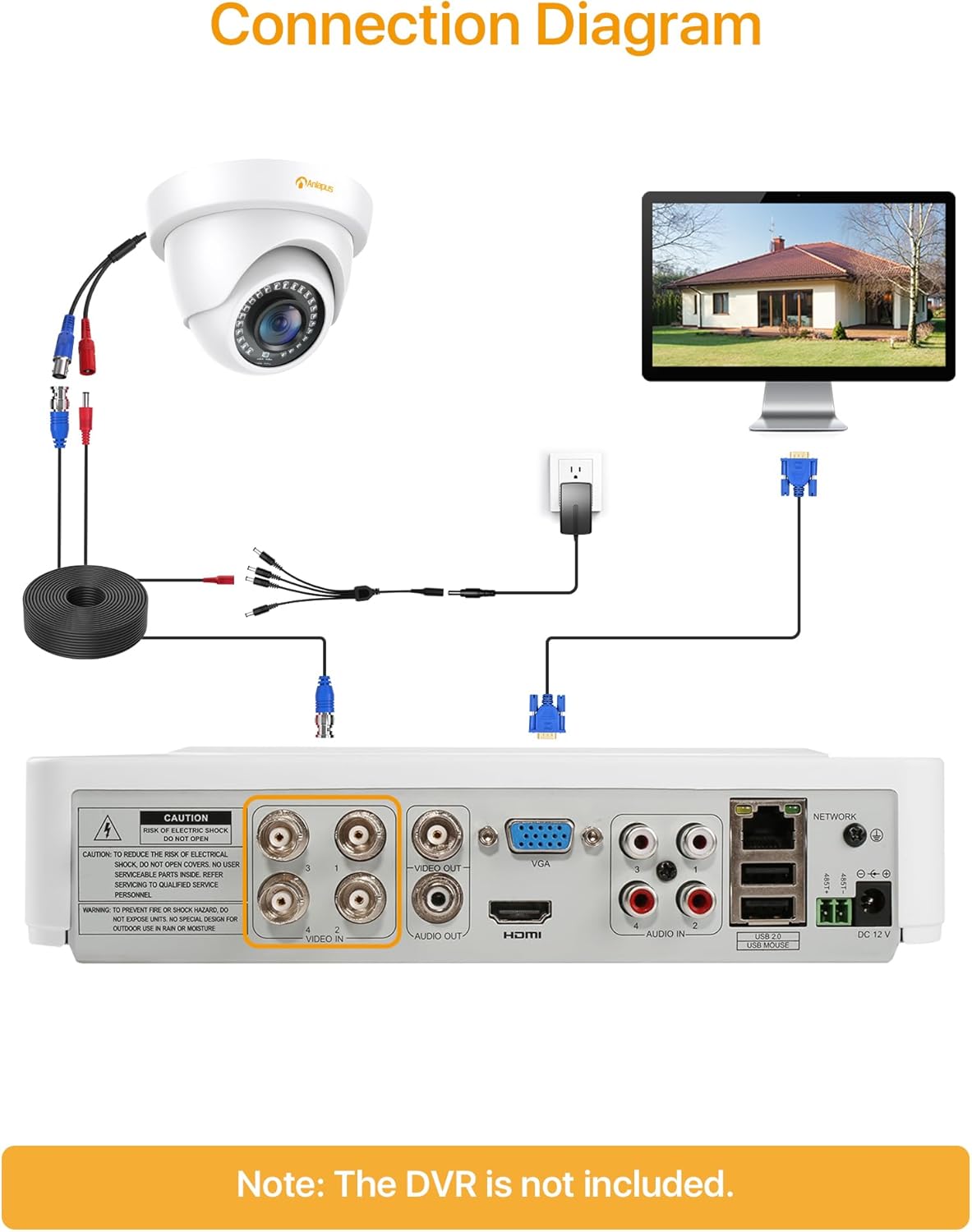
- Connect one end of the BNC video cable to the video output port of the camera.
- Connect the other end of the BNC video cable to a "VIDEO IN" port on your HD-TVI DVR.
- Connect the camera's power input to one of the outputs on the 1-to-4 power splitter cable.
- Connect the power supply to the 1-to-4 power splitter cable.
- Цахилгаан тэжээлийг стандарт цахилгаан залгуурт залгаарай.
- Repeat these steps for all cameras.
Чухал: Системийг асаахаас өмнө бүх холболт найдвартай эсэхийг шалгаарай.
5. Ашиглалтын заавар
Once the cameras are properly installed and connected to your HD-TVI DVR, refer to your DVR's instruction manual for specific operating procedures, including:
- ViewАмьд байна footage камеруудаас.
- Recording and playback of video.
- Configuring motion detection and alerts.
- Accessing the system remotely via mobile app or web интерфейс.
- Adjusting camera settings (if supported by your DVR).
The Anlapus camera provides a continuous video feed to the DVR. Its night vision capabilities activate automatically in low-light conditions.
6. Засвар үйлчилгээ
- Цэвэрлэгээ: Камерын линз болон орон сууцыг үе үе зөөлөн, damp даавуу. Зүлгүүрийн цэвэрлэгч эсвэл уусгагчаас зайлсхий.
- Кабелийн үзлэг: Regularly check all cables for signs of wear, damage, or loose connections.
- Програм хангамжийн шинэчлэлтүүд: While the camera itself does not typically require firmware updates, ensure your DVR's firmware is up-to-date for optimal performance and compatibility.
- Байгаль орчныг хамгаалах: Although the camera is IP66 weatherproof, extreme weather conditions (e.g., heavy snow, ice) may temporarily affect performance. Ensure the camera is securely mounted to withstand strong winds.
7. Алдаа засах
| Асуудал | Боломжит шалтгаан | Шийдэл |
|---|---|---|
| No image on DVR screen |
|
|
| Poor image quality / blurry video |
|
|
| Шөнийн хараа ажиллахгүй байна |
|
|
If you encounter issues not covered here, please contact Anlapus customer support.
8. Техникийн үзүүлэлтүүд
| Загварын дугаар | AJ-A4K-202T4-WPES |
| Видеоны нягтрал | 1080p (1920 x 1080 пиксел) |
| Линз | 3.6 мм |
| Viewing өнцөг | 90 градус |
| Шөнийн харааны хүрээ | 24 метр (80 фут) хүртэл |
| IR гэрэл | 24 pcs IR-Cut LEDs |
| Цаг агаарын хамгаалалттай үнэлгээ | IP66 |
| Материал | Металл |
| Холболтын технологи | Утастай (BNC) |
| Эрчим хүчний оролт | 12 вольт |
| Эрчим хүчний хэрэглээ | 12 ватт |
| Хэмжээ (L x W x H) | 42.9 x 27 x 8.71 см |
| Жин | 2.61 kilograms (for the package) |
| Зөвлөмж болгож буй хэрэглээ | Хяналт |
| Тохиромжтой төхөөрөмжүүд | Дижитал видео бичигч (DVR) |
9. Баталгаат хугацаа ба дэмжлэг
Anlapus products are designed for reliability and performance. For warranty information and technical support, please refer to the warranty card included in your package or visit the official Anlapus webсайт.
If you require assistance with installation, troubleshooting, or have any questions regarding your Anlapus surveillance camera, please contact our customer support team. Contact details can typically be found on the Anlapus brand store page or in the quick start guide.