1. Бүтээгдэхүүн дууссанview
The USR-DR301 is a DIN-Rail mounted RS232 Serial to Ethernet Converter. It facilitates transparent data transmission between RS232 serial devices and an Ethernet network. This device supports various operating modes, including TCP Client, TCP Server, UDP Client, UDP Server, and HTTP Client, making it suitable for industrial automation, power data networking, and other data acquisition applications.

Figure 1: USR-DR301 DIN-Rail RS232 Serial to Ethernet Converters. These devices are designed for industrial environments, offering robust RS232 to Ethernet connectivity with a compact form factor and DIN-rail mounting capability.
2. Үндсэн шинж чанарууд
- RS232 порт: Industrial-grade terminal type for reliable serial communication.
- Modbus RTU to Modbus TCP: Supports protocol conversion for industrial control systems.
- Network Heartbeat Packet: Maintains stable network connections by sending regular heartbeat packets.
- Identity Heartbeat Packet: Allows the device to send an identification packet (e.g., IMEI, ICCID, or user-editable) to the TCP server when operating as a TCP Client.
- Компакт дизайн: Small form factor suitable for installations with limited space.
- DIN төмөр замд суурилуулах: Easy installation on standard DIN-rails.
- Удаан эдэлгээтэй барилга: Made from PC+ABS material for industrial environments.
3. Техникийн үзүүлэлтүүд
| Тодорхойлолт | Үнэ цэнэ |
|---|---|
| Загварын дугаар | USR-DR301 |
| Интерфэйс | RS232 (Terminal Type), Ethernet (LAN) |
| Хэмжээ (L x W x H) | 109.66мм x 28мм x 64.67мм (ойролцоогоор) |
| Зүйлийн жин | 7 унц (ойролцоогоор 198 гр) |
| Суурилуулалт | DIN-Төмөр зам |
| Материал | PC+ABS |
| Эрчим хүчний оролт | DC 5-36V хувилбартай |
| Тохиромжтой төхөөрөмжүүд | Monitors, PCs, PLCs, Serial Devices |

Figure 2: USR-DR301 Dimensions and Port Details. The image illustrates the compact size of the device and provides a clear view of its RS232 terminal block and Ethernet port.
4. Тохиргоо ба суурилуулалт
4.1 Физик суурилуулалт
- Суурилуулалт: Securely attach the USR-DR301 to a standard DIN-rail in your industrial enclosure.
- Эрчим хүчний холболт: Connect a DC 5-36V power supply to the power input terminals. Ensure correct polarity.
- RS232 холболт: Connect your RS232 serial device to the RS232 terminal block on the converter. Refer to your serial device's documentation for pinout details.
- Ethernet холболт: Connect an Ethernet cable from the LAN port of the USR-DR301 to your network switch or router.

Figure 3: Basic Connection Diagram. This illustration shows the fundamental connection path from an RS232 serial device, through the USR-DR301 converter, to an Ethernet network.
4.2 Сүлжээний тохиргоо
The USR-DR301 requires network configuration to establish communication. This typically involves setting IP addresses, port numbers, and selecting the desired operating mode. Configuration is usually performed via dedicated software on a connected PC or through a web интерфейс.
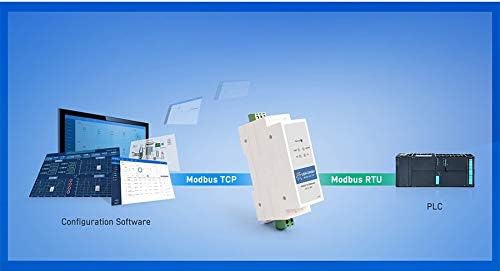
Figure 4: Modbus RTU to Modbus TCP Configuration. This diagram shows how configuration software on a computer interacts with the USR-DR301 to enable Modbus RTU to Modbus TCP protocol conversion for communication with a PLC.
For detailed configuration steps, refer to the official USR product documentation or software user guide.
5. Үйлдлийн горимууд
The USR-DR301 supports several operating modes to accommodate various network communication requirements:
- TCP үйлчлүүлэгч: The converter initiates a TCP connection to a configured destination IP address and port. It will continuously attempt to reconnect if the connection fails.
- TCP сервер: The converter monitors a specified port and waits for incoming TCP client connections. Data from the serial device is transmitted to all successfully connected clients.
- UDP Client: The converter communicates only with the target interface of a specified target IP address, ensuring data transmission accuracy.
- UDP Server: The converter automatically transmits received data to the last device it communicated with. This mode is suitable for scenarios where multiple network devices need to communicate with the DR301.
- HTTP Клиент: The converter supports transmitting serial data to a specified server using HTTP (GET/POST) requests.
6. Хэрэглээ
The USR-DR301 is designed for a range of industrial and data communication applications:
6.1 Power Data Networking Transmission
Facilitates the conversion of terminal data from distribution boxes into network data for real-time communication and monitoring.

Figure 5: Power Data Networking Application. The image shows the USR-DR301 integrated into a system for transmitting power data over a network.
6.2 Unattended Weighing Systems
Enables remote control of devices like barrier gates via Ethernet, connecting serial weighing equipment to a central control system.

Figure 6: Unattended Weighing Application. This image depicts the USR-DR301 facilitating remote control of a barrier gate, typical in unattended weighing scenarios.
6.3 Traffic Signal Control
Used to connect and control multiple serial-based traffic signal lights over an Ethernet network from a central server.
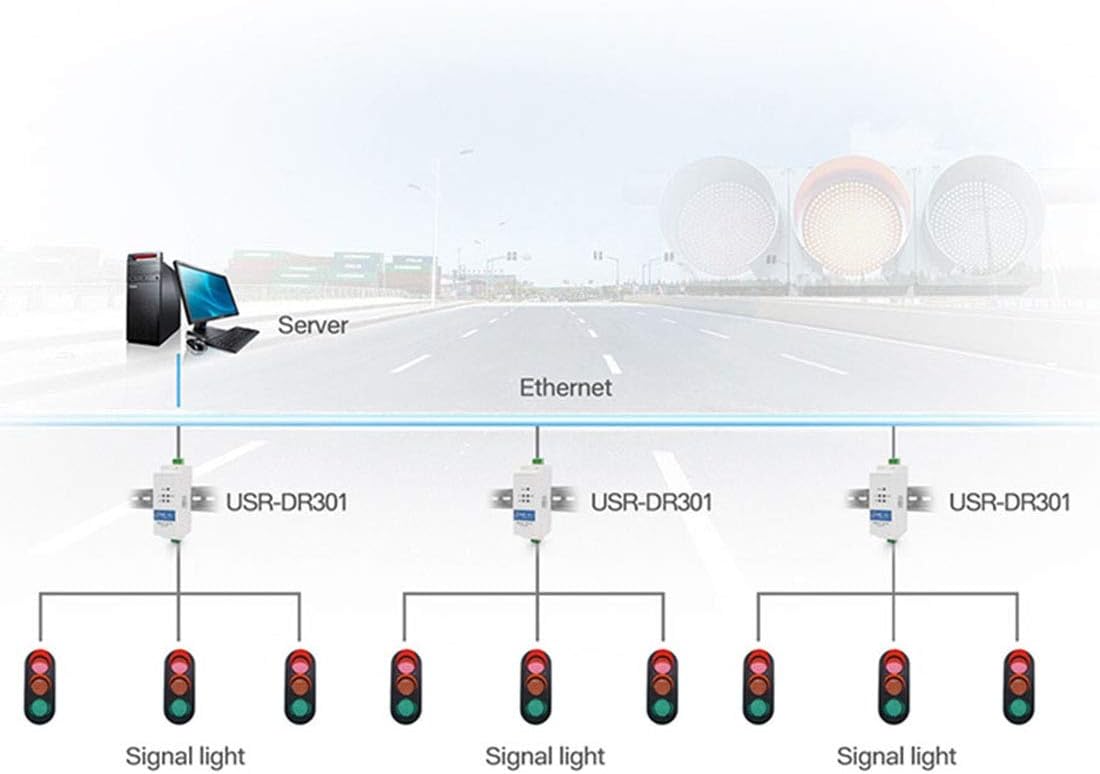
Figure 7: Traffic Signal Control Application. The diagram illustrates how multiple USR-DR301 units can connect various traffic signal lights to a central server via an Ethernet network for coordinated control.
7. Алдаа засах
This section provides basic troubleshooting steps for common issues. For more complex problems, refer to the official USR support resources.
- Цахилгаан заагч байхгүй:
- Verify the power supply is connected correctly and providing the specified DC 5-36V.
- Check power cable connections and ensure the power source is active.
- Сүлжээний холболт байхгүй:
- Ensure the Ethernet cable is securely connected to both the USR-DR301 and the network device (switch/router).
- Check the network status indicators on the device and your network equipment.
- Verify IP address settings and subnet mask in the device's configuration.
- No Serial Data Transmission:
- Confirm the RS232 serial cable is correctly wired and connected to your serial device.
- Check serial port settings (baud rate, data bits, parity, stop bits) in the converter's configuration to match the serial device.
- Ensure the operating mode (TCP Client, TCP Server, etc.) is correctly configured for your application.
- Модбус холбооны асуудлууд:
- Verify that the Modbus RTU and Modbus TCP settings are correctly configured, including slave IDs and register mappings.
- Ensure the PLC or Modbus master is correctly configured to communicate with the converter.
8. Засвар үйлчилгээ
The USR-DR301 is designed for reliable operation with minimal maintenance. Follow these guidelines to ensure optimal performance:
- Цэвэрлэгээ: Keep the device clean and free from dust and debris. Use a soft, dry cloth for cleaning. Do not use liquid cleaners.
- Байгаль орчин: Ensure the operating environment is within the specified temperature and humidity ranges. Avoid exposure to excessive moisture or extreme temperatures.
- Програм хангамжийн шинэчлэлтүүд: Үйлдвэрлэгчийг үе үе шалгаж байгаарай website for firmware updates. Applying updates can improve performance, add features, or resolve known issues. Follow the provided instructions carefully during firmware updates.
- Кабелийн бүрэн бүтэн байдал: Regularly inspect all connected cables (power, RS232, Ethernet) for any signs of damage or wear. Replace damaged cables immediately.
9. Баталгаат хугацаа ба дэмжлэг
For technical support, warranty information, or to download the latest drivers and software, please visit the official USR webсайт эсвэл харилцагчийн үйлчилгээний хэлтэстэй холбогдоно уу.
Үйлдвэрлэгч: PUSR
Загвар: USR-DR301
Refer to the product packaging or the official USR webтусгай баталгаат нөхцөл, болзлын сайт.


