1. Оршил ба түүнээс дээшview
The OSD Audio MX1680 GEN2 is a high-performance, multi-channel amplifier designed for distributed audio systems. This Class D amplifier provides 16 channels across 8 independent zones, delivering 80 Watts per channel into 4 Ohms or 50 Watts per channel into 8 Ohms. It is suitable for both residential and commercial audio installations, serving as a main amplifier for multi-room audio or integrating into home theater systems.
Key features include front-panel on/off buttons for each zone, efficient Class D amplification for low distortion, and built-in protection circuitry against thermal overload and short circuits. Its slim, 2U rack-mountable design (hardware included) allows for flexible installation.

Зураг 1.1: Урд ба хойд view of the OSD Audio MX1680 GEN2 Multi-Zone Digital Ampнастан.
2. Аюулгүй байдлын мэдээлэл
Энэ төхөөрөмжийг ажиллуулахын өмнө аюулгүй байдлын бүх зааврыг уншиж, ойлгоорой. Энэ гарын авлагыг цаашид лавлах зорилгоор хадгална уу.
- Эрчим хүчний эх үүсвэр: -г холбоно уу amplifier only to the type of power source indicated on the unit. Ensure the voltage нь танай бүс нутагт зөв байна.
- Агааржуулалт: Агааржуулалтын нүхийг бүү бөглөөрэй. Үйлдвэрлэгчийн зааврын дагуу суурилуулна уу. Агаарын урсгалыг хэвийн байлгахын тулд төхөөрөмжийн эргэн тойронд хангалттай зай үлдээнэ үү.
- Ус ба чийг: Энэ төхөөрөмжийг бороо, чийгэнд бүү тавь. Ваар зэрэг шингэнээр дүүрсэн зүйлийг төхөөрөмж дээр тавьж болохгүй.
- Дулаан: Радиатор, халаалтын төхөөрөмж, зуух болон бусад төхөөрөмж (үүнд ampөргөгч) дулаан үүсгэдэг.
- Газардуулга: This appliance must be grounded. Ensure the power cord is connected to a properly grounded outlet.
- Үйлчилгээ: Энэ бүтээгдэхүүнд өөрөө үйлчлэх гэж бүү оролдоорой. Бүх засвар үйлчилгээг мэргэшсэн үйлчилгээний ажилтнуудад хандаарай.
- Цэвэрлэгээ: Unplug the unit from the power outlet before cleaning. Use a dry cloth for cleaning.
3. Тохиргоо ба суурилуулалт
3.1 Савлах
Болгоомжтой арилгана уу amplifier from its packaging. Verify that all components listed in the 'What's in the Box' section are present. This includes the MX1680 GEN2 amplifier and the Quick Start Guide.
3.2 Байршил
The MX1680 GEN2 is designed for rack mounting (2U height) or placement on a flat, stable surface. Ensure adequate ventilation around the unit to prevent overheating. Avoid placing it near other heat-generating equipment.
3.3 холболт
Refer to the rear panel diagram for all input and output connections.
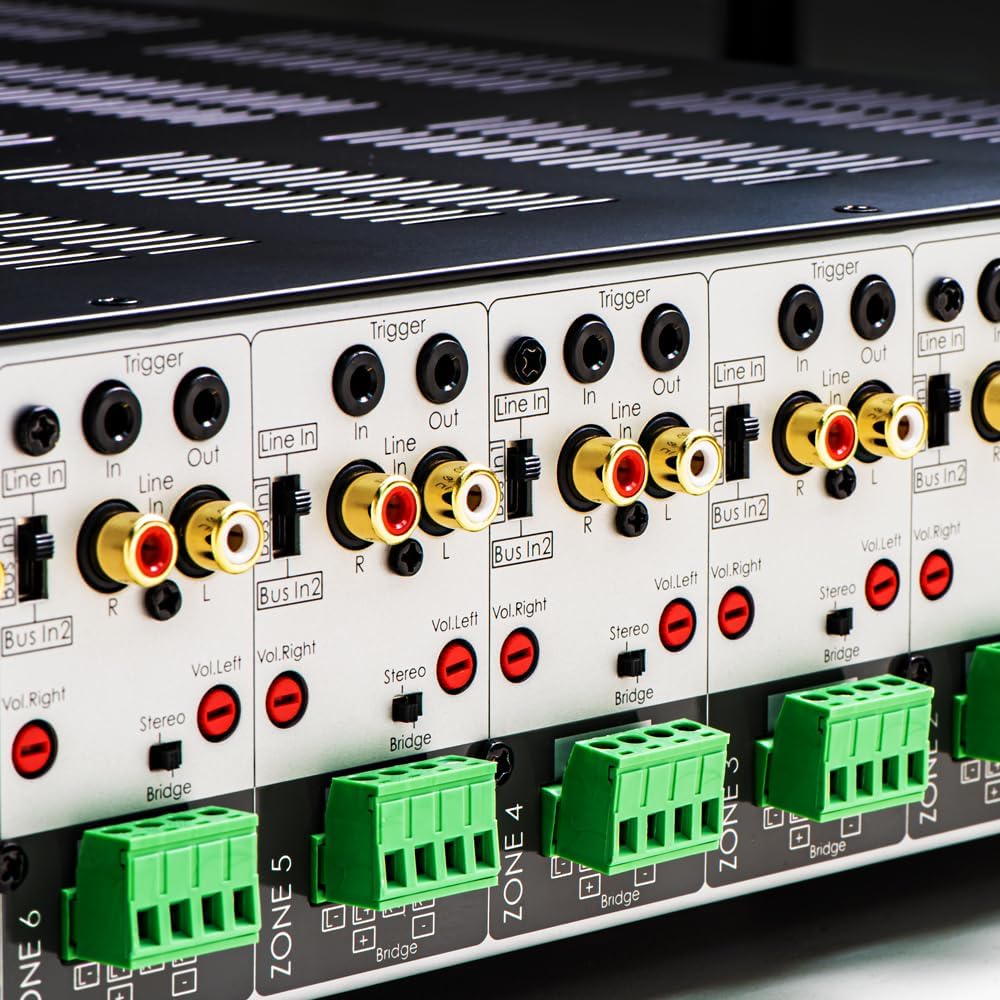
Зураг 3.1: Нарийвчилсан view of the rear panel input and output connections.
- Илтгэгчийн гаралт: Connect your speakers to the corresponding zone terminals. Ensure correct polarity (+ to + and - to -). The amplifier supports both 4-ohm and 8-ohm speakers. For bridged mode operation, refer to section 4.3.
- Line Inputs (RCA): Each zone has a dedicated stereo RCA Line In. Connect your audio sources (e.g., pre-amplifier, media player) to these inputs.
- Bus Inputs (RCA): The amplifier features two stereo Bus Inputs (Bus In 1, Bus In 2). These allow a single audio source to be distributed to multiple zones.
- Шугамын гаралт (RCA): Each zone also has a stereo RCA Line Out, allowing the audio signal from that zone to be passed to another ampөргөгч эсвэл аудио төхөөрөмж.
- Оролт/гаралтын гох: The 12V Trigger In allows the amplifier to be turned on/off by an external device. The 12V Trigger Out can be used to control other devices.
- AC цахилгаан оролт: Connect the supplied power cord to the AC IN receptacle and then to a suitable wall outlet.

Зураг 3.2: Нарийвчилсан view of Bus inputs and Trigger connections on the rear panel.
4. Ашиглалтын заавар
4.1 Асаах/унтраах
Press the main power button on the front panel to turn the amplifier on or off. A red LED indicator will illuminate when the unit is powered on.

Image 4.1: Front panel power button.
4.2 Бүсийн хяналт
Each of the 8 zones has a dedicated button on the front panel. Pressing a zone button will activate or deactivate that specific audio zone. The corresponding LED will indicate the zone's status.

Image 4.2: Front panel zone selection buttons.
4.3 Input Selection and Volume Adjustment
On the rear panel, each zone features switches for input selection and rotary controls for volume adjustment:
- Оруулагч сонгогч: A slide switch allows you to select the audio input for each zone: Мөр (dedicated input for that zone), Bus In 1, эсвэл Bus In 2.
- Дууны хяналт: Separate rotary controls for Left and Right channels (Vol. Left, Vol. Right) allow for precise volume balancing within each zone.
- Stereo/Bridge Switch: A switch allows you to configure the zone for stereo operation or bridged mono operation. In bridged mode, two amplifier channels combine to deliver higher power to a single speaker. Ensure the speaker impedance is appropriate for bridged mode (typically 8 ohms minimum).
4.4 Audio Sensing
The amplifier incorporates an audio sense feature that automatically activates a zone when an input signal is detected and turns it off after a period of no signal. This helps conserve power and prolong the unit's lifespan.

Зураг 4.3: Жишээ ньample of multi-zone audio distribution with the ampнастан.
5. Засвар үйлчилгээ
The OSD Audio MX1680 GEN2 amplifier requires minimal maintenance. Follow these guidelines to ensure optimal performance and longevity:
- Цэвэрлэгээ: Periodically wipe the exterior surfaces with a soft, dry cloth. Do not use liquid cleaners or aerosol sprays, as they may damage the finish or internal components.
- Агааржуулалт: Ensure that the ventilation openings on the top and sides of the unit remain clear of dust and obstructions. Dust accumulation can impede airflow and lead to overheating.
- Холболтууд: Occasionally check all cable connections to ensure they are secure and free from corrosion. Loose connections can lead to signal loss or degradation.
- Хадгалах: Хэрэв хадгалж байгаа бол ampӨргөгчийг удаан хугацаагаар асаах бол цахилгаанаас салгаж, сэрүүн, хуурай, нарны шууд тусгал болон хэт өндөр температураас хол газар хадгална уу.
6. Алдаа засах
If you experience issues with your MX1680 GEN2 amplifier, consult the following troubleshooting guide. For problems not resolved here, please contact OSD Audio support.
| Асуудал | Боломжит шалтгаан | Шийдэл |
|---|---|---|
| Хүч чадалгүй | Power cord disconnected; Power outlet faulty; Amplifier fuse blown | Check power cord connection; Test outlet with another device; Contact service for fuse replacement. |
| No sound from a zone | Zone not activated; Incorrect input selected; Source device off/muted; Speaker wires loose/incorrectly connected; Volume too low | Press the zone button on the front panel; Verify input selector switch position; Check source device; Inspect speaker connections; Adjust zone volume controls. |
| Гажуудсан дуу чимээ | Input signal too high; Speaker impedance mismatch; Faulty speaker cable; Ampилүү урт халалт | Reduce source device output level; Ensure correct speaker impedance (4 or 8 ohms, or 8 ohms for bridged); Check speaker cables; Ensure proper ventilation. |
| Amplifier shuts off unexpectedly | Overheating; Short circuit in speaker wiring; Protection circuit activated | Ensure proper ventilation; Check all speaker wiring for shorts; Allow unit to cool down before restarting. |
7. Техникийн үзүүлэлтүүд
| Онцлог | Тодорхойлолт |
|---|---|
| Загварын дугаар | MX1680-GEN2 |
| Сувгууд | 16 Channels (8 Zones) |
| Эрчим хүчний гаралт (4 Ом) | 80 Watts per channel (1KHz) |
| Эрчим хүчний гаралт (8 Ом) | 50 Watts per channel (1KHz) |
| AmpАмьдралын анги | D анги |
| Бүтээгдэхүүний хэмжээ (L x W x H) | 16.81 x 16.14 x 3.46 инч |
| Зүйлийн жин | 23 фунт |
| Rack холбох боломжтой | Yes (2U, hardware included) |
| Үйлдвэрлэгч | OSD аудио |
| Эхний боломжтой огноо | 31 оны нэгдүгээр сарын 2020 |
8. Баталгаат хугацааны мэдээлэл
Warranty information for the OSD Audio MX1680 GEN2 amplifier is typically provided with your purchase documentation or can be found on the official OSD Audio webсайт. Баталгаат хугацаа, нөхцөл, болзлын талаарх дэлгэрэнгүй мэдээллийг эдгээр эх сурвалжаас авна уу.
9. Дэмжлэг
For technical assistance, product inquiries, or service requests, please contact OSD Audio customer support. You can typically find contact information, including phone numbers and email addresses, on the official OSD Audio webсайт:
Please have your model number (MX1680-GEN2) and purchase details ready when contacting support.