Танилцуулга
This manual provides essential information for the safe and efficient operation of your Dual MCR 4 Portable DAB+/FM Radio. This device offers both digital DAB+ and analog FM radio reception, ensuring a wide range of listening options. Its color TFT display enhances usability by showing station names and additional information. With intuitive controls, auxiliary input, and headphone jack, the MCR 4 is designed for versatile and enjoyable audio experiences.
Аюулгүй байдлын мэдээлэл
- Төхөөрөмжийг ашиглахаасаа өмнө бүх зааврыг анхааралтай уншина уу.
- Төхөөрөмжийг ус, чийг, өндөр температураас хол байлга.
- Төхөөрөмжийг задлах, өөрчлөхийг бүү оролдоорой. Бүх үйлчилгээг мэргэшсэн боловсон хүчинд шилжүүлээрэй.
- Use only the provided power adapter or recommended battery types.
- Ашиглалтын явцад төхөөрөмжийн эргэн тойронд агааржуулалт сайтай байх ёстой.
- Орон нутгийн дүрэм журмын дагуу зайгаа хариуцлагатайгаар устгана уу.
Багцын агуулга
Бүх зүйл багцад байгаа эсэхийг шалгана уу:
- Dual MCR 4 Main Unit
- Эрчим хүчний адаптер
- Хэрэглэгчийн гарын авлага
Бүтээгдэхүүн дууссанview
The Dual MCR 4 features a compact design with intuitive controls for easy access to its functions. Key components include:
- Color TFT Display: Станцын мэдээлэл, цаг, цэсийн сонголтыг харуулна.
- Ротари бариул: For tuning, volume control, and menu navigation.
- Санах ойн товчлуурууд: To save and recall your favorite radio stations.
- Телескоп антен: For optimal radio signal reception.
- Туслах оролт (AUX-IN): Located at the back, for connecting external audio devices.
- Чихэвчний Жак: Located at the back, for private listening.
- Mechanical On/Off Switch: Located at the back, for direct power control.
- Passive Membrane: Located at the back, contributing to exceptional sound quality.
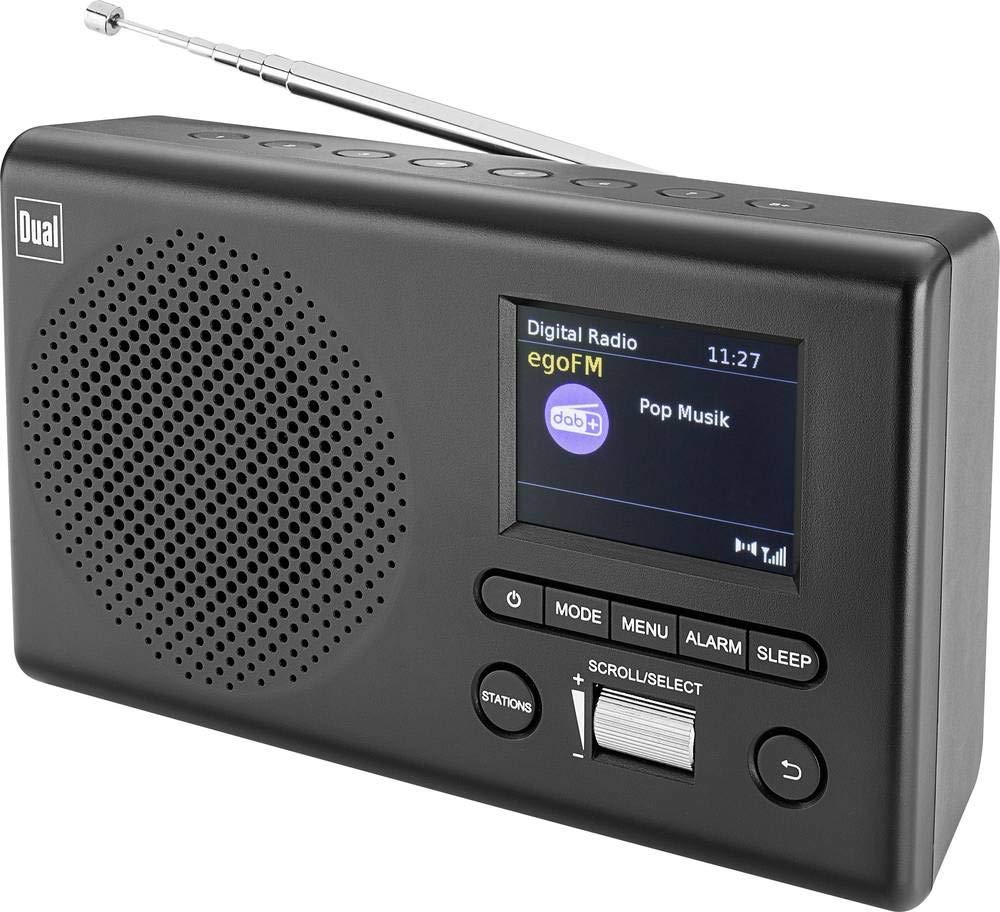
Зураг: Урд view of the Dual MCR 4 Portable DAB+/FM Radio, showing the color TFT display, rotary knob, and control buttons. The radio has a black and silver finish.
Тохиргоо
1. Төхөөрөмжийг тэжээх
The Dual MCR 4 can be powered by either the included AC power adapter or batteries, offering portability.
- АС адаптер ашиглах: Connect the power adapter to the DC IN port on the back of the radio and plug the other end into a standard wall outlet.
- Батерей ашиглах: Open the battery compartment on the bottom/back of the radio and insert the required batteries (type and quantity usually specified inside the compartment or in the full manual). Ensure correct polarity.
2. Антенны тохируулга
Extend the telescopic antenna fully for optimal reception of both DAB+ and FM radio signals. Adjust its position for the best signal quality.
3. Initial Power On and Station Scan
After connecting power, switch on the radio using the mechanical ON/OFF switch at the back. The radio will typically perform an automatic station scan upon first use, searching for available digital (DAB+) and analog (FM) radio stations. This process may take a few moments.
Ашиглалтын заавар
1. Үндсэн үйл ажиллагаа
- Асаах/унтраах: Use the mechanical switch at the back. For standby, a dedicated button on the front might be available (refer to physical unit).
- Дууны хяналт: Rotate the main rotary knob to adjust the listening volume.
2. DAB+ Radio Mode
- Selecting DAB+ Mode: Press the MODE button (if available) or navigate through the menu using the rotary knob until DAB+ mode is selected.
- Станцын сонголт: After an automatic scan, use the rotary knob to scroll through the list of available DAB+ stations. Press the knob to confirm your selection.
- Урьдчилсан тохиргоог хадгалах: Tune to your desired station. Press and hold a memory button (e.g., 1-5) until the display confirms the station is saved.
- Урьдчилан тохируулсан зүйлийг эргэн санах: Briefly press the corresponding memory button to recall a saved station.
- Дэлгэцийн мэдээлэл: The color TFT display will show station name, program information (DLS), and potentially station logos or slideshows.
3. FM радио горим
- Selecting FM Mode: Press the MODE button or navigate through the menu until FM mode is selected.
- Гараар тааруулах: Rotate the tuning knob to manually adjust the frequency.
- Автомат хайлт: Press and hold the tuning knob or a dedicated scan button to automatically search for the next available FM station.
- Урьдчилсан тохиргоог хадгалах: Tune to your desired FM station. Press and hold a memory button until the display confirms the station is saved.
- Урьдчилан тохируулсан зүйлийг эргэн санах: Briefly press the corresponding memory button to recall a saved station.
4. Auxiliary Input (AUX-IN)
Connect an external audio device (e.g., smartphone, MP3 player) to the AUX-IN port on the back of the radio using a 3.5mm audio cable. Select AUX mode on the radio to play audio from the connected device.
5. Чихэвчний хэрэглээ
For private listening, plug standard 3.5mm headphones into the headphone jack located on the back of the unit. The internal speaker will automatically mute.
Засвар үйлчилгээ
- Цэвэрлэгээ: Радиог зөөлөн, хуурай даавуугаар арчина. Зүлгүүрийн цэвэрлэгч, уусгагчийг бүү ашигла.
- Хадгалах: If storing for an extended period, remove batteries and store the unit in a cool, dry place.
- Антенны арчилгаа: Гэмтлээс урьдчилан сэргийлэхийн тулд дурангийн антенныг зөөлөн барь.
Алдааг олж засварлах
| Асуудал | Боломжит шийдэл |
|---|---|
| Хүч чадалгүй |
|
| Радио хүлээн авалт муу |
|
| Чанга яригчаас дуу гарахгүй |
|
Үзүүлэлтүүд
| Брэнд | Давхар |
| Загварын дугаар | 76074 |
| Өнгө | Хар, Мөнгө |
| Тааруулах технологи | DAB+, FM |
| Холболтын технологи | Auxiliary (AUX-IN) |
| Онцлог шинж чанарууд | Portable, Color TFT Display |
| Тохиромжтой төхөөрөмжүүд | Headphones, External Audio Devices (via AUX-IN) |
| Эрчим хүчний эх үүсвэр | Mains (AC Adapter), Battery Powered |
| Оруулсан бүрэлдэхүүн хэсгүүд | Main Unit, Power Adapter, User Manual |
| Зөвлөмж болгож буй хэрэглээ | Хөгжим |
Баталгаат болон дэмжлэг
For warranty information and technical support, please refer to the specific warranty card included with your product or contact Dual customer service. The included user manual provides detailed instructions and contact information.