1. Танилцуулга
Худалдан авалт хийсэнд баярлалааasing the ICON 12-inch Bluetooth Speaker. This manual provides detailed instructions for the safe and efficient operation of your new speaker. Please read this manual thoroughly before use and retain it for future reference.
2. Багцын агуулга
- ICON 12-inch Bluetooth Speaker
- Цахилгаан кабель
- Утасгүй микрофон
- Алсын удирдлага
- Хэрэглэгчийн гарын авлага

Image: The ICON Bluetooth speaker shown with its included wireless microphone and remote control, highlighting the complete package contents.
3. Бүтээгдэхүүн дууссанview
The ICON 12-inch Bluetooth Speaker is a versatile audio system designed for various applications, offering powerful sound output and multiple connectivity options. It features a built-in rechargeable battery for portability and integrated wheels and a retractable handle for easy transport.

Зураг: Урд view of the ICON 12-inch Bluetooth Speaker, showcasing its robust design and blue illuminated woofer.

Зураг: Ар талд view of the ICON 12-inch Bluetooth Speaker, displaying the main control panel and retractable handle.
Гол онцлогууд:
- Powerful 6000W PMPO Output
- Bluetooth Connectivity for Wireless Streaming
- USB болон SD картыг тоглуулах
- 3.5 мм AUX оролт
- Суурилагдсан FM радио
- Микрофон ба гитарын оролт
- Rechargeable Battery for Extended Playtime
- Integrated Equalizer for Sound Customization
- TWS (True Wireless Stereo) Functionality for connecting multiple speakers
- LED гэрлийн эффектүүд

Image: Visual representation of the ICON Bluetooth Speaker's key features, including excellent sound quality, Bluetooth compatibility, AUX input, rechargeable battery, FM radio, and equalizer.
4. Тохиргоо
4.1 Анхны цэнэглэлт
Before first use, fully charge the speaker's internal battery. Connect the power cable to the AC INPUT port on the rear panel and plug it into a standard wall outlet. The charging indicator will illuminate. Charging time may vary.
4.2 Хяналтын самбар дээрview
Familiarize yourself with the control panel located on the rear of the speaker.
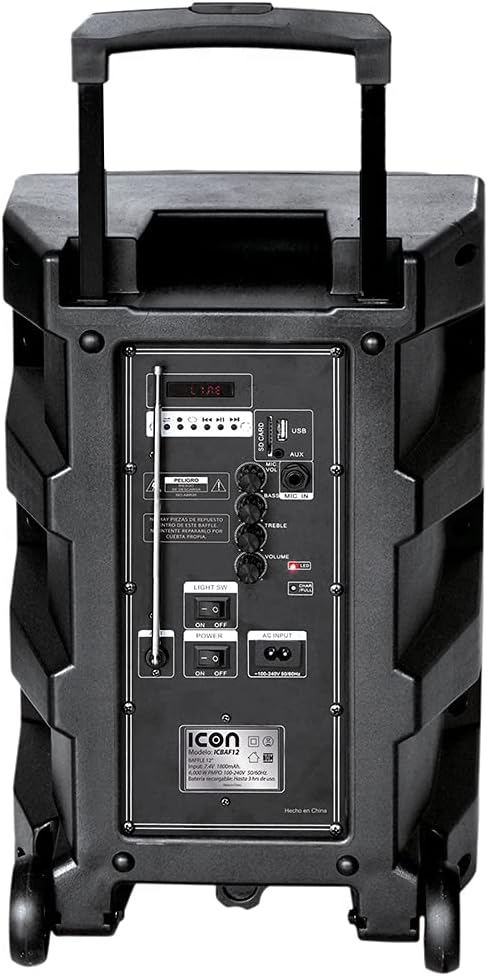
Зураг: Нарийвчилсан view of the ICON speaker's rear control panel, showing various inputs, volume, treble, and bass controls.
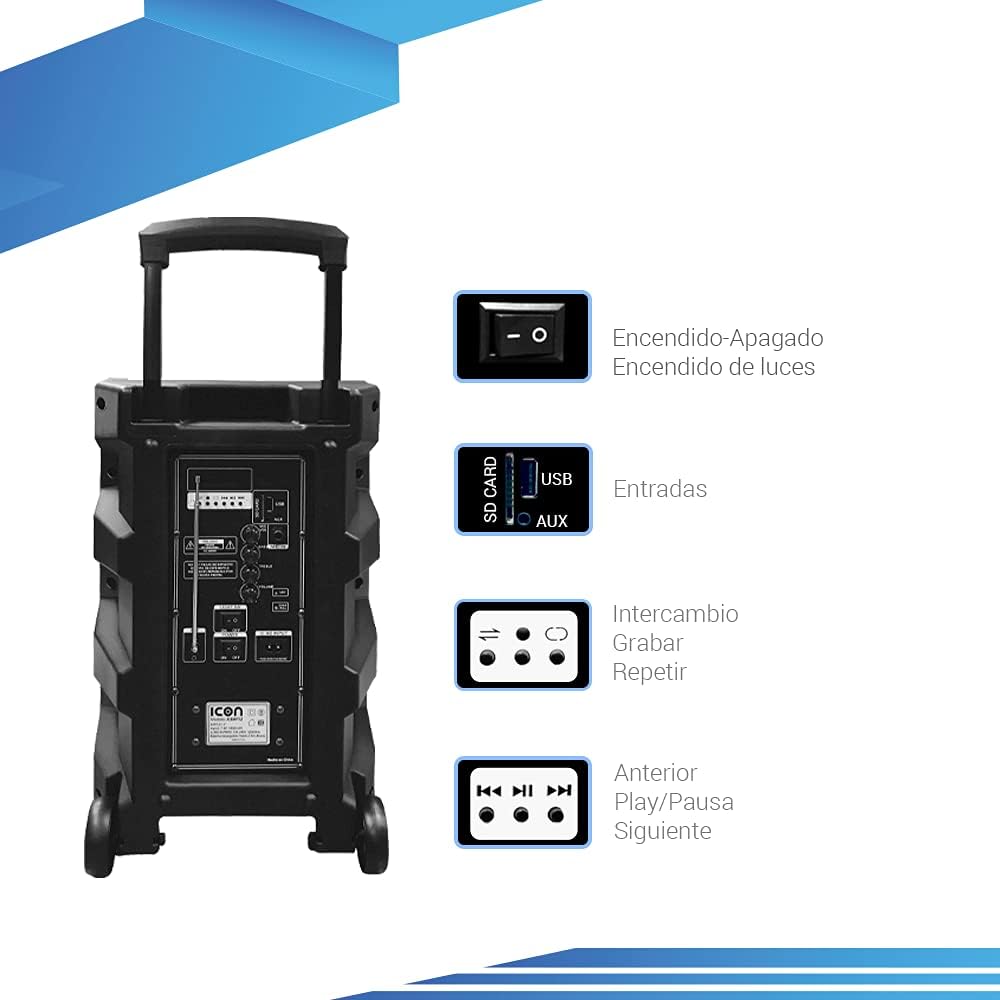
Image: Diagram illustrating key controls on the ICON speaker, including the power switch, light switch, input ports (SD Card, USB, AUX), and playback control buttons (Mode Switch, Record, Repeat, Previous, Play/Pause, Next).
- POWER унтраалга: Turns the speaker On or Off.
- Хөнгөн SW: Toggles the LED light effects On or Off.
- SD CARD / USB / AUX Inputs: For connecting external media or devices.
- MODE солих: Cycles through input modes (Bluetooth, USB, SD, AUX, FM).
- RECORD товч: Initiates recording (e.g., microphone input to USB/SD).
- REPEAT товч: Repeats the current track or playlist.
- PREVIOUS / PLAY/PAUSE / NEXT Buttons: Стандарт медиа тоглуулах удирдлага.
- Дууны эзлэхүүн: Мастер дууны хэмжээг тохируулна.
- TREBLE / BASS Knobs: Adjusts high and low frequencies.
- MIC INPUT / GUITAR INPUT: For connecting microphones and guitars.
5. Ашиглалтын заавар
5.1 Асаах/унтраах
To turn the speaker ON, flip the ХҮЧ switch to the 'ON' position. To turn it OFF, flip the switch to 'OFF'.
5.2 Bluetooth холболт
- Чанга яригчийг асаана уу. Энэ нь автоматаар Bluetooth холболтын горимд шилжих бөгөөд үүнийг дэлгэц дээр Bluetooth дүрс анивчсанаар заана.
- Мобайл төхөөрөмж дээрээ (ухаалаг утас, таблет, зөөврийн компьютер) Bluetooth-г идэвхжүүлж, боломжтой төхөөрөмжүүдийг хайж олоорой.
- Select "ICON Speaker" (or similar name) from the list of devices.
- Once paired, the speaker will emit a confirmation sound, and the Bluetooth icon will stop flashing. You can now play audio wirelessly from your device.
5.3 USB/SD карт тоглуулах
- USB флаш диск эсвэл SD карт (MP3 аудио бүхий) оруулна уу files) холбогдох порт руу.
- The speaker will automatically switch to USB/SD mode and begin playing the first compatible track. If not, press the MODE button to select USB/SD mode.
- -г ашиглана уу ӨМНӨХ, ТОГЛОХ/ЗОГСООХ, ба ДАРААГИЙН Тоглуулахыг удирдах товчлуурууд.
5.4 AUX оролт
Connect an external audio device (e.g., MP3 player, computer) to the AUX input using a 3.5mm audio cable. Press the MODE AUX горим сонгогдох хүртэл товчийг дарна уу.
5.5 FM радиогийн ажиллагаа
- дээр дарна уу MODE FM радио горимд шилжих товчийг дарна уу.
- -г удаан дар ТОГЛОХ/ЗОГСООХ боломжтой FM станцуудыг автоматаар сканнердаж, хадгалах товчийг дарна уу.
- -г ашиглана уу ӨМНӨХ болон ДАРААГИЙН Хадгалсан станцуудын хооронд шилжих товчлуурууд.
5.6 Microphone and Guitar Usage
Plug your microphone or guitar into the respective MIC оролт or Гитарын оролт jacks. Adjust the volume using the main ЭЗЭМШИГ knob and any dedicated microphone/guitar volume controls if present.
5.7 TWS (True Wireless Stereo) функц
The TWS function allows you to connect two ICON speakers wirelessly for a true stereo sound experience.
- Чанга яригч хоёулаа асаалттай, Bluetooth төхөөрөмжид холбогдоогүй байгаа эсэхийг шалгаарай.
- On one speaker (this will be the master), press and hold the TWS button (if available, or a combination of buttons as per specific model instructions, often the 'Mode' button or a dedicated TWS button).
- The speaker will search for another TWS-compatible speaker. Once connected, you will hear a confirmation sound.
- Now, connect your mobile device to the master speaker via Bluetooth as described in section 5.2. Audio will play through both speakers in stereo.
6. Засвар үйлчилгээ
6.1 Цэвэрлэгээ
Чанга яригчийн гадна талыг зөөлөн, хуурай даавуугаар арчина. Зүлгүүрийн цэвэрлэгч, лав эсвэл уусгагч бүү хэрэглэ. Чанга яригчийн нүхэнд шингэн орохгүй байхыг анхаарна уу.
6.2 Батерейны арчилгаа
- Зайны ашиглалтын хугацааг уртасгахын тулд зайгаа ойр ойрхон бүрэн цэнэггүй болгохоос зайлсхий.
- Recharge the battery regularly, even if the speaker is not in use for extended periods (e.g., every 3 months).
- Чанга яригчийг ашиглаагүй үед сэрүүн, хуурай газар хадгална.
6.3 Хадгалалт
When storing the speaker for a long time, ensure it is turned off and disconnected from the power source. Store it in a clean, dry environment away from extreme temperatures and direct sunlight.
7. Алдаа засах
| Асуудал | Боломжит шалтгаан | Шийдэл |
|---|---|---|
| Чанга яригч асахгүй байна. | Battery is depleted; Power cable not connected; Power switch is OFF. | Charge the speaker; Ensure power cable is securely connected; Flip POWER switch to ON. |
| Дуу алга. | Volume is too low; Incorrect input mode selected; Device not connected properly. | Дууны хэмжээг нэмэгдүүлэх; Зөв оролтыг сонгохын тулд MODE товчийг дарна уу; Төхөөрөмжийг дахин холбох/Блютүүтийг дахин холбох. |
| Bluetooth холболт амжилтгүй боллоо. | Чанга яригчийг холбох горимд оруулаагүй; Төхөөрөмж хэт хол; Хөндлөнгийн оролцоо. | Ensure speaker is in pairing mode; Move device closer; Turn off other Bluetooth devices. |
| Гажуудсан дуу чимээ. | Дууны түвшин хэт өндөр байна; Аудио эх сурвалжийн чанар муу байна. | Reduce volume; Try a different audio source. |
| Микрофон ажиллахгүй байна. | Microphone not plugged in correctly; Microphone volume too low; Microphone batteries dead (if wireless). | Ensure microphone is fully inserted; Adjust microphone volume; Replace microphone batteries. |
8. Техникийн үзүүлэлтүүд
| Онцлог | Тодорхойлолт |
|---|---|
| Загварын дугаар | US-ICBAF12 |
| Гаралтын хүч | 6000 ваттын PMPO |
| Чанга яригчийн хэмжээ | 12 инч |
| Холболтын технологи | Bluetooth, USB, AUX, SD Card |
| Тохиромжтой төхөөрөмжүүд | Зөөврийн компьютер, ухаалаг утас |
| Эрчим хүчний эх үүсвэр | Rechargeable Battery, AC Input |
| Бүтээгдэхүүний хэмжээ (L x W x H) | 38 x 36.5 x 54 см |
| Бүтээгдэхүүний жин | 7.62 кг |
| Онцлог шинж чанарууд | Bluetooth, FM Radio, Microphone Input, Guitar Input, TWS Function, LED Lights |

Image: Packaging of the ICON Bluetooth Speaker, displaying key features and product dimensions (37.5 cm x 36 cm x 54 cm).
9. Баталгаат хугацаа ба дэмжлэг
This product is covered by a limited warranty. Please refer to the warranty card included in your package for specific terms and conditions. For technical support, troubleshooting assistance, or warranty claims, please contact your retailer or the manufacturer's customer service department. Keep your purchase receipt as proof of purchase.
For more information, visit the official ICON store on Amazon: ICON Store


