1. Танилцуулга
Welcome to the user manual for your Nokia 216 Dual SIM mobile phone. This guide provides essential information to help you set up, operate, and maintain your device. The Nokia 216 (RM-1187) is a classic feature phone designed for reliable communication, featuring dual SIM capability, a 2.4-inch display, and a VGA camera.
Please read this manual carefully to ensure proper use and to get the most out of your phone.
2. Багцын агуулга
Таны бүтээгдэхүүний багцад бүх зүйл байгаа эсэхийг шалгаарай:
- Nokia 216 Dual SIM Mobile Phone (RM-1187)
- Батерей
- Эрчим хүчний адаптер
- USB кабель
3. Төхөөрөмж дууссанview
Familiarize yourself with the key components of your Nokia 216 phone.
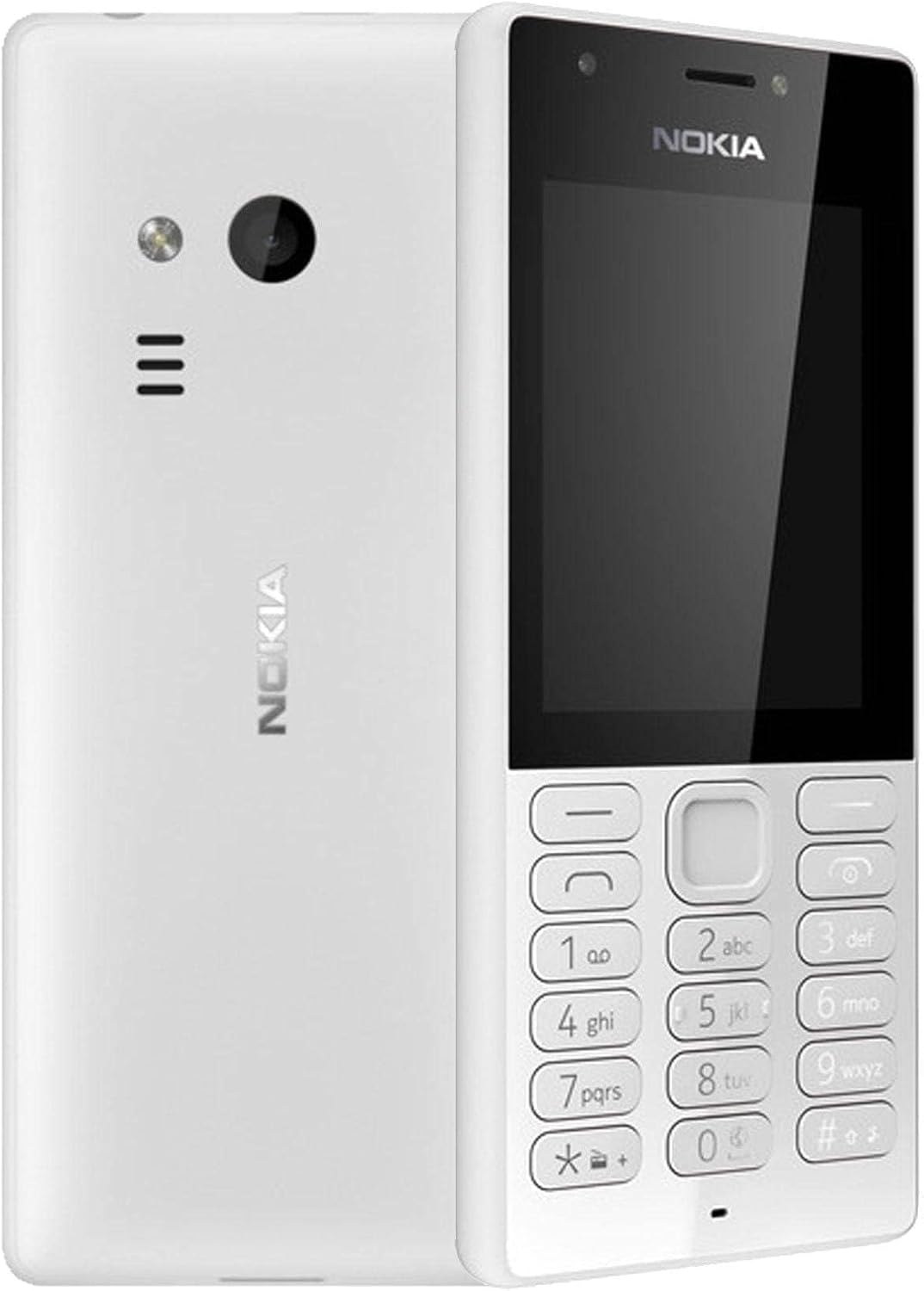
Зураг 3.1: Урд ба хойд view of the Nokia 216 Dual SIM mobile phone. The front shows the display, earpiece, and numeric keypad. The back features the rear camera, LED flash, and loudspeaker grille.

Зураг 3.2: Урд view of the Nokia 216 Dual SIM mobile phone. This image highlights the 2.4-inch display, the navigation keys, and the alphanumeric keypad for dialing and text input.

Зураг 3.3: Буцах view of the Nokia 216 Dual SIM mobile phone. This view shows the rear VGA camera lens, the LED flash, and the Nokia branding.
Гол бүрэлдэхүүн хэсгүүд:
- Дэлгэц: 2.4-inch QVGA screen.
- Товчлуур: Alphanumeric keypad for dialing and text entry, with navigation keys.
- Арын камер: VGA camera with LED flash.
- Чанга яригч: For audio playback and hands-free calls.
- Микрофон: Дуудлага болон бичлэгийн үеэр дуу хоолойгоор оруулах зориулалттай.
- 3.5 мм аудио залгуур: Чихэвч эсвэл гадаад чанга яригчийн хувьд.
- Цэнэглэх порт: Micro-USB port for charging and data transfer.
4. Тохиргоо
4.1. Insert SIM Card(s)
- Turn off the phone and disconnect any charger.
- Carefully remove the back cover by prying it open from the notch.
- Хэрэв зай нь байгаа бол түүнийг өргөж гарга.
- Insert the SIM card(s) into the designated slot(s) with the gold contacts facing down. For dual SIM models, ensure both SIMs are correctly seated.
- If applicable, insert a microSD card into its slot for additional storage.
- Зайг солих.
- Арын тагийг тэгшлээд, байрандаа товших чимээ гартал чанга дарна уу.
4.2. Батерейг цэнэглэ
- Цахилгаан адаптерийг ханын залгуурт холбоно уу.
- Plug the micro-USB end of the cable into the phone's charging port.
- Дэлгэц дээрх батерейны үзүүлэлт нь цэнэглэх төлөвийг харуулах болно.
- Once fully charged, disconnect the charger from the phone and then from the wall outlet.
5. Ашиглалтын заавар
5.1. Асаах/унтраах
- Асаахын тулд: Press and hold the power key (usually the red 'End Call' key) until the phone vibrates and the Nokia logo appears.
- Унтраахын тулд: Press and hold the power key until the 'Power off' option appears on the screen, then select it.
5.2. Дуудлага хийх
- Үндсэн дэлгэцээс тоон товчлуур ашиглан утасны дугаараа оруулна уу.
- Press the green 'Call' key to initiate the call.
- To end a call, press the red 'End Call' key.
5.3. Sending Text Messages (SMS)
- руу оч Цэс > Мессежүүд > Зурвас үүсгэх.
- Гарын товчлуурыг ашиглан мессежээ бичнэ үү.
- Хүлээн авагчийн утасны дугаарыг оруулах эсвэл харилцагчдаас сонгоно уу.
- Сонго Илгээх.
5.4. Камер ашиглах
- руу оч Цэс > Камер.
- Дэлгэцийг ашиглан өөрийн зургийг хүрээлээрэй.
- Press the center navigation key to take a photo.
6. Засвар үйлчилгээ, арчилгаа
To ensure the longevity and optimal performance of your Nokia 216, follow these care guidelines:
- Keep the device dry: Moisture can damage electronic circuits.
- Use original accessories: Only use batteries, chargers, and accessories approved by Nokia.
- Зөөлөн цэвэрлэх: Use a soft, clean, dry cloth to clean the surface of the device.
- Хэт их температураас зайлсхийх: Do not expose your device to very high or low temperatures.
- Болгоомжтой харьцах: Төхөөрөмжийг унагах эсвэл хүчтэй нөлөөнд оруулахаас зайлсхий.
7. Алдаа засах
If you encounter issues with your Nokia 216, try these common troubleshooting steps:
| Асуудал | Шийдэл |
|---|---|
| Утас асахгүй байна | Ensure the battery is charged. Connect the charger and try again. Check if the battery is properly inserted. |
| Сүлжээний дохио байхгүй | Check if the SIM card is correctly inserted. Move to an area with better network coverage. Restart the phone. |
| Батерейг цэнэглэхгүй байна | Ensure the charger is properly connected to both the phone and the power outlet. Try a different power outlet or charger. Check for any damage to the charging port. |
| Дуудлага хийх эсвэл хүлээн авах боломжгүй | Check network signal. Ensure your SIM card is active and has sufficient credit/plan. Verify that call barring is not enabled. |
8. Техникийн үзүүлэлтүүд
| Онцлог | Дэлгэрэнгүй |
|---|---|
| Брэнд | Nokia |
| Загварын нэр | RM-1187 |
| Үйлдлийн систем | Symbian 9.1 (Series 30) |
| Дэлгэцийн хэмжээ | 2.4 инч |
| Дэлгэцийн нягтрал | 240 x 320 пиксел |
| Сэргээх хурд | 90 Гц |
| Суулгасан RAM хэмжээ | 256 MB |
| Санах ойн хадгалах багтаамж | 3.9 GB (Internal, likely for system/apps, expandable via microSD) |
| CPU загвар | A10 |
| Үүрэн холбооны технологи | 2G |
| Утасгүй холбооны технологи | Үүрэн |
| Холболтын технологиуд | USB, Bluetooth, Wi-Fi |
| GPS | A-GPS |
| Primary Device User Interface | Buttons, Numeric Keypad, Microphone |
| Камерын бусад онцлогууд | Rear Camera (VGA) |
| Аудио залгуур | 3.5 мм |
| Form Factor | Сонгодог |
| Өнгө | Саарал |
| Ярилцах цаг | 18 цаг хүртэл |
| Зүйлийн жин | 339 грамм |
| Багцын хэмжээ | 13.4 x 12.6 x 3.6 см |
| Хайрцагт юу байна | Цахилгаан адаптер, USB кабель |
9. Баталгаат хугацаа ба дэмжлэг
For warranty information, please refer to the warranty card included in your product package or visit the official Nokia website. If you require further assistance or technical support, please contact Nokia customer service through their official channels.
Худалдан авалтын баримтаа баталгаат нэхэмжлэлд зориулж худалдан авалтын баталгаа болгон хадгална уу.