Танилцуулга
Худалдан авалт хийсэнд баярлалааasing the Altec Lansing AL-5003 Multimedia DJ Trolly Speaker. This speaker is designed to deliver powerful audio for various applications, including parties and surround sound systems. Featuring wireless connectivity, a built-in trolley for portability, and multiple input options, the AL-5003 offers a versatile audio experience. Please read this manual carefully to ensure proper setup, operation, and maintenance of your speaker.
Аюулгүй байдлын чухал заавар
- Read these instructions thoroughly before operating the speaker.
- Энэ гарын авлагыг цаашид лавлах зорилгоор хадгална уу.
- Чанга яригчийг бороо, чийгэнд бүү тавь.
- Агааржуулалтын нүхийг хааж болохгүй.
- Радиатор, халаалтын төхөөрөмж, зуух болон бусад төхөөрөмж (үүнд ampөргөгч) дулаан үүсгэдэг.
- Цахилгааны утсыг гишгэх, хавчихаас хамгаалаарай, ялангуяа залгуур, залгуур, төхөөрөмжөөс гарах цэг дээр.
- Зөвхөн үйлдвэрлэгчээс заасан хавсралт/дагалдах хэрэгслийг ашиглана уу.
- Аянга шуурганы үед эсвэл удаан хугацаагаар ашиглаагүй үед энэ төхөөрөмжийг цахилгааны залгуураас салга.
- Бүх үйлчилгээг мэргэшсэн үйлчилгээний ажилтнуудад шилжүүлээрэй.
Багцын агуулга
Дараах зүйлсийн багцад байгаа эсэхийг шалгана уу.
- Altec Lansing AL-5003 Multimedia DJ Trolly Speaker
- Цахилгааны утас
- Алсын удирдлага
- Хэрэглэгчийн гарын авлага
- Туслах кабель (бүс нутгаас хамаарч өөр өөр байж болно)
Бүтээгдэхүүн дууссанview
The AL-5003 speaker features a robust design with integrated wheels and a handle for easy transport. It includes a powerful 10-inch speaker and a 1-inch tweeter, providing clear and dynamic sound. The control panel is located on the top of the unit, offering easy access to various functions.
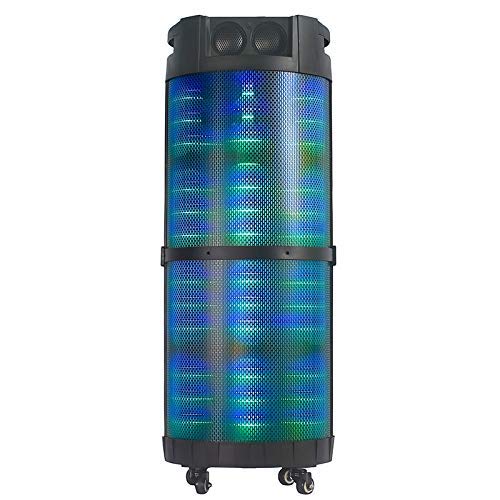
Зураг 1: Урд view of the Altec Lansing AL-5003 speaker, showcasing its cylindrical design and illuminated grille. The speaker features a sturdy build with integrated wheels at the base for portability.
Хяналтын самбар ба холболтууд
The top panel of the speaker houses the main controls and input/output ports.
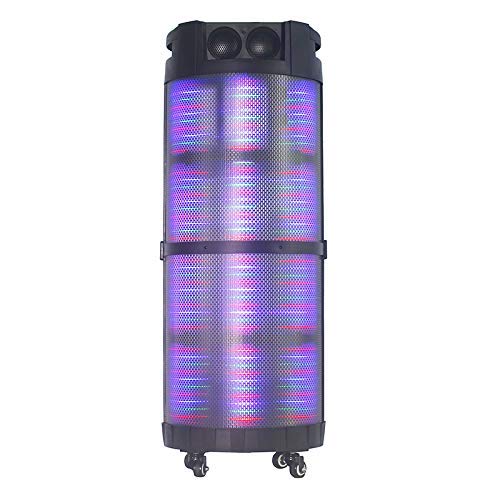
Зураг 2: Дээрээс доош view of the AL-5003 speaker, highlighting the control panel with various buttons and knobs, along with the top-mounted speakers. This view also shows the integrated handle for easy transport.
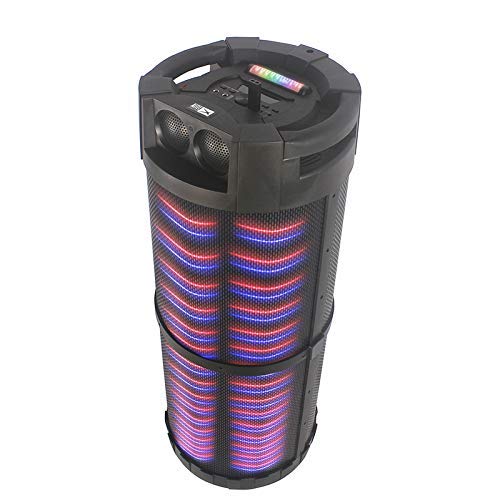
Зураг 3: Өнцөгтэй view of the AL-5003 speaker, providing a perspective of its overall structure, including the side grille and the top control area. The dynamic lighting effects are visible through the mesh.
Common controls include Power, Volume, Mode selection, Play/Pause, Track Skip, and inputs for USB, Auxiliary, and potentially Microphone (if available on the model).
Тохируулах заавар
- Савлах: Carefully remove the speaker and all accessories from the packaging. Retain the packaging for future transport or storage.
- Байршил: Place the speaker on a stable, flat surface. Ensure there is adequate ventilation around the unit. For optimal sound, position the speaker in a central location within the listening area.
- Эрчим хүчний холболт: Connect the provided power cord to the AC input on the speaker and then plug it into a standard wall outlet (AC 100-240V, 50/60Hz).
- Initial Charge (if applicable): If the speaker has an internal battery (Lead Acid battery mentioned in specs), it is recommended to fully charge it before first use. The charging indicator light will typically show charging status.
- Асаах: Press the Power button on the control panel or remote control to turn on the speaker.
Ашиглалтын заавар
1. Bluetooth горим
- Bluetooth-г идэвхжүүлэх: Turn on the speaker. Press the "Mode" button on the control panel or remote until "Bluetooth" or "BT" is displayed (or indicated by a blue LED). The speaker will enter pairing mode, indicated by a flashing light or audible prompt.
- Төхөөрөмжтэй хослуулах: On your mobile device (smartphone, tablet, laptop), go to Bluetooth settings and enable Bluetooth. хайх available devices. You should see "AL-5003" or "Altec Lansing" in the list. Select it to pair.
- Холболтын баталгаажуулалт: Once successfully paired, the speaker will emit a confirmation sound, and the Bluetooth indicator light will become solid.
- Тоглуулах: Start playing audio on your connected device. Use the speaker's volume controls or your device's volume controls to adjust the sound level. Use the Play/Pause, Next, and Previous buttons on the speaker or remote to control playback.
2. Auxiliary (AUX) Mode
- AUX кабелийг холбох: Insert one end of a 3.5mm auxiliary cable into the AUX input port on the speaker. Connect the other end to the headphone jack or audio output of your external audio device (e.g., MP3 player, laptop).
- AUX горимыг сонгоно уу: Press the "Mode" button on the speaker or remote until "AUX" is displayed or indicated.
- Тоглуулах: Play audio from your connected device. Adjust volume using both the speaker's controls and your device's volume.
3. USB Playback Mode
- USB диск оруулах: MP3 аудио агуулсан USB флаш дискийг оруулна уу fileчанга яригчийн USB порт руу залгаарай.
- USB горимыг сонгоно уу: The speaker may automatically switch to USB mode. If not, press the "Mode" button until "USB" is displayed or indicated.
- Тоглуулах: Чанга яригч автоматаар аудио тоглуулж эхэлнэ files from the USB drive. Use the Play/Pause, Next, and Previous buttons to control playback.
4. Karaoke Function (if applicable)
If your AL-5003 model includes a microphone input, you can use it for karaoke:
- Микрофоныг холбох: Plug a wired microphone into the designated microphone input jack.
- Дууны хэмжээг тохируулах: Use the dedicated Microphone Volume knob (if present) to adjust the microphone's volume.
- Цуурай хяналт: Some models may have an Echo knob to add an echo effect to the microphone audio.
5. Алсын удирдлагатай ажиллагаа
Дагалдах алсын удирдлага нь бүх үндсэн функцүүдэд хялбар хандах боломжийг олгодог:
- Эрчим хүч: Turn the speaker On/Off.
- Горим: Switch between Bluetooth, AUX, USB, and other available modes.
- Эзлэхүүн +/-: Мастер дууны хэмжээг тохируулна уу.
- Тоглуулах/түр зогсоох: Тоглуулахыг эхлүүлэх эсвэл түр зогсоох.
- Өмнөх/Дараагийн: Өмнөх эсвэл дараагийн дуу руу алгасах.
- Тэгшитгэл: Select different equalizer presets (if available).
- Дууг хаах: Mute or unmute the audio.
Засвар үйлчилгээ
- Цэвэрлэгээ: Чанга яригчийн гадна талыг зөөлөн, хуурай даавуугаар цэвэрлэ. Шингэн цэвэрлэгч болон зүлгүүрийн материалыг бүү ашигла.
- Хадгалах: Удаан хугацаагаар ашиглаагүй бол чанга яригчийг нарны шууд тусгал, хэт температураас хол, сэрүүн, хуурай газар хадгална.
- Батерейны арчилгаа: If the speaker has a built-in rechargeable battery, avoid fully discharging it frequently. For long-term storage, charge the battery to approximately 50-70% every few months to prolong its lifespan.
- Агааржуулалт: Хэт халалтаас урьдчилан сэргийлэхийн тулд агааржуулалтын нүхийг хаагаагүй эсэхийг шалгаарай.
Алдааг олж засварлах
| Асуудал | Боломжит шалтгаан | Шийдэл |
|---|---|---|
| Хүч чадалгүй | Power cord not connected; Power outlet not working; Speaker is off; Battery drained. | Ensure power cord is securely connected. Try a different outlet. Press the Power button. Charge the battery. |
| Дуу алга | Volume too low; Incorrect mode selected; Device not connected properly; Mute function active. | Increase volume on speaker and source device. Select the correct input mode (Bluetooth, AUX, USB). Reconnect device. Check if mute is active on remote. |
| Bluetooth холболт амжилтгүй боллоо | Чанга яригч хослуулах горимд байхгүй байна; Төхөөрөмжийн Bluetooth унтраалттай байна; Чанга яригч төхөөрөмжөөс хэт хол байна; Саад тотгор байна. | Ensure speaker is in Bluetooth pairing mode. Turn on Bluetooth on your device. Move device closer to speaker. Turn off other Bluetooth devices nearby. |
| USB тоглуулах ажиллахгүй байна | USB drive not inserted correctly; Incompatible file format; USB drive corrupted. | USB драйвыг дахин оруулна уу. files are in MP3 format. Try a different USB drive. |
| Алсын удирдлага ажиллахгүй байна | Batteries drained; Obstruction between remote and speaker; Remote not pointed at sensor. | Replace remote control batteries. Remove any obstructions. Point remote directly at the speaker's IR sensor. |
Үзүүлэлтүүд
| Онцлог | Дэлгэрэнгүй |
|---|---|
| Загварын нэр | Altec Lansing AL-5003 Multimedia DJ Trolly Speaker |
| Чанга яригчийн төрөл | Хүрээлэн буй орчны дуу чимээ |
| Онцлог шинж чанар | Утасгүй |
| Зөвлөмж болгож буй хэрэглээ | For Surround Sound Systems, Party |
| Тохиромжтой төхөөрөмжүүд | Gaming Console, Karaoke Machine, Laptop, MP3 Player, Smartphone, Tablet |
| Хүрээлэн буй орчны дууны сувгийн тохиргоо | 1.0 |
| Хяналтын арга | Алсын удирдлага |
| Утасгүй холбооны технологи | Bluetooth |
| Чанга яригчийн хэмжээ | 10 инч |
| Эрчим хүчний эх үүсвэр | Утастай цахилгаан |
| Жийргэгчийн диаметр | 1 инч |
| Аудио оролттой нийцтэй | Туслах, USB |
| Чанга яригчийн холболт | Wired (for power), Wireless (Bluetooth) |
| Аудио Wattage | 100 ватт |
| Зайны эсийн найрлага | Хар тугалгын хүчил |
| Суурилуулах төрөл | Шал зогсож байна |
Баталгаат болон дэмжлэг
Altec Lansing products are manufactured to the highest quality standards. For information regarding warranty coverage, technical support, or service inquiries, please refer to the warranty card included with your product or visit the official Altec Lansing website. Please have your model number (AL-5003) and purchase details ready when contacting support.
Webсайт: www.alteclansing.com (This is a generic link, actual link might vary by region)


