Танилцуулга
This manual provides essential instructions for the setup, operation, and maintenance of your DOYO R270 Racing Steering Wheel. This device is designed to enhance your racing simulation experience across multiple gaming platforms, including PC, Xbox Series X|S, Xbox One, PS4, PS3, and Nintendo Switch. Please read this manual thoroughly before use to ensure optimal performance and longevity of your product.
Багцын агуулга
- DOYO R270 Racing Steering Wheel
- Дөрөөний хэсэг (хурдасгуур ба тоормос)
- араа солигч
- Cl холбохamps
- Хэрэглэгчийн гарын авлага (Энэхүү баримт бичиг)
Бүтээгдэхүүн дууссанview
Familiarize yourself with the components of your DOYO R270 Racing Steering Wheel system.

Image: The complete DOYO R270 Racing Steering Wheel setup, including the steering wheel, pedal unit, and gear shifter.
Гол бүрэлдэхүүн хэсгүүд:
- Жолооны хүрд: Main control unit with buttons, D-pad, and paddle shifters.
- Дөрөөний нэгж: Separate unit with accelerator and brake pedals.
- Араа солигч: External lever for manual gear changes.
- Cl холбохamps: For securing the steering wheel to a desk or table.
Тохируулах заавар
1. Жолооны хүрдийг суурилуулах
The steering wheel can be securely attached to a desk or table using the included clamps. Alternatively, its curved base allows for comfortable lap play.

Зураг: Нарийвчилсан view clamp mounting system, showing how to attach the steering wheel to surfaces of varying thickness (0.2 inches to 2.44 inches).
- Жолооны хүрдийг тогтвортой гадаргуу дээр байрлуул.
- Холбох cl-ийг холбоно ууamps to the underside of the steering wheel and tighten them to secure the unit to your desk or table. Ensure the clamps are firmly fastened to prevent movement during use.
2. Connecting Pedals and Gear Shifter
Connect the pedal unit and gear shifter to the designated ports on the back of the steering wheel unit. Ensure all connections are firm.
3. Platform Connection
The DOYO R270 is compatible with multiple platforms. Connect the main USB cable from the steering wheel to an available USB port on your gaming console or PC.

Image: Visual representation of the steering wheel's compatibility with various gaming platforms, including Xbox One, PS4, PC, Xbox 360, Nintendo Switch, PS3, and Android TV.
- PC: Connect via USB. Drivers may be required for some games; check the DOYO support website for the latest drivers if needed.
- Xbox Series X|S / Xbox One / PS4 / PS3 / Nintendo Switch: Connect via USB. The system should automatically recognize the device.
Ашиглалтын заавар
1. Үндсэн удирдлага
- Удирдах: The wheel offers 270 degrees of rotation for precise control.
- Хурдатгал: Press the right pedal on the pedal unit.
- Тоормослох: Press the left pedal on the pedal unit.
- Араа солих: Use the external gear shifter or the paddle shifters located behind the steering wheel.

Image: A user demonstrating the 270-degree rotation capability of the DOYO R270 steering wheel, highlighting its range of motion.
2. Мэдрэмжийн тохируулга
The steering wheel features 7 levels of sensitivity adjustment to suit different driving styles and game requirements. The default setting is Grade 4.

Image: A close-up of the steering wheel's 'SEN' button and corresponding LED indicators, illustrating the 7-level sensitivity modes from Grade 1 to Grade 7.
To adjust sensitivity, press the 'SEN' button on the steering wheel. The LED indicators will change to reflect the current sensitivity grade.
3. Dual Vibration Feedback
The steering wheel is equipped with dual vibration motors that provide realistic force feedback, simulating in-game events such as collisions, road textures, and engine vibrations.
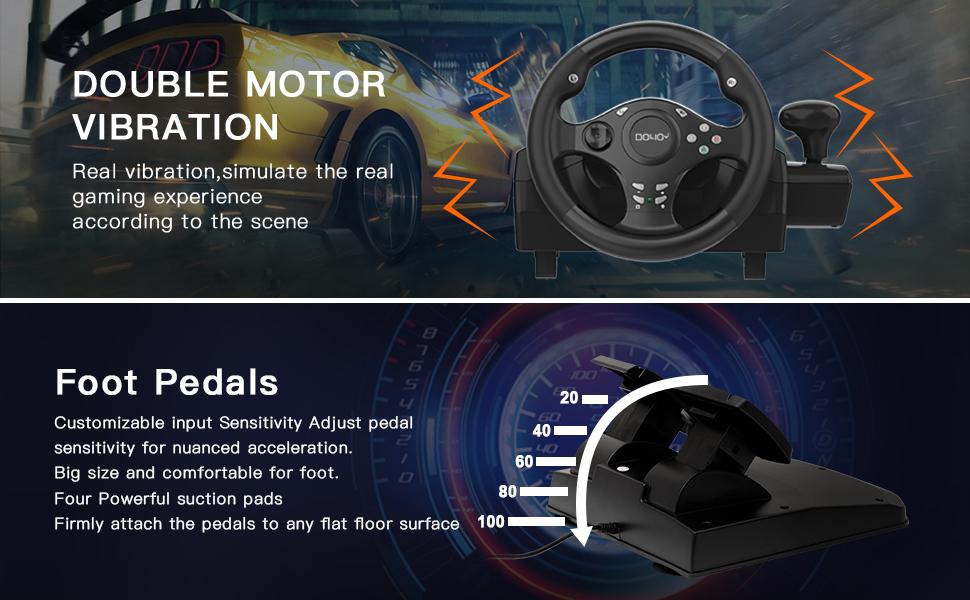
Image: An illustration highlighting the dual motor vibration feature of the steering wheel and the customizable input sensitivity of the foot pedals, which include four powerful suction pads for stability.
4. Analog Pedal Control
The pedal unit features 256-level analog change, allowing for nuanced acceleration and braking control, enhancing the realism of your driving experience.

Image: A close-up of the pedal unit, illustrating the 256-level analog change capability for precise control over acceleration and braking.
5. Recommended Games
The DOYO R270 Racing Steering Wheel is compatible with a wide range of racing titles across various platforms.
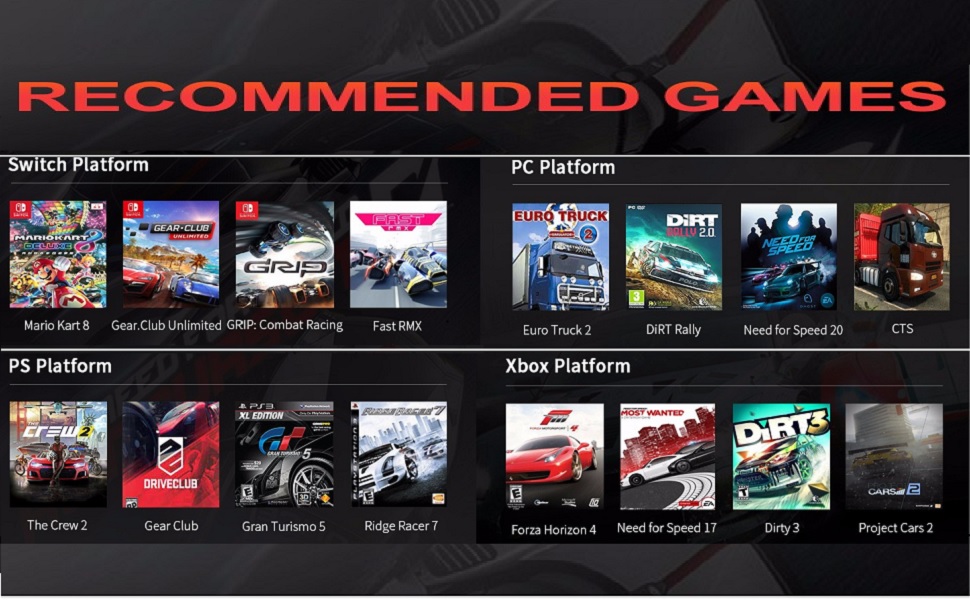
Image: A grid displaying recommended racing games categorized by platform (Switch, PC, PlayStation, Xbox) that are compatible with the DOYO R270 Racing Steering Wheel.
Засвар үйлчилгээ
- Цэвэрлэгээ: Use a soft, dry cloth to clean the steering wheel, pedals, and shifter. Avoid using abrasive cleaners or solvents.
- Хадгалах: Ашиглаагүй үед төхөөрөмжийг нарны шууд тусгал болон хэт өндөр температураас хол, цэвэр, хуурай газар хадгална уу.
- Кабелийн менежмент: Ensure cables are not tangled or pinched to prevent damage.
Алдааг олж засварлах
Хэрэв танд асуудал тулгарвал дараах нийтлэг шийдлүүдийг үзнэ үү.
- Төхөөрөмжийг танихгүй байна: Ensure all USB cables and interfaces are firmly connected. Try connecting to a different USB port. Restart your console or PC.
- Abnormal Input / Calibration Issues: Check your console or PC button mapping and driver settings. Recalibrate the device within the game settings if necessary. If using a wireless receiver (not applicable for this wired model, but generally for other devices), check for possible signal interference.
- Чичиргээний хариу үйлдэл байхгүй: Verify that vibration settings are enabled in your game and system settings. Ensure the device is properly connected.
- Педаль хариу өгөхгүй байна: Check the connection of the pedal unit to the steering wheel. Ensure no debris is obstructing the pedals.
Үзүүлэлтүүд
| Загварын дугаар | R270 |
| Эргэлтийн өнцөг | 270 градус |
| Чичиргээ | Dual Motor Vibration Feedback |
| Хөлний төрөл | Analog (256-level change) |
| Холболт | USB утастай |
| Тохиромжтой байдал | PC, Xbox Series X|S, Xbox One, PS4, PS3, Nintendo Switch |
| Бүтээгдэхүүний хэмжээс | 9.6 x 13 x 9.6 инч |
| Зүйлийн жин | 5.73 фунт |
Баталгаат болон дэмжлэг
DOYO is committed to providing quality products and customer satisfaction. Your purchase includes reliable customer support. For any issues or inquiries not covered in this manual, please contact DOYO customer service. Specific warranty details may vary by region and retailer; please refer to your purchase documentation for more information.


