Танилцуулга
The Sennheiser Momentum 3 Wireless headphones offer an exceptional audio experience with advanced features designed for comfort and control. This manual provides essential information for setting up, operating, and maintaining your headphones.
Хайрцагт юу байна
Савлагаанд бүх зүйл байгаа эсэхийг шалгана уу:
- MOMENTUM 3 headphone
- Цүнх
- USB-C цэнэглэгч кабель
- USB-C-ээс адаптер
- Analog cable

Image: Sennheiser Momentum 3 Wireless Headphones, carry case, and included cables.
Тохиргоо
Follow these steps to set up your Sennheiser Momentum 3 Wireless headphones:
- Анхны асаалт: Unfold the headphones to automatically power them on.
- Автомат хослуулах горим: The headphones will automatically enter pairing mode upon first activation.
- Bluetooth холболт: On your device (smartphone, tablet, laptop), navigate to Bluetooth settings and select "Sennheiser Momentum 3 Wireless" from the list of available devices.
- Ухаалаг хяналтын програм: Download the Sennheiser Smart Control App from your device's app store for advanced customization and features.

Зураг: хажуу тал view of the Sennheiser Momentum 3 Wireless Headphones, showing the earcups and control buttons.
Ашиглалтын заавар
The Momentum 3 Wireless headphones feature an intuitive three-button interface for easy control:
- Төвийн товчлуур: Хөгжим тоглуулах / түр зогсоох, дуудлагад хариулах / дуусгах.
- Дууны товчлуурууд: Дууны хэмжээг дээш эсвэл доош тохируулна уу.
- Дээд товчлуур: Toggle Active Noise Cancellation (ANC) and Transparent Hearing modes.
For more detailed control and personalization, use the Sennheiser Smart Control App.
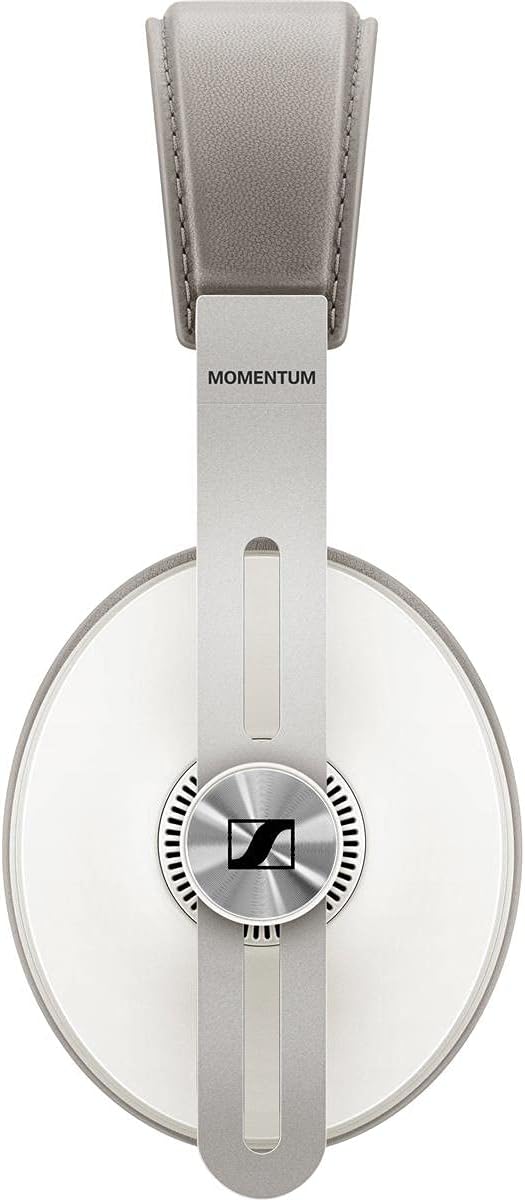
Image: Close-up of the control buttons on the earcup of the Sennheiser Momentum 3 Wireless Headphones.
Active Noise Cancellation (ANC) & Transparent Hearing
The headphones are equipped with Active Noise Cancellation (ANC) to minimize ambient noise and Transparent Hearing to allow you to hear your surroundings without removing the headphones.
- ANC горимууд: Adjust ANC levels (Max, Anti Wind, Anti Pressure) via the Smart Control App to suit your environment.
- Ил тод сонсгол: Activate this mode to stay aware of your surroundings.
Видео: Албан ёсны бүтээгдэхүүн дууссанview of Sennheiser Momentum 3 Wireless Headphones, highlighting key features like ANC and Transparent Hearing.
Ухаалаг шинж чанарууд
The Momentum 3 Wireless headphones incorporate smart functionalities for seamless use:
- Автомат асаах/унтраах: Unfolding the headphones powers them on, and collapsing them powers them off.
- Ухаалаг түр зогсоох: Music automatically pauses when you remove the headphones and resumes when you put them back on.

Image: Sennheiser Momentum 3 Wireless Headphones folded, demonstrating their compact design for storage.
Холболт
Your headphones offer versatile connectivity options:
- Bluetooth 5.0: Тохиромжтой төхөөрөмжүүдэд утасгүй холболт хийх зориулалттай.
- 3.5 мм аудио залгуур: Use the included analog cable for wired listening.
- USB-C интерфэйс: Connect via USB-C for audio playback and charging.
Зайны хугацаа ба цэнэглэх
The headphones provide up to 17 hours of battery life on a single charge. Use the included USB-C charging cable to recharge the headphones. A full charge takes approximately 17 hours.

Image: Sennheiser Momentum 3 Wireless Headphones neatly stored inside their round, fabric carry case.
Тав тух ба дизайн
Crafted for extended listening sessions, the Momentum 3 Wireless headphones feature:
- Онцгой тав тухтай байдал: Soft earpads and headband crafted from genuine leather.
- Удаан эдэлгээтэй материал: Constructed with leather, plastic, and stainless steel for longevity.
- Эвхэгддэг загвар: Ensures convenient portability and storage.
Үзүүлэлтүүд
| Онцлог | Дэлгэрэнгүй |
|---|---|
| Загварын нэр | Momentum 3 Wireless |
| Холболтын технологи | Bluetooth 5.0 |
| Чихэвчний үүр | 3.5 мм Жак |
| Дуу чимээний хяналт | Идэвхтэй дуу чимээг арилгах |
| Зайны ашиглалт | 17 цаг |
| Цэнэглэх хугацаа | 17 цаг |
| Материал | Leather, Plastic, Stainless Steel |
| Зүйлийн жин | 10.8 унц |
| Бүтээгдэхүүний хэмжээс | 7.8 x 6.7 x 1.78 инч |
Алдааг олж засварлах
- Дуугүй: Ensure headphones are powered on, charged, and correctly paired via Bluetooth or connected with the analog cable. Check device volume.
- Хослуулах асуудал: Turn off and on Bluetooth on your device. Ensure headphones are in pairing mode. Try resetting the headphones if issues persist.
- ANC ажиллахгүй байна: Verify ANC is enabled via the top button or Smart Control App. Ensure earcups form a good seal around your ears.
- Цэнэглэх асуудал: Use the provided USB-C cable and a compatible power source. Check for debris in the charging port.
Баталгаат болон дэмжлэг
For warranty information and technical support, please refer to the official Sennheiser webсайт эсвэл харилцагчийн үйлчилгээтэй холбогдоно уу. Баталгаат нэхэмжлэл гаргахын тулд худалдан авалтаа нотлох баримтаа хадгалаарай.


