1. Танилцуулга
The LifeSmart LS101GS Smart Door Lock (Classic) is designed to enhance your home security and user experience. It incorporates an independent encryption security zone and an advanced fingerprint acquisition device, ensuring both robust protection and convenient access to your private space.
This manual provides detailed instructions for the installation, operation, and maintenance of your smart door lock. Please read it carefully before use to ensure proper functionality and safety.
2. Үндсэн шинж чанарууд
- Олон хандалтын аргууд: Unlock your door using a password, fingerprint, NFC, or a traditional physical key.
- Гоёмсог дизайн: Features a frameless screen and a durable tempered panel.
- Advanced Security Alarms: Equipped with a duress alarm and an intrusion alarm for enhanced safety.
- Secure Password Entry: Includes a secure mode for password input to prevent unauthorized access.
- Lock Mode Functionality: Provides a dedicated lock mode for added security.
- Ухаалаг гэрийн интеграци: Recommended for use with a Smart Station for expanded smart home capabilities.
3. Бүтээгдэхүүн дууссанview
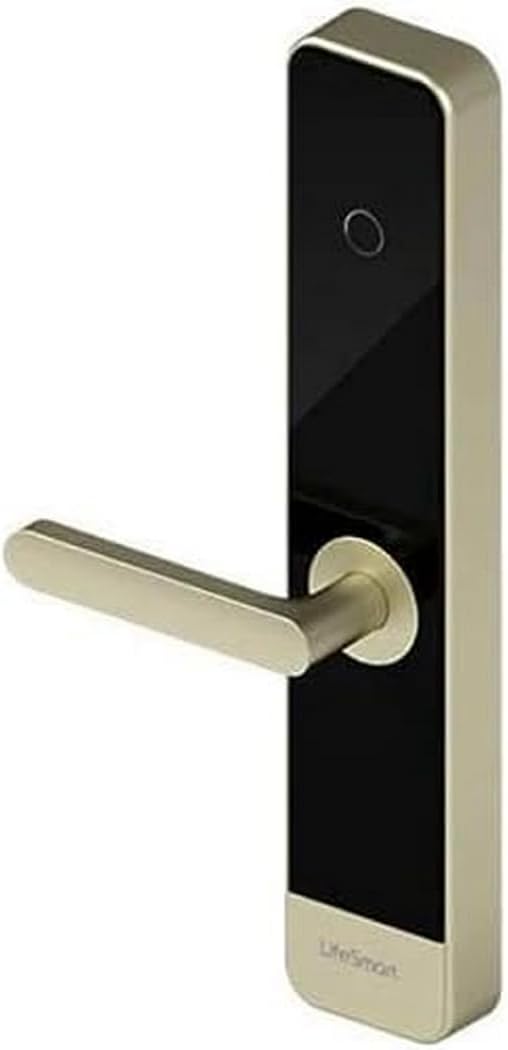
This image displays the LifeSmart LS101GS Smart Door Lock. It features a sleek, modern design with a gold-colored handle extending horizontally from a vertical black panel. The panel has a circular fingerprint sensor near the top and the 'LifeSmart' logo at the bottom. The overall structure is rectangular with rounded edges, indicating a contemporary aesthetic suitable for various door types.
4. Тохиргоо ба суурилуулалт
Proper installation is crucial for the optimal performance and security of your LifeSmart LS101GS Smart Door Lock. It is recommended to seek professional assistance if you are unsure about any steps.
4.1. Савлах, бэлтгэх
- Бүх эд ангиудыг болгоомжтой задалж, савлагааны жагсаалттай харьцуулж шалгана уу.
- Ensure you have the necessary tools: screwdriver, measuring tape, drill (if required).
- Check your door's compatibility with the lock's dimensions (385 x 75 x 33 mm).
4.2. Зай суурилуулах
The lock requires 8 AA batteries for power. Locate the battery compartment, typically on the interior unit of the lock. Insert the batteries, ensuring correct polarity.
4.3. Физик суурилуулалт
Follow the detailed instructions provided in the separate installation guide for mounting the lock on your door. This typically involves:
- Preparing the door (drilling holes if necessary).
- Installing the mortise lock.
- Mounting the exterior and interior lock units.
- Connecting internal cables.
- Securing all screws.
4.4. Анхны тохиргоо
After physical installation, power on the lock. Follow the on-screen prompts or refer to the quick start guide to set up an administrator password and register initial fingerprints or NFC cards.
5. Ашиглалтын заавар
5.1. Хаалганы түгжээг тайлах
- Хурууны хээ: Бүртгүүлсэн хуруугаа хурууны хээ мэдрэгч дээр байрлуулна уу. Түгжээг амжилттай танихад түгжээ нээгдэнэ.
- Нууц үг: Enter your registered password on the keypad. For secure mode, you may enter random digits before and after your actual password to obscure it. Press the '#' key to confirm.
- NFC: Present your registered NFC device (e.g., smartphone, NFC card) to the NFC reader area on the lock.
- Түлхүүр: Физик түлхүүрийг яаралтай тусламжийн түлхүүрийн нүхэнд хийж, түгжээг нь тайлахын тулд эргүүлнэ үү.
5.2. Хаалгыг түгжих
The lock typically auto-locks after a set period once the door is closed. You can also manually lock it by lifting the handle or pressing a dedicated lock button on the interior unit, depending on the specific model configuration.
5.3. Сэрүүлгийн функцууд
- Duress Alarm: If you are forced to unlock the door under duress, entering a pre-set duress code will unlock the door silently while simultaneously sending an alert to your connected Smart Station or emergency contacts.
- Халдлагын дохиолол: The lock will trigger an alarm if forced entry is detected or if multiple incorrect access attempts are made.
5.4. Хэрэглэгчийн удирдлага
Access the lock's menu (usually by entering the administrator password) to add, modify, or delete user fingerprints, passwords, or NFC devices. Refer to the on-screen menu for specific navigation.
6. Засвар үйлчилгээ
Regular maintenance ensures the longevity and reliable operation of your smart door lock.
- Зай солих: Replace all 8 AA batteries when the low battery indicator appears. Do not mix old and new batteries.
- Цэвэрлэгээ: Wipe the lock's surface and fingerprint sensor with a soft, dry cloth. Avoid using abrasive cleaners, solvents, or excessive moisture, as these can damage the electronic components or finish.
- Механик шалгалт: Periodically check that all screws are secure and that the handle operates smoothly.
- Програм хангамжийн шинэчлэлтүүд: If connected to a Smart Station, ensure the lock's firmware is updated regularly for optimal performance and security features.
7. Алдаа засах
If you encounter issues with your LifeSmart LS101GS Smart Door Lock, refer to the following common problems and solutions:
| Асуудал | Боломжит шалтгаан | Шийдэл |
|---|---|---|
| Түгжээ хариу өгөхгүй байна. | Дууссан батерейнууд. | Бүх 8 АА батерейг солино. |
| Хурууны хээ танигдаагүй. | Finger is dirty/wet, sensor is dirty, or fingerprint not properly registered. | Clean finger and sensor. Re-register fingerprint if issue persists. |
| Нууц үгийг хүлээн аваагүй. | Incorrect password entered, or secure mode entry error. | Ensure correct password. Re-enter carefully, paying attention to secure mode sequence if applicable. |
| Сэрүүлэг гэнэтийн байдлаар дуугардаг. | Sensitivity settings too high, or actual intrusion attempt. | Check sensitivity settings in the lock's menu. Investigate for signs of tampэринг. |
| Lock is unresponsive after power loss. | Түр зуурын цахим алдаа. | Remove batteries for 1 minute, then reinsert. If possible, use the physical key. |
Эдгээр шийдлүүдийг туршиж үзсэний дараа асуудал хэвээр байвал хэрэглэгчийн дэмжлэгтэй холбоо барина уу.
8. Техникийн үзүүлэлтүүд
| Тодорхойлолт | Үнэ цэнэ |
|---|---|
| Үйлдвэрлэгч | LifeSmart |
| Загварын дугаар | LS101SL |
| Хэмжээ (L x W x H) | 38.5 x 7.5 x 3.3 см (15.16 x 2.95 x 1.3 инч) |
| Жин | 1 килограмм (2.2 фунт) |
| Материал | Металл |
| Дамжуулах зай | Up to 100 meters in open field |
| Давтамж | GFSK 433 MHz |
| Утасгүй протокол | CoSS |
| Түгжээг тайлах аргууд | Fingerprint, Password, NFC, Keys |
| Эрчим хүчний хангамж | 8 АА батерей (оруулаагүй) |
| Ашиглалтын температур | -30°C ~ +60°C (-22°F ~ +140°F) |
| Ашиглалтын чийгшил | 20 ~ 90% (конденсацгүй) |
9. Баталгаат хугацаа ба дэмжлэг
Your LifeSmart LS101GS Smart Door Lock comes with a warranty provided by the seller, Eternal Security.
Буцаах бодлого: If the product is found to be defective, customers have up to 30 days from the date of purchase to return it for a 100% refund.
For any technical questions, incidents, or warranty claims, please contact Eternal Security directly. They are committed to providing quality products and excellent service, with customer satisfaction as their top priority.


