Танилцуулга
The SKYLOONG GK61 SK61 is a compact 60% mechanical keyboard engineered for performance and portability. Featuring Gateron Optical Red Switches, this keyboard offers a responsive and durable typing experience, ideal for both gaming and professional use. Its advanced RGB backlighting and programmable keys provide extensive customization options, while its robust construction ensures long-term reliability. This manual provides essential information for setting up, operating, maintaining, and troubleshooting your GK61 keyboard.

Image: The SKYLOONG GK61 SK61 mechanical keyboard showcasing its vibrant RGB backlighting across all keys.
Тохируулах гарын авлага
1. Багцын агуулга
- SKYLOONG GK61 SK61 Mechanical Keyboard
- USB-C кабель
- Түлхүүрийн таг татагч (хэрэв дагалдаж ирсэн бол)
- Шилжүүлэгч татагч (хэрэв багтсан бол)
2. Гарыг холбох
- Locate the USB-C port on the back of the GK61 keyboard.
- Өгөгдсөн USB-C кабелийн нэг үзүүрийг гарны USB-C порт руу холбоно уу.
- Connect the other end of the USB-C cable to an available USB port on your computer (PC or Mac).
- Гарыг таны үйлдлийн систем автоматаар таних болно. Үндсэн функцэд нэмэлт драйверууд ихэвчлэн шаардлагагүй байдаг.

Зураг: Ойрын зураг view of the USB-C interface on the SKYLOONG GK61 keyboard, highlighting the connection point for the detachable cable.
3. Системийн нийцтэй байдал
The SKYLOONG GK61 SK61 keyboard is compatible with a wide range of operating systems, including:
- Windows 2000, XP, Vista, Win7, Win8, Win10
- Mac OS
Ашиглалтын заавар
1. RGB арын гэрэлтүүлэг
The GK61 features 16.8 million color RGB backlighting with multiple adjustable modes. You can cycle through various lighting effects and adjust brightness directly on the keyboard using key combinations. Refer to the keyboard's quick guide or software for specific key combinations to change lighting modes and colors.
2. Programmable Keys and Layers
All keys on the GK61 are programmable, allowing for custom key assignments and on-the-fly macro recording. The keyboard supports multiple programmable layers:
- DIY User Mode (Layer 1): дарна уу Fn + W to enter user mode. The 'W' key will light white. Press Fn + W стандарт горим руу буцахын тулд дахин дарна уу.
- Mac OS Mode (Layer 2): дарна уу Fn + E to enter Mac OS mode. The 'E' key will light white. Press Fn + E стандарт горим руу буцахын тулд дахин дарна уу.
- FNX Layer 3: дарна уу Fn + R to enter FNX mode. The 'R' key will light white. Press Fn + R стандарт горим руу буцахын тулд дахин дарна уу.
For advanced programming and customization, including macro creation and detailed RGB control, download the official SKYLOONG software from the manufacturer's website. The software provides a graphical interface for managing key functions across different layers.
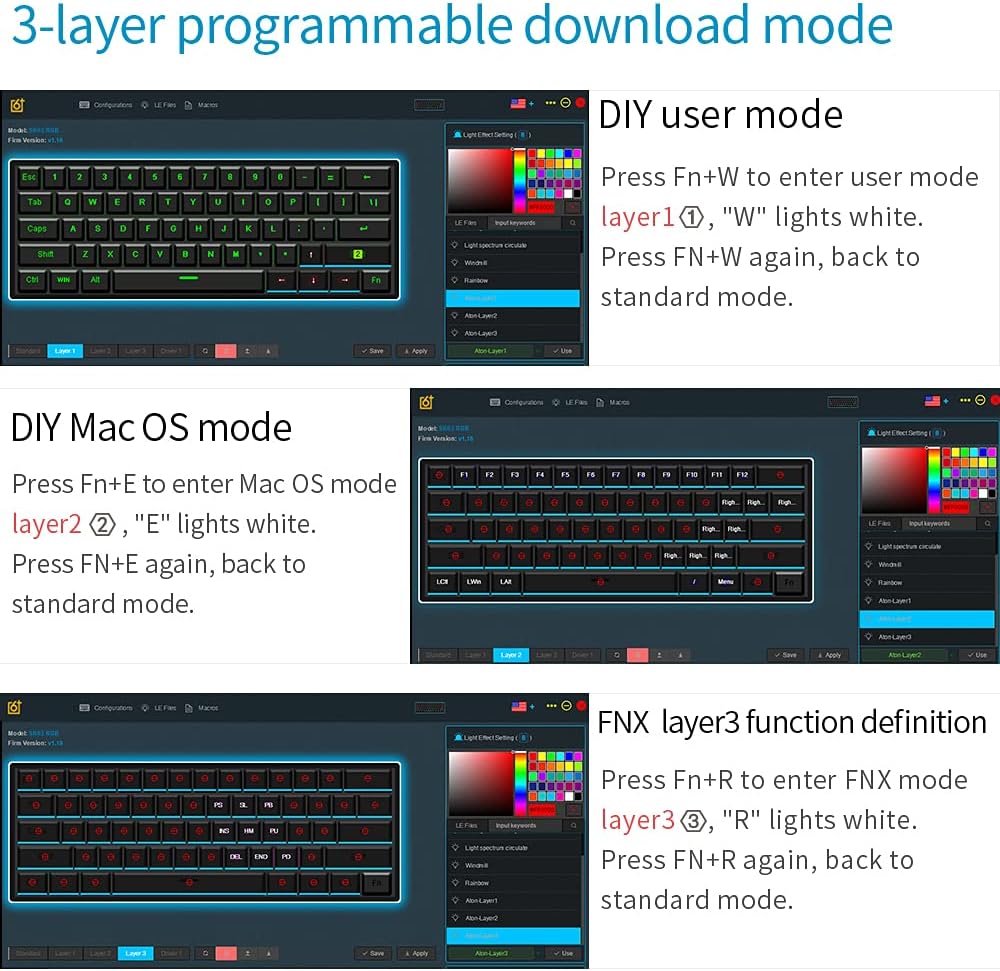
Image: Screenshots illustrating the 3-layer programmable download mode within the SKYLOONG keyboard software, showing options for DIY user mode, Mac OS mode, and FNX layer 3 function definition.
3. Халуун сольж болдог унтраалга
The GK61 features hot-swappable Gateron Optical Switches, allowing you to change switches without soldering. This feature is exclusive to optical switches. To replace a switch:
- Gently remove the keycap using the provided keycap puller.
- Шилжүүлэгч татагчийг ашиглан унтраалгыг болгоомжтой барьж, шулуун дээш татна уу.
- Align the pins of the new optical switch with the holes on the PCB and press down firmly until it clicks into place.
- Товчлуурын тагийг солих.

Image: A hand demonstrating the hot-swap capability of the Gateron optical switches on the SKYLOONG GK61 keyboard, with various switch types shown below.
Засвар үйлчилгээ
1. Гарыг цэвэрлэх
Regular cleaning helps maintain the keyboard's performance and appearance:
- Ерөнхий цэвэрлэгээ: Зөөлөн, хөвөнгүй даавуу хэрэглэх dampened with a small amount of water or a mild cleaning solution to wipe down the keycaps and chassis.
- Гүн цэвэрлэгээ: For thorough cleaning, remove the keycaps using a keycap puller. Use compressed air to blow out dust and debris from between the switches. You can then clean the keycaps separately with mild soap and water, ensuring they are completely dry before reattaching.
2. Waterproof and Dustproof Features
The GK61 is designed with waterproof and dustproof features to enhance durability. While it offers protection against spills and dust, it is not recommended to submerge the keyboard in water. In case of a spill, disconnect the keyboard immediately, dry it thoroughly, and allow it to air out before reconnecting.

Image: The SKYLOONG GK61 keyboard demonstrating its waterproof capability, partially submerged in water.
Алдааг олж засварлах
If you encounter issues with your SKYLOONG GK61 keyboard, try the following troubleshooting steps:
- Гар хариу өгөхгүй байна: Ensure the USB-C cable is securely connected to both the keyboard and the computer. Try connecting to a different USB port or a different computer to rule out port issues.
- Түлхүүрүүд бүртгэгдээгүй байна: If specific keys are not working, ensure they are properly seated. For hot-swappable switches, try removing and reinserting the switch, or swap it with a working switch to identify if the issue is with the switch or the PCB.
- RGB гэрэлтүүлгийн асуудал: Cycle through different RGB modes using the keyboard's key combinations. If the issue persists, try resetting the keyboard to factory settings (refer to the quick guide for specific key combinations) or use the official software to reconfigure lighting.
- Software Not Recognizing Keyboard: Ensure you have downloaded the correct and latest version of the SKYLOONG software for your GK61 model. Try restarting your computer and the software.
- Ghosting or Input Lag: The keyboard features anti-ghosting technology. Ensure your operating system and any gaming software are up to date. Test the keyboard on a different system to isolate the problem.
For persistent issues, consult the official SKYLOONG support resources or contact customer service.
Үзүүлэлтүүд
| Онцлог | Дэлгэрэнгүй |
|---|---|
| Загварын дугаар | GK61 |
| Гарны зохион байгуулалт | 60% (61 түлхүүр) |
| Шилжүүлэгчийн төрөл | Gateron Optical Red Switch |
| Товчны материал | ABS Dual-Color |
| Арын гэрэлтүүлэг | RGB (16.8 сая өнгө) |
| Холболт | USB-C (Detachable Cable) |
| Тохиромжтой байдал | Windows 2000/XP/Vista/7/8/10, Mac OS |
| Бүтээгдэхүүний хэмжээс | 11.5 x 4.05 x 1.57 инч |
| Зүйлийн жин | 1.57 фунт |
| Онцлог шинж чанарууд | Waterproof, Dustproof, Ergonomic, Backlit, Customizable Display Keys, Hot-Swappable (Optical Switches) |
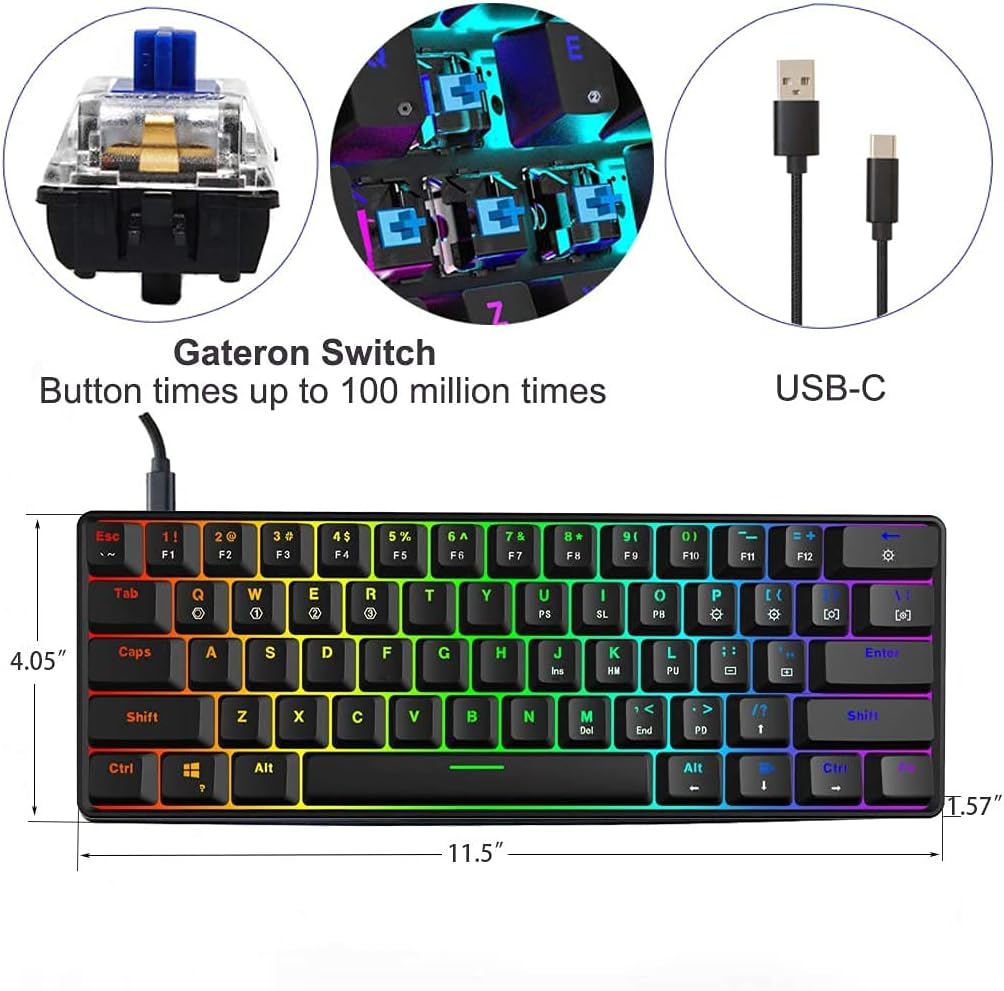
Image: A diagram illustrating the physical dimensions of the SKYLOONG GK61 keyboard, including length, width, and height.
Баталгаат болон дэмжлэг
Баталгаат хугацааны мэдээлэл
The SKYLOONG GK61 SK61 keyboard comes with a 12 сарын баталгаат хугацаа from the date of purchase, covering manufacturing defects. Additionally, the manufacturer offers a 90 хоногийн шалтгаангүйгээр буцаах бодлого. Баталгаат заргад зориулж худалдан авалтаа нотлох баримтаа үлдээнэ үү.
Хэрэглэгчийн дэмжлэг
For technical assistance, warranty claims, or any other inquiries regarding your SKYLOONG GK61 keyboard, please contact SKYLOONG customer support through their official website or the retailer where the product was purchased. Detailed contact information can usually be found on the product packaging or the manufacturer's webсайт.


