1. Танилцуулга
This manual provides instructions for the Powerextra D-Tap Charger, designed for V Mount, V Lock, and Gold Mount batteries. It ensures efficient and safe charging for compatible camera batteries and other devices that utilize a D-Tap port for charging.

Image 1.1: Powerextra D-Tap Charger with its integrated D-Tap cable.
2. Багцын агуулга
Таны багцад бүх зүйл байгаа эсэхийг шалгана уу:
- 1 x Powerextra D-Tap Charger
- 1 x 100cm AC Charging Cable
- 1 x Microfiber цэвэрлэгээний даавуу

Image 2.1: The D-Tap charger, AC power cable, and microfiber cloth included in the package.
3. Техникийн үзүүлэлтүүд
| Онцлог | Тодорхойлолт |
|---|---|
| АС оролт | 100-240В / 0.8А |
| DC гаралт | 16.8V-2.0A |
| Гаралтын ботьtage | 16.8 вольт |
| Зүйлийн жин | 8.1 унц (ойролцоогоор 230 гр) |
| Багцын хэмжээ | 6.14 x 3.58 x 1.46 инч |
| Гэрчилгээ | CE |
4. Тохиргоо
Follow these steps to set up your D-Tap Charger:
- Connect the AC Power Cable: Insert the included 100cm AC charging cable into the power input port on the charger unit.
- Цахилгааны залгуурт залгаарай: Plug the other end of the AC charging cable into a standard wall power outlet (100-240V).
- Батерейг холбох: Insert the D-Tap connector from the charger into the D-Tap port on your compatible V Mount, V Lock, or Gold Mount battery. Ensure a secure connection.

Image 4.1: The D-Tap connector for battery connection.


Зураг 4.2: Жишээ ньamples of compatible V-Mount, Gold Mount, and other D-Tap port batteries.
5. Ашиглалтын заавар
Once the charger is connected to a power source and a compatible battery, it will begin charging automatically.
- Цэнэглэх үзүүлэлт: The charger features an LED indicator light to show the charging status.
- Улаан гэрэл: Батерейг одоогоор цэнэглэж байгааг илтгэнэ.
- Ногоон гэрэл: Батерейг бүрэн цэнэглэж байгааг илтгэнэ.
The charger utilizes automatic constant current control to optimize charging speed and prevent overcharging.
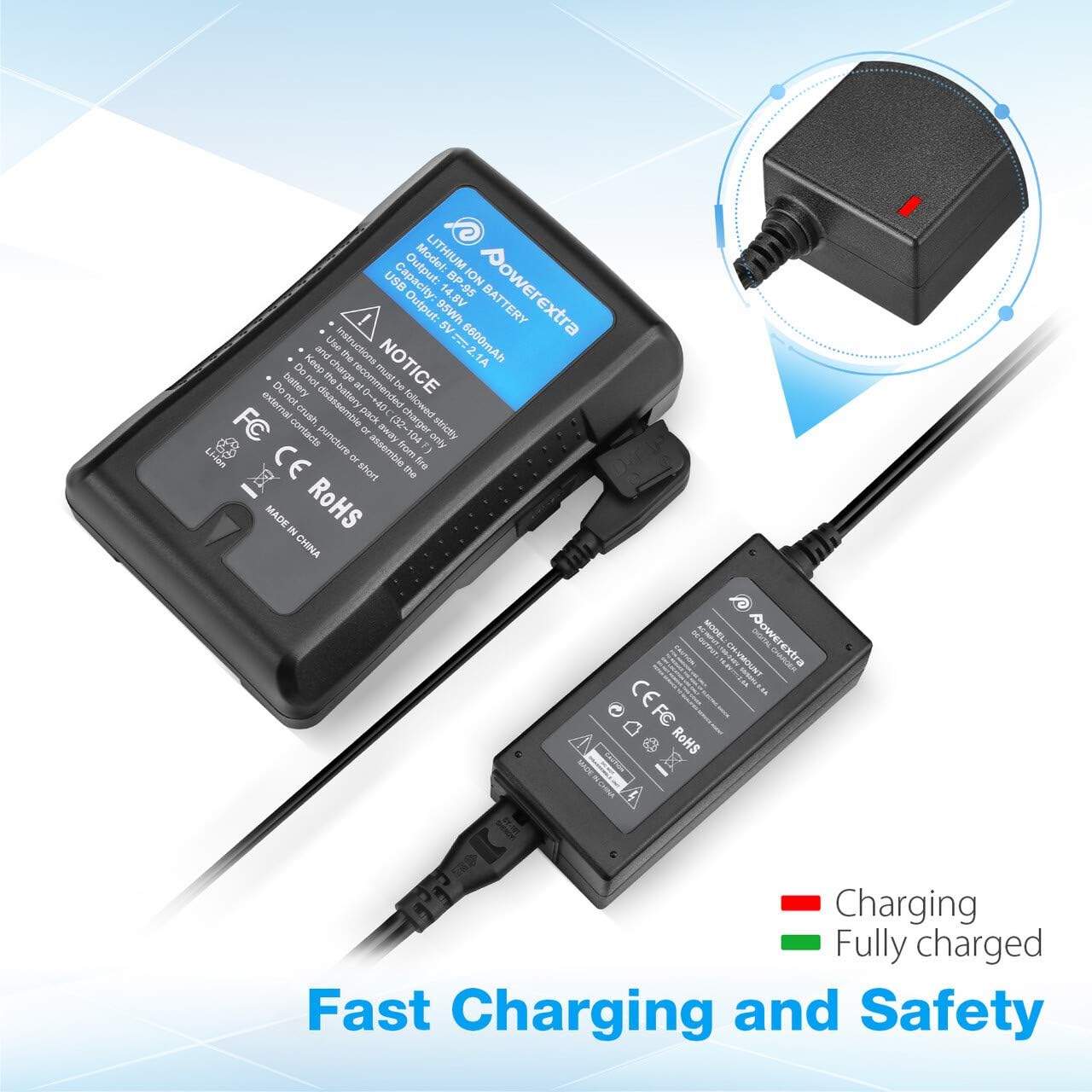
Image 5.1: Charger connected to a battery, with the red LED indicating active charging.
6. Аюулгүй байдлын мэдээлэл
To ensure safe operation and prolong the life of your charger and batteries, please observe the following safety precautions:
- Хэт их төлбөрөөс хамгаалах: The charger is designed to prevent batteries from overcharging.
- Богино залгааны хамгаалалт: Суурилуулсан механизмууд нь богино холболтоос хамгаалдаг.
- Одоогийн хэт хамгаалалт: Хэт их гүйдлийн урсгалаас хамгаална.
- Over Heating Protection: Ашиглалтын явцад цэнэглэгч хэт халахаас сэргийлнэ.
- Хэт цэнэгийн хамгаалалт: (Note: This protection is typically a feature of the battery itself, but the charger is designed to work safely with such batteries.)
- Use the charger only with compatible V Mount, V Lock, or Gold Mount batteries.
- Do not expose the charger to moisture, rain, or extreme temperatures.
- Цэнэглэгчийг задлах эсвэл өөрчлөхийг хориглоно. Бүх засвар үйлчилгээг мэргэшсэн ажилтнуудад даатга.
- Хүүхдийн гар хүрэхгүй газар хадгална.

Image 6.1: Visual representation of the multi-protection features including short circuit, over discharge, over current, over charge, and over heating protection.
7. Засвар үйлчилгээ
Proper maintenance ensures optimal performance and longevity of your charger:
- Цэвэрлэгээ: Use the provided microfiber cleaning cloth to gently wipe the charger and cables. Do not use liquid cleaners or solvents.
- Хадгалах: Цэнэглэгчийг ашиглаагүй үед нарны шууд тусгал, хэт температураас хол, сэрүүн, хуурай газар хадгална.
- Кабель арчилгаа: Avoid bending or crimping the cables excessively. Always grasp the plug, not the cable, when disconnecting.
8. Алдаа засах
If you encounter issues with your Powerextra D-Tap Charger, refer to the following common problems and solutions:
- Цэнэглэгч асахгүй байна:
- Ensure the AC power cable is securely connected to both the charger and the wall outlet.
- Ханын залгуур ажиллаж байгаа эсэхийг өөр төхөөрөмжөөр шалгана уу.
- Батерейг цэнэглэхгүй байна:
- Check that the D-Tap connector is fully and correctly inserted into the battery's D-Tap port.
- Confirm that the battery is compatible with the charger and is not fully charged already (green LED).
- Inspect the D-Tap cable and connector for any visible damage.
- Заагч гэрэл ажиллахгүй байна:
- If the charger is connected and the battery is not fully charged, but the light is off, contact customer support.
If the problem persists after attempting these solutions, please contact Powerextra customer support for further assistance.
9. Баталгаат хугацаа ба дэмжлэг
Powerextra provides the following for this D-Tap Charger:
- Баталгаат хугацаа: 12-month hassle-free warranty from the date of purchase.
- Дэмжлэг: Насан туршийн техникийн дэмжлэг.
For warranty claims, technical assistance, or any product-related inquiries, please contact Powerextra customer service through their official webтухайн бүтээгдэхүүнийг худалдаж авсан сайт эсвэл жижиглэнгийн худалдаачин.