
Танилцуулга
Thank you for choosing the LiNKFOR UHF Wireless Microphone System. This system is designed to provide clear, high-fidelity audio for various applications, including outdoor events, weddings, conferences, karaoke, and parties. With stable UHF signal transmission and high-sensitivity sound capture, it ensures an excellent audio experience. Please read this manual thoroughly before use to ensure proper operation and to maximize the product's lifespan.
Аюулгүй байдлын мэдээлэл
- This package contains only the wireless microphone system. An additional audio device (speaker or amplifier) is required to output sound.
- The output volume depends on the power output of your speakers. We do not recommend using this microphone with speakers less than 15 watts.
- Do not use the microphone too close to the receiver to avoid sound interference.
- Keep the receiver away from metal objects or any digital devices (such as computers, mobile phones, etc.) to avoid potential sources of interference.
- Do not cover the microphone head with your hand, as this may damage it or affect performance.
- For optimal performance and to reduce plosives, we recommend using a foam cover on the microphone.
Багцын агуулга
Бүх зүйл байгаа эсэхийг шалгахын тулд багцыг сайтар шалгана уу:
- 1 x Wireless Microphone Receiver
- 2 x Гар микрофон
- 2 x антен
- 1 x Batteries (AA, quantity 4 needed for microphones)
- 1 x Audio Cable (6.35mm)
- 1 x Certified Power Adapter
- 1 x 3.5mm Male to 6.35mm Female Stereo Adapter
- 1 х хэрэглэгчийн гарын авлага
Бүтээгдэхүүн дууссанview
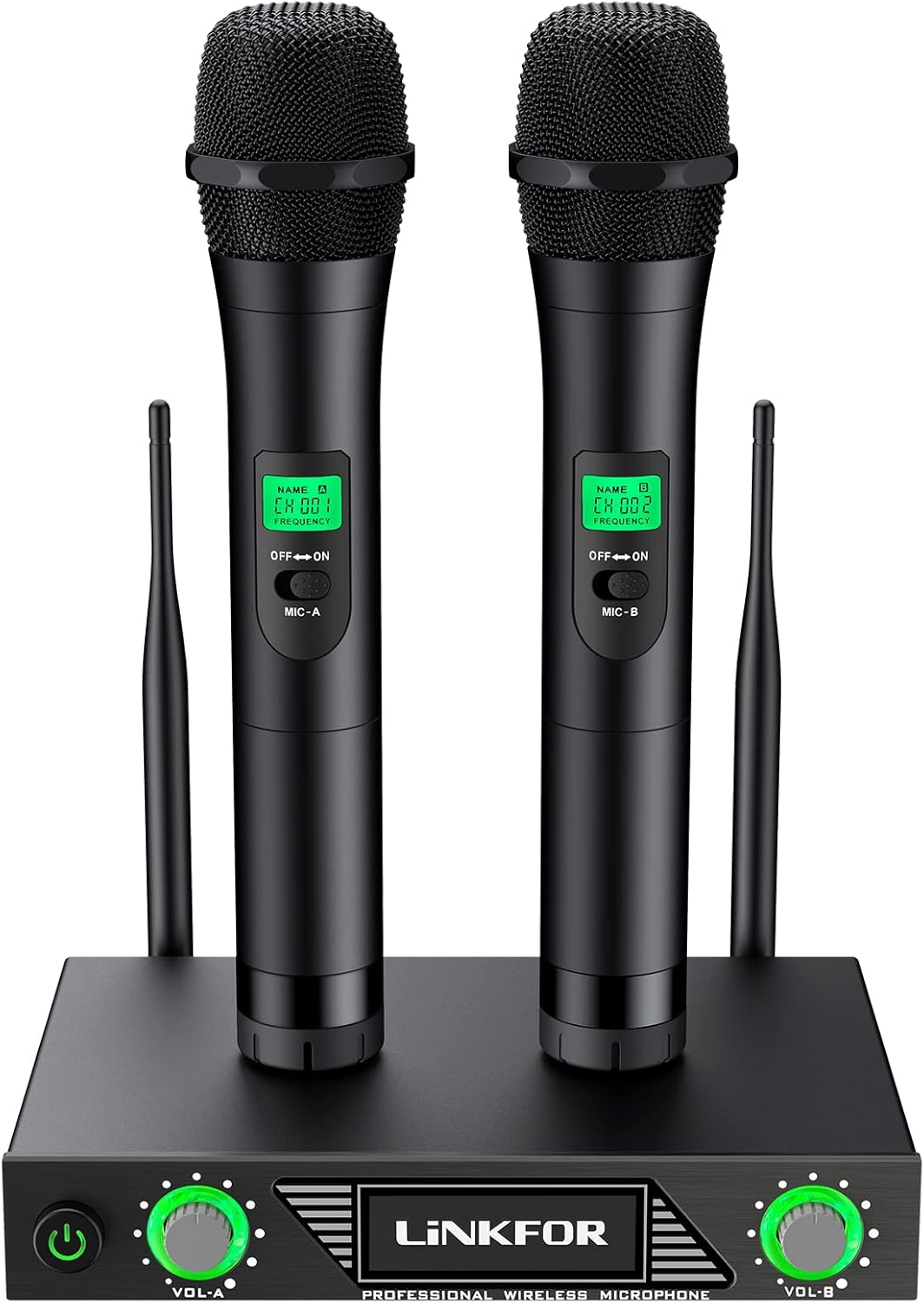
Figure 1: Complete LiNKFOR UHF Wireless Microphone System

Зураг 2: Нарийвчилсан view of the receiver and microphones
Гол бүрэлдэхүүн хэсгүүд:
- Утасгүй хүлээн авагч: The central unit that receives signals from the microphones. Features power button, volume controls (Vol-A, Vol-B), and input/output ports.
- Гар микрофон: Two dynamic, non-directional microphones with ON/OFF switches and LCD displays showing channel/frequency.
- Антенууд: Two antennas for stable UHF signal reception.
- Эрчим хүчний адаптер: For powering the receiver.
- Audio Cables/Adapters: For connecting the receiver to an ampилүү идэвхтэй эсвэл илүү чанга яригч.
Тохируулах заавар
Follow these steps to set up your LiNKFOR Wireless Microphone System:
- Хүлээн авагчийг асаана уу: Plug the receiver's power adapter into a power outlet and then into the receiver. Turn on the receiver.
- Connect to Audio Output: Use the provided audio cable to connect the receiver's output jack to the input jack of your ampөргөгч эсвэл идэвхтэй чанга яригч.
- If your speaker has a 3.5mm jack, use the included 6.35mm to 3.5mm adapter.
- Connect Background Audio (Optional): To play background music, connect your TV, PC, DVD, VOD, or other audio devices to your ampилүү идэвхтэй эсвэл илүү чанга яригч.
- Connect External Speaker (If applicable): If using a passive speaker, connect it to your amplifier using an audio cable to produce sound. (Skip this step if using active speakers).
- Insert Microphone Batteries: Insert 2 AA batteries into each handheld microphone. Ensure correct polarity.
- Асаалттай микрофонууд: Turn on the handheld microphones. They should automatically connect to the receiver.

Figure 3: User enjoying the wireless microphone system.
Ашиглалтын заавар
Once setup is complete, you can begin using your microphone system:
- Дууны тохируулга: Use the volume knobs on the receiver (Vol-A for Microphone A, Vol-B for Microphone B) to adjust the individual microphone volumes.
- Микрофоны хэрэглээ: Hold the microphone approximately 2-6 inches from your mouth for optimal sound pickup.
- Freedom of Movement: The wireless design allows you to move freely within the transmission range (up to 60m, ideally 80m).
- Дууны чанар: The system is equipped with a sound filter and high-sensitivity sound head to effectively filter excessive external noise and capture strong, clear audio.

Figure 4: The system is suitable for various performance settings.
Засвар үйлчилгээ
- Цэвэрлэгээ: Use a soft, dry cloth to clean the receiver and microphones. Do not use liquid cleaners or abrasive materials.
- Хадгалах: When not in use for extended periods, remove batteries from the microphones and store the system in a cool, dry place.
- Зайны хугацаа: The microphones offer a long battery life (typically 2 to 8 hours). Replace batteries when performance degrades.
Алдааг олж засварлах
How to Avoid Interference:
- Microphone Proximity: Do not use the microphone too close to the receiver to prevent sound interference (feedback).
- Хүлээн авагчийн байршил: Keep the receiver away from metal objects or any digital devices (e.g., computers, mobile phones) to avoid potential interference sources.
- Микрофонтой харьцах: Do not cover the microphone head with your hand, as this can cause damage or affect sound quality.
- Low Volume/No Sound:
- Ensure the receiver is powered on and connected correctly to your ampөргөгч / чанга яригч.
- Check if the microphones are turned on and have fresh batteries.
- Verify the volume levels on both the receiver and your ampөргөгч / чанга яригч.
- гэдгийг баталгаажуулна уу amplifier/speaker has sufficient power (recommended 15 watts or more).
- Гажуудсан дуу:
- Reduce the microphone volume on the receiver or the ampнастан.
- Ensure the microphone is not too close to your mouth or the speaker.
- Check for strong electromagnetic interference from other devices nearby.
Үзүүлэлтүүд
| Онцлог | Тодорхойлолт |
|---|---|
| Брэнд | LINKFOR |
| Загварын дугаар | XUNVC467uk |
| Микрофоны хэлбэр хүчин зүйл | Гарын төхөөрөмж |
| Холболтын технологи | UHF |
| Тээвэрлэгчийн давтамжийн хүрээ | 500-599 МГц |
| Динамик хүрээ | > 80 дБ |
| TH.D at 1 KHz | < 0.5% |
| Давтамжийн хариу үйлдэл | 40 Hz - 18 KHz (±3 dB) |
| Аудио гаралтын түвшин | 0 ~ ±400mv (Mix), 0 ~ ±200mv (Individual) |
| Температурын хүрээ | -10 хэмээс 50 хэм хүртэл |
| Дуу шуугианы харьцаа | 80 дБ |
| Сувгийн тоо | 2 |
| Эрчим хүчний эх үүсвэр | Battery Powered (Microphones), AC Adapter (Receiver) |
| Батерейны төрөл (Микрофон) | AA (4 шаардлагатай) |
| Материал | Металл |
| Зүйлийн жин | 1732 грамм |
| Хэмжээ (L x W x H) | 21 x 15.5 x 4.5 сантиметр |
| Зөвлөмж болгож буй хэрэглээ | Караоке |
Баталгаат болон дэмжлэг
For warranty information and technical support, please refer to the contact details provided on the LiNKFOR official webсайт эсвэл худалдагчтайгаа холбогдоно уу. Худалдан авалтын баримтаа аливаа баталгаат нэхэмжлэлийг худалдан авсан баримт болгон хадгална уу.


