1. Танилцуулга
This manual provides detailed instructions for the installation, configuration, and operation of your SMONET Wireless Security Camera System. This system features 5-megapixel high-resolution cameras, a 12-inch IPS monitor, two-way audio, AI human detection, IP67 weatherproofing, and a pre-installed 1TB hard disk drive for reliable surveillance.
2. Аюулгүй байдлын мэдээлэл
Please read and understand all safety warnings and instructions before installing and operating this product. Failure to follow these instructions may result in electric shock, fire, or serious injury.
- Ensure all power connections are secure and correctly rated for the device.
- Do not expose the monitor to extreme temperatures or direct sunlight.
- Cameras are IP67 rated for outdoor use, but ensure all cable connections are properly sealed to prevent water ingress.
- Avoid placing the camera in locations where it may be subject to strong vibrations or impact.
- Бүтээгдэхүүнийг хүүхдээс хол байлга.
- Installation and home maintenance are not covered under warranty.
3. Багцын агуулга
Доор жагсаасан бүх зүйл таны багцад байгаа эсэхийг шалгаарай. Хэрэв ямар нэгэн зүйл дутуу эсвэл эвдэрсэн бол хэрэглэгчийн дэмжлэгтэй холбоо барина уу.
- 1 x 12-inch IPS Monitor (with 8-channel NVR and 1TB HDD integrated)
- 2 x 5MP Wireless Cameras
- 1 x Monitor Power Adapter
- 2 x Камерын цахилгаан адаптер
- 1 х USB хулгана
- 1 x HDMI кабель
- 1 x LAN кабель
- 2 x Camera Antennas
- Mounting Screws and Wall Plugs for Cameras
- 1 x User Manual (Japanese)
- 2 ширхэг анхааруулах наалт

4. Бүтээгдэхүүн дууссанview
4.1. 5MP Wireless Camera Features
- 5 мегапикселийн өндөр нягтралтай: Тодорхой, нарийвчилсан зураг авдаг.
- IP67 цаг агаарт тэсвэртэй: Гадаа ашиглахад зориулагдсан, тоос шороо, ус нэвтэрдэггүй.
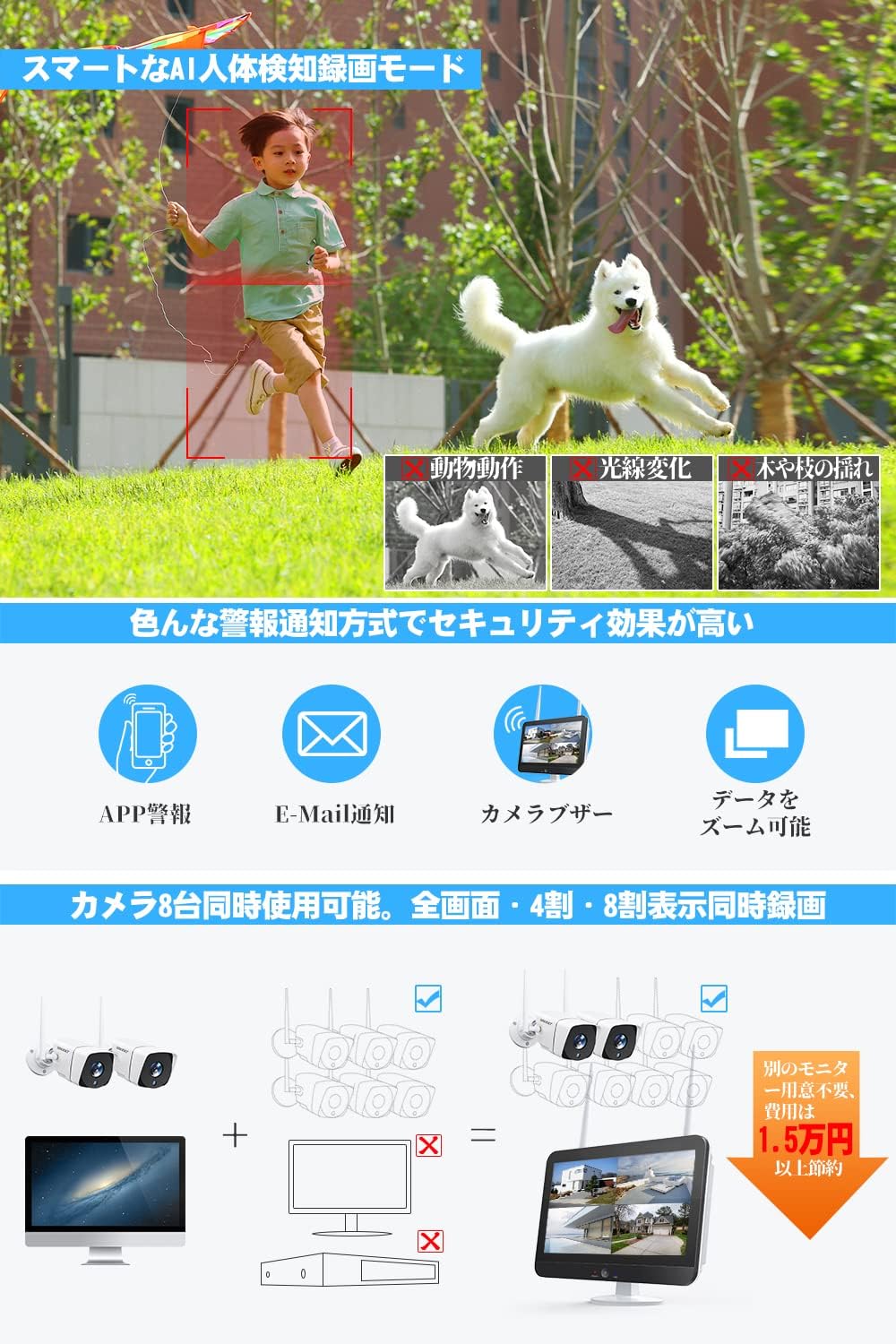
- AI хүний илрүүлэлт: Reduces false alarms by distinguishing human shapes from other moving objects.
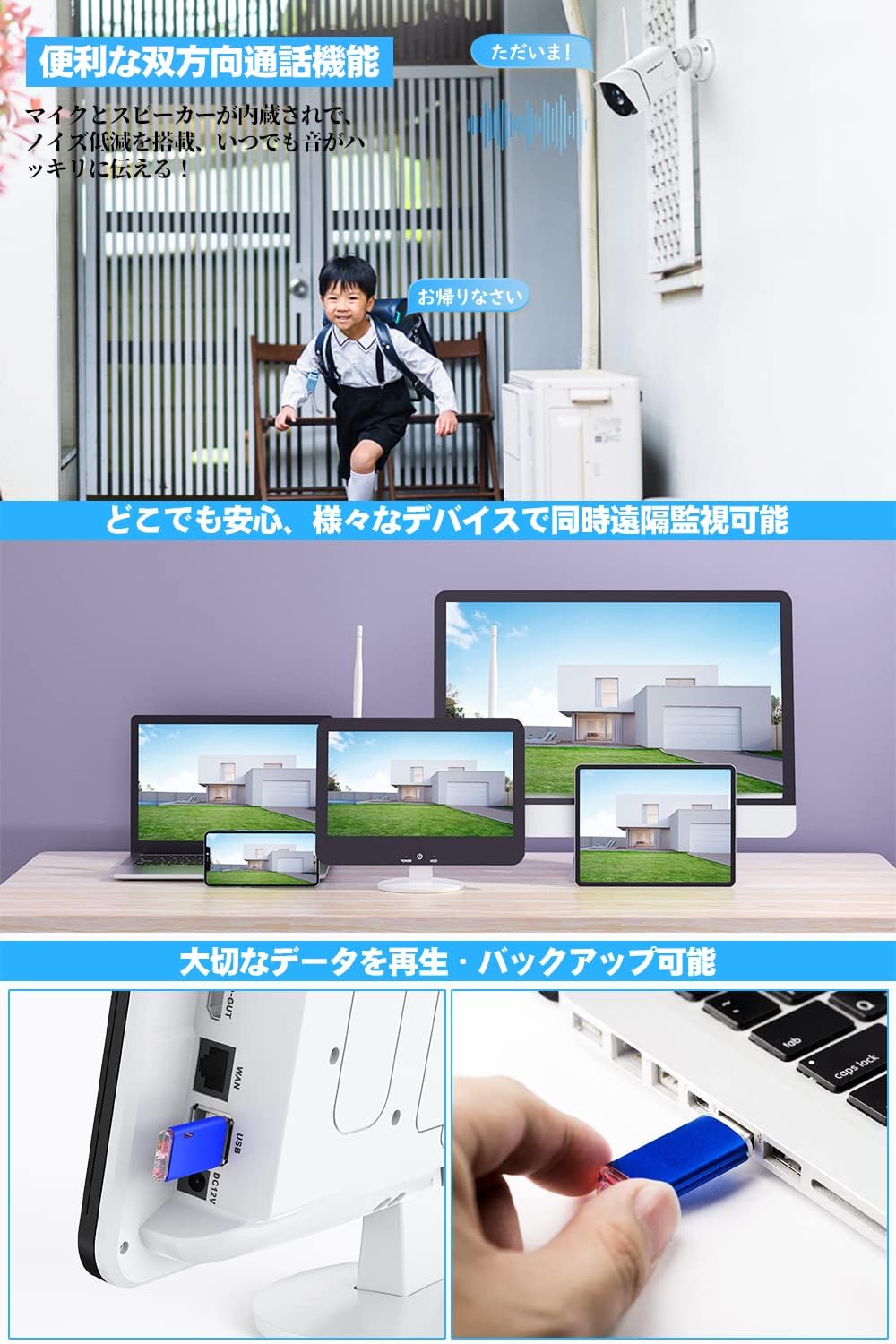
- Хоёр талын аудио: Харилцаа холбооны зориулалттай суурилуулсан микрофон болон чанга яригч.
- Хэт улаан туяаны шөнийн хараа: Automatic day/night mode for clear surveillance in low light.
- 360-degree Adjustable Mount: Ball-type metal mount allows flexible positioning.
- Давталтын горим: Extends Wi-Fi signal range for stable connection over larger areas.

4.2. 12-inch IPS Monitor (NVR) Features
- 12 инчийн IPS дэлгэц: Provides a wide viewing angle and vibrant colors, reducing eye strain.
- Integrated 8-Channel NVR: Supports up to 8 cameras simultaneously.
- 1TB HDD Pre-installed: Ampтасралтгүй бичлэг хийх зориулалттай хадгалах сан.
- H.265+ Шахалт: Efficiently stores video, extending recording time and improving wireless stability.
- Олон бичлэг хийх горим: Schedule recording, continuous recording, and motion-activated recording.
- Алсын удирдлага Viewing: Compatible with Android, iOS, Mac, and Windows devices for live view ба дахин тоглуулах.
- Холболт: Features HDMI, USB, LAN ports, and Wi-Fi.
5. Тохируулах заавар
5.1. Initial Power-up and Connection
- Install Camera Antennas: Carefully screw the antennas onto the designated ports on each camera.
- Камерын тэжээлийг холбох: Plug each camera's power adapter into a power outlet and connect it to the camera. The camera's lights will illuminate upon successful power-up.
- Connect Monitor Power: Plug the monitor's power adapter into a power outlet and connect it to the monitor. The monitor will power on automatically.
- USB хулганыг холбоно уу: Plug the USB mouse into one of the USB ports on the monitor.
- Автомат хослуулах: The cameras and monitor are pre-paired at the factory. They should automatically connect and display video feeds within a few minutes.

Видео гарын авлага: For a visual guide on unboxing and initial setup, please refer to the video below.
5.2. Сүлжээний тохиргоо
The system can operate wirelessly without an internet connection for local viewing. For remote monitoring via smartphone or PC, an internet connection is required.
- Утастай холболт: Connect the provided LAN cable from the monitor's LAN port to your router.
- Утасгүй холболт:
- Right-click on the monitor screen with the mouse.
- Navigate to "Network Settings" or a similar option.
- Select "Wireless Network" and choose your Wi-Fi network.
- Enter your Wi-Fi password to connect.
Видео гарын авлага: For a visual guide on connecting the monitor to your network, please refer to the video below.
5.3. Smartphone App Setup
Алсын зайнаас идэвхжүүлэхийн тулд viewing and receive alerts, download the companion app to your smartphone.
- Апп татаж авах: On the monitor, right-click and navigate to the "Wizard" or "App Download" section. Scan the QR code displayed on the screen with your smartphone to download the "EseeCloud" app (or similar, as indicated by the QR code).
- Бүртгэл үүсгэх: Open the app and create a new user account if you don't have one.
- Төхөөрөмж нэмэх: In the app, click the "+" button to add a new device. Select "Kit" or "NVR" and scan the device ID QR code displayed on the monitor. Enter the NVR's password (default is usually blank or 'admin' if not set).
- Амьд View: Нэгэнт нэмсэн бол та чадна view live feeds from your cameras and access other features remotely.
5.4. Камер суурилуулах
The cameras can be mounted indoors or outdoors. Ensure the mounting surface is stable and provides a clear view хүссэн хяналтын талбайн .
- Байршлыг сонгох: Select a suitable location for each camera, considering power access and Wi-Fi signal strength.
- Өрөмдлөгийн цэгүүдийг тэмдэглэх: Use the camera's base as a template to mark the drilling points on the wall or ceiling.
- Өрөмдлөгийн цооног: Drill pilot holes and insert the provided wall plugs if necessary.
- Камер суурилуулах: Өгөгдсөн боолтыг ашиглан камерын суурийг гадаргуу дээр бэхлэнэ үү.
- Өнцөг тохируулах: Adjust the camera's angle using the 360-degree ball-type mount to cover the desired area.
Видео гарын авлага: For a visual guide on camera installation, please refer to the video below.
6. Ашиглалтын заавар
6.1. Амьд View and Multi-Screen Display
The 12-inch IPS monitor can display live feeds from all connected cameras simultaneously. You can switch between single-camera view, 4-split screen, or 8-split screen modes (if more cameras are added) using the NVR interface.

6.2. Хоёр талын аудио
Each camera is equipped with a microphone and speaker, allowing for two-way communication. You can speak through the camera using the smartphone app or the monitor interface.

6.3. Бичлэг хийх горимууд
The NVR supports various recording options:
- Үргэлжлүүлэн бичлэг хийх: Records 24/7, utilizing the 1TB HDD.
- Бичлэг хийх хуваарь: Бичлэг хийх тодорхой цагийг тохируулна уу.
- Хөдөлгөөн илрүүлэх бичлэг: Хөдөлгөөн илэрсэн үед л бичиж, хадгалах зайг хэмнэдэг.
- AI Human Detection Recording: Advanced motion detection that only triggers recording for human shapes.
6.4. Remote Monitoring and Alerts
With the smartphone app, you can monitor your property from anywhere. The system also provides various alert notifications:
- Аппликейшний Түлхэх Мэдэгдэл: Receive instant alerts on your smartphone when motion or human detection is triggered.
- Имэйл анхааруулга: Get email notifications with snapshots of events.
- Дуут дохио: The NVR can sound an audible alarm.
- Тохируулж болох илрүүлэх хэсгүүд: Define specific areas for motion detection to avoid unnecessary alerts (e.g., excluding public roads).
6.5. Дахин тоглуулах
Та амархан дахин болноview foo бүртгэгдсэнtage on the monitor or via the smartphone app.
- Ухаалаг тоглуулах: Quickly find specific events using the timeline.
- Date/Time Selection: Select specific dates and times to review бичлэгүүд.
- Нөөцлөх: Important data can be backed up via USB.
6.6. Шөнийн хараа
The cameras automatically switch to night vision mode in low-light conditions, providing clear black-and-white images. The 5MP sensor and large infrared LED lights ensure detailed capture even in darkness.

7. Засвар үйлчилгээ
- Цэвэрлэгээ: Use a soft, dry cloth to clean the camera lens and monitor screen. Avoid abrasive cleaners.
- Програм хангамжийн шинэчлэлтүүд: Үйлдвэрлэгчийг үе үе шалгаж байгаарай website or app for firmware updates to ensure optimal performance and security.
- Хатуу дискний удирдлага: The 1TB HDD will automatically overwrite the oldest footage when full. Back up important recordings regularly.
- Power Off Monitor: Use the power OFF button on the monitor to extend its lifespan when not in active use.
8. Алдаа засах
| Асуудал | Боломжит шалтгаан | Шийдэл |
|---|---|---|
| No video displayed on monitor. | Power issue, camera not paired, weak signal. | Check power connections for both monitor and cameras. Ensure cameras are within range and properly paired. Restart the system. |
| Wi-Fi-д холбогдох боломжгүй байна. | Incorrect password, router issues, weak signal. | Verify Wi-Fi password. Ensure router is functioning correctly. Move monitor closer to the router or use repeater mode. |
| App alerts not received. | App notifications disabled, network issue, incorrect settings. | Check app notification settings on your phone. Ensure the NVR is connected to the internet. Verify motion detection settings. |
| Шөнийн харааны чанар муу. | Obstruction, dirty lens, insufficient IR light. | Clear any obstructions in front of the camera. Clean the camera lens. Ensure IR LEDs are not blocked. |
9. Техникийн үзүүлэлтүүд
| Онцлог | Дэлгэрэнгүй |
|---|---|
| Брэнд | SMNET |
| Загварын дугаар | SMJP-W823M1TM-002 |
| Камерын нягтрал | 5 мегапиксел |
| Мониторын хэмжээ | 12-inch IPS Panel |
| NVR сувгууд | 8 суваг |
| Хатуу диск | 1TB (Урьдчилан суулгасан) |
| Видео шахалт | H.265 + дээр |
| Усны хамгаалалттай үнэлгээ | IP67 |
| Холболт | Wi-Fi, LAN |
| Портууд | HDMI, USB, LAN |
| Эрчим хүчний эх үүсвэр | DC |
| Материал | Metal (camera case) |
| Ашиглалтын температур | -10°C to 50°C (implied from A+ content) |
10. Баталгаат хугацаа ба дэмжлэг
SMONET provides a нэг жилийн баталгаат хугацаа for this product. In case of any defects or issues during the warranty period, please contact our customer support for exchange or refund. We also offer насан туршийн техникийн дэмжлэг.
A detailed Japanese instruction manual is included in the package. For further assistance, please contact our dedicated after-sales service team via phone, email, Line, or Skype.
Жич: Installation and home maintenance services are not covered under warranty.