Танилцуулга
This manual provides comprehensive instructions for the setup, operation, and maintenance of your Trust Ymo Wireless Keyboard and Mouse Set. This set is designed for comfortable and efficient use with its German QWERTZ layout, quiet keys, and splash-proof design.

Image: The Trust Ymo Wireless Keyboard and Mouse Set, featuring a full-size German QWERTZ keyboard and a compact wireless mouse.
Багцын агуулга
Багцанд байгаа бүх зүйл байгаа эсэхийг шалгана уу:
- Trust Ymo Wireless Keyboard (German QWERTZ Layout)
- Trust Ymo Wireless Mouse
- USB бичил хүлээн авагч
- AAA батерей (4 ширхэг багтсан)
- Хэрэглэгчийн гарын авлага (энэ баримт бичиг)

Image: The retail packaging for the Trust Ymo Wireless Keyboard and Mouse Set, indicating the contents.
Тохируулах заавар
- Батерейг суулгах:
Open the battery compartments on both the keyboard and the mouse. Insert the included AAA batteries, ensuring correct polarity (+/-). Close the compartments securely.
- USB хүлээн авагчийг холбоно уу:
Locate the USB micro receiver, typically stored within the mouse's battery compartment or a dedicated slot. Plug the USB receiver into an available USB port on your computer (PC, Laptop, Mac, or Chromebook).
- Automatic Connection (Plug & Play):
The keyboard and mouse are designed for plug-and-play functionality. Your operating system (Windows, MacOS, Chrome OS) should automatically detect and install the necessary drivers. No additional software installation is required.

Image: A user setting up the Trust Ymo Wireless Keyboard and Mouse, illustrating the "Plug & Play" feature and the shared micro USB receiver.
Ашиглалтын заавар
Гарны онцлог
- German QWERTZ Layout: The keyboard features a standard German QWERTZ layout with a full numeric keypad for efficient data entry.
- Чимээгүй түлхүүрүүд: The keys are designed for a soft and quiet keystroke, minimizing disturbance in shared environments.
- Multimedia and Function Keys: Access 13 dedicated office and multimedia buttons for quick control over volume, media playback, and common applications.
- Тохируулах хазайлт: The keyboard includes foldable feet to adjust the typing angle for ergonomic comfort.

Image: Close-up of the Trust Ymo keyboard, highlighting its quiet keys, adjustable feet, and multimedia function keys.
Хулганы онцлог шинж чанарууд
- Quiet Buttons: Хулганы товчлуурууд нь чимээгүй товших зориулалттай бөгөөд ашиглалтын явцад дуу чимээг бууруулдаг.
- DPI товчлуур: Adjust the mouse sensitivity (DPI) between 600 and 1400 DPI to suit your preference and task requirements.
- Утасгүй хүрээ: The mouse operates wirelessly with a range of up to 10 meters from the USB receiver.
- Хоёр талт загвар: The mouse features a comfortable design suitable for both left-handed and right-handed users.
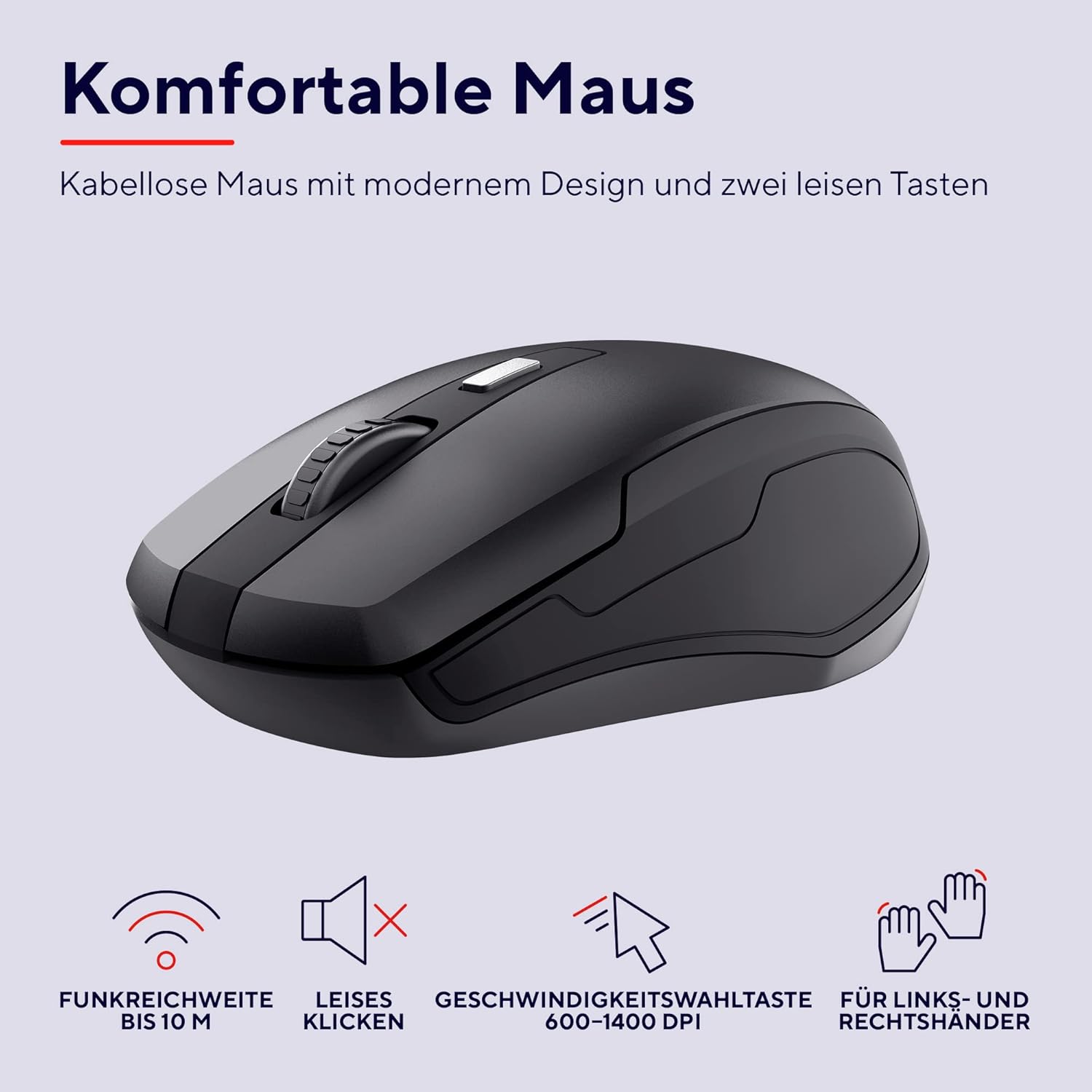
Зураг: Нарийвчилсан view of the Trust Ymo wireless mouse, showing its ergonomic shape, quiet click functionality, and DPI adjustment button.
Засвар үйлчилгээ
- Цэвэрлэгээ: Зөөлөн, хуурай даавуугаар гар болон хулганы гадаргууг цэвэрлэ. Зөрүүд шороонд бага зэрэг damp даавуу ашиглаж болох бөгөөд ингэснээр төхөөрөмжид шингэн орохгүй байх боломжтой.
- Splash-Proof Feature: The keyboard is designed to be splash-proof, offering protection against accidental spills. However, it is not waterproof. Avoid submerging the keyboard in liquid. If a spill occurs, gently wipe away the liquid and allow the keyboard to dry completely before continued use.
- Зай солих: Replace batteries when performance degrades or the low battery indicator illuminates.

Image: A close-up of the Trust Ymo keyboard demonstrating its splash-proof design, with water droplets on the keys.
Алдааг олж засварлах
- Холболт байхгүй:
- USB хүлээн авагчийг ажиллаж байгаа USB порт руу найдвартай залгасан эсэхийг шалгаарай.
- Check if the batteries in both the keyboard and mouse are correctly installed and have sufficient charge.
- USB хүлээн авагчийг компьютер дээрээ өөр USB порт руу залгаад үзээрэй.
- Хүрээтэй холбоотой асуудлуудыг арилгахын тулд гар болон хулганыг USB хүлээн авагч руу ойртуулна уу.
- Lagging or Intermittent Performance:
- Replace the batteries in both devices.
- Ensure there are no large metallic objects or other wireless devices interfering with the signal between the receiver and the devices.
- Mouse Cursor Not Moving:
- Check the mouse batteries.
- Ensure the mouse sensor on the bottom is clean and unobstructed.
- Хулганаа өөр гадаргуу дээр ашиглаж үзнэ үү.
Үзүүлэлтүүд
| Брэнд | Итгэл |
| Загварын дугаар | 24080 |
| Холболтын технологи | Радио давтамж (утасгүй) |
| Гарны зохион байгуулалт | Германы QWERTZ |
| Хулганы DPI | 600-1400 DPI (тохируулж болно) |
| Утасгүй сүлжээ | 10 метр хүртэл |
| Эрчим хүчний эх үүсвэр | Батерейгаар ажилладаг (4x AAA багтаасан) |
| Тохиромжтой байдал | Windows, Mac OS, Chrome OS |
| Онцлог шинж чанарууд | Splash-proof keyboard, Quiet keys and mouse buttons |
| Бүтээгдэхүүний хэмжээс | 2 x 44.2 x 14.2 cm (Keyboard); 560 g (Total weight) |
Баталгаат болон дэмжлэг
Баталгаат хугацаа болон техникийн дэмжлэг авахыг хүсвэл албан ёсны Итгэлцлийн сантай холбогдоно уу webсайт эсвэл орон нутгийн жижиглэн худалдаалагчтай холбоо барина уу. Баталгаат нэхэмжлэл гаргахын тулд худалдан авалтаа нотлох баримтаа хадгалаарай.
Байгаль орчны мэдээлэл
The packaging for the Trust Ymo Wireless Keyboard and Mouse Set is made from recycled materials, reflecting a commitment to environmental sustainability. Please dispose of the product and its batteries responsibly according to local regulations.

Image: Illustration of the sustainable packaging used for the Trust Ymo set, made from recycled cardboard.


