1. Танилцуулга
The SKYLOONG GK61/SK61 is a compact 60% mechanical gaming keyboard designed for performance and customization. Featuring 61 keys, RGB illumination, and Gateron Optical Brown Switches, it offers a responsive and tactile typing experience. This keyboard is wired, programmable, and built with durability in mind, including waterproof capabilities.

Зураг 1: Илүүview of the SKYLOONG GK61/SK61 Mechanical Gaming Keyboard with its vibrant RGB backlighting.
2. Багцын агуулга
Таны багцад бүх зүйл байгаа эсэхийг шалгана уу:
- SKYLOONG GK61/SK61 Mechanical Gaming Keyboard
- USB төрөл-C кабель
- Товчлуур татагч
- Шилжүүлэгч татагч
- Хэрэглэгчийн гарын авлага (энэ баримт бичиг)

Figure 2: Contents typically found in the SKYLOONG GK61/SK61 keyboard retail box, showing the keyboard, USB cable, and included tools.
3. Тохируулах гарын авлага
3.1 Гарыг холбох
The SKYLOONG GK61/SK61 keyboard connects via a detachable USB Type-C cable, ensuring a stable and reliable connection for gaming and typing.
- Гарны ар талд USB Type-C портыг олоорой.
- Дагалдаж ирсэн USB Type-C кабелийн нэг үзүүрийг гарны порттой холбоно уу.
- USB кабелийн нөгөө үзүүрийг компьютер дээрээ (PC эсвэл Mac) байгаа USB порт руу холбоно уу.
- The keyboard will be automatically recognized by your operating system, and the RGB backlighting will illuminate.

Figure 3: The USB Type-C interface for connecting the keyboard to your computer.
3.2 Програм хангамж суулгах (Дэвшилтэт функцуудын хувьд заавал биш)
For full customization, including advanced RGB lighting effects, key remapping, and macro programming, download the official SKYLOONG software (often referred to as GK6XPlus driver). This software is compatible with Windows and macOS.
- Visit the official SKYLOONG webпрограм хангамжийн хамгийн сүүлийн хувилбарыг татаж авах сайт.
- Дэлгэц дээрх зааврыг дагаж програм хангамжийг суулгана уу.
- Launch the software to access customization options.
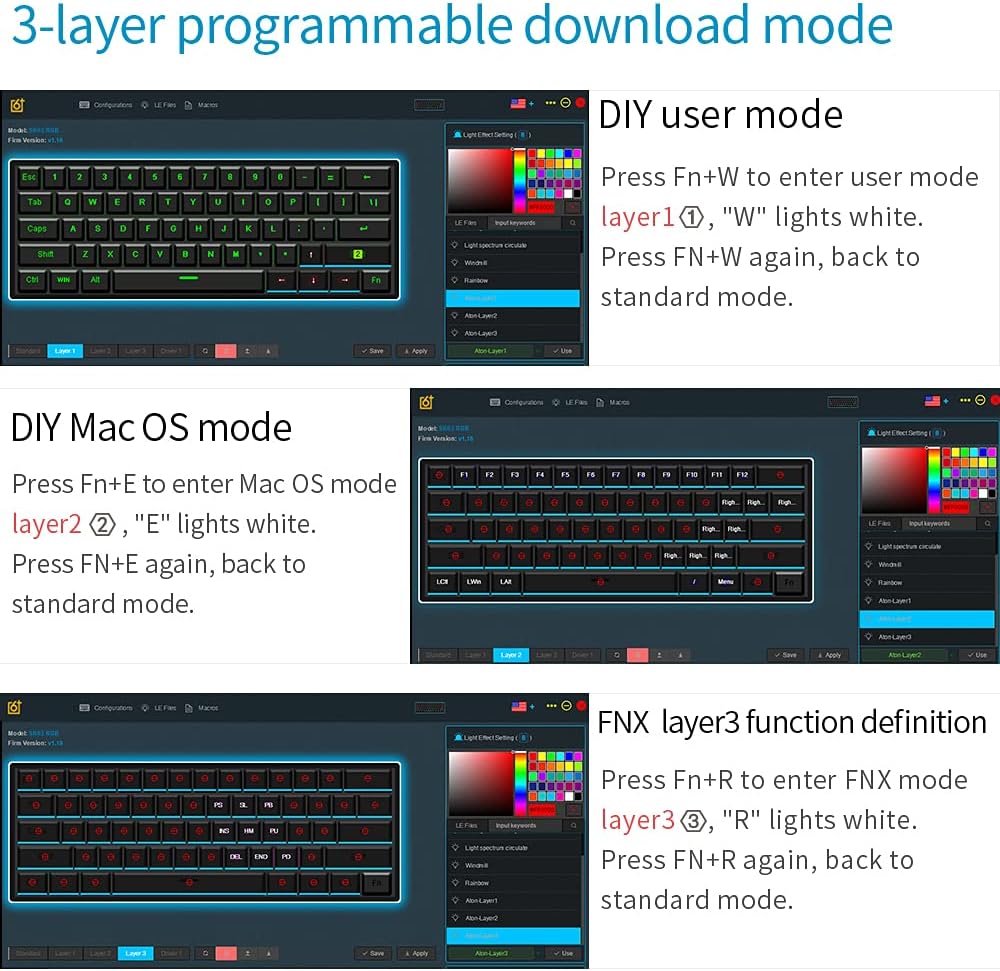
Figure 4: The software interface for managing the keyboard's programmable layers and lighting effects.
4. Ашиглалтын заавар
4.1 Basic Functions and Fn Layer
The GK61/SK61 is a 60% keyboard, meaning some functions are accessed via a Function (Fn) layer. The Fn key is typically located on the bottom right of the keyboard.
| Хослол | Чиг үүрэг |
|---|---|
| Fn + 1! - 0) | F1 - F10 |
| Fn + -= | F11 |
| Fn + [+={ | F12 |
| Fn + Q | Layer 1 (User Mode) |
| Fn + E | Layer 2 (Mac OS Mode) |
| Fn + R | Layer 3 (FNX Mode) |
| Fn + W | Switch between User Mode and Standard Mode |
| Fn + хоосон зай | Change RGB lighting effects |
| Fn + Alt (Right) | Adjust RGB brightness |
4.2 RGB арын гэрэлтүүлгийн хяналт
The keyboard features 16.8 million color RGB backlighting with multiple adjustable modes. Use the following combinations to control the lighting:
- Fn + Зай авах товчлуур: Cycle through various RGB lighting effects.
- Fn + Right Alt: Арын гэрэлтүүлгийн гэрэлтүүлгийг тохируулна уу.
- Fn + Баруун Ctrl: Динамик гэрэлтүүлгийн эффектийн хурдыг өөрчлөх.
4.3 Programmable Keys and Macros
The SKYLOONG GK61/SK61 supports full key programmability and on-the-fly macro recording through its 3-layer programmable download mode. This allows for extensive customization of key functions and complex command sequences.
- DIY User Mode (Layer 1): дарна уу Fn + W to enter. The 'W' key will light white. Press Fn + W again to return to standard mode. This layer is for user-defined key mappings.
- DIY Mac OS Mode (Layer 2): дарна уу Fn + E to enter. The 'E' key will light white. Press Fn + E again to return to standard mode. This layer is optimized for macOS specific functions.
- FNX Layer 3 Function Definition (Layer 3): дарна уу Fn + R to enter. The 'R' key will light white. Press Fn + R again to return to standard mode. This layer allows for advanced function definitions.
Detailed programming instructions are available within the GK6XPlus software.
5. Засвар үйлчилгээ
5.1 Гарыг цэвэрлэх
Тогтмол цэвэрлэгээ нь гарны гүйцэтгэл болон гадаад төрхийг хадгалахад тусалдаг.
- Цэвэрлэхийн өмнө гарыг компьютерээсээ салга.
- Түлхүүрийн тагны хоорондох тоос шороо, хогийг арилгахын тулд зөөлөн сойз эсвэл шахсан агаар ашиглана уу.
- For surface cleaning, gently wipe the keycaps and chassis with a slightly damp, хөвөнгүй даавуу. Хэт их чийгээс зайлсхий.
- The keyboard has an IP68 waterproof rating, offering protection against spills. However, it is recommended to clean up any liquid spills immediately to prevent long-term damage.

Figure 5: The keyboard's waterproof design, allowing for enhanced durability against spills.
5.2 Switch Replacement (Hot-Swap Feature)
The SKYLOONG GK61/SK61 features hot-swappable Gateron Optical Switches, allowing you to easily change switches without soldering. This is only compatible with other Gateron Optical Switches.
- Using the provided keycap puller, carefully remove the desired keycap.
- Insert the switch puller around the top and bottom clips of the switch.
- Gently squeeze the clips and pull the switch straight up to remove it from the PCB.
- Align the pins of the new Gateron Optical Switch with the holes on the PCB.
- Press the new switch firmly into place until it clicks. Ensure it is seated properly.
- Товчлуурын тагийг солих.

Figure 6: The hot-swap capability of the Gateron optical switches, allowing for easy replacement.
6. Алдаа засах
If you encounter issues with your SKYLOONG GK61/SK61 keyboard, please refer to the following common solutions:
- Гар хариу өгөхгүй байна:
- USB Type-C кабель нь гар болон компьютерт найдвартай холбогдсон эсэхийг шалгаарай.
- Компьютер дээрээ гарыг өөр USB порт руу холбож үзнэ үү.
- Системтэй холбоотой асуудлуудаас зайлсхийхийн тулд гарыг өөр компьютер дээр туршиж үзээрэй.
- RGB гэрэлтүүлэг ажиллахгүй эсвэл гацсан:
- дарна уу Fn + хоосон зай гэрэлтүүлгийн горимуудаар ээлжлэн солих.
- дарна уу Fn + Баруун Alt гэрэлтүүлгийг тохируулах.
- Ensure the keyboard is not in a specific programmable layer that might override lighting settings.
- If using the software, check lighting settings within the application.
- Бүртгүүлээгүй эсвэл давхар бичээгүй түлхүүрүүд:
- Carefully remove the keycap and switch (if hot-swappable) for the affected key. Check for any debris or obstruction.
- Re-seat the switch firmly. If the issue persists, consider replacing the switch.
- Албан ёсны програм хангамжаар дамжуулан гарын товчлуурын програм хангамж шинэчлэгдсэн эсэхийг шалгаарай.
- Programmable functions not working:
- Ensure you are in the correct programmable layer (Fn + W, Fn + E, or Fn + R).
- Verify your settings within the GK6XPlus software.
- Make sure the software is running and properly communicating with the keyboard.
7. Техникийн үзүүлэлтүүд
| Онцлог | Дэлгэрэнгүй |
|---|---|
| Загвар | GK61 / SK61 |
| Зохион байгуулалт | 60% (61 түлхүүр) |
| Шилжүүлэгчийн төрөл | Gateron Optical Brown (Hot-swappable for optical switches only) |
| Холболт | Wired (USB Type-C detachable cable) |
| Арын гэрэлтүүлэг | RGB (16.8 million colors, multiple modes) |
| Програмчлах чадвар | Full keys programmable, 3-layer download mode, on-the-fly macro recording |
| Бат бөх чанар | IP68 Waterproof/Dustproof/Anti-Corrosion, 100 million keystrokes lifetime |
| Товчлуурууд | ABS dual-color |
| Тохиромжтой байдал | Windows 2000/XP/Vista/Win7/Win8/Win10, Mac OS |
| Хэмжээ | Approx. 292mm x 104mm (Refer to Figure 2 for visual) |
| Жин | Ойролцоогоор 1.32 фунт (0.6 кг) |

Figure 7: Ergonomic design of the keyboard, featuring a five-level height arc surface for comfortable typing.

Figure 8: Internal hardware architecture, highlighting the 32-bit M3 MCU, 8M Flash memory, and 3 channels 256 professional level RGB color management chip.
8. Баталгаат хугацаа ба дэмжлэг
SKYLOONG products are designed for reliability and performance. For warranty information, technical support, or service inquiries, please refer to the official SKYLOONG webсайт эсвэл худалдагчтайгаа холбогдоно уу. Баталгаат нэхэмжлэл гаргахын тулд худалдан авалтаа нотлох баримтаа хадгалаарай.
For the latest drivers and software, please visit the official SKYLOONG support page.


