Бүтээгдэхүүн дууссанview
Experience powerful volume and heavy bass sound with 16cm twin woofers and independent 4-channel high-power amplifiers. This all-in-one system features CD, Wide FM tuner, USB, and Bluetooth connectivity. Enjoy lighting effects for events and parties, with 4 types of light effects and 7-color illumination around the front speakers, including an option to turn lights off. Equipped with mixable microphone and guitar input terminals, and a built-in battery for approximately 14 hours of playback in environments without AC power (may vary depending on usage conditions). Includes a convenient shoulder strap for easy portability. Features a dimmer function to adjust display brightness, 10-second skip for CD/USB playback, and an auto-standby (power-saving) function that automatically turns off the unit after 15 minutes of inactivity. Also includes an eco-mode to reduce battery consumption during long periods of non-use.

Зураг 1: Урд view of the JVC RV-NB250BT system, showcasing its robust design and speaker grilles.
1. Тохиргоо
1.1 Unpacking and Accessories
Carefully remove all components from the packaging. Ensure all accessories, including the power cord and shoulder strap, are present. Retain the packaging for future transport or storage.

Figure 2: JVC RV-NB250BT with included shoulder strap and power cord.
1.2 Эрчим хүчний холболт
Connect the provided power cord to the AC IN terminal on the rear of the unit and then to a standard wall outlet. The unit can also operate on its internal rechargeable battery for portable use.

Figure 3: Rear panel connections, including the AC power input and FM antenna terminal.
1.3 FM антенны холболт
For optimal FM radio reception, connect the included FM antenna to the FM ANT terminal on the rear of the unit. Extend the antenna fully and adjust its position for the best signal.
1.4 Анхдагч асаалттай
Press the Power button on the unit to turn it on. The display will illuminate. If using for the first time, ensure the internal battery is charged by connecting to AC power.
2. Ашиглалтын заавар
2.1 CD тоглуулах
- дээр дарна уу CD товчийг дарж CD горимыг сонгоно уу.
- CD тасалгааны тагийг нээ.
- CD-г шошготой талыг нь дээш харуулан байрлуул.
- CD тасалгааны тагийг хаа.
- Тоглуулах нь автоматаар эхэлнэ. Ашиглах Тоглуулах/түр зогсоох, Урагшаа алгасах, ба Буцах Тоглуулахыг удирдах товчлуурууд.
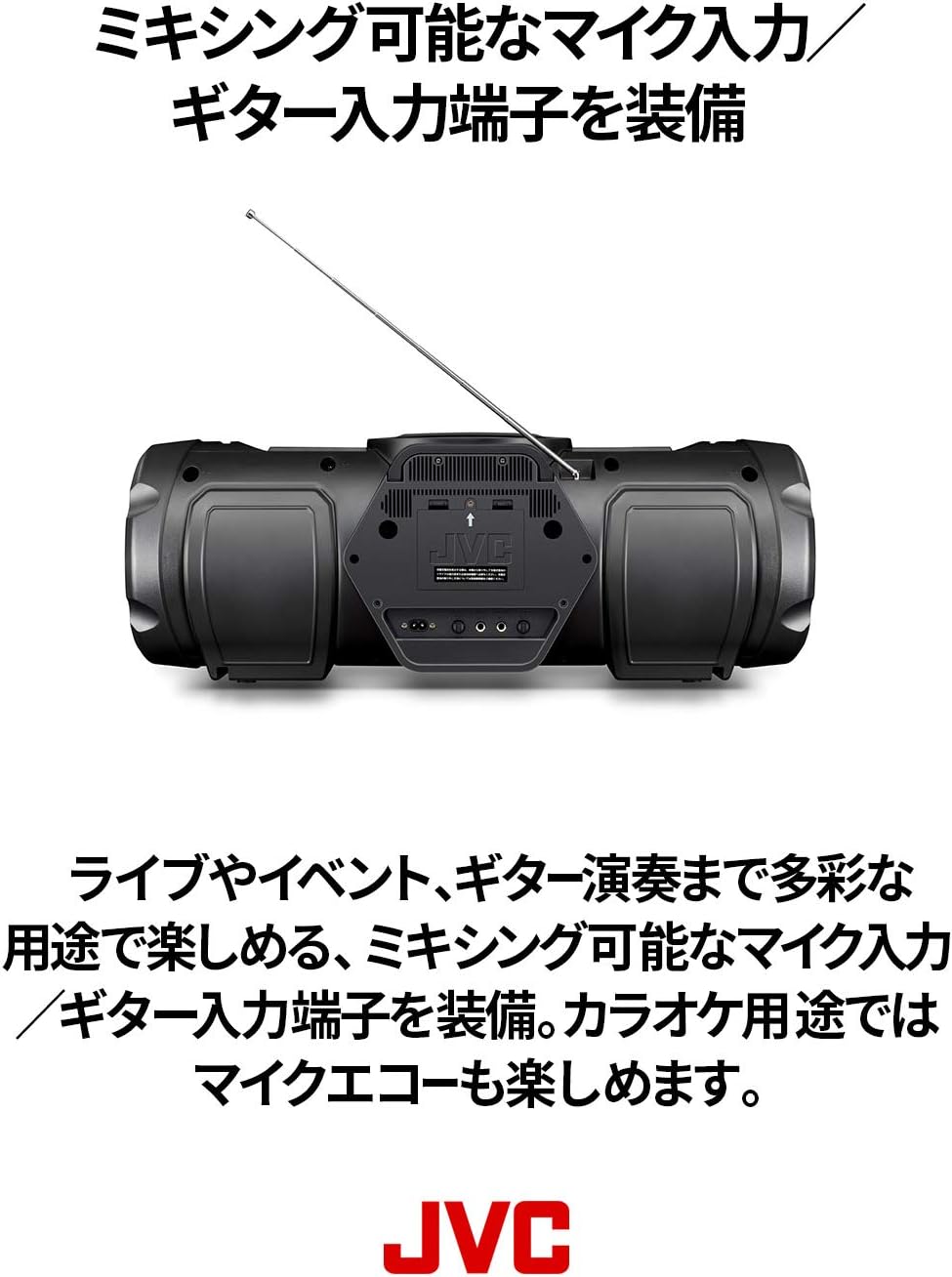
Figure 4: Top-loading CD compartment for easy disc insertion.
2.2 USB тоглуулах
- Insert a USB flash drive into the USB port on the front of the unit.
- дээр дарна уу USB товчийг дарж USB горимыг сонгоно.
- The unit will automatically detect and play compatible audio files (жишээ нь, MP3, WMA).
- -г ашиглана уу Тоглуулах/түр зогсоох, Урагшаа алгасах, ба Буцах Тоглуулахыг удирдах товчлуурууд.
2.3 Bluetooth аудио дамжуулалт
- дээр дарна уу Bluetooth Bluetooth горимыг сонгох товчийг дарна уу. Bluetooth индикатор анивчих болно.
- Enable Bluetooth on your smart device and search for "RV-NB250BT".
- Select "RV-NB250BT" from the list of available devices to pair. Once paired, the indicator will stop flashing and remain lit.
- Play audio from your smart device. The sound will be streamed to the RV-NB250BT.
2.4 FM радио
- дээр дарна уу FM button to select FM tuner mode.
- -г ашиглана уу Тохируулах or Доор нь тааруулах станц руу гараар тохируулах товчлууруудыг дарах эсвэл дараагийн боломжтой станцыг автоматаар хайхын тулд удаан дарна уу.
2.5 Microphone and Guitar Input
The unit features dedicated input terminals for a microphone and a guitar, allowing for mixing. Connect your microphone or guitar to the respective input jacks. Adjust the input volume using the dedicated controls. Microphone echo effects are also available for karaoke use.

Figure 5: Close-up of the front panel, highlighting the microphone and guitar input terminals.
2.6 Гэрэлтүүлгийн эффектүүд
The RV-NB250BT includes four types of lighting effects with seven color options around the front speakers. Press the Гэрлийн эффект button to cycle through the modes or turn the lights off. These effects synchronize with the music for an enhanced audio-visual experience.

Figure 6: The RV-NB250BT displaying its dynamic lighting effects.
2.7 Гэрэл бүдэгрүүлэгч функц
Adjust the brightness of the display using the dimmer function. Refer to the detailed instructions in the full manual for specific button presses to activate and adjust this feature.
2.8 Auto Standby and Eco Mode
The unit features an auto-standby function that automatically turns off the power after 15 minutes of inactivity to conserve energy. An eco-mode is also available to reduce internal battery consumption when the unit is not in use for extended periods.
3. Засвар үйлчилгээ
3.1 Төхөөрөмжийг цэвэрлэх
Төхөөрөмжийн гадна талыг зөөлөн, хуурай даавуугаар арчина. Зөрүүд бохирдлыг бага зэрэг арчина.ampen the cloth with water and then wipe dry. Do not use abrasive cleaners, solvents, or alcohol, as these can damage the finish.
3.2 CD Lens Care
CD-г оновчтой тоглуулахын тулд CD линзийг худалдаанд гарсан CD линз цэвэрлэгчээр үе үе цэвэрлэ. Линзэнд шууд хүрэхээс зайлсхий.
3.3 Батерейны арчилгаа
For the built-in rechargeable lithium-ion battery, avoid fully discharging it frequently. If storing the unit for an extended period, charge the battery to approximately 50% and store in a cool, dry place. Recharge every 3-6 months to maintain battery health.
4. Алдаа засах
| Асуудал | Боломжит шалтгаан | Шийдэл |
|---|---|---|
| Хүч чадалгүй | Power cord not connected securely; internal battery discharged. | Ensure power cord is firmly plugged into the unit and wall outlet. Charge the internal battery if operating wirelessly. |
| Дуу алга | Дууны түвшин хэт бага байна; буруу эх үүсвэр сонгогдсон; дуугүй болгох функц идэвхтэй байна. | Increase volume. Select the correct input source (CD, USB, Bluetooth, FM). Check if the unit is muted. |
| Bluetooth холболт амжилтгүй боллоо | Device too far; Bluetooth not enabled on source device; unit already paired with another device. | Ensure devices are within range. Enable Bluetooth on your smart device. Disconnect from other Bluetooth devices. Try re-pairing. |
| CD/USB тоглуулах асуудал | Disc/USB drive dirty or damaged; incompatible file формат. | Clean the CD or try a different disc/USB drive. Ensure audio files are in a compatible format (e.g., MP3, WMA). |
| Clock resets when power is off | This model may reset the clock when completely powered off (not in standby). | This is a characteristic of the unit. Keep the unit in standby mode or reset the clock upon powering on if precise timekeeping is required. |
5. Техникийн үзүүлэлтүүд
- Загварын дугаар: RV-NB250BT
- Брэнд: JVC
- Эрчим хүчний эх үүсвэр: AC Power Cord Type
- Зай: 8 Lithium-ion batteries (included), built-in rechargeable
- Чанга яригчийн тохиргоо: 4 speakers (2x 16cm woofers, 2x 10cm full-range speakers)
- Нийт гаралтын хүч: 60W (implied from description)
- Холболт: Bluetooth, USB, CD, Wide FM Tuner, Microphone Input, Guitar Input
- Бүтээгдэхүүний хэмжээс (LxWxH): 69.6 x 26.5 x 26.1 см
- Bluetooth давтамжийн зурвас: 2.4GHz зурвас (2.4000GHz-2.4835GHz)
- Онцлогууд: Lighting effects (4 types, 7 colors), Dimmer function, 10-second skip (CD/USB), Auto-standby, Eco-mode, Shoulder strap included.
6. Бүтээгдэхүүний видео
Энэ загварт зориулсан худалдагчийн албан ёсны бүтээгдэхүүний видео одоогоор байхгүй байна.
7. Баталгаат хугацааны мэдээлэл
This product is covered by a manufacturer's warranty. Please refer to the warranty card included in the product packaging for detailed terms and conditions, including the warranty period and coverage. Keep your proof of purchase for warranty claims.
8. Хэрэглэгчийн дэмжлэг
For technical assistance, product inquiries, or service requests, please contact JVC customer support. Visit the official JVC webхолбоо барих мэдээлэл, түгээмэл асуултууд болон нэмэлт эх сурвалжийн сайт.
Албан ёсны JVC Webсайт: www.jvc.com


