1. Танилцуулга
This manual provides detailed instructions for the setup, operation, maintenance, and troubleshooting of your Sceptre Curved 27" FHD 1080p Gaming Monitor. Please read this manual thoroughly before using your monitor to ensure proper functionality and safety.

Image: Sceptre Curved 27" FHD 1080p Gaming Monitor in a typical desk setup.
2. Багцын агуулга
Verify that all items listed below are included in your package. If any items are missing or damaged, please contact Sceptre customer support.
- Sceptre Curved 27" FHD 1080p Gaming Monitor
- Хяналтын тавиур (суурь ба гар)
- HDMI кабель
- Power Supply and Adapter
- Philips толгой халив
- Screws and Hardware Kit
- Хэрэглэгчийн гарын авлага
- Warranty Information and Customer Service Card

Зураг: Дууслааview of all items included in the Sceptre monitor package, including the monitor, stand components, cables, tools, and documentation.
3. Угсралт
Мониторын тавиурыг угсрахдаа дараах алхмуудыг дагана уу.
- Attach the metal stand arm to the plastic base. Align the tabs and gently twist until secure.
- Use the provided Philips head screwdriver and the designated base screw to fasten the stand arm to the base.
- Угсарсан суурийг дэлгэцийн ар талд байрлах бэхэлгээний цэгүүдтэй зэрэгцүүл.
- Insert the two remaining Philips head screws into the designated holes on the monitor's back and tighten them securely.
- Place the plastic cover over the screws on the stand arm.

Image: The Sceptre Curved 27" monitor with its dimensions labeled, showing the curved screen and the stand.
4. Холболтууд
The monitor features various ports for connectivity. Ensure proper connection for optimal performance.
- DC IN: Энд тэжээлийн адаптерийг холбоно уу.
- Аудио гаралт: Гадаад чанга яригч эсвэл чихэвчийг холбоно уу.
- Аудио оруулах: Connect an audio source for the built-in speakers.
- VGA: Connect to a computer's VGA port. Supports up to 75Hz refresh rate.
- HDMI 1.4 (x2): Connect to devices with HDMI output. Supports up to 75Hz refresh rate.
- Kensington Security Lock: Мониторыг бэхлэх зориулалттай.
Зураг: Нарийвчилсан view of the monitor's rear panel, highlighting the DC IN, Audio In/Out, VGA, and two HDMI 1.4 ports.
5. Ашиглалтын заавар
The On-Screen Display (OSD) menu allows you to adjust various monitor settings. Use the buttons on the back of the monitor to navigate.
OSD цэсийн навигаци
- Түргэн эхлэх: Adjust basic settings like preset modes, aspect ratio, source, volume, Blue Light Shift, and Adaptive Sync.
- Зураг: Fine-tune image settings including brightness, contrast, DCR, aspect ratio, and sharpness.
- Өнгө: Adjust color temperature, gamma, tint, saturation, and Blue Light Shift.
- Систем: Configure overdrive, Adaptive Sync, sleep mode, language, OSD position, timer, transparency, mute, and factory reset.
Video: A user demonstrates the Sceptre monitor's OSD menu, showing navigation through settings like volume and input source while displaying gameplay.
6. Дэлгэцийн онцлог
- 1500R муруй дэлгэц: The 1500R curvature immerses you into the content, providing a comfortable viewтуршлага.
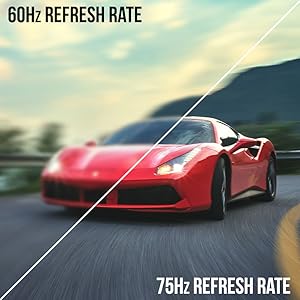
- 100 Гц сэргээх хурд: Experience smoother visuals with a refresh rate of up to 100Hz, reducing screen tearing.
- 98% sRGB: Offers a wider color gamut for deeper and more accurate colors.
- Цэнхэр гэрлийн шилжилт: Reduces blue light emission to protect your eyes from fatigue and strain during extended use.
- Дасан зохицох синк: Дэлгэц урагдах, гацах зэргийг арилгахын тулд мониторын сэргээх хурдыг график картын хүрээний хурдтай синхрончилдог.
- FPS-RTS Game Modes: Pre-set display modes optimized for First Person Shooter (FPS) and Real-Time Strategy (RTS) games.
- Баригдсан чанга яригч: Integrated speakers provide audio without needing external devices.

Image: Visual representation of the 1500R curvature, highlighting its immersive design.

Image: A side-by-side comparison demonstrating the visual smoothness of 75Hz refresh rate versus 60Hz.

Image: A visual comparison highlighting the enhanced color accuracy of 98% sRGB compared to a conventional display.

Image: Split-screen view demonstrating the visual enhancements provided by FPS and RTS game modes.
7. Засвар үйлчилгээ
Монитороо удаан эдэлгээтэй, оновчтой ажиллуулахын тулд дараах цэвэрлэгээний зөвлөмжийг дагаж мөрдөөрэй.
- Цэвэрлэхийн өмнө цахилгааны утсыг үргэлж салга.
- Зөөлөн, хөвөнгүй даавууг бага зэрэг хэрэглээрэй dampусаар эсвэл зөөлөн, зүлгүүргүй цэвэрлэгчээр дүүргэнэ.
- Avoid using alcohol, ammonia, or abrasive cleaners, as these can damage the screen surface.
- Дэлгэц болон гаднах гадаргууг зөөлөн арчина. Цэвэрлэгч бодисыг дэлгэц рүү шууд шүршиж болохгүй.
8. Алдаа засах
If you encounter any issues with your monitor, refer to the following common solutions:
- Эрчим хүчгүй: Ensure the power cable is securely connected to both the monitor and a working power outlet. Check the power adapter and outlet.
- Зураг байхгүй: Verify that the video cable (HDMI or VGA) is securely connected to both the monitor and your computer/device. Ensure the correct input source is selected in the OSD menu.
- Анивчих/гажуудсан зураг: Check the video cable for damage. Try a different cable or port. Ensure your graphics card drivers are up to date. Adjust refresh rate settings in your device's display settings.
- Аудио байхгүй: Check the volume settings in the OSD menu and on your connected device. Ensure external speakers are properly connected if used.
- Хариу өгөхгүй товчлуурууд: Perform a factory reset through the OSD menu if accessible.
For further assistance, please refer to the full user manual or contact Sceptre customer support.
9. Техникийн үзүүлэлтүүд
| Онцлог | Тодорхойлолт |
|---|---|
| Дэлгэцийн хэмжээ | 27 инч |
| Шийдвэр | 1920 x 1080 (FHD 1080p) |
| Сэргээх хурд | Up to 100Hz (75Hz via HDMI/VGA) |
| Муруйлт | 1500R |
| Хариу өгөх хугацаа | 3 мс (GtG) |
| Самбарын төрөл | VA |
| Гэрэлтүүлэг | 280 нит |
| Өнгөний хүрээ | 98% sRGB |
| Видео оролт | 2x HDMI 1.4, 1x VGA |
| Аудио портууд | Audio In, Audio Out |
| Илтгэгчид | Баригдсан |
| VESA уул | 100 мм x 100 мм |
| Хэмжээ (LxWxH) | 15.09 x 19.97 x 7.02 инч |
| Жин | 5.5 фунт |
10. Тоглоомын туршлага
The Sceptre Curved 27" monitor is designed to enhance your gaming experience with its high refresh rate, low response time, and immersive curvature.
Video: An official Sceptre video showcasing various gaming monitors, including the Curved 27" model, highlighting their features and performance in gaming scenarios.
For optimal gaming performance, ensure your device's display settings match the monitor's capabilities (e.g., 1920x1080 resolution at 75Hz).
11. Баталгаат хугацаа ба дэмжлэг
Your Sceptre monitor comes with a 1 жилийн хязгаарлагдмал бүтээгдэхүүний баталгаа. For detailed terms and conditions, please refer to the included warranty information card in your package.
For technical support, troubleshooting, or warranty claims, please contact Sceptre Customer Service. Contact information is provided on the customer service card included with your monitor.


