Танилцуулга
This manual provides comprehensive instructions for setting up, operating, and maintaining your Macally Bluetooth Keyboard. Designed for multi-device compatibility, this wireless keyboard features a built-in stand, a rechargeable battery, and 78 keys for efficient typing across various devices including tablets, smartphones, and computers.

Image: The Macally Bluetooth Keyboard in white, with a tablet securely docked in its integrated stand, showcasing түүний авсаархан дизайн болон үйл ажиллагаа.
Хайрцагт юу байна
Upon unboxing your Macally Bluetooth Keyboard, please ensure all the following items are present:
- Macally Bluetooth Keyboard
- USB цэнэглэгч кабель
- Хэрэглэгчийн гарын авлага (энэ баримт бичиг)
If any items are missing or damaged, please contact Macally customer support.
Бүтээгдэхүүний онцлог
The Macally Bluetooth Keyboard is designed for versatility and convenience, offering several key features:
- Олон төхөөрөмжийн холболт: Seamlessly switch between up to 3 Bluetooth-enabled devices (e.g., tablet, smartphone, computer).
- Төхөөрөмжийн нэгдсэн тавиур: Features a built-in 10.5-inch slot to securely hold your smartphone or tablet.
- Авсаархан, зөөврийн: Small enough to fit into most bags, making it ideal for on-the-go use.
- Цэнэглэдэг батерей: Equipped with a 280mAh rechargeable battery for extended use.
- Үр ашигтай зохион байгуулалт: Includes 78 quiet scissor-switch keys and 13 convenient shortcut/media keys for enhanced productivity.

Image: The keyboard demonstrating seamless Bluetooth connectivity with a 30ft wireless range, compatible with Apple, Windows, iOS, and Android operating systems.

Image: A visual representation of the keyboard's multi-device capability, showing it paired with a laptop, a desktop computer, and a smartphone simultaneously.

Image: The keyboard positioned on a desk, with both a tablet and a smartphone docked in its integrated 10.5-inch stand, highlighting its "setup anywhere" convenience.
Тохиргоо
Гарыг цэнэглэж байна
Before first use, fully charge your Macally Bluetooth Keyboard. Connect the provided USB charging cable to the keyboard's charging port and the other end to a USB power source (e.g., computer USB port, USB wall adapter). The charging indicator light will show the charging status.

Image: The keyboard with its charging cable connected, illustrating the rechargeable 280mAh battery and the included charging cable.
Bluetooth хослуулах
Follow these steps to pair your keyboard with a device:
- Ensure the keyboard is charged and powered on. The power switch is located on the top right of the keyboard.
- On your device (tablet, smartphone, computer), enable Bluetooth.
- -г удаан дар Fn товчлуур болон Bluetooth сувгийн товчлууруудын нэг (B1, B2, эсвэл B3) simultaneously for a few seconds until the corresponding Bluetooth indicator light starts blinking rapidly. This indicates the keyboard is in pairing mode.
- On your device, search for "Macally Keyboard" or a similar name in the Bluetooth device list and select it to connect.
- Once connected, the indicator light will stop blinking and remain solid for a moment before turning off, indicating successful pairing.
To pair additional devices, repeat steps 3-5 using a different Bluetooth channel key (B1, B2, or B3).
Ашиглалтын заавар
Төхөөрөмжүүдийн хооронд шилжих
Хосолсон төхөөрөмжүүдийн хооронд шилжихийн тулд товчийг дарна уу Fn товчлуурыг харгалзах Bluetooth сувгийн товчлуурын хамт (B1, B2, эсвэл B3) for the desired device. The keyboard will quickly connect to the selected device.
Товчлуурын товчлууруудыг ашиглах
The keyboard features 13 dedicated shortcut/media keys for quick access to common functions. These keys are typically located on the top row (F1-F12 and an additional key). Functions may vary slightly depending on the operating system of your connected device.
Common shortcut functions include:
- Media playback controls (play/pause, next/previous track)
- Дууны түвшний хяналт (дууг хаах, дууг нэмэгдүүлэх/бууруулах)
- Дэлгэцийн тод байдлын тохируулга
- Home screen/desktop access
- Хайлтын функц
Refer to your device's operating system documentation for specific compatibility and functionality of these keys.

Зураг: Нарийвчилсан view of the keyboard's layout, emphasizing its 78 quiet scissor-switch keys and the 13 dedicated shortcut/media keys for efficient use.
Засвар үйлчилгээ
Macally Bluetooth гарныхаа удаан эдэлгээтэй, оновчтой ажиллагааг хангахын тулд дараах засвар үйлчилгээний удирдамжийг дагаж мөрдөнө үү.
- Цэвэрлэгээ: Гарын гадаргууг цэвэрлэхдээ зөөлөн, хуурай, хөвөнгүй даавуу ашиглаарай. Зөрүүд бохирдлыг бага зэрэг арчина.ampдаавууг усаар эсвэл зөөлөн, зүлгүүргүй цэвэрлэгчээр угаана. Хэт их чийгээс зайлсхий.
- Хадгалах: Удаан хугацаагаар ашиглаагүй тохиолдолд гарыг нарны шууд тусгал, хэт температураас хол, сэрүүн, хуурай газар хадгална.
- Батерейны арчилгаа: To preserve battery life, avoid fully discharging the keyboard frequently. Recharge it when the low battery indicator appears. If storing for a long time, charge it to about 50% every few months.
- Асгарахаас зайлсхийх: Keep liquids away from the keyboard to prevent internal damage.
Алдааг олж засварлах
If you encounter issues with your Macally Bluetooth Keyboard, try the following solutions:
| Асуудал | Боломжит шийдэл |
|---|---|
| Гар асахгүй байна. | Ensure the keyboard is charged. Connect it to a power source using the USB cable. |
| Unable to pair the keyboard. |
|
| Гар нь байнга салдаг. |
|
| Түлхүүрүүд хариу өгөхгүй байна. |
|
If these solutions do not resolve the issue, please contact Macally customer support for further assistance.
Үзүүлэлтүүд
| Онцлог | Дэлгэрэнгүй |
|---|---|
| Загварын дугаар | БТТАБКЕЙБАТ |
| Холболтын технологи | Bluetooth |
| Түлхүүрүүдийн тоо | 78 |
| Зайны төрөл | 1 лити ион батерей (дагсан) |
| Зүйлийн жин | 1.92 фунт |
| Багцын хэмжээ | 13.98 x 7.91 x 2.48 инч |
| Үйлдвэрлэгч | Mace Group Inc / Macally Peripherals |
| Тохиромжтой төхөөрөмжүүд | PC, Tablet, Apple devices, Windows Desktop/Laptop, Surface, Chromebook, Smartphones, TVs (any device with Bluetooth) |
| Зөвлөмж болгож буй хэрэглээ | Office, School, Everyday Use, Personal, Education, Business |
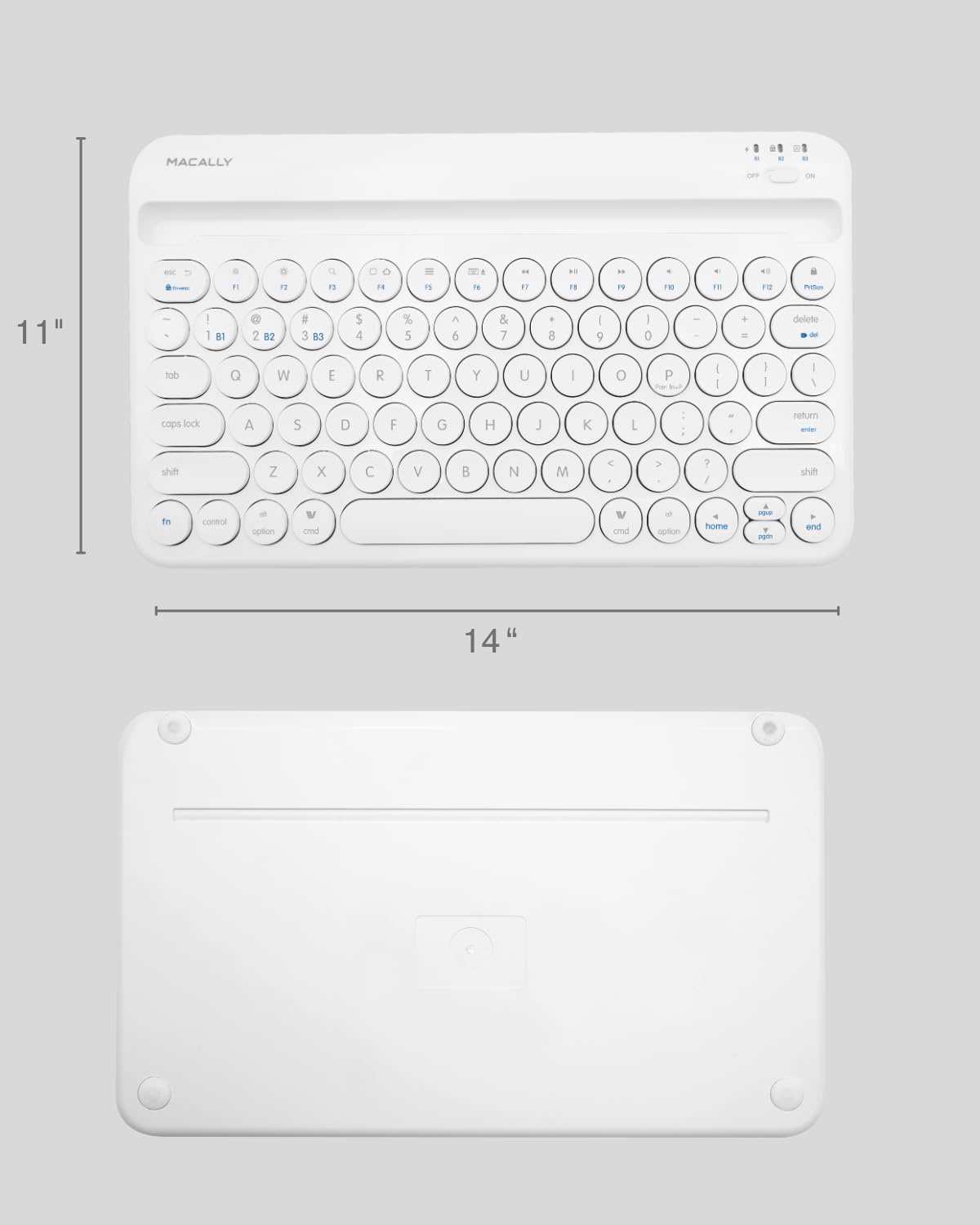
Image: The physical dimensions of the keyboard, measuring approximately 11 inches in width and 14 inches in length.

Image: The keyboard fitting easily into a backpack, demonstrating its compact size and suitability for travel and on-the-go use.
Баталгаат болон дэмжлэг
Macally products are designed for quality and reliability. For information regarding product warranty, technical support, or service, please visit the official Macally webсайт эсвэл харилцагчийн үйлчилгээний хэлтэстэй холбогдоно уу. Худалдан авалтын баримтаа баталгаат нэхэмжлэлд зориулж худалдан авалтын баталгаа болгон хадгална уу.
Та дэлгэрэнгүй мэдээлэл, дэмжлэг авах боломжтой Амазон дээрх Macally дэлгүүр.


