Танилцуулга
The Blackmagic Design ATEM Mini Pro ISO is a powerful four-input live production switcher designed for multi-camera live streaming and recording. This device allows you to connect multiple HDMI sources, such as cameras or computers, and switch between them seamlessly for professional-quality live productions. The ISO model uniquely records all individual input streams along with the program output, creating a DaVinci Resolve project file for flexible post-production.
This manual provides detailed instructions on setting up, operating, maintaining, and troubleshooting your ATEM Mini Pro ISO to ensure optimal performance.

Image: The ATEM Mini Pro ISO switcher, accompanied by a 6-foot HDMI cable and a 10-pack of fastener straps.
Тохиргоо
1. Савлах, анхны үзлэг
Carefully remove all components from the packaging. Verify that all items listed in the "What's in the box" section of your product description are present:
- Blackmagic Design ATEM Mini Pro ISO HDMI Switcher
- 12V цахилгаан хангамж
- HDA-106 High Speed HDMI Cable with Ethernet (Black, 6ft)
- 10 Pack Fastener Straps
- 1 жилийн баталгаат хугацааны мэдээлэл

Image: Included High-Speed HDMI cables for connecting video sources.

Image: One of the included fastener straps for cable management.
2. Цахилгааныг холбох
Connect the included 12V power supply to the 'POWER' input on the rear panel of the ATEM Mini Pro ISO. Plug the power supply into a suitable electrical outlet.
3. Видео эх үүсвэрүүдийг холбох
The ATEM Mini Pro ISO features four HDMI inputs. Connect your cameras, computers, or other video sources to the HDMI inputs labeled '1' through '4' on the rear panel using high-quality HDMI cables. Ensure your sources are set to a compatible video format (e.g., 1080p, 720p).

Image: Rear panel connections of the ATEM Mini Pro ISO, highlighting the HDMI inputs.
4. Connecting to a Monitor (Program Output)
Connect a monitor to the 'HDMI OUT' port on the rear panel to view your program output. This output displays the live switched video feed.
5. Connecting to a Computer (Control & Recording)
For full control and recording capabilities, connect the ATEM Mini Pro ISO to your computer via the USB-C port. Download and install the latest ATEM Software Control from the Blackmagic Design website. This software allows for advanced control, media management, and configuration.
For ISO recording, connect an external USB drive (SSD recommended) to the USB-C port. The ATEM Mini Pro ISO will record individual input streams and the program output directly to this drive.
6. Аудио холбох
Connect microphones or other audio sources to the 'MIC 1' and 'MIC 2' 3.5mm stereo input jacks. You can also embed audio from your HDMI sources. Audio levels can be adjusted using the ATEM Software Control.
Ашиглалтын заавар
1. Асаах
Once all connections are made, the ATEM Mini Pro ISO will power on automatically when connected to the 12V power supply.
2. Basic Switching
The front panel features large buttons for direct switching between your HDMI inputs. Press the numbered buttons (1-4) to select the desired input for your program output. Use the 'CUT' button for an instant transition or 'AUTO' for a smooth, pre-set transition.
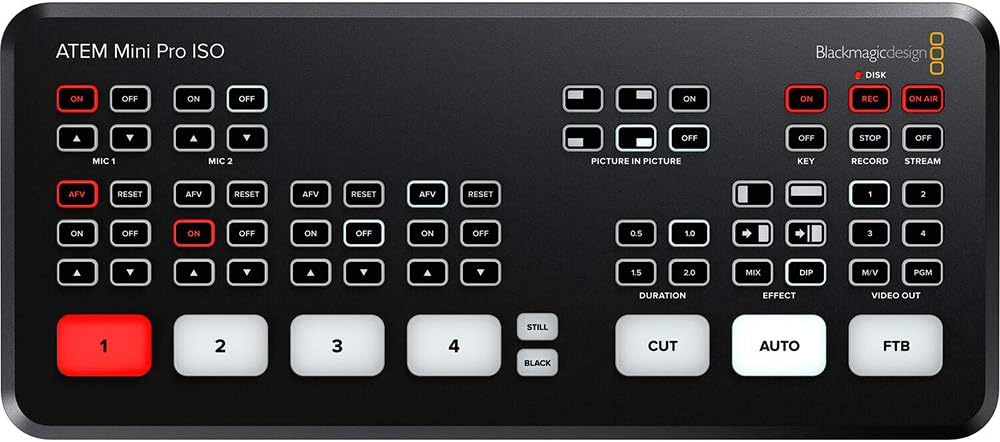
Image: The control panel of the ATEM Mini Pro ISO, showing input selection and transition buttons.
3. Бичлэг хийх болон дамжуулах
To begin recording, ensure an external USB drive is connected and press the 'REC' button on the front panel. The 'ON AIR' button initiates live streaming via the Ethernet connection, provided you have configured streaming settings in the ATEM Software Control.
4. Advanced Features (via ATEM Software Control)
The ATEM Mini Pro ISO supports a variety of advanced features accessible through the ATEM Software Control, including:
- Up/Down Keyers: For layering graphics or video.
- Advanced Chroma Keyer: For green screen/blue screen effects.
- Picture-in-Picture (DVE): For displaying one video source within another.
- Медиа тоглуулагч: For storing and playing still images (PNG, TGA, BMP, JPEG, TIFF formats supported, up to 20 stills).
- Аудио холигч: Comprehensive control over all audio inputs.
- Color Generators: For creating solid color backgrounds.
Засвар үйлчилгээ
To ensure the longevity and optimal performance of your ATEM Mini Pro ISO, follow these simple maintenance guidelines:
- Цэвэрлэгээ: Төхөөрөмжийн гадна талыг цэвэрлэхийн тулд зөөлөн, хуурай даавуу ашиглана уу. Зүлгүүрийн цэвэрлэгч эсвэл уусгагчаас зайлсхий.
- Агааржуулалт: Ensure the unit has adequate ventilation to prevent overheating. Do not block any vents.
- Кабелийн менежмент: Use the included fastener straps to keep cables tidy and prevent strain on ports.
- Програм хангамжийн шинэчлэлтүүд: Blackmagic дизайныг тогтмол шалгаж үзээрэй website for firmware and software updates to ensure you have the latest features and bug fixes.
Алдааг олж засварлах
| Асуудал | Боломжит шалтгаан | Шийдэл |
|---|---|---|
| Монитор дээр видео гаралт байхгүй. | Incorrect HDMI cable connection; monitor input not selected; incompatible video format. | Check HDMI cable connections. Ensure monitor is set to the correct HDMI input. Verify source video format is compatible with ATEM Mini Pro ISO. |
| Cannot connect to ATEM Software Control. | USB cable issue; software not installed or outdated; network configuration (for Ethernet). | Ensure USB-C cable is securely connected. Reinstall or update ATEM Software Control. Check network settings if connecting via Ethernet. |
| Бичлэг амжилтгүй болох эсвэл гэнэт зогсох. | USB drive not connected or full; drive speed too slow; drive format issue. | Verify USB drive is connected and has sufficient free space. Use a high-speed SSD. Ensure drive is formatted correctly (e.g., exFAT). |
| No audio from microphones. | Microphones not connected properly; audio levels too low in software; microphone type mismatch. | Check microphone connections. Adjust audio levels in ATEM Software Control. Ensure microphones are compatible (e.g., TRS for stereo). |
Үзүүлэлтүүд
| Онцлог | Дэлгэрэнгүй |
|---|---|
| Загварын дугаар | SWATEMMINIBPRISO |
| Оролтууд | 4 x HDMI (Video), 2 x 3.5mm Stereo (Audio) |
| Гаралт | 1 x HDMI (Program Out), 1 x USB-C (Webcam Out/Recording) |
| Холболт | Ethernet (for control and streaming), USB-C (for control and external drive recording) |
| Бичлэг хийж байна | ISO recording of all inputs + program output to external USB drive (DaVinci Resolve project file үе) |
| Хэмжээ | 10.9 x 5.9 x 5.2 инч (Багцын хэмжээ) |
| Жин | 2.74 фунт (Барааны жин) |
| Supported Still Image Formats | PNG, TGA, BMP, JPEG, TIFF (up to 20 stills) |
Баталгаат болон дэмжлэг
The Blackmagic Design ATEM Mini Pro ISO comes with a 1 жилийн баталгаат хугацаа. For technical support, software downloads, and additional resources, please visit the official Blackmagic Design webсайт. Баталгаат нэхэмжлэл гаргахын тулд худалдан авалтаа нотлох баримтаа хадгалаарай.
For the most up-to-date information and comprehensive guides, refer to the official Blackmagic Design support pages.