1. Танилцуулга
The Fireye BurnerLogix Interlock Annunciator Module (models YZ300 and YZ320) is designed to significantly enhance the interlock monitoring capabilities of the Fireye BurnerLogix system. This module integrates seamlessly with BurnerLogix YB110 (YB230) and ZB110 (ZB230) chassis/amplifiers, providing advanced diagnostic and messaging functions without interfering with the normal operation of the BurnerLogix system. It expands the display's functionality to act as a "first out" annunciator for up to twenty interlock switches, and includes a standard fuel selection circuit for comprehensive annunciation, even when two fuels are in use simultaneously.
2. Үндсэн шинж чанарууд
- Enhanced interlock monitoring for BurnerLogix YB110/ZB110 systems.
- "First out" annunciation for up to twenty interlock switches.
- Standard fuel selection circuit for comprehensive annunciation with dual fuels.
- Ability to modify interlock messages using BLV512 or BLL510 display modules.
- Custom message programming (up to 40 characters) via Windows-based YZ300P software.
- Compact wiring bases (4 in. wide by 7 in. high) with a 24-position terminal block.
3. Тохиргоо ба суурилуулалт
The YZ300/YZ320 Interlock Annunciator module connects to the BurnerLogix YB110 or ZB110 chassis/amplifier via a dedicated cable. Ensure that the BurnerLogix YB110 system has an engineering code of 3 or later for proper operation. Any ZB110 chassis/amplifier is compatible. The wiring bases are designed for minimal cabinet space consumption.
3.1 Утас
The module's wiring bases feature a 24-position terminal block. Each position is clearly numbered and includes a locking mechanism to ensure secure connections. Refer to the specific wiring diagrams provided with your BurnerLogix system and the YZ300/YZ320 module for detailed connection instructions.
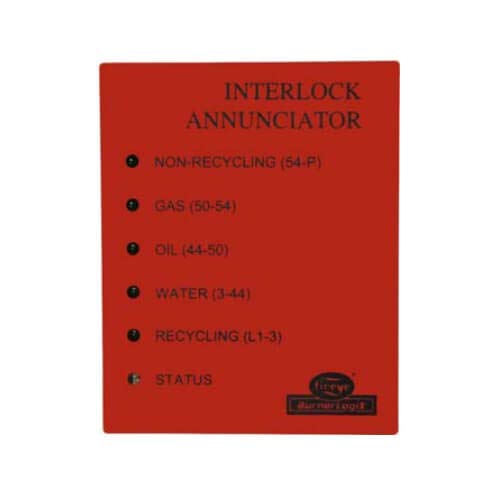
Зураг 1: Front panel of the Fireye Interlock Annunciator module. This image displays the front panel of the Fireye Interlock Annunciator module. It features indicators for 'NON-RECYCLING (54-P)', 'GAS (50-54)', 'OIL (44-50)', 'WATER (3-44)', 'RECYCLING (L1-3)', and 'STATUS', along with the Fireye logo.
4. Үйл ажиллагаа
Once connected, the BurnerLogix display automatically utilizes the Interlock Annunciator module's capabilities. When any of the twenty interlock switches connected to the module are activated, the BurnerLogix display will indicate the "first out" alarm, simplifying fault identification. The integrated fuel selection circuit ensures that all relevant annunciation messages are displayed, even in systems operating with two different fuels.
5. Програмчлал ба тохиргоо
The YZ300/YZ320 module allows for flexible customization of interlock messages:
5.1 Using Display Modules
You can select pre-defined interlock alarm messages for individual YZ300/YZ320 terminals from a library of available messages using a BLV512 or BLL510 display module. Refer to Fireye Bulletins BL-1001 and BLZ-1001 for detailed instructions on operating these controls.
5.2 Custom Message Programming
For more specific needs, custom messages (up to 40 characters in length) can be programmed for individual YZ300/YZ320 terminals. This requires a compatible PC running Windows-based YZ300P programming software, available from Fireye, along with the appropriate hardware interface. The YZ300/YZ320 Interlock Annunciator module does not need to be connected to a BurnerLogix system to undergo custom programming.
6. Техникийн үзүүлэлтүүд
- Бүтээгдэхүүний төрөл: Interlock Annunciator Module
- Загварууд: YZ300, YZ320
- Тохиромжтой байдал: Fireye BurnerLogix YB110 (engineering code 3 or later), ZB110 (any engineering code) chassis/ampамьдрагчид.
- Оролтын хэмжээtage: 120V (as per product title)
- Wiring Base Dimensions: 4 инч (өргөн) x 7 инч (өндөр)
- Терминал блок: 24-position, clearly numbered, with locking mechanisms.
- Annunciation Capacity: Up to 20 interlock switches.
- Custom Message Length: 40 хүртэлх тэмдэгт.
- Эхний боломжтой: 1 оны есдүгээр сарын 2020
7. Алдаа засах
If you encounter issues with the Fireye BurnerLogix Interlock Annunciator Module, consider the following general troubleshooting steps:
- Холболтуудыг баталгаажуулах: Ensure all cables and terminal block connections are secure and correctly wired according to the installation diagrams.
- Check BurnerLogix Compatibility: Confirm that your BurnerLogix YB110 system meets the engineering code 3 or later requirement.
- Review Алдааны мессежүүд: Pay close attention to any messages displayed on the BurnerLogix system, as they often provide specific diagnostic information.
- Consult Fireye Bulletins: Refer to Fireye Bulletins BL-1001 and BLZ-1001 for detailed operational and troubleshooting information related to the BurnerLogix system and compatible modules.
- Програм хангамжийн шалгалт: If custom programming issues arise, ensure the YZ300P programming software is correctly installed and the hardware interface is functioning.
For persistent issues, it is recommended to contact Fireye technical support or a qualified service technician.
8. Засвар үйлчилгээ
The Fireye BurnerLogix Interlock Annunciator Module is designed for reliable operation with minimal maintenance. Regular maintenance should focus on ensuring the integrity of its connections and cleanliness of the unit.
- Тогтмол үзлэг: Periodically inspect all wiring connections to the terminal block to ensure they remain tight and free from corrosion.
- Цэвэр байдал: Keep the module and its surrounding area clean and free from dust, debris, and moisture. Use a soft, dry cloth for cleaning. Do not use abrasive cleaners or solvents.
- Байгаль орчны нөхцөл: Ensure the module operates within its specified environmental conditions (temperature, humidity) to prevent premature wear or malfunction.
No user-serviceable parts are inside the sealed module. Any internal servicing should only be performed by authorized Fireye personnel.
9. Баталгаат хугацаа ба дэмжлэг
For information regarding the warranty coverage for your Fireye BurnerLogix Interlock Annunciator Module, please refer to the warranty documentation provided at the time of purchase or visit the official Fireye website. For technical support, service, or to obtain the latest software and bulletins, please contact Fireye customer service or your authorized Fireye distributor. Ensure you have your product model number and any relevant system information ready when contacting support.


