
1. Танилцуулга
This user manual provides comprehensive instructions for the UNIWA E1801 Senior Mobile Phone. Designed with large buttons and a clear display, this phone is ideal for users seeking simplicity and essential communication features. Please read this manual carefully before using your device to ensure proper operation and longevity.
2. Багцын агуулга
Багцыг нээхдээ дараах зүйлс багтсан эсэхийг шалгана уу.
- 1 x UNIWA E1801 Mobile Phone
- 1 x BL-5C 800 mAh Battery
- 1 х цэнэглэгч
- 1 х хэрэглэгчийн гарын авлага (энэ баримт бичиг)
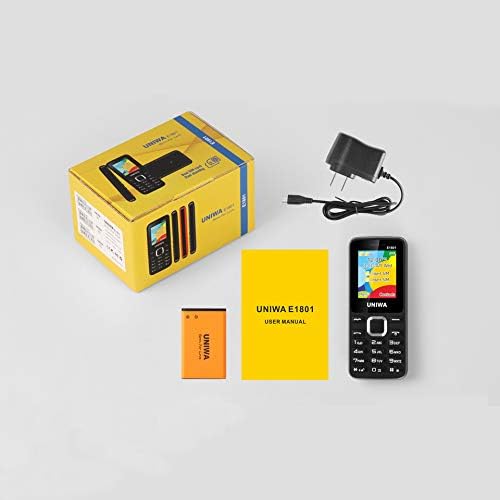
Image: Contents of the UNIWA E1801 package, including the phone, battery, charger, and user manual.
3. Төхөөрөмж дууссанview
The UNIWA E1801 features a user-friendly design with large, easy-to-press buttons and a non-slip frame for comfortable handling. It includes an ergonomic keypad with plating navigation keys for intuitive operation.
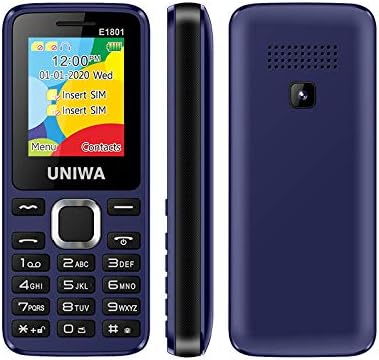
Зураг: урд, хажуу, хойд views of the UNIWA E1801 phone, highlighting its compact design.

Image: Detail showing the non-slip frame of the UNIWA E1801, designed for secure grip.

Image: Close-up of the ergonomic keypad and plating navigation keys on the UNIWA E1801.
4. Тохиргоо
4.1. Зай суурилуулах
- Утасны арын тагийг ховилоос нь зөөлөн татаж нээ.
- Align the gold contacts of the BL-5C 800 mAh battery with the contacts in the battery compartment.
- Батерейг байрандаа орох хүртэл зөөлөн дарна уу.
- Арын тагийг буцааж тавиад найдвартай бэхлэгдсэн эсэхийг шалгана уу.
4.2. SIM карт суурилуулах
The UNIWA E1801 supports Dual SIM cards, allowing for two active phone numbers simultaneously.
- With the back cover removed and battery out (if necessary), locate the SIM card slots.
- Insert your SIM card(s) into the designated slot(s) with the gold contacts facing down and the cut corner aligned correctly.
- SIM картыг бүрэн суутал зөөлөн түлхэнэ үү.
- Батерей болон арын тагийг дахин суулгана уу.

Image: The dual SIM card slots of the UNIWA E1801, illustrating how SIM cards are inserted.
4.3. Төхөөрөмжийг цэнэглэж байна
Эхний удаа ашиглахын өмнө утасны батарейг бүрэн цэнэглэ.
- Connect the charger cable to the charging port on the phone.
- Цэнэглэгчийг ердийн ханын залгуурт холбоно уу.
- Дэлгэц дээрх батерейны индикатор нь цэнэглэлтийн төлөвийг харуулах болно.
- Бүрэн цэнэглэгдсэний дараа цэнэглэгчийг салга.
5. Ашиглалтын заавар
5.1. Асаах/унтраах
- Асаахын тулд: Дэлгэц асах хүртэл Асаах/Дуудлагыг дуусгах товчийг дараад барина уу.
- Унтраахын тулд: Press and hold the Power/End Call button until the power-off options appear, then confirm.
5.2. Дуудлага хийх
- Идэвхгүй дэлгэцээс товчлуур ашиглан утасны дугаараа оруулна уу.
- Press the Call button (usually green) to initiate the call.
- To end a call, press the End Call button (usually red).
5.3. Мессеж илгээх
- Үндсэн дэлгэцээс 'Мессеж' цэс рүү очно уу.
- Select 'Write Message' or 'New SMS'.
- Товчлуур ашиглан мессежээ оруулна уу.
- Хүлээн авагчийн дугаарыг оруулна уу эсвэл харилцагчдаас сонгоно уу.
- Зурвас илгээнэ үү.
5.4. Харилцагчид
Утасны дэвтэр нь 300 хүртэлх харилцагч хадгалах боломжтой.
- Харилцагч нэмэх: Go to 'Contacts' > 'Add New Contact', then enter the name and number.
- Харилцагч хайж байна: From the 'Contacts' menu, use the navigation keys to scroll or search by name.
5.5. FM радио
The UNIWA E1801 features a wireless FM radio, allowing you to listen to your favorite stations without needing headphones as an antenna.
- Үндсэн цэснээс 'FM радио' програм руу очно уу.
- Use the navigation keys to scan for available stations or manually tune to a frequency.
- Adjust the volume using the side keys (if available) or navigation keys.

Image: The UNIWA E1801 showcasing its wireless FM radio feature.
5.6. Multimedia (MP3/MP4)
The phone supports MP3 audio and MP4 video playback.
- Ensure you have a TF card (up to 16GB) inserted with your media files.
- Navigate to the 'Multimedia' or 'File Manager' menu.
- Select 'MP3 Player' or 'Video Player' to browse and play your files.

Image: Illustration of the 2030 Box Speaker on the UNIWA E1801, indicating its audio capabilities.
5.7. Камер
The phone is equipped with a 0.08 MP rear camera.
- Үндсэн цэснээс 'Камер'-г сонгоно уу.
- Дэлгэцийг ашиглан өөрийн зургийг хүрээлээрэй viewологч.
- Press the designated button (usually the center navigation key) to take a photo.
5.8. Гар чийдэн
The built-in flashlight can be useful in low-light conditions.
- Refer to your phone's specific shortcut key or menu option to activate/deactivate the flashlight. This is often a long press on a specific number key or a dedicated button.

Image: The UNIWA E1801 demonstrating its integrated flashlight function.
5.9. Бусад функцууд
The UNIWA E1801 includes several utility functions:
- Тоглоомууд: Simple pre-installed games.
- Хуанли: To keep track of dates and events.
- Сэрүүлэгтэй цаг: Олон сэрүүлэг тохируул.
- Тооцоологч: Үндсэн арифметик функцүүд.
- Дэлхийн цаг: View time in different time zones.
- Цахим ном: Basic text file уншигч.
- WAP: Basic internet browsing (requires GPRS data plan).
- Бичлэг хийх: Voice recording function.
6. Засвар үйлчилгээ
- Цэвэрлэгээ: Use a soft, dry cloth to clean the phone's surface. Avoid liquid cleaners or abrasive materials.
- Батерейны арчилгаа: To prolong battery life, avoid extreme temperatures. Do not leave the phone charging for excessively long periods after it is full.
- Хадгалах: If storing the phone for an extended period, ensure the battery is partially charged (around 50%) and store it in a cool, dry place.
7. Алдаа засах
| Асуудал | Боломжит шалтгаан / шийдэл |
|---|---|
| Утас асахгүй байна. | Battery is depleted. Charge the phone for at least 30 minutes. Ensure battery is correctly installed. |
| Дуудлага хийх эсвэл хүлээн авах боломжгүй. | No network signal. Move to an area with better reception. SIM card not properly inserted. Reinsert SIM card. |
| Батерей хурдан дуусдаг. | Background applications running. Close unused applications. Battery may be old and require replacement. |
| Дуудагчийг сонсохгүй байна / Дуудагч намайг сонсохгүй байна. | Volume too low. Adjust call volume. Microphone/speaker blocked. Ensure no obstructions. |
Хэрэв эдгээр шийдлүүдийг туршиж үзсэний дараа асуудал хэвээр байвал хэрэглэгчийн дэмжлэгтэй холбогдоно уу.
8. Техникийн үзүүлэлтүүд
| Онцлог | Дэлгэрэнгүй |
|---|---|
| Загварын дугаар | ECON E1801 |
| Хэмжээ | 108 x 45 x 14 мм |
| Жин | 68 гр |
| CPU | SC6531E |
| Сүлжээний Band | 2G: GSM850/900/1800/1900 MHz, GPRS |
| SIM карт | Dual-SIM, Dual-Standby |
| Утасны дэвтрийн багтаамж | 300 тоо |
| Хонхны дуу | 64 chords, supports MP3, Midi ringtones |
| Илтгэгч | 2030 Илтгэгч |
| FM радио | Утасгүй FM радио |
| Дэлгэц | 1.77 inch QQVGA Display, 160 x 128 pixels |
| Камер | 0.08 MP Rear Camera, 640 x 480 pixels |
| Мультимедиа | MP3, MP4 |
| Санах ой | Supports TF cards up to 16 GB max |
| Bluetooth | V2.1 |
| Чичиргээ | Тиймээ |
| Ярилцах цаг | 240 минут хүртэл |
| Зогсоолын цаг | 200 цаг хүртэл |
| Хэлнүүд | English, Russian, Hebrew, Arabic, French, Spanish, Polish, German, Italian, Portuguese, Chinese |
9. Баталгаат хугацаа ба дэмжлэг
For warranty information and technical support, please refer to the warranty card included with your product or contact the retailer where you purchased the UNIWA E1801. You may also visit the official UNIWA website for further assistance and updated support information.