1. Танилцуулга
Thank you for choosing the Sunbuck AS-35BU Stereo Ampөргөгч. Энэхүү авсаархан хэрнээ хүчирхэг amplifier is designed to enhance your home audio experience, offering versatile connectivity options including Bluetooth 5.0, RCA, USB, SD card, FM radio, and AUX input. With a maximum output of 400W x 2 (RMS 60W x 2), it delivers high-fidelity sound with low distortion, suitable for various environments such as offices, small apartments, basements, and garages. This manual provides detailed instructions for setup, operation, maintenance, and troubleshooting to ensure optimal performance and longevity of your device.
2. Аюулгүй ажиллагааны чухал заавар
- Эрчим хүчний эх үүсвэр: -ийг баталгаажуулах amplifier is connected to a power supply matching the voltage indicated on the unit. Use only the provided AC power plug.
- Агааржуулалт: Агааржуулалтын нүхийг бүү бөглөөрэй. Үйлдвэрлэгчийн зааврын дагуу суурилуулна уу. Хэт халалтаас урьдчилан сэргийлэхийн тулд хангалттай агаарын урсгал чухал юм.
- Ус ба чийг: Do not expose this apparatus to rain or moisture. Do not use near water (e.g., bathtubs, sinks, swimming pools).
- Дулаан: Радиатор, халаалтын төхөөрөмж, зуух болон бусад төхөөрөмж (үүнд ampөргөгч) дулаан үүсгэдэг.
- Цэвэрлэгээ: Зөвхөн хуурай даавуугаар цэвэрлэ. Шингэн эсвэл аэрозоль цэвэрлэгч хэрэглэхээс зайлсхий.
- Үйлчилгээ: Энэ бүтээгдэхүүнийг өөрөө засварлах гэж бүү оролдоорой. Бүх үйлчилгээг мэргэшсэн үйлчилгээний ажилтнуудад шилжүүлээрэй. Төхөөрөмж нь цахилгаан тэжээлийн утас, залгуур гэмтсэн, шингэн асгарсан, эд зүйл төхөөрөмжид унасан, бороо, чийгэнд өртсөн, хэвийн ажиллахгүй байгаа, унасан зэрэг тохиолдолд засвар үйлчилгээ хийх шаардлагатай.
- Хэт ачаалал: Галын болон цахилгаанд цохиулах эрсдэлтэй тул ханын залгуур эсвэл өргөтгөлийн утсыг хэт ачаалж болохгүй.
3. Багцын агуулга
Доор жагсаасан бүх зүйл таны багцад байгаа эсэхийг шалгаарай.
- 1 x Sunbuck AS-35BU Stereo Ampөргөгч (110V)
- 1 x Алсын удирдлага
- 1 x FM антен
- 1 x AC Power Plug

Image: Contents of the Sunbuck AS-35BU amplifier package, including the amplifier unit, remote control, FM antenna, and AC power plug.
4. Бүтээгдэхүүн дууссанview
4.1 Урд самбар
The front panel provides access to primary controls and inputs for convenient operation.
- Эрчим хүч солих: -Ийг идэвхжүүлдэг ampөргөгчийг асаах/унтраах.
- Оруулагч сонгогч: Rotary knob to select between Media Player (USB/SD/Bluetooth/FM), AUX, CD, and Line inputs.
- Аяны удирдлага: Separate knobs for Treble and Bass adjustment to fine-tune audio output.
- Цуурай хяналт: Adjusts the echo effect for microphone inputs.
- Mic 1/2 Volume: Controls the overall volume for both microphone inputs.
- Хөгжмийн хэмжээ: Main rotary knob for adjusting the overall music volume.
- USB/SD/MMC/BT Player: Digital display and control buttons for media playback (Play/Pause, Scan, Mode, Next/Previous Track, Volume +/-).
- Микрофоны оролт: Two 1/4" (6.35mm) jacks for connecting microphones.

Зураг: Урд view of the Sunbuck AS-35BU amplifier, showing all controls and inputs including power switch, input selector, tone controls, media player interface, and microphone inputs.
4.2 Арын самбар
The rear panel houses all the necessary connections for your audio sources and speakers.
- RCA Audio Inputs: Two pairs of RCA inputs labeled 'CD' and 'LINE' for connecting external audio devices.
- Илтгэгчийн гаралт: Spring clip terminals for connecting left and right passive speakers.
- DC тэжээлийн оролт: For alternative DC power supply (DC12V 5A-10A).
- AC цахилгаан оролт: Standard AC power cord connection.
- Ботьtage Conversion Switch: Allows selection between 230V and 115V AC power.
- FM антенны оролт: Coaxial connector for the FM antenna.

Зураг: Ар талд view of the Sunbuck AS-35BU amplifier, displaying RCA audio inputs, speaker terminals, power input, voltage selector, and FM antenna connection.
4.3 Хэмжээ
The compact design of the AS-35BU allows for flexible placement in various settings.
- Бүтээгдэхүүний хэмжээ: 6.1 x 5.31 x 2.17 инч (15.5 x 13.5 x 5.5 см)
- Барааны жин: 2.2 фунт (1 кг)
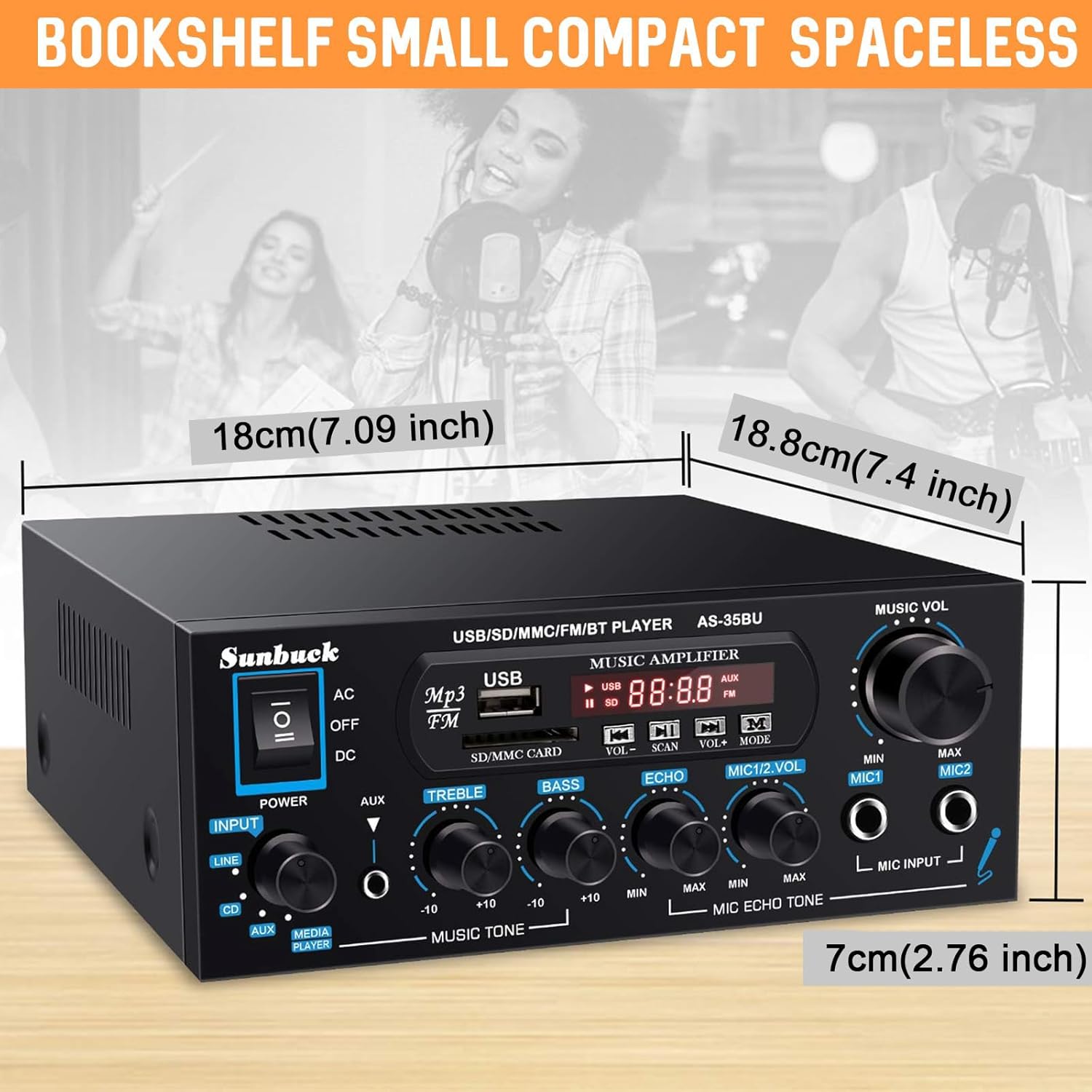
Image: Diagram showing the compact dimensions of the Sunbuck AS-35BU amplifier, highlighting its small footprint.
5. Тохиргоо
5.1 Чанга яригчийн холболт
Connect your passive speakers to the speaker output terminals on the rear panel. Ensure correct polarity (positive to positive, negative to negative) for optimal sound quality.
- Strip approximately 1/2 inch (1.2 cm) of insulation from the ends of your speaker wires.
- Press down on the spring clip terminal to open the connection point.
- Insert the bare wire into the opening.
- Release the spring clip to secure the wire.
- Repeat for all four connections (Left +, Left -, Right +, Right -).
5.2 Аудио оролтын холболт
Connect your audio sources to the appropriate RCA inputs on the rear panel.
- CD оролт: Use RCA cables to connect a CD player or other audio device.
- LINE оролт: Use RCA cables to connect devices like laptops, TVs, or projectors with AV audio output.
- AUX Input (Front Panel): Use a 3.5mm to 3.5mm audio cable to connect portable devices like smartphones or tablets to the front panel AUX jack.

Image: Diagram illustrating various input and output connections for the Sunbuck AS-35BU amplifier, including RCA, speaker terminals, and compatible devices.
5.3 Эрчим хүчний холболт
Before connecting to power, ensure the voltage conversion switch on the rear panel is set correctly for your region (230V or 115V). Then, connect the provided AC power plug to the ampөргөгч ба ханын залгуур.
5.4 FM антенны холболт
Connect the included FM antenna to the FM ANT coaxial input on the rear panel for radio reception.
6. Ашиглалтын заавар
6.1 Асаах/унтраах
Flip the power switch on the front panel to the 'ON' position to power on the amplifier. The digital display will illuminate. Flip to 'OFF' to power down.
6.2 Оролтын сонголт
Rotate the 'INPUT' knob on the front panel to select your desired audio source: 'MEDIA PLAYER' (for USB/SD/Bluetooth/FM), 'AUX', 'CD', or 'LINE'.
6.3 Дууны түвшин болон аяыг хянах
Adjust the 'MUSIC VOL' knob to control the overall output volume. Use the 'TREBLE' and 'BASS' knobs to fine-tune the high and low frequencies of your music.
6.4 USB/SD/MMC Playback
Insert a USB drive or SD/MMC card containing MP3 audio files into the respective slots on the front panel. The amplifier will automatically switch to 'MEDIA PLAYER' mode and begin playback. Use the control buttons (VOL+/-, SCAN, MODE, Next/Previous) to navigate and control playback.
6.5 Bluetooth холболт
Bluetooth төхөөрөмжийг холбохын тулд:
- Switch the input selector to 'MEDIA PLAYER'. The display will show 'BLUE' indicating Bluetooth mode.
- Мобайл төхөөрөмж дээрээ (ухаалаг утас, таблет, зөөврийн компьютер) Bluetooth-г идэвхжүүлж, боломжтой төхөөрөмжүүдийг хайж олоорой.
- Select 'AS-35BU' from the list of devices to pair. Once connected, you will hear a confirmation tone.
- Та одоо аудиог төхөөрөмжөөсөө утасгүй дамжуулах боломжтой amplifier. The wireless range is approximately 40 feet (12 meters). Note that signal and volume may be intermittent if there are physical obstructions like walls between the devices.

Image: Visual representation of the Sunbuck AS-35BU amplifier connecting wirelessly to various devices via Bluetooth, including smartphones, tablets, and laptops.
6.6 FM радиогийн ажиллагаа
FM радио функцийг ашиглахын тулд:
- Switch the input selector to 'MEDIA PLAYER' and then press the 'MODE' button until 'FM' is displayed.
- Press the 'SCAN' button to automatically scan and save available FM stations as presets.
- Use the 'Next/Previous Track' buttons on the front panel or the remote control to cycle through the saved presets. For direct frequency input, use the number pad on the remote control.
6.7 Микрофон болон Караоке функц
The amplifier supports two microphone inputs for karaoke or public address.
- Plug your 1/4" (6.35mm) microphones into the 'MIC INPUT' jacks on the front panel.
- Adjust the 'MIC 1/2 VOL' knob to control the microphone volume.
- Use the 'ECHO' knob to add or remove echo effect to the microphone sound.
6.8 Алсын удирдлагын ашиглалт
The included remote control provides convenient access to various functions from a distance. It allows for direct input of FM frequencies, track navigation, volume control, and mode selection.

Image: Step-by-step guide for installing the battery in the remote control, ensuring proper functionality.
7. Алдаа засах
If you encounter any issues with your Sunbuck AS-35BU amplifier, please refer to the table below for common problems and their solutions.
| Асуудал | Боломжит шалтгаан | Шийдэл |
|---|---|---|
| Хүч чадалгүй | Цахилгааны утас холбогдоогүй байна; Цахилгаан унтраалга унтарсан; Дууны түвшин буруу байнаtage сонголт. | Ensure power cord is securely plugged in. Turn power switch ON. Verify voltage switch (230V/115V) is set correctly. |
| Дууны гаралт байхгүй | Incorrect input selected; Volume too low; Speaker wires loose or incorrect polarity. | Select the correct input source. Increase 'MUSIC VOL' knob. Check speaker wire connections and polarity. |
| Bluetooth холболтын асуудал | Device not in pairing mode; Amplifier too far from device; Obstructions. | Баталгаажуулах amplifier is in 'BLUE' mode. Move device closer to amplifier. Remove obstructions. Try re-pairing. |
| FM радио хүлээн авах чадвар муу | Antenna not connected or positioned poorly; Weak signal. | Connect FM antenna securely. Adjust antenna position for better reception. Perform a new auto-scan for stations. |
| Гажуудсан дуу чимээ | Volume too high; Tone controls set incorrectly; Poor audio source quality. | Reduce 'MUSIC VOL'. Adjust 'TREBLE' and 'BASS' knobs. Test with a different audio source. |
8. Техникийн үзүүлэлтүүд
- Загвар: AS-35BU
- Эрчим хүчний гаралт: Max 400W x 2 (RMS 60W x 2)
- Bluetooth хувилбар: 5.0 (Wireless range: 40 feet / 12 meters)
- Оролтууд: 2 x RCA Audio (CD, Line), 2 x Microphone (1/4"), USB2.0, SD Card, Bluetooth 5.0, FM Radio, AUX (3.5mm front)
- Гаралт: 2-Channel Speaker Output
- Хэмжээ (L x W x H): 6.1 x 5.31 x 2.17 инч (15.5 x 13.5 x 5.5 см)
- Жин: 2.2 фунт (1 кг)
- Үйлдвэрлэгч: JS Electronics Limited
9. Засвар үйлчилгээ, арчилгаа
Таны урт наслалт, оновчтой гүйцэтгэлийг хангахын тулд ampөргөгч бол дараах засвар үйлчилгээний зааврыг дагаж мөрдөнө үү.
- Цэвэрлэгээ: Гадна талыг тогтмол арчиж байгаарай ampзөөлөн, хуурай даавуугаар арчина. Зүлгүүрийн цэвэрлэгч, лав, уусгагч хэрэглэж болохгүй.
- Агааржуулалт: Keep the ventilation openings clear of dust and debris. Ensure adequate space around the unit for proper airflow.
- Хадгалах: Хэрэв хадгалж байгаа бол amplifier for an extended period, disconnect it from the power source and store it in a cool, dry place away from direct sunlight and extreme temperatures.
- Харьцуулах: Төхөөрөмжийг болгоомжтой харьц. Унах, хүчтэй нөлөө үзүүлэхээс зайлсхий.
10. Баталгаат хугацаа ба дэмжлэг
Sunbuck products are manufactured with high-quality standards. For specific warranty information, please refer to the documentation included with your purchase or contact the retailer. If you require technical support or have questions not covered in this manual, please contact Sunbuck customer service or the authorized dealer from whom you purchased the product. Provide your model number (AS-35BU) and a detailed description of the issue for faster assistance.