Танилцуулга
This user manual provides comprehensive instructions for the setup, operation, maintenance, and troubleshooting of your Trust Ozaa Rechargeable Wireless Mouse. Please read this manual carefully before using the product to ensure optimal performance and longevity.

Image: The Trust Ozaa Rechargeable Wireless Mouse shown with its USB receiver and micro-USB charging cable. This image illustrates the main components included with the mouse.
Багцын агуулга
Бүх зүйл багцад байгаа эсэхийг шалгана уу:
- Trust Ozaa Rechargeable Wireless Mouse
- USB хүлээн авагч
- Micro-USB цэнэглэгч кабель
- Хэрэглэх заавар (энэ гарын авлага)

Image: The retail packaging for the Trust Ozaa Rechargeable Wireless Mouse, highlighting its key features such as 10m wireless range, comfortable design, and silent click buttons.
Тохиргоо
- Хулгана цэнэглэх: Before first use, connect the supplied micro-USB charging cable to the mouse's charging port and to a USB power source (e.g., computer USB port, USB wall adapter). The charging indicator light will illuminate. Allow the mouse to fully charge.
- USB хүлээн авагчийг оруулах: Locate the USB receiver, typically stored in a compartment on the underside of the mouse. Remove it and plug it into an available USB-A port on your computer (PC or Mac).
- Асаах: Turn on the mouse using the on/off switch located on the underside.
- Автомат холболт: The mouse should automatically connect to your computer. No additional drivers are typically required for basic functionality (Plug and Play).

Image: A user operating the Trust Ozaa mouse wirelessly next to a laptop, demonstrating its plug-and-play functionality and 10-meter wireless range.
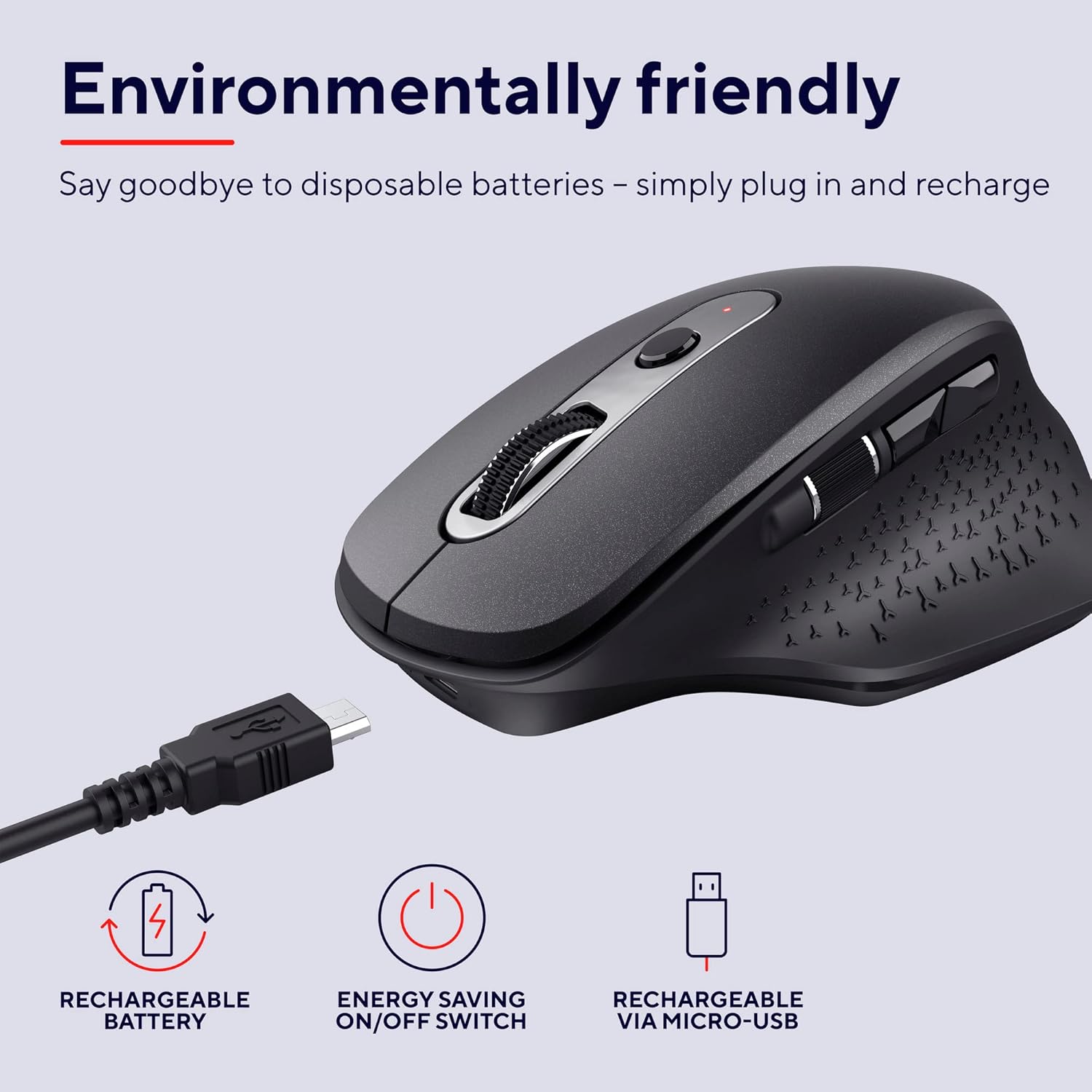
Image: The Trust Ozaa mouse being charged via its micro-USB cable, highlighting its rechargeable battery and energy-saving features.
Ашиглалтын заавар
Товчлуурын функцууд
- Зүүн товшилтын товчлуур: Standard primary click. Designed for silent operation.
- Баруун товчлуур дээр дарна уу: Standard secondary click. Designed for silent operation.
- Scroll Wheel (Middle Button): Баримт бичгүүдийг босоогоор гүйлгэх ба web pages. Press down for middle-click functionality.
- DPI тохируулах товч: Located behind the scroll wheel. Press to cycle through different cursor speeds (DPI settings: 800, 1200, 1600, 2400 DPI).
- Хажуугийн гүйлгэх дугуй: Located on the left side. Allows for horizontal scrolling.
- Урагшаа/Буцах товчлуурууд: Located above the side scroll wheel. Used for navigating forward and backward in web хөтөч эсвэл file судлаачид.

Зураг: Дээд тал нь view of the Trust Ozaa mouse, visually indicating the DPI adjustment, silent buttons, and convenient side scroll wheel.
DPI тохируулга
The mouse features an adjustable cursor speed (DPI) ranging from 800 to 2400 DPI. To change the DPI, press the dedicated DPI button located behind the main scroll wheel. Each press will cycle through the available settings, allowing you to select the sensitivity that best suits your task or preference.
Эрчим хүчний хэмнэлт
To conserve battery life, the mouse is equipped with an on/off switch on its underside. It also features an automatic sleep mode that activates after a period of inactivity. To wake the mouse, simply move it or click any button.
Засвар үйлчилгээ
- Цэвэрлэгээ: Хулганыг цэвэрлэхийн тулд зөөлөн, хуурай даавуу ашиглана уу. Зөрүүд шороонд бага зэрэг damp даавуу хэрэглэж болох ч дотор эд ангиудад чийг орохгүй байхыг анхаарна уу. Хүчтэй химийн бодис эсвэл зүлгүүрийн цэвэрлэгч хэрэглэж болохгүй.
- Цэнэглэж байна: Recharge the mouse when the battery indicator light signals low power or when performance degrades. Use only the provided charging cable or a compatible micro-USB cable.
- Хадгалах: Удаан хугацаагаар ашиглаагүй үед батерейны ашиглалтын хугацааг хэмнэхийн тулд хулганаа унтраагаарай. Сэрүүн, хуурай газар хадгална уу.
Алдааг олж засварлах
| Асуудал | Боломжит шалтгаан | Шийдэл |
|---|---|---|
| Хулгана хариу өгөхгүй байна. |
|
|
| Курсорын хөдөлгөөн тогтворгүй эсвэл үсрэлттэй байна. |
|
|
| Buttons not working. |
|
|
Үзүүлэлтүүд
| Брэнд | Итгэл |
| Загварын дугаар | 23812 |
| Холболтын технологи | Радио давтамж (утасгүй) |
| Утасгүй сүлжээ | 10 метр хүртэл |
| DPI тохиргоо | 800, 1200, 1600, 2400 DPI (Тохируулж болох) |
| Товчлуурын тоо | 6 (Left, Right, Scroll Wheel Click, DPI, Forward, Backward) + Side Scroll Wheel |
| Гол товчлуурууд | Silent Left and Right Buttons |
| Эрчим хүчний эх үүсвэр | Rechargeable Battery (1 AAA battery included, contained in equipment) |
| Цэнэглэх порт | Микро-USB |
| Бүтээгдэхүүний хэмжээ (L x W x H) | 7.7 x 11.8 x 4.6 см |
| Зүйлийн жин | 122 гр |
| Тоног төхөөрөмжийн платформын нийцтэй байдал | PC, Mac |
| Үйлдлийн системийн нийцтэй байдал | Chrome OS, Windows, Mac OS |
| Онцлог шинж чанарууд | Wireless, Rechargeable, Quiet, Ergonomic Design, Energy-saving On/Off Switch |
Баталгаат болон дэмжлэг
Баталгаат хугацаа болон техникийн дэмжлэг авахыг хүсвэл албан ёсны Итгэлцлийн сантай холбогдоно уу webсайт эсвэл харилцагчийн үйлчилгээтэй шууд холбогдоно уу. Баталгаат нэхэмжлэл гаргахын тулд худалдан авалтаа нотлох баримтаа хадгалаарай.
Trust Official Webсайт: www.trust.com
Худалдагчийн албан ёсны бүтээгдэхүүний видео бичлэгийг энэ гарын авлагад оруулах боломжгүй.


