Танилцуулга
This manual provides detailed instructions for the setup, operation, and maintenance of your groov e Atlas Radio Alarm Clock with Wireless Charger. Please read this manual thoroughly before using the device to ensure proper function and to maximize your user experience. Keep this manual for future reference.
Багцын агуулга
Бүх зүйл багцад байгаа эсэхийг шалгана уу:
- groov e Atlas Radio Alarm Clock
- Эрчим хүчний адаптер
- Хэрэглэгчийн гарын авлага
Бүтээгдэхүүний онцлог
- Wireless Charging (5W): Тохиромжтой ухаалаг гар утсыг дээд гадаргуу дээр байрлуулж эвтэйхэн цэнэглээрэй.
- FM радио: Tune into your favorite FM stations.
- Лэд дэлгэц: Clear digital time display.
- Цахилгаан тэжээл: Reliable power supply for continuous operation.
- USB цэнэглэх станц: Additional USB port for charging other devices.
- Хос дохиолол: Өөр өөр сэрэх цагт хоёр бие даасан сэрүүлгийг тохируулна уу.
- Дэлгэцийн бүдэгрүүлэгч: Adjust the brightness of the LED display.
Тохиргоо
- Эрчим хүчийг холбох: Insert the power adapter into the 'DC IN' port on the back of the alarm clock, then plug the adapter into a wall outlet. The display will light up.
- Цаг тохируулах:
- Press and hold the 'TIME SET' button located on the back of the unit.
- Use the 'TUN-' or 'TUN+' buttons on the top panel to adjust the hour.
- Press 'TIME SET' again to confirm the hour and move to minutes.
- Use 'TUN-' or 'TUN+' to adjust the minutes.
- Press 'TIME SET' once more to confirm and exit time setting.
- To switch between 12-hour and 24-hour format, press the '12/24H' button on the back.

Зураг: Ар талд view of the groov e Atlas alarm clock, highlighting the DC IN power input and the USB charging port. The '12/24H TIME SET' and 'SLEEP' buttons are also visible.
Ашиглалтын заавар
Setting Alarms (ALM1 / ALM2)
- Press the 'ALM1' or 'ALM2' button to select the alarm you wish to set. The alarm icon will flash on the display.
- Use the 'TUN-' or 'TUN+' buttons to adjust the alarm hour.
- Press the 'ALM1' or 'ALM2' button again to confirm the hour and move to minutes.
- Use 'TUN-' or 'TUN+' to adjust the alarm minutes.
- Press the 'ALM1' or 'ALM2' button a third time to confirm the alarm time. The alarm icon will remain lit, indicating the alarm is active.
- To deactivate an alarm, press the corresponding 'ALM1' or 'ALM2' button until the alarm icon disappears from the display.
FM радиогийн үйл ажиллагаа
- Асаах/унтраах: Press the 'ON/OFF' button to turn the radio on or off.
- Автомат скан хийх: Боломжтой FM станцуудыг автоматаар сканнердаж, хадгалахын тулд 'SCAN' товчийг дарна уу.
- Гараар тааруулах: Use the 'TUN-' or 'TUN+' buttons to manually adjust the frequency. Press and hold for faster tuning.
- Урьдчилан тохируулсан станцууд: Use 'MEM-' or 'MEM+' to cycle through saved preset stations.
- Дууны хэмжээг тохируулах: Use the 'VOL-' or 'VOL+' buttons to control the radio volume.
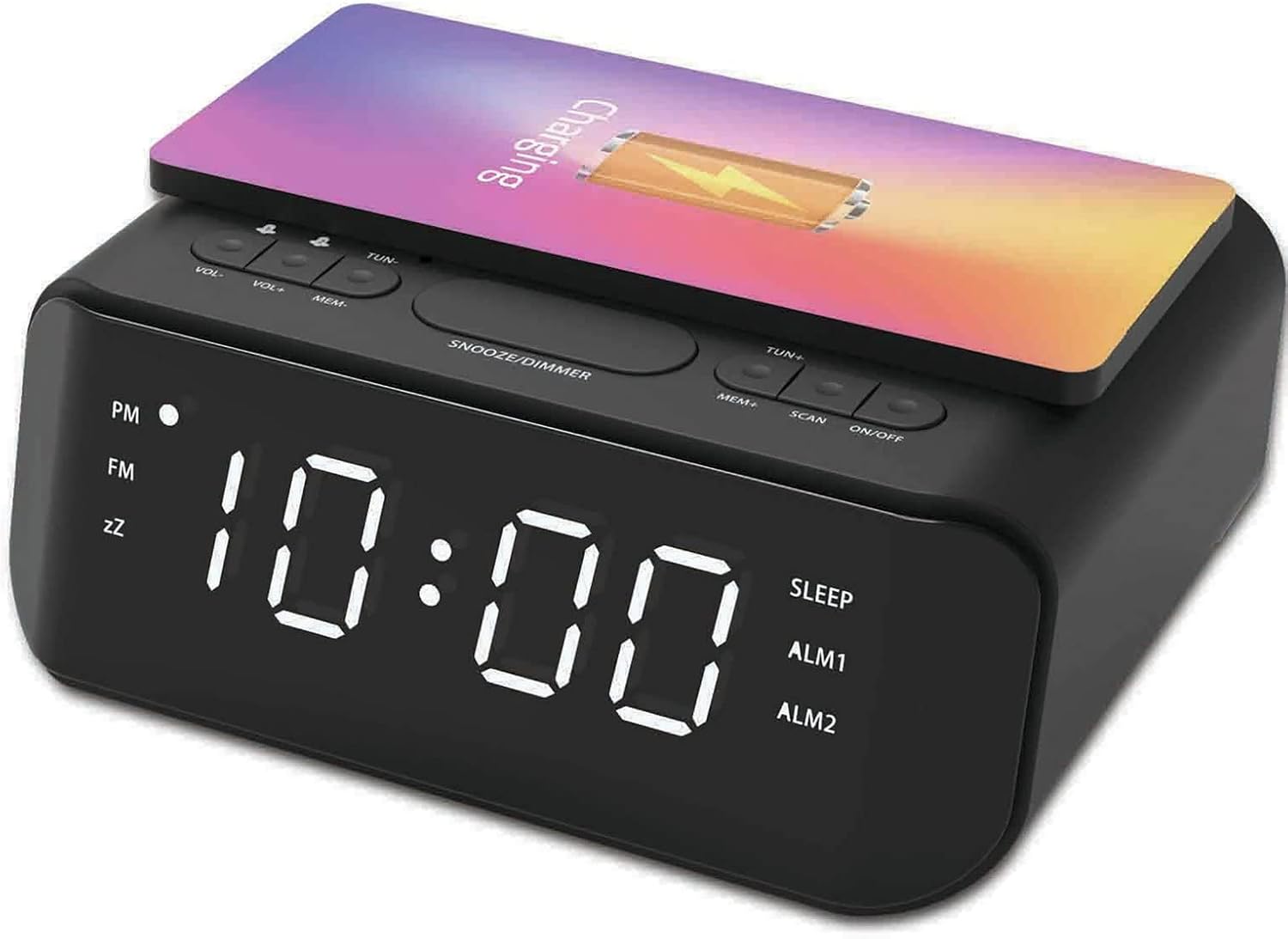
Зураг: дээд view of the groov e Atlas alarm clock, illustrating the layout of the control buttons for volume, tuning, memory, scan, and power.
Утасгүй цэнэглэх
- Ensure your smartphone is compatible with 5W Qi wireless charging.
- Place your compatible smartphone centrally on the wireless charging pad located on the top surface of the alarm clock.
- The phone's display should indicate that charging has begun. If not, adjust the phone's position.

Image: A smartphone placed on the groov e Atlas alarm clock's top surface, showing the charging indicator on the phone's screen, confirming wireless charging is active.
USB цэнэглэх
- Connect a USB charging cable (not included) to the USB port on the back of the alarm clock.
- Кабелийн нөгөө үзүүрийг төхөөрөмждөө холбоно уу.
- Таны төхөөрөмж цэнэглэж эхэлнэ.
Диммерийг харуулах
Press the 'SNOOZE/DIMMER' button to cycle through different brightness levels for the LED display. This allows you to adjust the display to your preferred visibility, especially in dark environments.
Засвар үйлчилгээ
- Цэвэрлэгээ: Зөөлөн, хуурай даавуугаар сэрүүлэгтэй цагны гадаргууг цэвэрлэ. Шингэн цэвэрлэгч болон зүлгүүрийн материалыг бүү ашигла.
- Хадгалах: Удаан хугацаагаар ашиглаагүй бол төхөөрөмжийг салгаад сэрүүн, хуурай газар хадгална уу.
- Аюулгүй байдал: Do not expose the device to water, high humidity, or extreme temperatures. Avoid dropping or subjecting the device to strong impacts.
Алдааг олж засварлах
| Асуудал | Боломжит шалтгаан | Шийдэл |
|---|---|---|
| Төхөөрөмж асахгүй байна. | Цахилгаан адаптер холбогдоогүй эсвэл залгуур буруу байна. | Тэжээлийн адаптер нь төхөөрөмж болон ажиллаж байгаа ханын залгуурт найдвартай холбогдсон эсэхийг шалгаарай. Өөр залгуураар оролдоно уу. |
| Утасгүй цэнэглэгч ажиллахгүй байна. | Phone not Qi-compatible or not positioned correctly. | Verify your phone supports Qi wireless charging. Reposition the phone centrally on the charging pad. Remove any thick phone cases. |
| Сэрүүлэг дуугарахгүй байна. | Сэрүүлэг идэвхжээгүй эсвэл дууны түвшин хэт бага. | Check if the alarm icon is lit on the display. Increase the alarm volume using the 'VOL+' button. |
| Радио хүлээн авалт муу байна. | Сул дохио эсвэл антенны байрлал. | Extend and adjust the position of the FM antenna wire on the back of the unit for better reception. |
Үзүүлэлтүүд
- Загварын дугаар: GVWC06BK
- Брэнд: groov e
- Өнгө: Хар
- Дэлгэцийн төрөл: Дижитал LED
- Эрчим хүчний эх үүсвэр: Mains Powered (AC Adapter included)
- Утасгүй цэнэглэх гаралт: 5W
- USB цэнэглэх гаралт: 5V/1A
- Дохиоллын онцлогууд: Dual Alarm, Snooze
- Радио: FM
- Материал: Акрилонитрил бутадиен стирол (ABS)
- Дүрс: Тэгш өнцөгт
- Суурилуулах төрөл: Ширээний бэхэлгээ
- Хөдөлгөөний төрөл: Кварц
- Батерей: Not included (requires 1 battery for backup, type not specified in data)
Баталгаат болон дэмжлэг
Your groov e Atlas Radio Alarm Clock GVWC06BK comes with a standard manufacturer's warranty. Please refer to the warranty card included in your package for specific terms and conditions, including the warranty period and coverage details.
For technical support, troubleshooting assistance, or warranty claims, please contact groov e customer service through their official webсайт эсвэл таны баталгаат картанд заасан холбоо барих мэдээлэл.
Баталгаат хугацаатай холбоотой лавлагаа авахын тулд худалдан авсан баримтаа хадгална уу.


