Танилцуулга
Thank you for choosing the Hoover H-PURIFIER 300 HHP30C Air Purifier. This device is designed to improve your indoor air quality by effectively filtering various pollutants. Equipped with advanced sensors and a triple-action HEPA13 filter, it captures PM2.5, PM10, VOCs, CO, and removes up to 99.97% of bacteria and pollen. This manual provides essential information for the safe and efficient use of your air purifier.
Аюулгүй байдлын чухал мэдээлэл
Please read all safety instructions before operating the appliance. Keep this manual for future reference.
- Төхөөрөмжийг газардуулсан тэжээлийн залгуурт зөв томоор холбосон эсэхийг шалгаарайtage (230 В).
- Гэмтсэн утас, залгууртай төхөөрөмжийг бүү ажиллуул.
- Агаарын оролт, гаралтыг саад тотгороос хол байлга.
- Төхөөрөмжийг усны ойролцоо эсвэл хэт чийглэг орчинд бүү ашигла.
- Энэ хэрэгсэл нь зөвхөн дотор ашиглах зориулалттай.
- Төхөөрөмжийг цэвэрлэх, засвар үйлчилгээ хийхээсээ өмнө цахилгааны утсыг салга.
Бүтээгдэхүүн дууссанview
The Hoover H-PURIFIER 300 features an intuitive design with integrated sensors and a multi-layer filtration system.

Зураг 1: Урд view of the Hoover H-PURIFIER 300 Air Purifier, showcasing its sleek design and multi-sensor area.

Зураг 2: Дээд тал view of the air purifier, highlighting the control panel with its various indicators and buttons.
Гол бүрэлдэхүүн хэсгүүд:
- Хяналтын самбар: Located on the top, with touch controls and a 4-color LED light ring indicating air quality.
- Multi-Sensors: Detects PM2.5, PM10, VOCs, and CO levels in the air.
- Агаарын оролт: Located around the lower section of the unit for 360° air intake.
- Агаарын гарц: Located at the top for purified air release.
- HEPA13 шүүлтүүр: A triple-action filter system for comprehensive air purification.
- Hidden Handles: Хялбар зөөвөрлөхийн тулд.
Тохируулах заавар
1. Савлах ба байрлуулах
- Агаар цэвэршүүлэгчийг савлагаанаас нь болгоомжтой авч хая.
- Place the unit on a flat, stable surface, ensuring at least 20 cm of clear space around all sides for optimal airflow. The unit is designed to purify areas up to 100m².
- Төхөөрөмжийг дулааны эх үүсвэрийн ойролцоо, нарны шууд тусгал эсвэл өндөр чийгшилтэй газар байрлуулахаас зайлсхий.
2. Шүүлтүүр суурилуулах
The HEPA13 filter is typically pre-installed but may require removal of protective packaging before first use.
- Locate the filter access panel, usually at the bottom or side of the unit.
- Open the panel and ensure the HEPA13 filter is correctly seated and any plastic wrapping is removed.
- Шүүлтүүрийн хандалтын самбарыг найдвартай хаа.
3. Эрчим хүчний холболт
- Цахилгааны утсыг тохирох цахилгаан залгуурт (230 В) залгаарай.
- Төхөөрөмж зогсолтын горимд орно.
4. App Connection (hOn App)
For advanced control and real-time air quality monitoring, connect your air purifier to the hOn app.
- Ухаалаг гар утасныхаа апп дэлгүүрээс hOn аппликейшнийг татаж аваарай.
- Бүртгэл үүсгэх эсвэл нэвтэрнэ үү.
- Follow the in-app instructions to add your Hoover H-PURIFIER 300. This typically involves enabling Wi-Fi and Bluetooth on your phone and pressing a specific button on the purifier to initiate pairing.

Figure 3: A smartphone screen showing the hOn app, used for controlling the air purifier and monitoring air quality.
Ашиглалтын заавар
1. Асаах/унтраах
- Press the power button on the control panel or via the hOn app to turn the unit on or off.
2. Үйлдлийн горимууд
The H-PURIFIER 300 offers several operating modes:
- Авто горим: The purifier automatically adjusts fan speed based on detected air quality levels (PM2.5, PM10, VOC, CO). This is the recommended mode for continuous operation.
- Night Mode (Sleep Function): Reduces fan speed to its lowest setting (21 dB) and dims the control panel lights for quiet operation during sleep.
- Турбо горим: Operates at maximum fan speed for rapid air purification.
- Гарын авлагын хурд: Allows you to manually select a fan speed (e.g., 3 speeds available).
3. Air Quality Indicator (LED Ring)
The LED light ring on the control panel changes color to indicate current air quality:
- Ногоон: Маш сайн агаарын чанар.
- Шар: Дунд зэргийн агаарын чанар.
- Улбар шар: Агаарын чанар муу.
- Улаан: Агаарын чанар маш муу.
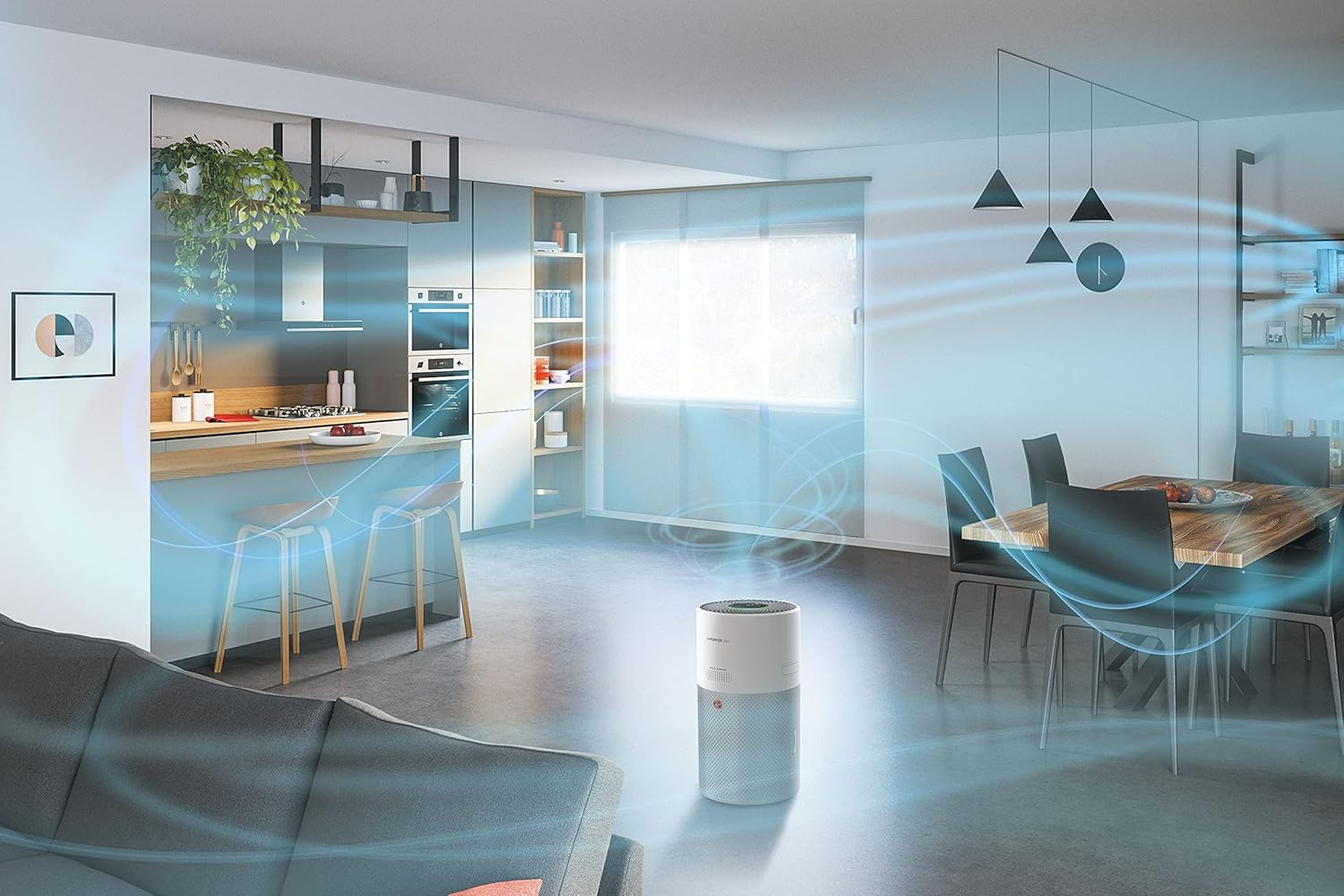
Figure 4: Illustration of the 360-degree airflow system, showing air intake from all sides and purified air expulsion from the top.
Засвар үйлчилгээ
Тогтмол засвар үйлчилгээ нь агаар цэвэршүүлэгчийн оновчтой ажиллагааг хангаж, ашиглалтын хугацааг уртасгадаг.
1. Шүүлтүүрийг солих
The HEPA13 filter has a limited lifespan and needs to be replaced periodically. The hOn app will notify you when a filter change is due.
- Агаар цэвэршүүлэгчийг цахилгаан залгуураас салга.
- Шүүлтүүрийн хандалтын самбарыг нээнэ үү.
- Хуучин шүүлтүүрийг аваад зохих ёсоор нь хая.
- Insert a new genuine Hoover HEPA13 filter, ensuring it is correctly oriented.
- Шүүлтүүрийн хандалтын самбарыг найдвартай хаа.
- Plug the unit back in. Reset the filter life indicator via the control panel or hOn app if prompted.
2. Мэдрэгч цэвэрлэх
Dust and debris can accumulate on the sensors, affecting their accuracy. Clean them regularly, especially if you notice inconsistent air quality readings.
- Төхөөрөмжийг салга.
- Gently wipe the sensor area (located on the side/back of the unit) with a soft, dry cloth or a cotton swab. Do not use liquids or abrasive cleaners.
3. Гадна цэвэрлэгээ
- Wipe the exterior surfaces of the air purifier with a soft, damp даавуу.
- Do not allow water to enter the unit.
- Avoid using harsh chemicals or abrasive cleaning agents.
Алдааг олж засварлах
If you encounter issues with your Hoover H-PURIFIER 300, refer to the following table:
| Асуудал | Боломжит шалтгаан | Шийдэл |
|---|---|---|
| Төхөөрөмж асахгүй байна. | Цахилгаан хангамж байхгүй. | Check if the power cord is securely plugged into the outlet and the unit. Test the outlet with another device. |
| Агаар цэвэршүүлэх чадвар муу. | Clogged or incorrectly installed filter. | Check filter installation. Replace the filter if it is dirty or expired. |
| Inaccurate air quality readings. | Dirty sensors. | Clean the air quality sensors as described in the Maintenance section. |
| Cannot connect to hOn app. | Wi-Fi/Bluetooth issues; incorrect pairing process. | Ensure your phone's Wi-Fi and Bluetooth are on. Restart the air purifier and your phone. Follow the app's pairing instructions carefully. Try disabling Wi-Fi on the unit for 30 minutes, then re-enabling and trying to connect again. |
| Нэгж дуу чимээтэй байна. | Operating in Turbo mode; obstruction in fan. | Switch to Auto or Night mode for quieter operation. Check for any foreign objects obstructing the fan. |
Үзүүлэлтүүд
| Онцлог | Дэлгэрэнгүй |
|---|---|
| Брэнд | Гувер |
| Загварын дугаар | HHP30C |
| Өнгө | Цагаан |
| Бүтээгдэхүүний хэмжээ (L x W x H) | 27.99 x 31.39 x 52.04 см |
| Зүйлийн жин | 6.3 кг |
| Хүч | 35 ватт |
| Ботьtage | 230 В |
| Дууны түвшин | 21 Decibels (in Night Mode) |
| Шүүлтүүрийн төрөл | HEPA13 (Triple-action) |
| Шалны талбайн хамрах хүрээ | 100 м² хүртэл |
| Хяналтын арга | Control Panel, hOn App (Wi-Fi + BLE) |
| Онцлог шинж чанарууд | Sleep Function, Gas Sensor, Night Mode, Turbo Mode, Pollen Filtering |
| Эрчим хүчний эх үүсвэр | Цахилгаан утас |
| Тохиромжтой үзүүлэлтүүд | TUV |
Баталгаат болон дэмжлэг
The Hoover H-PURIFIER 300 HHP30C comes with a manufacturer's warranty. Please refer to the warranty card included in your product packaging for specific terms and conditions.
Сэлбэг хэрэгслийн бэлэн байдал:
Spare parts for this model are available for a period of 2 years from the date of purchase.
Хэрэглэгчийн дэмжлэг:
For technical assistance, troubleshooting beyond this manual, or to inquire about spare parts, please contact Hoover customer support. Contact details can be found on the official Hoover webсайт эсвэл таны бүтээгдэхүүний баримт бичигт.


