1. Бүтээгдэхүүн дууссанview
Пurline WS015 is a versatile weather station designed to provide detailed and current information regarding indoor and outdoor environmental conditions. This device monitors temperature, humidity, and offers a weather forecast. It also includes a digital clock with an alarm function and a calendar display.
Equipped for both indoor and outdoor use, the WS015 features a clear digital LCD display with animated symbols for weather forecasting. It stores maximum and minimum readings and tracks temperature trends over the past 12 hours. The main unit can also function as a USB charging hub for other devices.
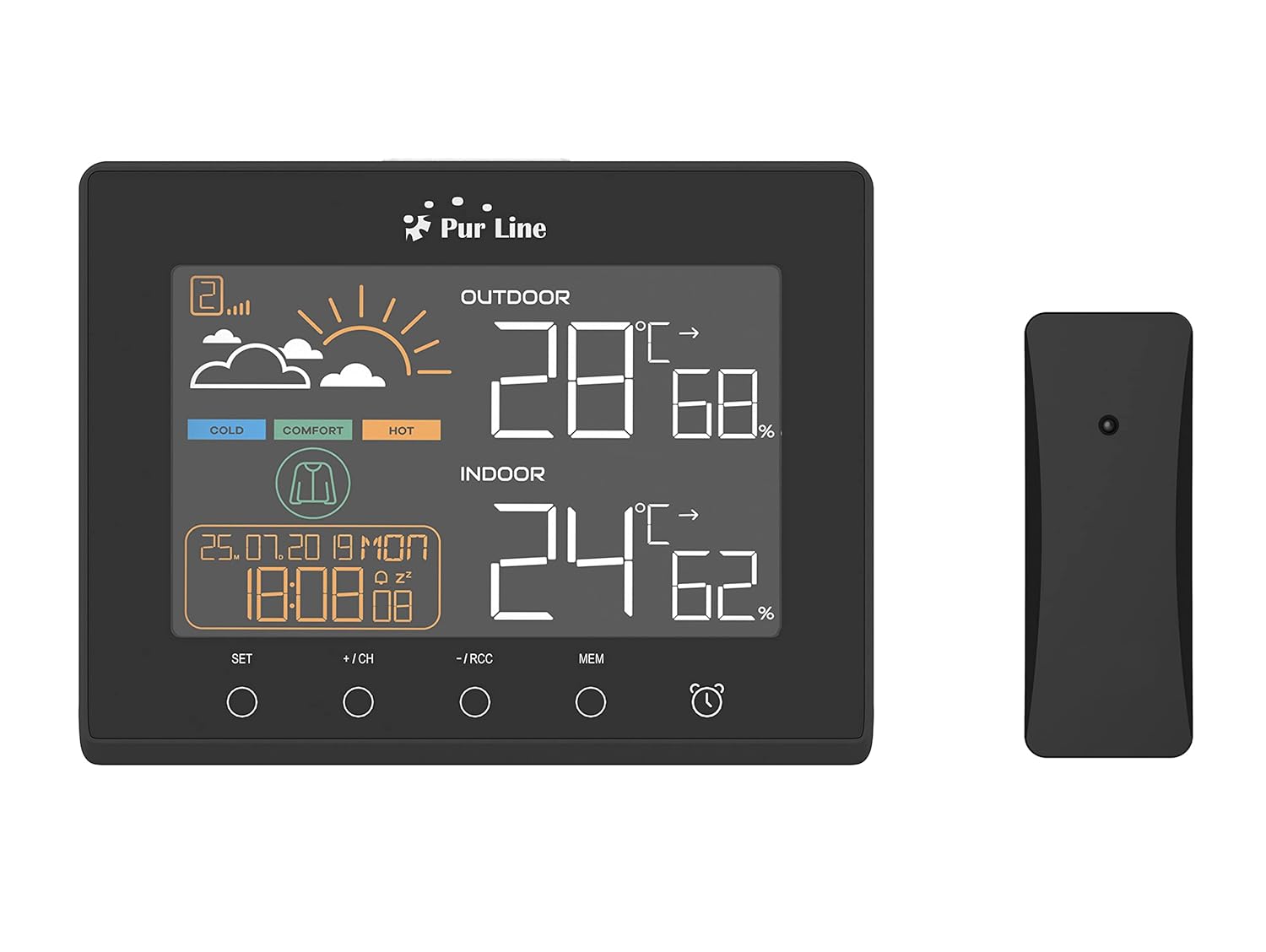
Урд view of the PUR LINE WS015 Weather Station display unit and its wireless outdoor sensor.
2. Тохируулах заавар
2.1. Сав баглаа боодол ба эд ангиуд
Carefully remove all components from the packaging. Ensure you have the main display unit and the wireless outdoor sensor.
2.2. Үндсэн нэгжийг тэжээх
The main unit requires 3 AAA batteries (not included) or can be powered via a USB connection. To install batteries:
- Үндсэн нэгжийн арын хэсэгт байрлах зайны тасалгааны тагийг нээнэ үү.
- Зөв туйлшралыг (+/-) ажиглан 3 AAA батерейг оруулна уу.
- Зайны тасалгааны тагийг хаа.
Alternatively, connect the main unit to a USB power source using a compatible USB cable (not included).
2.3. Гадна мэдрэгчийн байршил
The outdoor sensor is splash-proof (IP rated) but should be placed in a sheltered location to protect it from direct rain and prolonged sunlight, which can affect temperature readings. Ensure the sensor is within effective transmission range of the main unit (typically up to 30 meters in open air).
2.4. Анхны синхрончлол
Once both the main unit and the outdoor sensor are powered, they should automatically synchronize. If synchronization does not occur, press the 'CH' button on the main unit to initiate a search for the sensor. Ensure the sensor is close to the main unit during initial setup.

Арын view of the PUR LINE WS015 Weather Station, showing the battery compartment and stand.
3. Ашиглалтын заавар
3.1. Дэлгэц Overview
LCD дэлгэц нь дараах мэдээллийг харуулна.
- Гаднах температур ба чийгшил: Утасгүй мэдрэгчээс уншсан мэдээлэл.
- Өрөөн доторх температур ба чийгшил: Үндсэн төхөөрөмжийн дотоод мэдрэгчээс гарсан уншилтууд.
- Цаг агаарын урьдчилсан мэдээ: Animated symbols indicating predicted weather conditions.
- Цаг, огноо: Current time, day, and date.
- Тав тухтай байдлын үзүүлэлт: Based on indoor temperature and humidity.
- Temperature Trend: Arrows indicating rising, falling, or stable temperature over the last 12 hours.

Ойролцоогоор view of the PUR LINE WS015 Weather Station display, showing outdoor and indoor temperature, humidity, time, date, and weather forecast symbols.
3.2. Товчлуурын функцууд
Үндсэн төхөөрөмж нь хэд хэдэн хяналтын товчлууртай:
- Тохируулах: Enters setting mode for time, date, and alarm. Confirms settings.
- +/CH: Increases values during setting. In normal mode, cycles through outdoor sensor channels or initiates sensor search.
- -/RCC: Decreases values during setting. In normal mode, manually initiates RCC (Radio Controlled Clock) signal reception.
- MEM: Displays maximum and minimum temperature/humidity records. Press again to clear records.
- Сэрүүлгийн дүрс: Сэрүүлгийн функцийг идэвхжүүлж эсвэл идэвхгүй болгоно.
3.3. Цаг, огноог тохируулах
- -г удаан дар SET цагийн дэлгэц анивчих хүртэл товчийг дарна уу.
- -г ашиглана уу + or - товчлуурыг дарж цагийг тохируулаад дараа нь дарна уу SET баталгаажуулж, минут руу шилжих.
- Минут, жил, сар, өдрөөр давтана.
- дарна уу SET тохиргооны горимоос гарахын тулд.
3.4. Сэрүүлгийг тохируулах
- дээр дарна уу Сэрүүлгийн дүрс Сэрүүлгийн цагийг харуулахын тулд нэг удаа дарна уу.
- -г удаан дар Сэрүүлгийн дүрс Сэрүүлгийн цаг анивчих хүртэл товчийг дарна уу.
- -г ашиглана уу + or - buttons to adjust the alarm hour, then press the Сэрүүлгийн дүрс button to confirm and move to minutes.
- Хэдэн минутын турш давтана.
- дээр дарна уу Сэрүүлгийн дүрс button to exit setting mode. Press it again in normal mode to toggle the alarm on/off.
3.5. USB Charging Outputs
The main unit is equipped with USB outputs that allow you to charge compatible electronic devices. Simply connect your device's USB charging cable to the USB port on the side of the weather station.

The PUR LINE WS015 Weather Station with two smartphones connected to its USB charging outputs.
4. Засвар үйлчилгээ
4.1. Цэвэрлэгээ
To clean the weather station and sensor, use a soft, damp даавуу. Зүлгүүрийн цэвэрлэгч эсвэл уусгагч хэрэглэж болохгүй, учир нь эдгээр нь дэлгэц эсвэл дэлгэцийг гэмтээж болзошгүй.asing. Ensure no liquid enters the device openings.
4.2. Зай солих
When the display becomes dim or readings are inconsistent, it may be time to replace the batteries in the main unit and/or the outdoor sensor. Follow the battery installation steps outlined in Section 2.2 for the main unit. For the outdoor sensor, open its battery compartment, replace the old batteries with new ones of the correct type, and close the compartment securely.
5. Алдаа засах
Нийтлэг асуудал ба шийдэл
- Үндсэн төхөөрөмж дээр дэлгэц байхгүй байна:
- Check if batteries are inserted correctly and are not depleted.
- Ensure the USB power cable (if used) is securely connected.
- Outdoor Readings Not Displaying or Incorrect:
- Check the batteries in the outdoor sensor.
- Ensure the outdoor sensor is within range of the main unit and free from major obstructions.
- дээр дарна уу +/CH button on the main unit to re-initiate sensor search.
- Relocate the outdoor sensor to a more suitable position, away from direct sunlight or heat sources.
- Time Not Synchronizing (RCC):
- Ensure the unit is placed away from electronic interference.
- Manually initiate RCC signal reception by pressing the -/RCC товч.
- Сэрүүлэг дуугарахгүй байна:
- Verify that the alarm function is activated (alarm icon visible on display).
- Сэрүүлгийн цаг зөв тохируулагдсан эсэхийг шалгана уу.
6. Техникийн үзүүлэлтүүд
- Загвар: WS015
- Үйлдвэрлэгч: Purlин
- Хэмжээ (L x D x H): 17 x 3 x 13 см (ойролцоогоор)
- Цахилгаан эх үүсвэр (Үндсэн нэгж): 3 x AAA batteries (not included) or USB
- Цахилгаан эх үүсвэр (Гадна мэдрэгч): Batteries (type not specified, typically AAA or AA)
- Материал: Хуванцар
- Холболт: Wireless (sensor), USB (charging outputs)
- Онцлог шинж чанарууд: Programmable alarm, Max/Min memory, Temperature trend, Weather forecast, USB charging outputs
- Дэлгэцийн төрөл: Дижитал LCD
7. Баталгаат хугацаа ба дэмжлэг
Information regarding product warranty and specific support contacts is not available in this document. For warranty claims or technical assistance, please refer to the documentation provided at the time of purchase or contact your retailer or the manufacturer directly.


