1. Танилцуулга
Welcome to the BRIO World! This instruction manual provides essential information for the setup, operation, and maintenance of your new BRIO 33975 Smart Tech Sound Train Service Station. This accessory is designed to enhance your BRIO World railway experience by providing interactive service points for compatible Smart Tech Sound trains.
The Smart Tech Sound Train Service Station offers a full-service experience, including areas for train repairs and cleaning. It interacts with Smart Tech Sound engines to trigger various sounds and actions, bringing your railway to life.
2. Багцын агуулга
Your BRIO 33975 Smart Tech Sound Train Service Station package includes the following items:
- 1x Service Station
- 1x Breaking Action Tunnel
Please ensure all components are present before beginning assembly.

Image: All components of the BRIO 33975 Smart Tech Sound Train Service Station, including the main service station unit and the separate breaking action tunnel.
3. Аюулгүй байдлын мэдээлэл
WARNING: Not for children under 3 years of age.
This product contains small parts which may pose a choking hazard. Adult supervision is recommended during play. Ensure all parts are securely connected to prevent accidental detachment.
4. Тохиргоо
Follow these steps to set up your Smart Tech Sound Train Service Station:
- Бүрэлдэхүүн хэсгүүдийг задлах: Сав баглаа боодолоос бүх зүйлийг болгоомжтой авч хая.
- Position the Service Station: Place the main service station unit on a flat, stable surface. The station features multiple track connections.
- Холболтын замууд: Attach standard BRIO World wooden railway tracks to the designated connection points on the service station. Ensure a secure fit for smooth train movement.
- Integrate the Breaking Action Tunnel: Place the Breaking Action Tunnel on a straight section of track leading into or out of the service station, or anywhere else on your layout where a 'danger' sound effect is desired.

Image: The assembled Smart Tech Sound Train Service Station and the separate Breaking Action Tunnel, ready to be integrated into a railway layout.
5. Ашиглалтын заавар
The Smart Tech Sound Train Service Station is designed to interact with BRIO Smart Tech Sound engines (sold separately) to create an immersive play experience. The station features different zones that trigger specific sounds and actions from compatible trains.
5.1. Service Station Functions
- Repair Bay: Guide a Smart Tech Sound train into the repair bay. The train will recognize this zone and emit sounds related to repairs, such as mechanical noises or a mechanic's voice.
- Wash Station: Move a Smart Tech Sound train through the wash station area. The train will respond with washing sounds and possibly light effects, simulating a train wash.
- Track Selector: Use the orange lever on the side of the service station to direct trains to different tracks within the station (e.g., wash, repair, or bypass).
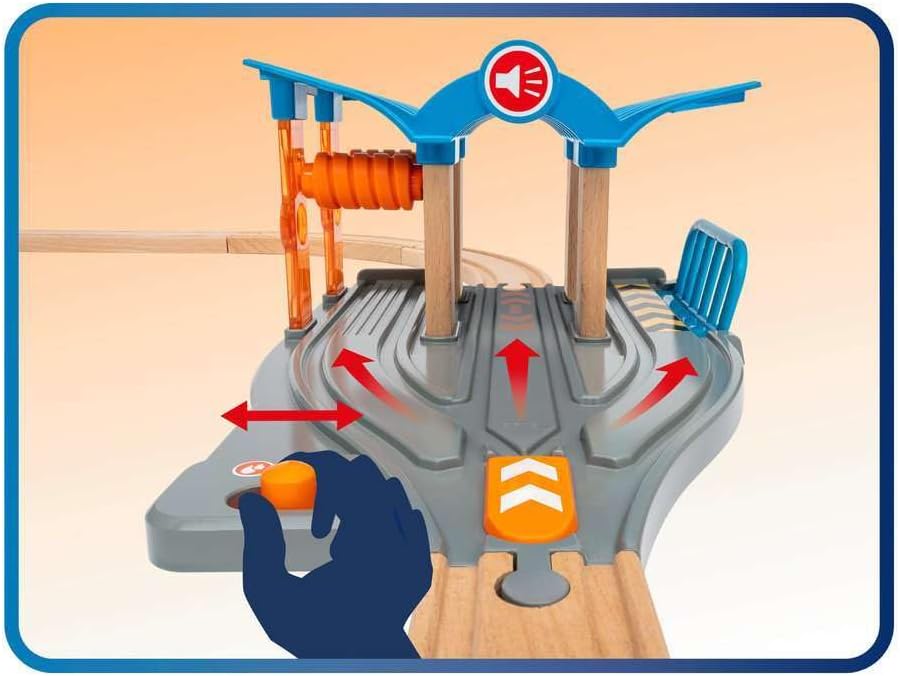
Image: A hand demonstrating the use of the orange lever to switch tracks within the service station, guiding trains to different service areas.

Image: A Smart Tech Sound train positioned within the service station, illustrating the interactive repair function with associated sound and light icons.
5.2. Breaking Action Tunnel
When a Smart Tech Sound train passes through the Breaking Action Tunnel, it will trigger a 'danger' sound effect and potentially flashing lights, adding an element of surprise and excitement to the railway layout.

Image: A Smart Tech Sound train interacting with the Breaking Action Tunnel, followed by its entry into the service station, demonstrating the sequence of play.
5.3. Аппликейшнийг нэгтгэх
For enhanced functionality and customization of sounds, download the BRIO Smart Tech Sound app. The app allows you to update your Smart Tech Sound engines with new sounds and features. Access the 'parents only' section in the app to update engine firmware and customize environmental sounds.
Video: A product demonstration showcasing the interactive features of a BRIO Smart Tech Sound accessory, including a train passing through a service area and triggering sounds.
6. Засвар үйлчилгээ
To ensure the longevity and optimal performance of your BRIO Smart Tech Sound Train Service Station, follow these simple maintenance guidelines:
- Цэвэрлэгээ: Wipe the service station and tunnel with a damp тоос шороо, шороог арилгах даавуу. Хүчтэй химийн бодис, зүлгүүрийн цэвэрлэгч хэрэглэхээс зайлсхий.
- Хадгалах: Хэрэглээгүй үедээ бүтээгдэхүүнийг хуурай газар, нарны шууд тусгал болон хэт өндөр температураас хол хадгална уу.
- Замын арчилгаа: Keep wooden tracks clean and free of debris to ensure smooth operation of trains.
7. Алдаа засах
If you encounter any issues with your Smart Tech Sound Train Service Station, please refer to the following common solutions:
- No Sound/Interaction from Train:
- Ensure you are using a compatible BRIO Smart Tech Sound engine.
- Check the batteries in your Smart Tech Sound engine. Low battery power can affect sound and light functions (e.g., red headlights may indicate low battery).
- Verify that the Smart Tech Sound engine's firmware is up-to-date using the BRIO Smart Tech Sound app.
- Trains Not Moving Smoothly:
- Inspect tracks for any obstructions or misalignments.
- Ensure track connections are firm and flat.
8. Техникийн үзүүлэлтүүд
- Бүтээгдэхүүний загвар: 33975
- Бүтээгдэхүүний хэмжээ: 4.65 x 5.12 x 7.83 инч
- Барааны жин: 1.04 фунт
- Үйлдвэрлэгчээс санал болгосон нас: 36 сар - 10 жил
- Гарсан огноо: 1 оны тавдугаар сарын 2020
9. Баталгаат хугацаа ба дэмжлэг
For warranty information, product support, or to purchase replacement parts, please visit the official BRIO website or contact BRIO customer service. Keep your proof of purchase for any warranty claims.
Онлайн нөөцүүд: www.brio.net


