1. Бүтээгдэхүүн дууссанview
The Ewin Keyboard Case with Trackpad is designed to enhance your tablet experience by providing a physical keyboard and a multi-touch trackpad, transforming your tablet into a versatile productivity tool. It features a durable protective cover and smart functions for efficient use.

Image 1.1: Ewin Keyboard Case with Trackpad, showcasing the integrated keyboard and trackpad with a tablet in stand mode.
2. Тохиромжтой байдал
This keyboard case is compatible with various iPad models. Please verify your iPad's model number to ensure proper fit and function.
- iPad Air 4 10.9 inch 2020: Загварын дугаарууд A2072, A2316, A2324, A2325
- iPad Pro 11 inch 3rd Gen 2021: Загварын дугаарууд A2301, A2459, A2460
- iPad Pro 11 inch 2nd Generation 2020: Загварын дугаарууд A2228, A2068, A2230, A2231
- iPad Pro 11 inch 1st Generation 2018: Загварын дугаарууд A1980, A2013, A1934

Image 2.1: Visual guide for iPad model compatibility, including iPad Pro 11-inch (2019), iPad Air 4 10.9-inch (2020), and iPad Pro 11-inch (2020).
3. Багцын агуулга
Багцыг нээхэд дараах зүйлс байгаа эсэхийг шалгаарай.
- 1 x Ewin Keyboard Case
- 1 x Type-C цэнэглэгч кабель
- 1 х хэрэглэгчийн гарын авлага
Note: iPad is not included.

Image 3.1: Contents of the Ewin Keyboard Case package, including the case, charging cable, and manual.
4. Тохиргоо
4.1 Гарыг цэнэглэх
Before first use, fully charge the keyboard. Connect the provided Type-C charging cable to the keyboard's charging port and a USB power source. The charging indicator light will show the charging status.
- Цэнэглэх хугацаа: Ойролцоогоор 2 цаг
- Usage Time: 100+ hours
- Standby Time: 130+ days
4.2 Bluetooth холболт
- Гар цэнэглэгдсэн эсэхийг шалгаарай.
- Гарын товчлуурыг гулсуулж асаана уу. Bluetooth заагч гэрэл анивчиж эхлэх бөгөөд энэ нь хослох горимд байгааг илтгэнэ.
- Өөрийн iPad дээр очно уу Тохиргоо > Bluetooth.
- Bluetooth-г асаана уу. Таны iPad боломжтой төхөөрөмжүүдийг хайх болно.
- Select "Magnetic Keyboard 5.1 V81" (or similar name) from the list of "OTHER DEVICES".
- Once connected, the Bluetooth indicator light on the keyboard will stop flashing. The keyboard will automatically reconnect to your iPad in the future after the initial pairing.
4.3 Inserting the iPad
Carefully align your iPad with the case and gently press it into place. Ensure all edges are securely seated within the protective frame of the case.

Зураг 4.1: Нарийвчилсан view of the iPad Keyboard Case, illustrating its key features including the gestures touchpad, Bluetooth connectivity, ergonomic design, Type-C port, and integrated pencil holder.
5. Ашиглалтын заавар
5.1 Keyboard Functions and Shortcuts
The keyboard provides a comfortable typing experience with industry-leading design and 22 kinds of shortcuts for increased productivity.
Familiarize yourself with standard keyboard shortcuts for your iPadOS. Common shortcuts include:
- Command + H: Үндсэн дэлгэц рүү оч
- Command + Space: Хайлтыг нээх
- Тушаал + Таб: Нээлттэй програмуудын хооронд шилжих
- Command + C / Command + V: Хуулж тавих
- Fn + Зай авах товчлуур: Toggle Trackpad On/Off
5.2 Smart Trackpad Gestures
The integrated smart touchpad supports 9 kinds of practical laptop gestures, allowing for precise navigation and control. Ensure "AssistiveTouch" is enabled in your iPad settings if you wish to use advanced touch features.

Image 5.1: Close-up of the Smart Touchpad, illustrating its functionality for precise control.
5.3 Auto Sleep/Wake Function
The case features an auto sleep/wake function to conserve battery life. Closing the case will put your iPad to sleep, and opening it will wake it up.
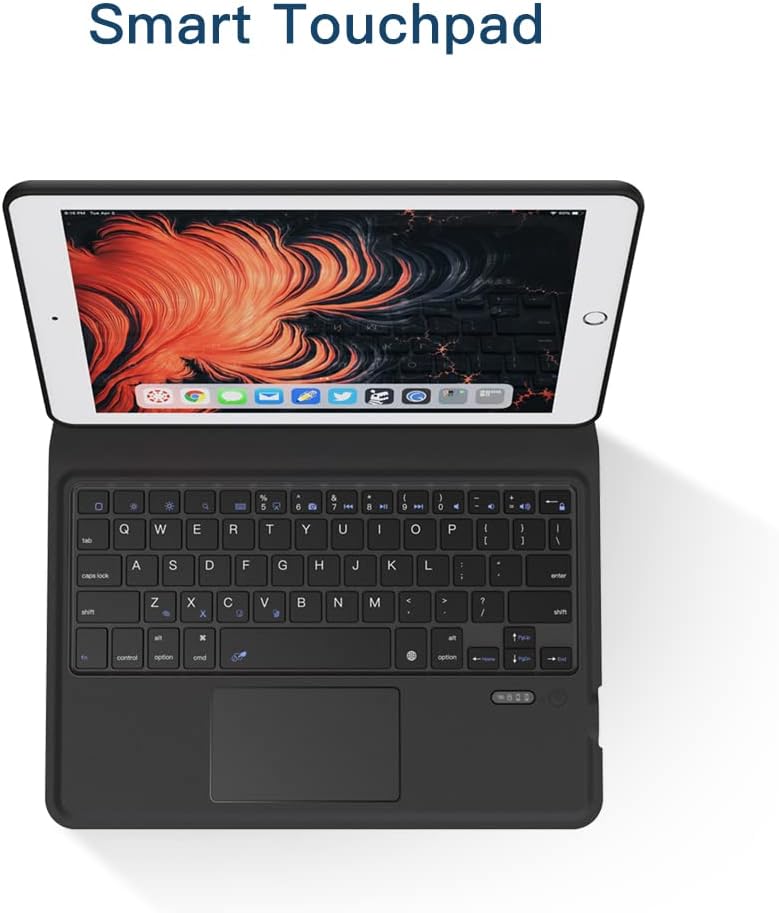
Image 5.2: Illustration of the Auto Sleep feature, which reduces battery consumption when the case is closed.
5.4 Stand Function
The case is designed to automatically convert into a stable stand for comfortable viewing and typing. Fold the buckle along the crease and allow the magnets to secure the stand position.

Image 5.3: Demonstration of the iPad Keyboard Case's stand function, showing how it folds and magnetically secures into a viewбайрлал.
6. Засвар үйлчилгээ
6.1 Цэвэрлэгээ
To clean the keyboard case, gently wipe the exterior with a soft, damp cloth. Avoid using harsh chemicals or abrasive materials. For the keyboard keys, use a soft brush or compressed air to remove dust and debris.
6.2 Батерейны арчилгаа
To prolong battery life, avoid fully discharging the keyboard frequently. Charge it regularly, even if not in constant use. Store the device in a cool, dry place when not in use for extended periods.
7. Алдаа засах
| Асуудал | Боломжит шалтгаан | Шийдэл |
|---|---|---|
| Гар нь Bluetooth-ээр холбогдоогүй байна. | Low battery; Bluetooth not enabled on iPad; keyboard not in pairing mode; interference. | Charge the keyboard. Ensure Bluetooth is on in iPad settings. Turn keyboard off and on to re-enter pairing mode. Move closer to iPad. |
| Trackpad not responding. | Trackpad disabled; software glitch; dirty surface. | дарна уу Fn + хоосон зай to enable/disable trackpad. Restart iPad and keyboard. Clean trackpad surface. |
| Түлхүүрүүд хариу өгөхгүй байна. | Батерей бага; холболтын асуудал. | Charge the keyboard. Re-pair the Bluetooth connection. |
| iPad does not go to sleep/wake automatically. | iPad settings; case not properly closed. | Ensure "Lock/Unlock" is enabled in iPad settings (Settings > Display & Brightness > Lock/Unlock). Ensure the case is fully closed. |
8. Техникийн үзүүлэлтүүд
| Онцлог | Дэлгэрэнгүй |
|---|---|
| Брэнд | Ewin |
| Загварын дугаар | EWIN-KEYBOARD |
| Тохиромжтой төхөөрөмжүүд | iPad Air 4 10.9 inch (2020), iPad Pro 11 inch (2018/2020/2021) |
| Холболт | Bluetooth утасгүй |
| Онцлог шинж чанар | Integrated Trackpad, Pencil Holder, Auto Sleep/Wake, Stand Function |
| Бүрхүүлийн төрөл | Хатуу хэрэг |
| Max. Compatible Device Size | 10.9 инч |
| Зүйлийн жин | 1.48 фунт (ойролцоогоор 0.67 кг) |
| Багцын хэмжээ | 11.34 x 7.99 x 1.3 инч (ойролцоогоор 28.8 x 20.3 x 3.3 см) |

Image 8.1: Illustration of the Scissor Switch Keycap mechanism, indicating responsive and comfortable typing.

Image 8.2: Detail of the Honeycomb Case design, promoting heat dissipation for the tablet.

Image 8.3: Visual representation of the case's shockproof design, offering enhanced protection against drops.
9. Баталгаат хугацаа ба дэмжлэг
Ewin products are manufactured with high-quality standards. For warranty information or technical support, please refer to the contact details provided on the product packaging or the official Ewin webсайт. Баталгаат зардлаа авахын тулд худалдан авалтын баримтаа хадгална уу.


