1. Танилцуулга
This manual provides detailed instructions for the installation, operation, and maintenance of your xmartO DT3034 2K Wireless Security Camera. Please read this manual thoroughly before using the product to ensure proper functionality and safety. The xmartO DT3034 is an outdoor WiFi security camera featuring 2K Super HD resolution, auto-tracking, pan-tilt-zoom control, enhanced two-way audio, auto floodlights, and IP66 weatherproofing. It can operate standalone via the xmartO WallPixel App or integrate with an xmartO NVR system.
2. Багцын агуулга
Таны багцад бүх зүйл байгаа эсэхийг шалгана уу:
- 1 x xmartO DT3034 WiFi Security Camera
- 2 х WiFi антен
- 1 x 12V DC 1A тэжээлийн адаптер
- 1 х хэрэглэгчийн гарын авлага (энэ баримт бичиг)
- 1 x Mounting Kits (screws and wall anchors)
3. Бүтээгдэхүүн дууссанview
The xmartO DT3034 camera is designed for outdoor surveillance, offering a range of features for comprehensive security monitoring.


4. Тохиргоо
4.1 Power and Connectivity Requirements
The camera requires a continuous power supply from a nearby electrical outlet. It can connect to your network wirelessly via WiFi or through a wired Ethernet connection.

4.2 Физик суурилуулалт
- Байршил сонгоно уу: Хүссэн параметрүүдийг хангасан суурилуулах байршлыг сонгоно уу viewing angle and is within range of a power outlet and your WiFi network. Ensure the location offers good signal strength for wireless operation.
- Камерыг суурилуулах: Use the provided mounting kit to securely attach the camera to a wall or ceiling.
- Эрчим хүчийг холбох: Plug the 12V DC 1A power adapter into the camera and then into a power outlet.
4.3 Апп суулгах болон анхны тохиргоо
- Апп татаж авах: хайх 'xmartO WallPixel' in your smartphone's app store (available on Google Play and Apple App Store) and install it.
- Бүртгэл үүсгэх: Аппликейшнийг нээгээд дэлгэцэн дээрх зааврыг дагаж шинэ хэрэглэгчийн бүртгэл үүсгэнэ үү.
- Камер нэмэх: Follow the in-app guide to add your DT3034 camera. This typically involves scanning a QR code on the camera or manually entering its ID.
- Сүлжээнд холбогдох: Configure the camera's network settings within the app. You can choose to connect via WiFi or a wired Ethernet cable.
- Програм хангамжийн шинэчлэлт: It is important to perform an Over-The-Air (OTA) firmware upgrade to the latest version upon initial setup to enable features like Auto-Track and Home Point.
5. Ашиглалтын заавар
5.1 Автоматаар мөрдөх
The camera features automatic motion tracking. When movement is detected, the camera will automatically pan and tilt to follow the subject and record the activity. You can enable or disable this feature in the xmartO WallPixel app.

5.2 Night Vision and Auto Flood Lights
The DT3034 camera is equipped with both infrared (IR) LEDs and professional floodlights for night vision capabilities.
- Шөнийн хараа: Six built-in IR LEDs provide clear black-and-white video in complete darkness.
- Auto Flood Lights & Color Night Vision: Four professional LED floodlights automatically activate upon motion detection at night, illuminating the area and enabling the camera to capture full-color night vision video. The floodlights can be configured to turn on or off based on your preferences.


5.3 Хоёр талын аудио
The camera includes a high-gain microphone and enhanced speakers, allowing for clear two-way communication through the xmartO WallPixel app. You can listen to the camera's surroundings and speak through the camera from your smartphone.

5.4 Deterrence Protection
With auto floodlights and an integrated siren, the camera can deter intruders. These features can be activated automatically upon motion detection or manually controlled via the app. You have the option to enable or disable the siren and floodlights independently.

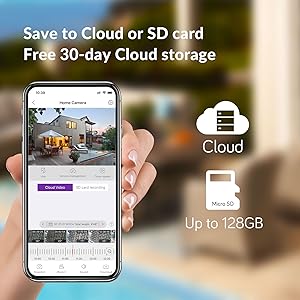
5.5 Хадгалах сонголтууд
The xmartO DT3034 supports two primary storage methods for recorded video:
- Микро SD карт: The camera supports up to a 128GB TF (Micro SD) card for local storage.
- Үүл хадгалах сан: Encrypted AWS Cloud storage is available, often with a free trial period (e.g., 30 days).

5.6 Alexa интеграци
The xmartO DT3034 camera is compatible with Amazon Alexa. You can use voice commands to view the camera feed on compatible Alexa-enabled devices.

6. Засвар үйлчилгээ
- Цэвэрлэгээ: Камерын линз болон орон сууцыг үе үе зөөлөн, damp Тоос шороо, хог хаягдлыг арилгахын тулд даавуугаар арчина. Хүчтэй химийн бодис бүү хэрэглээрэй.
- Програм хангамжийн шинэчлэлтүүд: Regularly check for and install firmware updates via the xmartO WallPixel app. Updates often include performance improvements, new features, and security enhancements.
- Эрчим хүчний мөчлөг: Хэрэв камер асуудалтай тулгарвал цахилгаан адаптерийг салгаад дахин залгаж, цахилгааныг нь унтрааж үзээрэй.
7. Алдаа засах
If you encounter problems with your xmartO DT3034 camera, refer to the following common issues and solutions:
| Асуудал | Боломжит шалтгаан / шийдэл |
|---|---|
| Camera is offline or disconnects frequently |
|
| Auto-tracking is not working or inaccurate |
|
| Хөдөлгөөн илрүүлэлтээс үүссэн хуурамч дохиолол |
|
| Floodlights or siren do not activate |
|
| Camera rotation (Pan/Tilt) issues |
|
8. Техникийн үзүүлэлтүүд
| Онцлог | Тодорхойлолт |
|---|---|
| Загварын дугаар | DT3034 |
| Видео бичлэгийн нягтрал | 3 MP (2K Super HD) |
| Холболтын технологи | Утасгүй (Wi-Fi) |
| Эрчим хүчний эх үүсвэр | Утастай цахилгаан (12V DC) |
| Дотор/гадаа ашиглах | Гадаа |
| Олон улсын хамгаалалтын зэрэглэл | IP66 цаг агааргүй |
| Шөнийн харааны хүрээ | 30 метр |
| Хадгалах сонголтууд | Микро SD карт (128 ГБ хүртэл), Үүлэн санах ой |
| Аудио онцлог | Enhanced 2-Way Audio |
| Онцлог шинж чанарууд | Auto-Track, Auto Flood Lights, Color Night Vision, Auto Siren, Motion Sensor, Alexa Integration |
| Хэмжээ (L x W x H) | 8.35 x 8.23 x 5.51 инч |
| Зүйлийн жин | 1 фунт |
9. Баталгаат хугацаа ба дэмжлэг
xmartO is committed to providing reliable products and customer support.
- 30-Day Money Back Guarantee and Free Return: Хэрэв та худалдан авалтдаа сэтгэл хангалуун бус байвал 30 хоногийн дотор буцаан өгч, мөнгөө бүрэн буцаан авах боломжтой.
- 1 жилийн хязгаарлагдмал баталгаа: The xmartO DT3034 camera is covered by a 1-year limited warranty against manufacturing defects.
- 24/7 Онлайн дэмжлэг: Access 1-on-1 online support for any technical assistance or inquiries.