1. Танилцуулга
Худалдан авалт хийсэнд баярлалааasing the XTUGA ES602 Professional DJ Mixer. This manual provides essential information for the safe and efficient operation of your mixer. Please read it thoroughly before use and retain it for future reference.
The XTUGA ES602 is a versatile 7-channel mixing console designed for stage audio, DJ applications, and music production. It features XLR and LINE inputs, +48V phantom power, a built-in digital effect processor, USB/MP3 playback, and Bluetooth connectivity.
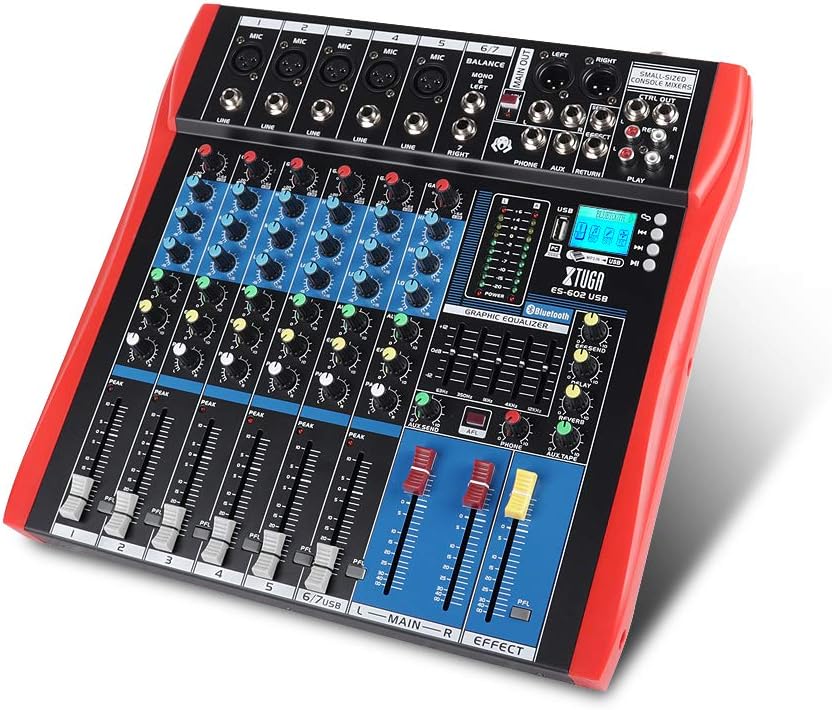
Figure 1: XTUGA ES602 Professional DJ Mixer overview. This image displays the top panel of the mixer, showing all input channels, control knobs, faders, and the master section with the USB/MP3/Bluetooth module.
2. Аюулгүй ажиллагааны заавар
- Эрчим хүчний хангамж: Зөвхөн заасан тэжээлийн адаптерийг ашиглана уу. Боть байгаа эсэхийг баталгаажуулна ууtage нь таны орон нутгийн цахилгаан хангамжтай таарч байна.
- Ус ба чийг: Төхөөрөмжийг бороо, чийгэнд бүү тавь. Төхөөрөмж дээр шингэнээр дүүрсэн зүйлийг бүү байрлуул.
- Агааржуулалт: Тохиромжтой агааржуулалтыг хангах. Агааржуулалтын нүхийг хааж болохгүй.
- Дулааны эх үүсвэрүүд: Төхөөрөмжийг радиатор, халаалтын төхөөрөмж, зуух эсвэл бусад дулаан ялгаруулдаг төхөөрөмж зэрэг дулааны эх үүсвэрээс хол байлга.
- Цэвэрлэгээ: Clean only with a dry cloth. Avoid liquid cleaners.
- Үйлчилгээ: Энэ төхөөрөмжийг өөрөө засварлах гэж бүү оролдоорой. Бүх үйлчилгээг мэргэшсэн үйлчилгээний ажилтнуудад шилжүүлээрэй.
- Фантомын хүч: When using condenser microphones, ensure +48V phantom power is activated only after connecting the microphone and before connecting to other devices to prevent damage.
3. Онцлогууд
The XTUGA ES602 mixer offers a range of features for professional audio mixing:
- 7 суваг холих консол: Equipped with XLR and LINE inputs for versatile connectivity.
- +48V Phantom Power: Конденсатор микрофонуудад ашиглах боломжтой.
- Хувийн сувгийн удирдлага: Each channel features GAIN, 3-band EQ (HIGH, MID, LOW), AUX, EFFECT, PAN control knobs, and a volume fader.
- PFL (Pre-Fader Listen) Switch: Allows monitoring of individual channels via headphones.
- Built-in Digital Effect Processor: Includes REPEAT, EFF SEND, DELAY, SEND, and RETURN controls for integrated effects.
- USB/MP3 Playback and Recording: Direct USB input for MP3 playback from U-disk and recording capabilities.
- Bluetooth холболт: Seamlessly connect mobile phones, tablets, and other Bluetooth-enabled devices for audio playback.
- Үндсэн гарцууд: XLR (L/R) and 1/4" (L/R) stereo output jacks.
- REC гаралт: Dedicated REC (L/R) output for external recording devices.
- Чихэвчний интерфейс: Аудио хянах зориулалттай.
- LED үзүүлэлтүүд: Power and output level indicator lights for easy monitoring.
- Бат бөх дизайн: Ultra-thin, all-metal chassis for high density dust resistance and durability.
4. Хяналт ба функцууд
This section details the various controls and connections on your XTUGA ES602 mixer.
4.1 Input Channels (Channels 1-7)
- MIC оролт (XLR): Connects balanced microphones.
- LINE Input (1/4" Jack): Connects line-level instruments or devices.
- +48V PHANTOM Power Switch: Activates phantom power for condenser microphones on XLR inputs.
- GAIN товчлуур: Суваг бүрийн оролтын мэдрэмжийг тохируулна.
- HIGH, MID, LOW EQ Knobs: 3-band equalizer for adjusting the treble, midrange, and bass frequencies of each channel.
- AUX бариул: Туслах гаралт руу илгээх түвшинг хянадаг.
- EFFECT товчлуур: Controls the send level to the internal effect processor.
- PAN бариул: Adjusts the stereo position (left/right) of the channel.
- PFL Switch: Engages Pre-Fader Listen for monitoring the channel's signal before the fader.
- PEAK LED: Оролтын дохио хэт өндөр байх үед асдаг бөгөөд энэ нь хайчлах боломж байгааг илтгэнэ.
- Суваг бүдгэрүүлэгч: Adjusts the output volume of the individual channel.
4.2 Мастер хэсэг
- MAIN OUT (XLR & 1/4" Jacks): Balanced stereo main outputs for connecting to ampөргөгч эсвэл цахилгаан чанга яригч.
- REC OUT (RCA Jacks): Stereo output for connecting to recording devices.
- PHONES Jack (1/4"): Stereo headphone output for monitoring.
- AUX SEND/RETURN Jacks: For connecting external effects processors or monitoring systems.
- MAIN Faders (L/R): Холигчийн нийт гаралтын эзэлхүүнийг хянадаг.
- EFFECT Level Knob: Adjusts the overall level of the internal effects.
- REPEAT, DELAY Knobs: Controls parameters of the digital effect processor.
- LEVEL Meter: LED display showing the main output level.

Зураг 2: Нарийвчилсан view of the XTUGA ES602 mixer's channel controls and LED level meters. This image highlights the individual channel knobs for GAIN, EQ, AUX, EFFECT, PAN, and the main output level indicators.
4.3 USB/MP3/Bluetooth Module
- USB порт: For connecting a USB flash drive for MP3 playback or connecting to a computer for recording/playback.
- LCD дэлгэц: Shows current mode, track information, and Bluetooth status.
- Хяналтын товчлуурууд: Play/Pause, Stop, Previous/Next Track, Mode selection (USB/Bluetooth/PC).
- Bluetooth үзүүлэлт: Bluetooth холболтын статусыг харуулна.

Figure 3: Close-up of the Bluetooth and MP3 connection section on the XTUGA ES602 mixer. This image shows the USB port, LCD display, and control buttons for media playback and Bluetooth pairing.
5. Тохиргоо
Follow these steps to set up your XTUGA ES602 mixer.
5.1 Эрчим хүчний холболт
- Холигчийн цахилгаан унтраалга OFF байрлалд байгаа эсэхийг шалгаарай.
- Connect the provided power adapter to the mixer's power input.
- Цахилгаан адаптерийг тохирох АС цахилгаан залгуурт холбоно уу.
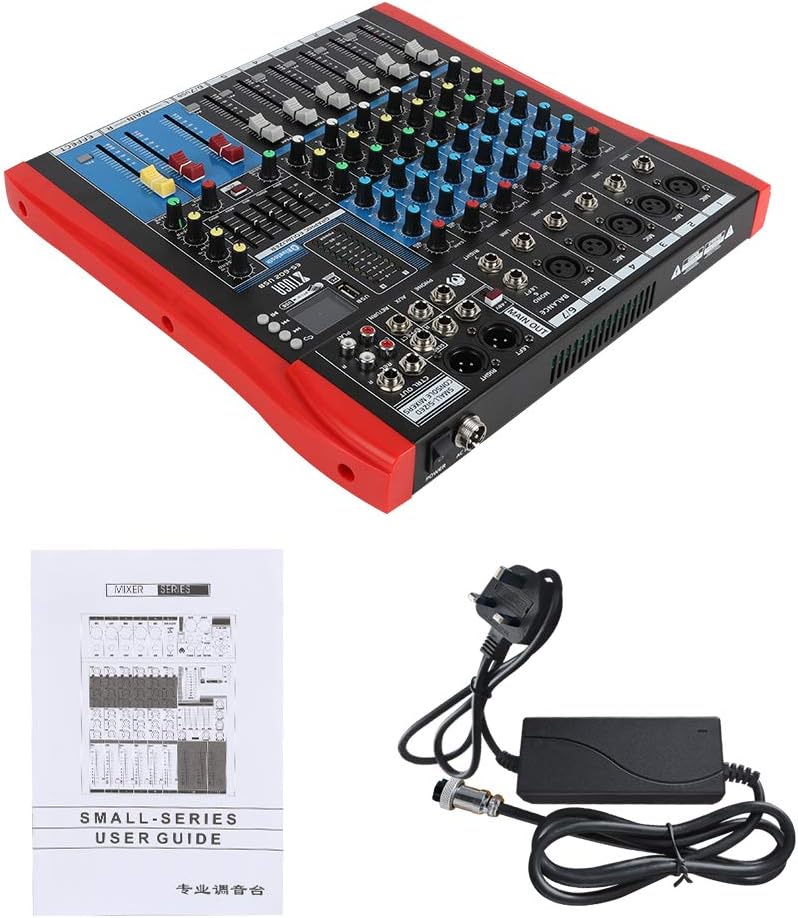
Figure 4: XTUGA ES602 mixer shown with its power adapter and user guide. This illustrates the components included for initial setup.
5.2 Микрофон ба багаж хэрэгслийг холбох
- For microphones, connect XLR cables to the MIC оролт jacks. If using condenser microphones, activate the +48V PHANTOM Power Switch for the respective channel.
- For line-level instruments (keyboards, guitars with preamps, etc.), connect 1/4" TS/TRS cables to the Шугамын оролт үүр.
- Ensure all channel GAIN knobs are set to their minimum position before connecting.
5.3 Гаралтын төхөөрөмжүүдийг холбох
- Үндсэн чанга яригчаа холбох эсвэл ampхүртэл илүү амьд MAIN OUT (XLR or 1/4") үүр.
- For recording, connect an external recording device to the REC OUT (RCA) үүр.
- Чихэвчийг залгаарай УТАС jack for monitoring.
5.4 Бичлэг хийх компьютерт холбогдох
- Connect a USB cable from the mixer's USB порт таны компьютерт.
- Холигчийг таны үйлдлийн систем аудио төхөөрөмж гэж таних ёстой.
- Select the mixer as the input device in your digital audio workstation (DAW) or recording software.
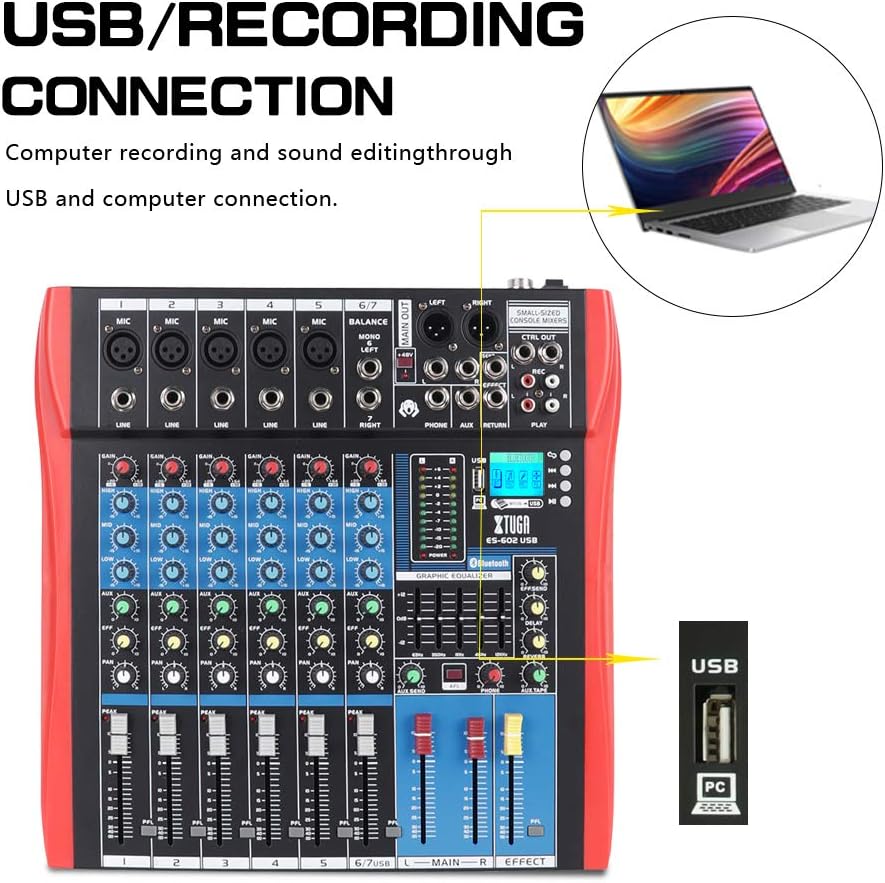
Figure 5: Illustration of the XTUGA ES602 mixer connected to a laptop via USB for recording and sound editing. This highlights the USB input port and its function.
6. Ажиллаж байгаа
This section covers the basic operation of your XTUGA ES602 mixer.
6.1 Powering On and Initial Level Setting
- After all connections are made, turn on your mixer's power switch.
- Аажмаар дээшлүүлнэ MAIN Faders ая тухтай сонсох түвшинд хүргэх.
- For each active input channel, gradually increase the GAIN товчлуур хүртэл Оргил LED flashes only occasionally during the loudest parts of the signal.
- Adjust individual Суваг бүдгэрүүлэгчид to balance the mix.
6.2 Bluetooth ашиглах
- дээр дарна уу MODE товчлуур on the USB/MP3/Bluetooth module until "Bluetooth" appears on the LCD display. The Bluetooth indicator will flash.
- On your mobile device, search for Bluetooth devices and select "XTUGA MIXER" (or similar).
- Once paired, the Bluetooth indicator will become solid. You can now play audio from your device through the mixer.
- Use the module's control buttons for Play/Pause, Next/Previous track.
6.3 USB/MP3 тоглуулах
- MP3 аудио агуулсан USB флаш дискийг оруулна уу files руу USB порт.
- The mixer should automatically switch to USB mode and begin playback. If not, press the MODE товчлуур USB сонгох.
- Use the control buttons to navigate tracks and control playback.
6.4 Бичлэг хийх
- USB диск рүү: In USB/MP3 mode, press the REC товчлуур on the module to start recording the main mix to the connected USB drive. Press again to stop.
- Компьютер руу: Ensure the mixer is connected to your computer via USB. Open your recording software and select the mixer as the input device. Start recording within your software.
6.5 Эффект ашиглах
- -ийг тохируулна уу EFFECT knob on individual channels to send a portion of that channel's signal to the internal effect processor.
- -г ашиглана уу EFFECT Level knob in the master section to control the overall volume of the applied effect.
- -ийг тохируулна уу ДАВТАХ болон ХОЁРОЛТ knobs to fine-tune the characteristics of the digital effect.
7. Засвар үйлчилгээ
Зохих засвар үйлчилгээ нь таны холигчийг удаан эдэлгээтэй, оновчтой ажиллагааг баталгаажуулдаг.
- Цэвэрлэгээ: Холигчны гадна талыг зөөлөн, хуурай даавуугаар цэвэрлэ. Зүлгүүрийн цэвэрлэгч, уусгагч, лав хэрэглэж болохгүй.
- Тоос хамгаалах: Ашиглаагүй үед холигчийг тоос шороо, хог хаягдлаас хамгаалахын тулд таглана.
- Хадгалах: Холигчийг нарны шууд тусгал, хэт температураас хол, сэрүүн, хуурай газар хадгална.
- Кабелийн менежмент: Avoid bending or crimping cables excessively. Disconnect cables by pulling the plug, not the cable itself.
8. Алдаа засах
If you encounter issues with your mixer, refer to the following common problems and solutions.
- Дууны гаралт байхгүй:
- Check if the mixer is powered on.
- Бүгдийг нь баталгаажуул MAIN Faders and individual Суваг бүдгэрүүлэгчид are raised.
- Verify that output cables are securely connected to your ampөргөгч/чанга яригч.
- Төхөөрөмж дээрх дууны түвшинг шалгана уу ampөргөгч/чанга яригч.
- Оролтын дохио байхгүй:
- Ensure microphones/instruments are properly connected to the correct input jacks.
- байгаа эсэхийг шалгана уу GAIN товчлуур for the respective channel is sufficiently turned up.
- If using a condenser microphone, ensure +48V PHANTOM Power идэвхжсэн байна.
- Test input sources (microphones, instruments) with another device to confirm they are working.
- Гажуудсан дуу:
- -ийг багасгах GAIN товчлуур for the offending channel if the Оргил LED байнга асдаг.
- -ийг доошлуул MAIN Faders if the output level meter is consistently in the red.
- Гэмтсэн кабелийг шалгана уу.
- Bluetooth холболтын асуудал:
- Ensure the mixer is in Bluetooth mode (LCD shows "Bluetooth").
- Таны мобайл төхөөрөмжийн Bluetooth идэвхжсэн, хүрээн дотор байгаа эсэхийг шалгаарай.
- Төхөөрөмжийг салгаж, дахин холбож үзнэ үү.
- USB Playback Not Working:
- Ensure the USB drive is properly inserted and contains compatible MP3 files.
- дээр дарна уу MODE товчлуур to ensure the mixer is in USB mode.
- Өөр USB диск ашиглаж үзнэ үү.
9. Техникийн үзүүлэлтүүд
| Онцлог | Тодорхойлолт |
|---|---|
| Загварын дугаар | ES602 (also ES802/1202 series) |
| Сувгийн тоо | 7 |
| Холболтын технологи | Туслах, Bluetooth, USB |
| Аудио оролт | Auxiliary, USB, XLR |
| Гаралтын холболтын төрөл | Туслах, XLR |
| Эрчим хүчний эх үүсвэр | Утастай цахилгаан |
| Зүйлийн жин | 3.59 кг |
| Бүтээгдэхүүний хэмжээс | 46 x 46 x 14 см |
| Үйлдвэрлэгч | XTUGA |
| UPC | 784124158754 |
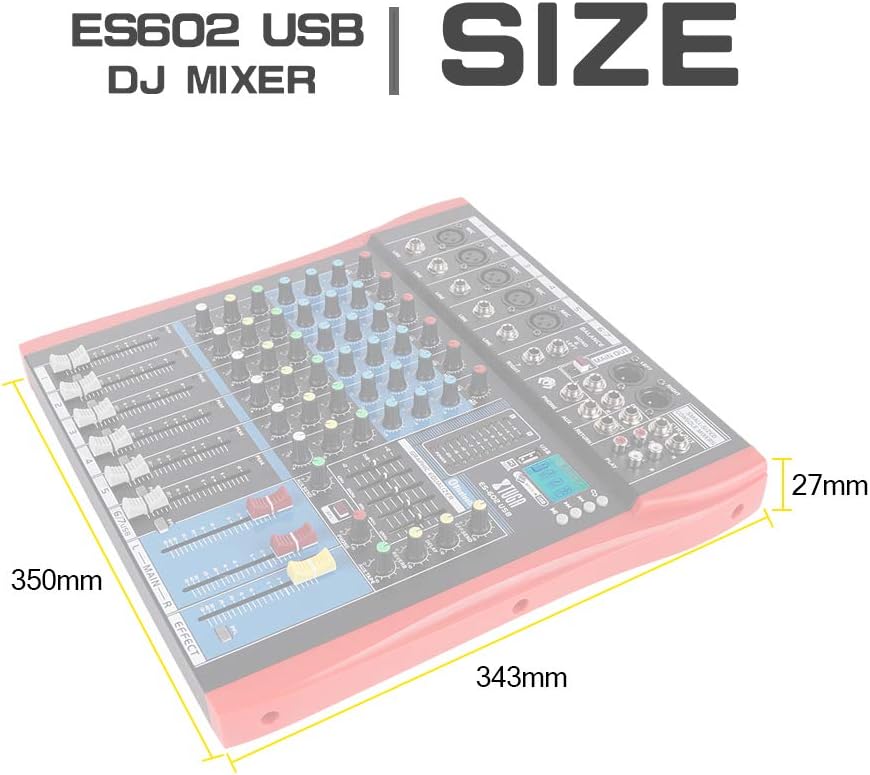
Figure 6: Dimensions of the XTUGA ES602 USB DJ Mixer, showing measurements of 350mm length, 343mm width, and 27mm height.
10. Баталгаат хугацаа ба дэмжлэг
XTUGA products are designed for reliability and performance. For warranty information and technical support, please refer to the warranty card included with your product or visit the official XTUGA webсайт. Худалдан авалтын баримтаа аливаа баталгаат нэхэмжлэлийг худалдан авсан баримт болгон хадгална уу.


