1. Танилцуулга
This manual provides comprehensive instructions for the installation, operation, and maintenance of your Aigo Warrior AK700 Max 700W Power Supply. Designed for high-performance desktop computers, this power supply unit (PSU) delivers stable and efficient power to your system components. Please read this manual thoroughly before installation and use to ensure proper functionality and safety.
2. Аюулгүй байдлын мэдээлэл
Always observe the following safety precautions to prevent injury or damage to the product and other components:
- Ensure the power supply is disconnected from the main power outlet before installation or handling.
- Цахилгаан хангамжийг нээж болохгүй casing. Өндөр ботьtages are present inside, even when disconnected, and can cause electric shock.
- Install the power supply in a well-ventilated area to prevent overheating.
- Зөвхөн цахилгаан тэжээлд дагалддаг кабелийг ашиглана уу.
- Төхөөрөмжийг чийг, хэт өндөр температурт өртөхөөс зайлсхий.
- Энэ бүтээгдэхүүн нь зөвхөн дотор ашиглах зориулалттай.
3. Багцын агуулга
Таны багцад бүх зүйл байгаа эсэхийг шалгана уу:
- Aigo Warrior AK700 Max 700W Power Supply Unit
- Хувьсах гүйдлийн цахилгааны утас
- Modular Cables (if applicable, otherwise fixed cables)
- Суурилуулах эрэг
- Хэрэглэгчийн гарын авлага (энэ баримт бичиг)
4. Бүтээгдэхүүн дууссанview
The Aigo Warrior AK700 Max is a 700-watt power supply designed to meet the demands of modern gaming and high-performance computing systems. It features an energy-efficient design with a silent 12cm hydraulic bearing fan for optimal cooling and quiet operation. The unit incorporates a built-in Power Factor Correction (PFC) and a dual magnetic ring magnetic amplifier circuit, along with high-frequency low-resistance filter capacitors, to ensure a pure and stable current output. Multiple protection circuits are integrated to safeguard against overvoltage, overcurrent, overload, undervoltage, мөн богино холболт.
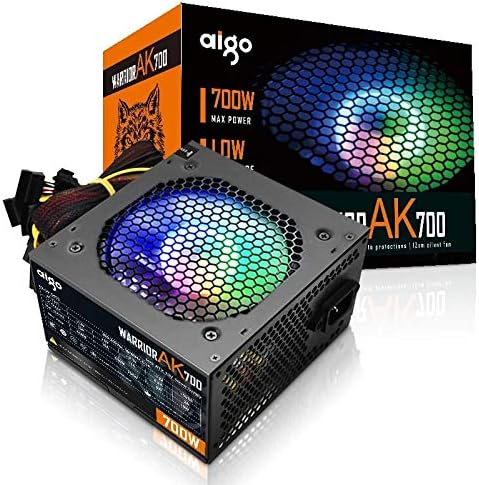
Figure 4.1: The Aigo Warrior AK700 Max 700W Power Supply, showcasing its RGB fan and retail packaging.
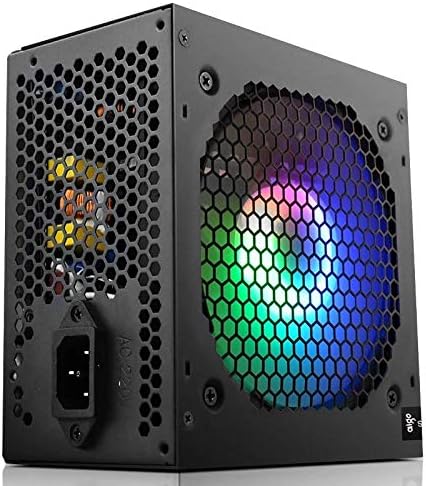
Зураг 4.2: Хажуу тал view of the power supply, highlighting the 12cm RGB cooling fan and honeycomb grille.

Зураг 4.3: Ар талд view of the power supply, illustrating the exhaust grille and AC power input socket.
5. Тохиргоо ба суурилуулалт
Follow these steps to properly install the Aigo Warrior AK700 Max power supply into your computer system:
- Бэлтгэл: Компьютерээ бүрэн унтрааж, залгуураас салгасан эсэхийг шалгаарай. Компьютерийнхээ гэрийг нээ.
- Хуучин PSU-г арилгах (хэрэв байгаа бол): Хуучин тэжээлийн эх үүсвэрээсээ бүх кабелийг салгаж, бэхэлгээний боолтыг нь салга. Үүнийг хайрцгаас болгоомжтой гаргаж ав.
- Шинэ PSU суулгах: Gently slide the Aigo Warrior AK700 Max into the power supply bay of your computer case. Ensure the fan is oriented correctly for optimal airflow (usually facing down or up, depending on your case design).
- Аюулгүй цахилгаан хангамж: Align the screw holes on the power supply with those on your case. Secure the power supply using the provided mounting screws.
- Кабель холбох:
- 24 зүүтэй ATX эх хавтангийн холбогч: Үндсэн 24 зүүтэй кабелийг эх хавтантайгаа холбоно уу.
- CPU Power Connector (4+4 pin or 8-pin EPS): Connect the CPU power cable to the appropriate socket on your motherboard.
- PCIe Power Connectors (6+2 pin): Connect these to your graphics card(s) if required.
- SATA цахилгаан холбогч: Connect to your storage drives (HDDs, SSDs) and optical drives.
- Захын (Molex) холбогч: Connect to other peripherals as needed.
- Кабелийн менежмент: Route cables neatly to improve airflow and aesthetics within your case.
- Кейс хаах: Бүх холболтууд хийгдэж, баталгаажсаны дараа компьютерын гэрийг хаа.
- Хувьсах гүйдлийн хүчийг холбоно уу: Хувьсах гүйдлийн тэжээлийн утсыг тэжээлийн эх үүсвэрт, дараа нь ханын залгуурт залгана уу.
6. Ашиглалтын заавар
After successful installation, follow these steps to operate your computer system with the Aigo Warrior AK700 Max power supply:
- Асаах: Ensure the power switch on the back of the PSU is in the 'ON' (I) position. Press the power button on your computer case.
- Систем ачаалах: Your computer should now power on and begin its boot sequence. The RGB fan on the power supply will illuminate.
- Унтраах: To turn off your computer, use the operating system's shutdown function. For a complete power cycle, switch the PSU to the 'OFF' (O) position after shutting down the computer.
The intelligent temperature control design automatically adjusts the fan speed to maintain optimal cooling and extend the lifespan of the unit, ensuring quiet operation under various loads.
7. Засвар үйлчилгээ
Тохиромжтой засвар үйлчилгээ нь таны цахилгаан хангамжийн урт наслалт, оновчтой гүйцэтгэлийг баталгаажуулдаг.
- Тоос цэвэрлэх: Цахилгаан тэжээлийн сэнс болон агааржуулалтын нүхнүүдийн тоосыг үе үе шахсан агаараар цэвэрлэж байгаарай. Цэвэрлэхийн өмнө компьютерийг унтрааж, залгуураас нь салгасан эсэхийг шалгаарай.
- Агаарын урсгал: Ensure that the power supply's intake and exhaust vents are not obstructed by cables or other components within the computer case.
- Байгаль орчны нөхцөл: Operate the power supply in a clean, dry environment with adequate ventilation.
- Бүү задалж болохгүй: Never attempt to open the power supply unit. There are no user-serviceable parts inside, and doing so will void your warranty and poses a risk of electric shock.
8. Алдаа засах
If you encounter issues with your Aigo Warrior AK700 Max power supply, refer to the following common problems and solutions:
| Асуудал | Боломжит шалтгаан | Шийдэл |
|---|---|---|
| Компьютер асахгүй байна. |
|
|
| Систем асаалттай боловч шууд унтарна. |
|
|
| Fan is not spinning or is excessively loud. |
|
|
If the problem persists after attempting these solutions, please contact Aigo customer support for further assistance.
9. Техникийн үзүүлэлтүүд
Detailed technical specifications for the Aigo Warrior AK700 Max 700W Power Supply:
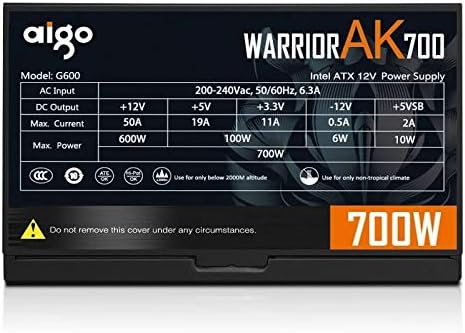
Figure 9.1: The specifications label found on the Aigo Warrior AK700 Max Power Supply.
| Онцлог | Дэлгэрэнгүй |
|---|---|
| Загвар | AK700 Max |
| Ватtage | 700 ватт |
| Form Factor | ATX, ATX12V |
| Оролтын хэмжээtage | 220V (Minimum 220V, Maximum 220V) |
| Хөргөх арга | Агаар хөргөх |
| Сэнсний хэмжээ | 120 Millimeters (Hydraulic Bearing) |
| Тохиромжтой төхөөрөмжүүд | Хувийн компьютер |
| Холбогч төрөл | SATA, PCIe (6+2 pin), ATX 24-pin, EPS 4+4 pin |
| Хамгаалалтын онцлог | Хэт ихtage, Overcurrent, Overload, Undervoltage, Short Circuit, Light Protection |
| Зүйлийн жин | 1.9 кг |
| Багцын хэмжээ | 5 x 5 x 5 см (ойролцоогоор) |
10. Баталгаат хугацаа ба дэмжлэг
For warranty information and technical support, please refer to the official Aigo webсайт эсвэл орон нутгийн жижиглэн худалдаалагчтай холбоо барина уу. Баталгаат нэхэмжлэл гаргахын тулд худалдан авалтаа нотлох баримтаа хадгалаарай.
Aigo Official Webсайт: www.aigocorp.com (Тэмдэглэл: Энэ бол орлуулагч юм URL албан тушаалтан биш учраас website was provided in the product data. Please refer to actual product documentation for correct contact information.)


