1. Танилцуулга
The Tycon TPSC2440NMPPT is an advanced Maximum Power Point Tracking (MPPT) solar charge controller designed for efficient battery charging from solar panels. It automatically adjusts to 12V or 24V battery systems and supports various battery types including Flooded, AGM, GEL, and Lithium, with a customizable USER setting. This controller features an integral LCD display for monitoring key system parameters.
2. Аюулгүй ажиллагааны заавар
Please read and understand all instructions before installation and operation. Failure to follow these instructions may result in electric shock, fire, or severe injury.
- Бүх утаснууд зөв туйлширсан, найдвартай холбогдсон эсэхийг шалгаарай.
- Удирдагчийг задлах эсвэл засах гэж бүү оролдоорой. Мэргэшсэн үйлчилгээний ажилтанд хандаарай.
- Хянагчийг шатамхай материал болон идэмхий хийнээс хол, агааржуулалт сайтай газар байрлуулна.
- Always disconnect the battery and solar panel before installing or moving the controller.
- Суурилуулалтын явцад зохих хувийн хамгаалалтын хэрэгсэл (PPE) өмс.
- The controller is designed for indoor use or protected outdoor environments (IP32 rating). Avoid direct exposure to water.
3. Бүтээгдэхүүн дууссанview
The TPSC2440NMPPT controller is equipped with several features to optimize solar charging and battery management:
- MPPT технологи: Нарны хавтангаас эрчим хүч хураах ажлыг хамгийн их байлгадаг.
- Auto-Ranging Voltage: Compatible with 12V or 24V battery arrays.
- Multimode Load Operation: Offers 5 selectable modes for load control.
- Soft Start Load Output: Powers high capacitive loads safely.
- Automatic Battery Equalization: Performs 30-day equalization for optimal battery health.
- Conformal Coated Electronics: Provides environmental protection.
- TVS Lightning Protection: Enhances durability against electrical surges.
- Integral LCD Display: Батерейны боть харуулж байнаtage, Capacity, Charging Capacity, Temperature, Load Current, and Solar Current.
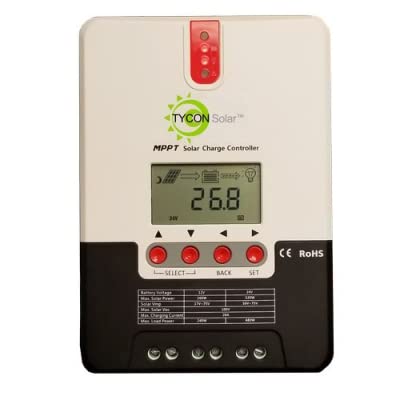
Зураг 1: Урд view of the Tycon TPSC2440NMPPT Solar MPPT Battery Charging Controller, showing the LCD display and connection terminals.
4. Тохиргоо ба суурилуулалт
Зөв суулгахын тулд дараах алхмуудыг дагана уу.
- Суурилуулалт: Choose a suitable location for mounting the controller. Ensure good ventilation and protection from direct sunlight and moisture.
- Зайны холболт: Connect the battery to the controller's battery terminals first. Ensure correct polarity (+ to + and - to -). The controller will automatically detect the battery voltage (12V эсвэл 24V).
- Нарны хавтангийн холболт: Connect the solar panel array to the controller's solar input terminals. Observe correct polarity. Ensure the open-circuit voltage of the solar array does not exceed the controller's maximum input voltage (110V at 25°C).
- Ачаалах холболт (заавал биш): If using the load output, connect your DC loads to the controller's load terminals. Do not exceed the rated load current (20A Max).
- Температур мэдрэгч: Connect the included battery temperature probe cable to the designated port on the controller. Place the sensor near the battery for accurate temperature compensation.
- Асаах: Once all connections are secure, the controller will power on and begin operation.
5. Ашиглалтын заавар
The integral LCD display provides real-time information about your solar charging system. Use the buttons (if present, assuming standard UP/DOWN/SET) to navigate through the display menus and adjust settings.
5.1 LCD дэлгэцийн мэдээлэл
- Батерейны эзлэхүүнtage: Одоогийн ботьtage холбогдсон батерейны.
- Зайны багтаамж: Estimated state of charge.
- Цэнэглэх хүчин чадал: Current power being delivered to the battery.
- Зайны температур: Temperature measured by the external probe.
- Одоогийн ачаалал: Current being drawn by connected DC loads.
- Solar Current: Current being generated by the solar panels.
5.2 Battery Type Settings
The controller supports Flooded, AGM, GEL, and Lithium battery types. A USER setting allows for custom charge parameters. Refer to the on-screen menu for selecting and configuring the battery type.
5.3 Load Operation Modes
The controller offers 5 selectable load operation modes. Consult the device's menu for details on each mode and how to select them, typically involving timed operation or dusk-to-dawn control.
6. Засвар үйлчилгээ
Тогтмол засвар үйлчилгээ нь таны нарны цэнэг хянагчийн оновчтой ажиллагаа, удаан эдэлгээг хангана.
- Холболтуудыг шалгах: Бүх холболтын битүүмжлэл болон зэврэлтийг үе үе шалгаж байх.
- Цэвэр хянагч: Keep the controller clean and free of dust. Use a dry cloth for cleaning. Do not use liquids.
- Батерейны эрүүл мэнд: Батерейны хэмжээг хянахtage and capacity on the LCD. Ensure batteries are properly maintained according to their manufacturer's guidelines.
- Агааржуулалт: Ensure the installation area remains well-ventilated to prevent overheating.
7. Алдаа засах
| Асуудал | Боломжит шалтгаан | Шийдэл |
|---|---|---|
| Дэлгэц байхгүй/Цахилгаангүй | Сул батерей холболт; Батерейны хэмжээtage too low; Blown fuse (external, if applicable). | Check battery connections and polarity. Charge battery if voltage is below operating threshold. Check and replace any external fuses. |
| Нарны цэнэггүй | Solar panel not connected; Incorrect polarity; Insufficient sunlight; Damaged solar panel/wiring. | Verify solar panel connections and polarity. Ensure panels are receiving adequate sunlight. Inspect panels and wiring for damage. |
| Ачаалах ажиллахгүй байна | Load disconnected; Overload; Short circuit; Battery voltage хэтэрхий бага. | Check load connections. Reduce load if exceeding 20A. Check for short circuits. Ensure battery is sufficiently charged. |
| Буруу уншилтууд | Loose connections; Faulty sensor. | Check all wiring connections. Ensure temperature sensor is properly connected and placed. |
8. Техникийн үзүүлэлтүүд
- Загвар: TPSC2440NMPPT
- Авто ботьtage: 12V/24V (System)
- Ampэнд: 40 А
- Нэрлэсэн ачааллын гүйдэл: 20А Макс
- Хамгийн их багтаамжийн ачаалал: 10,000uF
- Хамгийн их нарны оролтын хэмжээtage: 110V (25°C), 90V (25°C)
- Max Power Point Range: 2VDC to 75VDC (Battery Volts)
- Хөрвүүлэлтийн үр ашиг: 96% Төрөл.
- MPPT Tracking Efficiency: 99%
- Өөрийгөө ашиглах: 1W
- Температурын нөхөн олговор: -3.0mV/°C/Cell
- Хамгийн их утас хэмжээ: 8 AWG
- Ботьtage and Current Accuracy: +/-2%
- Газардуулга: Сөрөг үндэслэл
- Байгаль орчныг хамгаалах: IP32
- Бүтээгдэхүүний хэмжээ: 12 x 9 x 6 инч
- Барааны жин: 5.16 фунт
- Дэлгэцийн төрөл: LCD


