Бүтээгдэхүүн дууссанview
The VANBAR Wildlife Camera D500 is a high-performance trail camera designed for capturing images and videos of wildlife, for home security, or for monitoring farm areas. It features a 20-megapixel camera for clear still images and records full HD 1080P video. Equipped with advanced night vision capabilities and a rapid 0.2-second trigger speed, it ensures you capture every moment. Its IP66 waterproof design makes it suitable for various outdoor environments.

Зураг: Урд view of the VANBAR Wildlife Camera D500, showcasing its robust, camouflage design and sensor layout.
Багцын агуулга
Багцыг нээхдээ дараах зүйлс багтсан эсэхийг шалгана уу.
- VANBAR Wildlife Camera D500
- Суурилуулах оосор
- Тохируулга хийх бэхэлгээ
- USB кабель
- Суурилуулах эрэг ба ханын залгуур
- Хэрэглэгчийн гарын авлага

Image: The VANBAR Wildlife Camera D500 and its included accessories laid out, showing the camera, box, mounting strap, bracket, USB cable, and manual.
Гол онцлогууд
- 0.2s Trigger Speed: The camera activates in less than 0.2 seconds upon detecting movement, ensuring minimal delay in capturing events. The trigger distance extends up to 20 meters (65 feet).

Image: A fox captured mid-movement, demonstrating the camera's fast 0.2-second trigger speed.
- 20MP Images & 1080P Video: Captures high-resolution 20-megapixel still images and full HD 1080P videos, providing clear and detailed recordings.

Image: Two deer in a natural setting, illustrating the camera's ability to capture high-resolution images and videos.
- 120° Wide Detection Angle & Night Vision: Features three passive infrared (PIR) sensors for a 120° wide detection range. 850nm infrared technology provides clear night vision up to 65 feet (20m) without disturbing wildlife.

Image: A visual representation of the camera's 120-degree wide detection angle, capturing a broad area.

Image: Bears in a nighttime forest, demonstrating the camera's advanced infrared night vision capabilities.
- IP66 Waterproof & Durable: Built with an IP66 waterproof rating, making it resistant to rain, dust, and fog, ensuring reliable operation in challenging outdoor conditions.
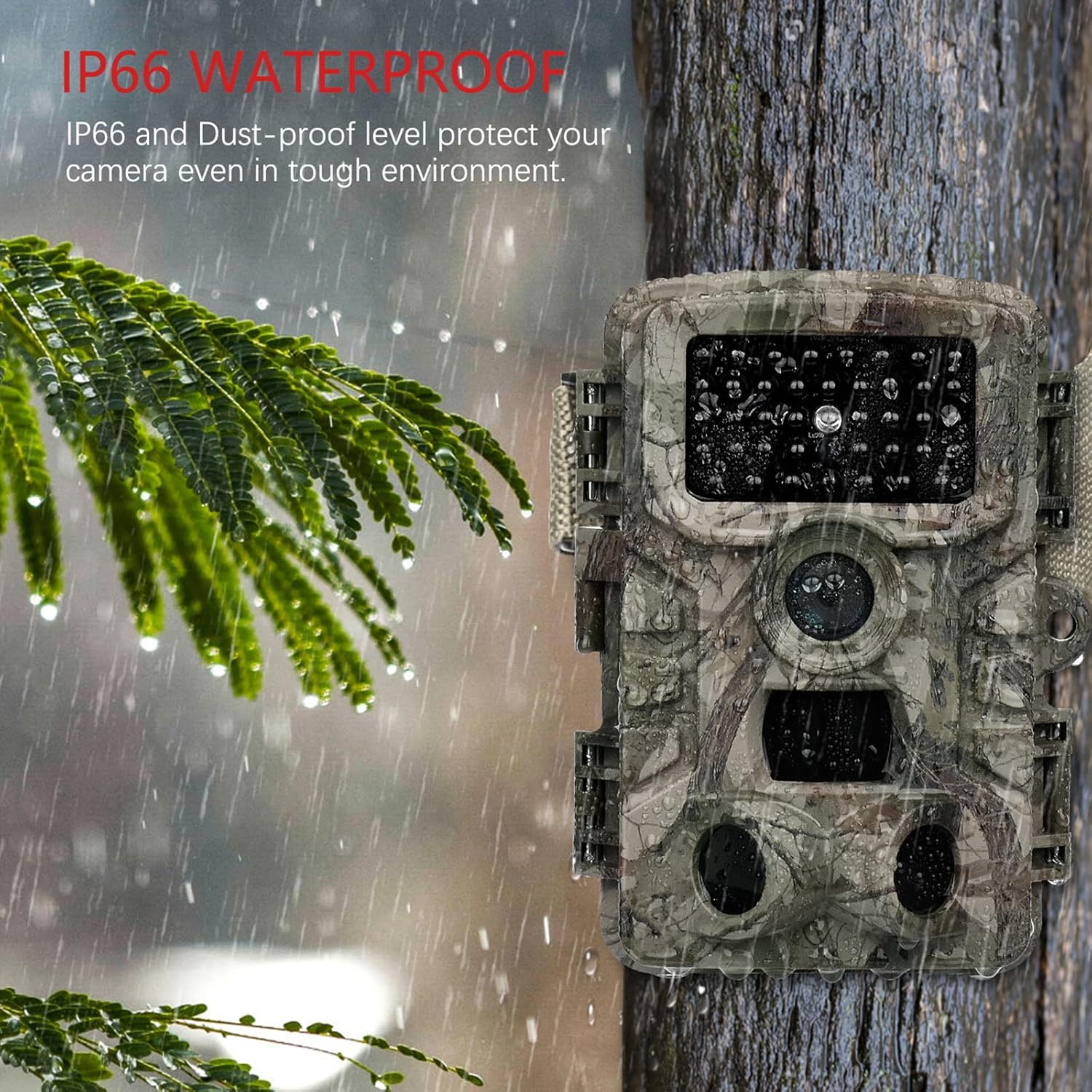
Image: The camera mounted on a tree during rainfall, showcasing its IP66 waterproof protection.
- Олон талт хэрэглүүрүүд: Suitable for various uses including hunting, home security, farm monitoring, and general wildlife observation.

Зураг: Жишээ ньamples of the camera's diverse applications, including hunting, home security, farm surveillance, and wildlife monitoring.
Тохируулах гарын авлага
1. Зай суурилуулах
The VANBAR Wildlife Camera requires 8 x 1.5V Alkaline AA LR6 batteries for optimal performance and maximum battery life. Batteries are not included with the camera.
- Камерыг нээх casing Хажуугийн хавчааруудыг тайлах замаар.
- Зайны тасалгааг олоорой.
- Тасалгааны дотор заасан зөв туйлшралыг (+/-) баталгаажуулж, 8 АА батерейг оруулна уу.
- Зайны тасалгааг найдвартай хаа.
2. Micro SD Card Installation and Formatting
A Micro SD card (Class 10, up to 32GB capacity) is required for storing images and videos. The Micro SD card is not included.
- Камертай casing open, locate the Micro SD card slot.
- Микро SD картыг үүрэнд нь товших хүртэл оруулна.
- Чухал: Before first use, format the Micro SD card using the camera's menu. Refer to the "Operating Instructions" section for menu navigation. Formatting ensures compatibility and proper function.
3. Камер суурилуулах
The camera can be mounted using the included strap or the adjustable mounting bracket.
- Оосор ашиглах: Thread the strap through the slots on the back of the camera and secure it around a tree or pole.
- Using the Mounting Bracket: Attach the bracket to a wall or flat surface using the provided screws. Then, attach the camera to the bracket.
Ensure the camera is positioned to capture the desired area, considering the 120° detection angle and night vision range of 65 feet.
Ашиглалтын заавар
1. Асаах/Унтраах болон горим сонгох
The camera typically has a mode switch (OFF/TEST/ON).
- Унтрааж байна: Powers down the camera.
- Тест: Allows access to the camera's menu, settings, and manual photo/video capture. The internal screen will be active.
- АСААЛТ: Activates the camera for automatic motion-triggered recording. The screen will turn off after a few seconds to conserve power.
2. Цэсийн навигаци ба тохиргоо
In TEST mode, use the navigation buttons (usually Up, Down, Left, Right, OK/Menu) to browse and adjust settings. Key settings include:
- Горим: Select Photo, Video, or Photo + Video.
- Зургийн нягтрал: Set to 20MP for highest quality.
- Видеоны нягтрал: Set to 1080P for highest quality.
- PIR-ийн мэдрэмтгий байдал: Adjust for desired motion detection range (High, Medium, Low).
- Триггерийн интервал: Дараалсан триггерүүдийн хоорондох саатлыг тохируулна уу.
- Хугацаа: Configure for periodic captures.
- Огноо/Цаг: Яг цаг хугацааны хувьд одоогийн огноо, цагийг тохируулна ууampбичлэгүүд дээр.
- SD картыг форматлах: Essential for new or problematic SD cards.
3. Viewing болон шилжүүлэх Files
Fileбайж болно viewed directly on the camera's screen in TEST mode or transferred to a computer.
- Шууд Viewing: In TEST mode, navigate to the playback option to review авсан зураг, видео.
- USB кабелиар дамжуулан: Connect the camera to your computer using the provided USB cable. The camera should appear as a removable disk, allowing you to copy files.
- Via SD Card Reader: Remove the Micro SD card from the camera and insert it into a compatible card reader connected to your computer or mobile device for faster file шилжүүлэх.
- Using Mobile App (if applicable): Some models may support a mobile application for wireless connection and file management. Refer to the camera's display or packaging for app details.
Засвар үйлчилгээ
- Cleaning the Lens and PIR Sensors: Gently wipe the camera lens and the three PIR sensors with a soft, lint-free cloth. Avoid touching the PIR sensors directly with fingers, as this can cause scratches that may affect performance.
- Батерейны арчилгаа: Replace all 8 AA batteries when the low battery indicator appears. For prolonged periods of inactivity, remove the batteries to prevent leakage.
- Ус нэвтрүүлдэггүй тамга: Regularly inspect the rubber seal around the camera casing to ensure it is clean and free from debris. A clean, intact seal is crucial for maintaining the IP66 waterproof rating.
- Хадгалах: Ашиглаагүй үед камерыг нарны шууд тусгал, хэт температураас хол, сэрүүн, хуурай газар хадгална.
Алдааг олж засварлах
| Асуудал | Боломжит шалтгаан | Шийдэл |
|---|---|---|
| Камер асахгүй байна. | Батерей бага эсвэл буруу оруулсан байна. | Зөв туйлшралыг хангаж, шинэ АА батерейгаар солино уу. |
| Camera not recording images/videos. | SD card not formatted, full, or faulty. Camera in wrong mode. | Format the SD card in the camera menu. Check SD card capacity. Ensure camera is in ON mode. |
| Шөнийн цагаар зураг/видео чанар муу. | Subject too far from camera. PIR sensors obstructed. | Ensure subject is within 65ft (20m) night vision range. Clean PIR sensors. |
| Excessive blank recordings. | PIR sensitivity too high. Camera pointed at moving branches/grass. | Reduce PIR sensitivity. Reposition camera to avoid false triggers. |
| Компьютерт холбогдох боломжгүй байна. | USB cable faulty. Camera not in correct mode. | Try a different USB cable. Ensure camera is in TEST mode when connecting. Use an SD card reader as an alternative. |
Үзүүлэлтүүд
| Онцлог | Дэлгэрэнгүй |
|---|---|
| Загварын дугаар | D500 |
| Зургийн нягтрал | 20 МП |
| Видеоны нягтрал | 1080P бүрэн HD |
| Триггерийн хурд | 0.2 секунд |
| Илрүүлэх өнцөг | 120 градус |
| Шөнийн харааны хүрээ | 65 Фут (20 метр) |
| Усны хамгаалалттай үнэлгээ | IP66 |
| Эрчим хүчний эх үүсвэр | 8 х АА шүлтлэг батерей (оруулаагүй) |
| Хадгалах | Micro SD Card (Class 10, up to 32GB, not included) |
| Хэмжээ (L x W x H) | 50 x 80 x 60 мм |
| Жин | 530 гр |
| Материал | Хуванцар |
Баталгаат болон дэмжлэг
VANBAR offers comprehensive customer support for its products:
- Буцаан олголтын бодлого: 30 хоногийн буцаан олголтын бодлого боломжтой.
- Бүтээгдэхүүний үйлчилгээ: Enjoy 24 months of free product service.
- Professional After-Sales Service: Our dedicated customer service team is available to assist you with any product-related inquiries or issues.
For any product problems or questions regarding wildlife protection and observation, please do not hesitate to contact the VANBAR Customer Service Team. We are committed to providing satisfactory solutions and support.


