1. Танилцуулга
This manual provides detailed instructions for the setup, operation, maintenance, and troubleshooting of your Hannspree HO275PTB LED-Monitor. Please read this manual thoroughly before using the product to ensure proper and safe operation.
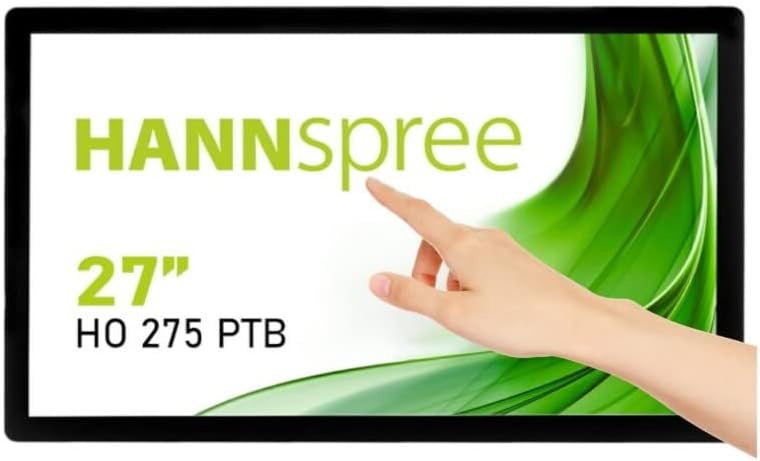
Зураг 1.1: Урд view of the Hannspree HO275PTB LED-Monitor, showcasing its 27-inch display and touch functionality.
2. Тохиргоо
2.1 Савлах
Сав баглаа боодолоос бүх бүрэлдэхүүн хэсгүүдийг болгоомжтой арилгана. Доор жагсаасан бүх зүйл байгаа эсэхийг шалгаарай:
- Hannspree HO275PTB LED-Monitor
- Цахилгаан кабель
- HDMI кабель (бүс нутгаас хамаарч өөр өөр байж болно)
- USB кабель (мэдрэгчтэй функцэд зориулагдсан)
- Хэрэглэгчийн гарын авлага (энэ баримт бичиг)
2.2 Физик суурилуулалт
The monitor can be placed on a flat surface or mounted using a VESA-compatible mount (not included).

Зураг 2.1: Side profile of the monitor, illustrating its slim design.

Зураг 2.2: Ар талд view of the monitor, highlighting the VESA mounting holes for wall or arm installation.
2.3 Холбох кабель
Connect the necessary cables to the corresponding ports on the back of the monitor. Ensure all connections are secure.
- Эрчим хүчний холболт: Цахилгааны кабелийг мониторын тэжээлийн оролтод, дараа нь цахилгааны залгуурт холбоно.
- Видео холболт: Компьютерийн видео гаралтын HDMI эсвэл DisplayPort кабелийг дэлгэц дээрх харгалзах оролттой холбоно уу.
- USB холболт (мэдрэгчтэй): Connect the USB cable from your computer to the USB upstream port on the monitor to enable touch functionality.
- Аудио холболт: If using external speakers or headphones, connect them to the audio output port.

Зураг 2.3: Нарийвчилсан view of the monitor's connectivity ports, including power, USB, HDMI, and DisplayPort.
3. Мониторыг ажиллуулах
3.1 Асаах/унтраах
Дэлгэц дээр байрлах цахилгаан товчийг дарж асаах эсвэл унтраана уу. Дэлгэц асаалттай үед цахилгаан заагч гэрэл асна.
3.2 Оролтын сонголт
The monitor automatically detects the active video input. If multiple sources are connected, you may need to manually select the input using the monitor's on-screen display (OSD) menu.
3.3 Дэлгэц дээрх дэлгэц (OSD) цэс
Access the OSD menu to adjust various display settings such as brightness, contrast, color temperature, and aspect ratio. Refer to the quick start guide for specific button functions.
3.4 Мэдрэгчийн функц
The Hannspree HO275PTB features multi-touch capability. Ensure the USB cable is connected to your computer for this feature to work. Drivers may be required for certain operating systems.
4. Засвар үйлчилгээ
4.1 Мониторыг цэвэрлэх
Хяналтын дэлгэцийг цэвэрлэхийн тулд хөвөнгүй зөөлөн даавуугаар зөөлөн арчина. Зөрүүд тэмдгийн хувьд dampдаавууг бага зэрэг усаар эсвэл зүлгүүргүй дэлгэц цэвэрлэгчээр угаана. Дэлгэц рүү шууд шингэн цацаж болохгүй.
Мониторын хувьд casinзөөлөн, хуурай даавуу хэрэглээрэй. Хүчтэй угаалгын нунтаг эсвэл зүлгүүрийн цэвэрлэгч хэрэглэхээс зайлсхий.
4.2 Хадгалалт
When storing the monitor for an extended period, disconnect all cables and place it in its original packaging or a protective cover to prevent dust accumulation and damage.
5. Алдаа засах
Хэрэв танд монитортой холбоотой асуудал тулгарвал дараах нийтлэг асуудал, шийдлүүдийг үзнэ үү.
| Асуудал | Боломжит шалтгаан | Шийдэл |
|---|---|---|
| Хүч чадалгүй | Цахилгааны кабель холбогдоогүй эсвэл цахилгаан гаралтын асуудал. | Ensure power cable is securely connected to both the monitor and a working power outlet. |
| Дохио байхгүй | Видео кабель холбогдоогүй эсвэл буруу оролт сонгогдсон байна. | Check video cable connections (HDMI/DisplayPort). Select the correct input source via the OSD menu. |
| Display is Blurry/Distorted | Буруу нягтрал эсвэл сэргээх хурд. | Set your computer's display resolution to 1920x1080 and refresh rate to 60Hz. |
| Мэдрэгчийн функц ажиллахгүй байна | USB cable not connected or driver issue. | Ensure the USB upstream cable is connected. Install or update touch screen drivers for your operating system. |
6. Техникийн үзүүлэлтүүд
Below are the technical specifications for the Hannspree HO275PTB LED-Monitor:
- Загвар: HO275PTB
- Дэлгэцийн хэмжээ: 27 инч
- Шийдвэр: FHD 1080p (1920 x 1080 pixels)
- Харьцаа: 16:9
- Дэлгэцийн гадаргуу: Хавтгай
- Үйлдвэрлэгч: ХАННСРЕЙ
- Бүтээгдэхүүний хэмжээ: 1.85 x 21.61 x 15.24 инч (4.7 x 54.9 x 38.7 см)
- Барааны жин: 19.36 фунт (8.78 кг)
- Ботьtage: 220 В
- Сэргээх хурд: 60 Гц
- Эрчим хүчний үр ашгийн ангилал (SDR): D
- Цахилгаан зарцуулалт (SDR): 16.8 Вт

Figure 6.1: Energy label for the Hannspree HO275PTB, indicating its energy efficiency class and consumption.
Бүтээгдэхүүний нарийвчилсан мэдээлэл болон эрчим хүчний хэмнэлтийн талаарх мэдээллийг EPREL албан ёсны мэдээллийн сангаас авна уу.
7. Баталгаат хугацаа ба дэмжлэг
7.1 Баталгаат хугацааны мэдээлэл
The Hannspree HO275PTB LED-Monitor comes with a minimum guaranteed product support period of 8 жил and a general warranty period of 3 жил ханган нийлүүлэгчээс хангана.
7.2 Хэрэглэгчийн дэмжлэг
For technical assistance, warranty claims, or general inquiries, please contact Hannspree customer support:
- Webсайт: www.hannspree.com
- Имэйл: service@eu.hannspree.com
- Утас: +49 (0) 21 59 / 81 45 7 - 0


