1. Танилцуулга
This manual provides detailed instructions for the safe and efficient use of your Hoco HC3 Bounce Sports Wireless Speaker. Please read this manual thoroughly before operating the device and retain it for future reference. The Hoco HC3 is a versatile portable speaker supporting Bluetooth, FM radio, TF card, USB, AUX, and TWS modes.

Figure 1: Hoco HC3 Bounce Sports Wireless Speaker. This image displays the speaker in a vertical orientation, showcasing its black mesh grille, the 'hoco' logo at the bottom right, and a braided carrying strap attached to the top left side. The control buttons are visible on the side panel.
2. Багцын агуулга
Хайрцагнаас задлахад бүх зүйл байгаа эсэхийг шалгаарай:
- Hoco HC3 Bounce Sports Wireless Speaker
- USB цэнэглэгч кабель
- Хэрэглэгчийн гарын авлага (энэ баримт бичиг)
- AUX Audio Cable (if included with your model)
3. Бүтээгдэхүүн дууссанview
3.1 Чанга яригчийн бүрэлдэхүүн хэсгүүд

Figure 2: Rear panel of the Hoco HC3 speaker. This image highlights the various input ports and control buttons located on the back of the speaker. Visible elements include the power switch, USB port, TF card slot, AUX input, and LED indicator.
Чанга яригчийн удирдлага болон портуудтай танилцана уу:
- Цахилгаан товч: Long press to power on/off. Short press to switch modes.
- Тоглуулах/түр зогсоох товчлуур: Аудио тоглуулах эсвэл түр зогсоох. Дуудлагад хариулах/дуусгах.
- Дууны хэмжээг нэмэгдүүлэх / Дараагийн бичлэгийн товчлуур: Дараагийн дууг оруулахын тулд богино дарж, дууны хэмжээг нэмэгдүүлэхийн тулд удаан дарна уу.
- Дууны дууг багасгах / өмнөх дууны товчлуур: Өмнөх дууг богино хугацаанд дарж дууг багасгах бол удаан дарна уу.
- Горимын товчлуур (M): Short press to cycle through Bluetooth, FM, TF card, USB, and AUX modes.
- USB порт: USB дискийг тоглуулах зориулалттай.
- TF картын оролт: TF (MicroSD) картыг тоглуулах зориулалттай.
- AUX оролт: 3.5mm jack for wired audio connection.
- Цэнэглэх порт: Чанга яригчийг цэнэглэх микро USB порт.
- LED үзүүлэлт: Displays charging status and operating mode.
3.2 Гол онцлогууд
- Bluetooth V5.0: Тогтвортой, үр ашигтай утасгүй холболтоор хангана.
- Олон тоглуулах горим: Supports Bluetooth, FM radio, TF card, USB drive, and AUX input.
- Жинхэнэ утасгүй стерео (TWS): Allows two HC3 speakers to connect wirelessly for a stereo sound experience.
- Батерейны урт наслалт: 2400mAh battery capacity offers up to 5 hours of music playback.
- Хос чанга яригч: Equipped with two 45mm speaker units, each with 5W power output.
- Авсаархан, зөөврийн: Dimensions of 202*60*60mm and weight of 561g for easy transport.
4. Тохиргоо
4.1 Чанга яригчийг цэнэглэх
- Өгөгдсөн USB цэнэглэгч кабелийг чанга яригчийн цэнэглэх порт руу холбоно уу.
- Connect the other end of the USB cable to a 5V USB power adapter (not included) or a computer's USB port.
- The LED indicator will illuminate to show charging status. It typically takes about 3 hours for a full charge.
- Once fully charged, the LED indicator will change or turn off (refer to specific LED behavior in the troubleshooting section if unsure).
Тэмдэглэл: Батерейны ашиглалтын хугацааг оновчтой болгохын тулд чанга яригчийг анх ашиглахаасаа өмнө бүрэн цэнэглээрэй.
4.2 Асаах/унтраах
- Асаахын тулд: Long press the Power button until you hear an audible prompt and the LED indicator lights up.
- Унтраахын тулд: Long press the Power button again until you hear an audible prompt and the LED indicator turns off.
5. Ашиглалтын заавар
5.1 Bluetooth холболт
- Ensure the speaker is powered on and in Bluetooth mode (the LED indicator will typically flash blue, indicating it's ready for pairing). If not, short press the Mode (M) button to switch to Bluetooth mode.
- Өөрийн хөдөлгөөнт төхөөрөмж (ухаалаг утас, таблет, компьютер) дээр Bluetooth-г идэвхжүүлнэ үү.
- хайх available Bluetooth devices. You should see "HC3" or "Hoco HC3" in the list.
- Select "HC3" to connect. Once paired, the speaker will emit an audible confirmation, and the LED indicator will stop flashing and remain solid blue.
- Та одоо чанга яригчаар дамжуулан төхөөрөмжөөсөө аудио тоглуулах боломжтой.
Note: The speaker will automatically attempt to reconnect to the last paired device when powered on, if that device's Bluetooth is active and within range.
5.2 FM радио горим
- Чанга яригчийг асаах.
- Short press the Mode (M) button repeatedly until you enter FM radio mode.
- To auto-scan and save available FM stations, short press the Play/Pause button. The speaker will scan and store stations.
- Use the Volume Up / Next Track and Volume Down / Previous Track buttons to navigate between saved stations.
5.3 TF карт / USB тоглуулах
- Чанга яригчийг асаах.
- Insert a TF (MicroSD) card into the TF card slot or a USB flash drive into the USB port.
- The speaker should automatically switch to TF card or USB mode and begin playing audio files. If not, short press the Mode (M) button to select the correct mode.
- Use the Play/Pause, Volume Up / Next Track, and Volume Down / Previous Track buttons to control playback.
Note: Ensure your TF card or USB drive contains compatible audio files (e.g., MP3 format).
5.4 AUX горим
- Чанга яригчийг асаах.
- Connect one end of a 3.5mm audio cable (if included) to the speaker's AUX input port.
- Аудио кабелийн нөгөө үзүүрийг гадаад төхөөрөмжийнхөө аудио гаралтын залгуурт холбоно уу (жишээ нь, MP3 тоглуулагч, компьютер).
- The speaker should automatically switch to AUX mode. If not, short press the Mode (M) button to select AUX mode.
- Control playback from your external device. Volume can be adjusted on both the speaker and the external device.
5.5 TWS (True Wireless Stereo) функц
The TWS function allows you to pair two Hoco HC3 speakers together for a true stereo sound experience.
- HC3 чанга яригч хоёулаа унтарсан эсэхийг шалгаарай.
- Хоёр чанга яригчийг зэрэг асаана уу. Тэд хоёулаа Bluetooth холболтын горимд орох ёстой.
- On нэг of the speakers (this will become the primary speaker), long press the Mode (M) button or a dedicated TWS button (if present, otherwise try the Play/Pause button for 3-5 seconds) until you hear a pairing tone. The speakers will attempt to connect to each other.
- Once successfully paired, you will hear a confirmation tone, and one speaker's LED will indicate it's the primary (e.g., flashing slowly), while the other's LED will be solid.
- Now, connect your mobile device to the анхан шатны speaker via Bluetooth as described in section 5.1.
- Аудио одоо хоёр чанга яригчаар дамжуулан стерео хэлбэрээр тоглох болно.
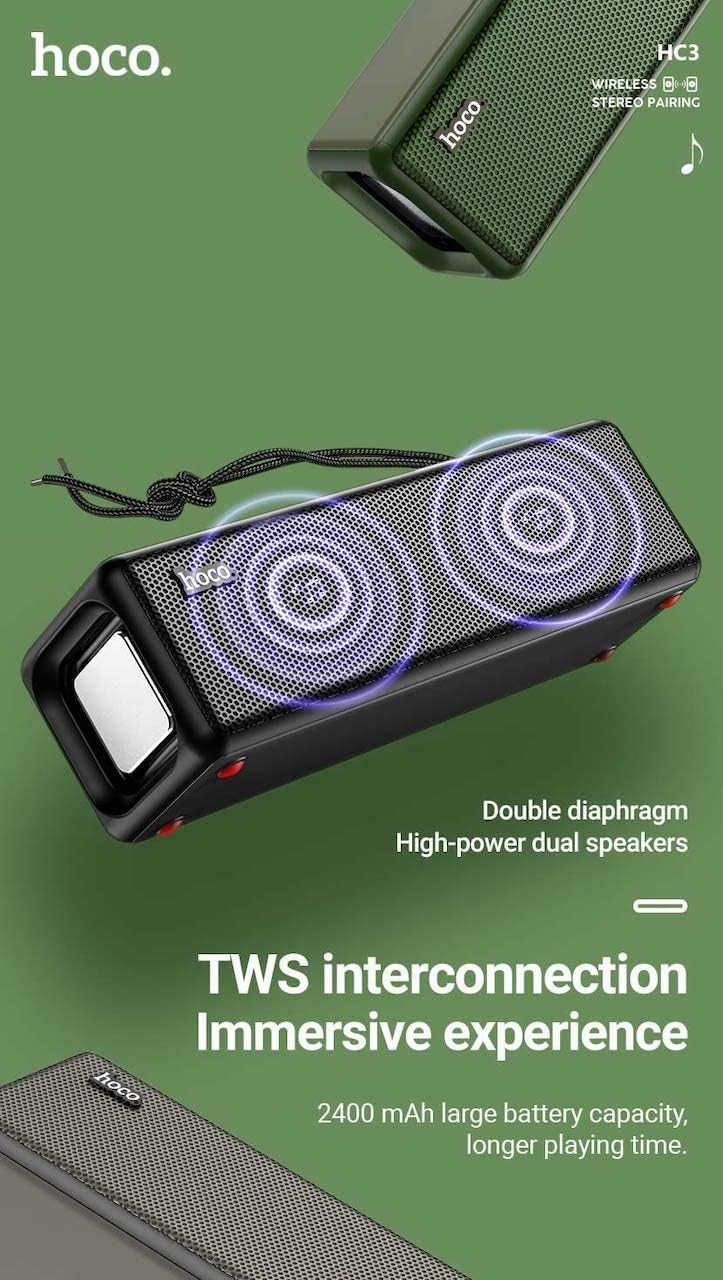
Figure 3: TWS Interconnection. This image illustrates the concept of two Hoco HC3 speakers wirelessly connected to provide a stereo audio experience, highlighting the dual speaker setup and the 2400 mAh battery capacity.
5.6 Дуудлага зохицуулах
Ухаалаг гар утсанд Bluetooth-ээр холбогдсон үед:
- Дуудлагад хариулах: Тоглуулах/Түр зогсоох товчийг богино хугацаанд дарна уу.
- Дуудлага дуусгах: Дуудлага хийх үед Тоглуулах/Түр зогсоох товчийг богино хугацаанд дарна уу.
- Дуудлагаас татгалзах: Ирж буй дуудлага дуугарах үед Тоглуулах/Түр зогсоох товчийг удаан дарна уу.
- Сүүлийн дугаарыг дахин залгах: Тоглуулах/Түр зогсоох товчийг давхар дар.
6. Засвар үйлчилгээ
- Цэвэрлэгээ: Use a soft, dry cloth to clean the speaker's surface. Do not use abrasive cleaners, alcohol, or other chemical solvents.
- Хадгалах: Чанга яригчийг нарны шууд тусгал, хэт температураас хол, сэрүүн, хуурай газар хадгална уу.
- Батерейны арчилгаа: To prolong battery life, charge the speaker regularly, even if not in use for extended periods (e.g., once every 3 months). Avoid fully discharging the battery frequently.
- Усны эсэргүүцэл: While designed for sports, avoid submerging the speaker in water. Refer to product specifications for any IP rating.
- Нөлөөлөлөөс зайлсхийх: Protect the speaker from drops and strong impacts.
7. Алдаа засах
If you encounter issues with your Hoco HC3 speaker, refer to the following table for common problems and solutions:
| Асуудал | Боломжит шалтгаан | Шийдэл |
|---|---|---|
| Чанга яригч асахгүй байна. | Батерей бага. | Чанга яригчийг дор хаяж 30 минутын турш цэнэглэ. |
| Bluetooth-ээр холбох боломжгүй. | Төхөөрөмж дээр Bluetooth идэвхжээгүй байна; чанга яригч нь хослуулах горимд байхгүй байна; төхөөрөмжөөс хэт хол байна. | Ensure Bluetooth is on, speaker is in pairing mode (flashing blue LED), and devices are within 10 meters. Forget "HC3" on your device and try pairing again. |
| Дуу алга. | Дууны түвшин хэт бага; буруу горим сонгогдсон; төхөөрөмж аудио тоглуулахгүй байна. | Increase volume on both speaker and connected device. Verify correct mode (Bluetooth, AUX, TF, USB). Ensure audio is playing on the source device. |
| FM радио хүлээн авах чадвар муу байна. | Сул дохио; хүрээлэн буй орчны хөндлөнгийн оролцоо. | Чанга яригчийг илүү сайн хүлээн авах боломжтой байршил руу зөөнө үү. Станцуудыг дахин хайна уу. |
| TF card/USB playback not working. | Card/drive not inserted correctly; incompatible file формат; эвдэрсэн files. | Ensure card/drive is fully inserted. Check file formats (MP3 recommended). Try another card/drive. |
| TWS холболт амжилтгүй боллоо. | Чанга яригч нь TWS холболтын горимд байхгүй; хэтэрхий хол. | Ensure both speakers are powered on and in TWS pairing mode. Keep them close during pairing. Refer to section 5.5. |
8. Техникийн үзүүлэлтүүд
| Онцлог | Дэлгэрэнгүй |
|---|---|
| Загвар | HC3 |
| Хэмжээ | 202 x 60 x 60 мм |
| Жин | 561 гр |
| Bluetooth хувилбар | V5.0 (Chip: JLAC6928B) |
| Зайны багтаамж | 2400 мАч |
| Цэнэглэх хугацаа | Ойролцоогоор 3 цаг |
| Ярилцах / Хөгжмийн цаг | 5 цаг хүртэл |
| Чанга яригч | 45мм * 2 |
| Чанга яригчийн цахилгаан гаралт | 5Вт * 2 |
| Холболтын горимууд | Bluetooth, FM, TF card, USB, AUX, TWS |
| Аудио гаралтын горим | Хүрээлэн |
| Үйлдвэрлэгч | Хоко |
| Гарал үүслийн улс | Хятад |
9. Баталгаат хугацаа ба дэмжлэг
Hoco products are manufactured to high quality standards. For information regarding warranty coverage, please refer to the warranty card included with your purchase or contact your local Hoco distributor or retailer. Keep your proof of purchase for any warranty claims.
For technical support or further assistance, please visit the official Hoco website or contact their customer service department. Contact details are typically available on the product packaging or the official webсайт.


