Танилцуулга
This manual provides detailed instructions for the installation, operation, and maintenance of your Lockly Secure Pro Wi-Fi Smart Door Lock. Please read this manual thoroughly before installation and use to ensure proper function and to maximize the security features of your device. Keep this manual for future reference.

Image: Lockly Secure Pro Smart Door Lock with Wi-Fi Hub and smartphone app interface.
Аюулгүй байдлын мэдээлэл
- Do not attempt to disassemble or modify the lock. This may cause damage to the product, void the warranty, and compromise security.
- Use only specified batteries (AA Alkaline). Do not mix old and new batteries or different types of batteries.
- Ensure all components are securely fastened during installation to prevent malfunction.
- Keep physical keys in a secure location outside the property to be used as a backup.
- Protect your PIN codes and fingerprint data. Do not share them with unauthorized individuals.
Бүтээгдэхүүн дууссанview
Гол онцлогууд
- Олон хандалтын аргууд: Patented PIN Genie digital keypad, 3D biometric fingerprint reader, smartphone app, voice control (Alexa/Hey Google), and physical key.
- PIN Genie Digital Keypad: Features dynamic shuffling of digits to prevent code guessing.
- 3D Biometric Fingerprint Sensor: Quick access with less than 0.3-second recognition, storing up to 99 fingerprints.
- Мобайл програмын хяналт: Remote lock/unlock, real-time monitoring, and access history via the Lockly App.
- Дуут удирдлага: Compatible with Amazon Alexa and Hey Google for hands-free operation.
- Programmable Auto-Lock: Customizable auto-lock feature for enhanced security.
- Offline Access Codes: Generate access codes usable without Wi-Fi or internet connection.
- Цаг агаарт тэсвэртэй: Durable design suitable for various environmental conditions.
Бүрэлдэхүүн хэсгүүд
The Lockly Secure Pro package includes the smart lock assembly, a Wi-Fi hub, a door sensor, four AA batteries, and two backup physical keys.

Image: Summary of Lockly Secure Pro features.
Тохиргоо ба суурилуулалт
Хаалганы нийцтэй байдал
Суулгахын өмнө таны хаалга дараах үзүүлэлтүүдийг хангаж байгаа эсэхийг шалгаарай.
- Door thickness: 1 3/8" - 2"
- Backset: 2 3/8" or 2 3/4"
- Cross bore diameter: 2 1/8"
- Edge bore diameter: 1"

Image: Door compatibility measurements.
Суулгах үйл явц
The Lockly Secure Pro is designed for easy DIY installation using common household tools. A detailed installation guide video is available to assist you through each step.

Image: Installation guide video demonstration.
Wi-Fi Hub Setup
The included Wi-Fi hub enables remote control and monitoring of your smart lock. Simply plug it into a power outlet within range of your lock and follow the instructions in the Lockly app for plug-n-play setup.

Image: Lockly Wi-Fi Hub for remote connectivity.
Ашиглалтын заавар
Unlocking and Locking Methods
Your Lockly Secure Pro offers multiple convenient ways to secure and access your property:
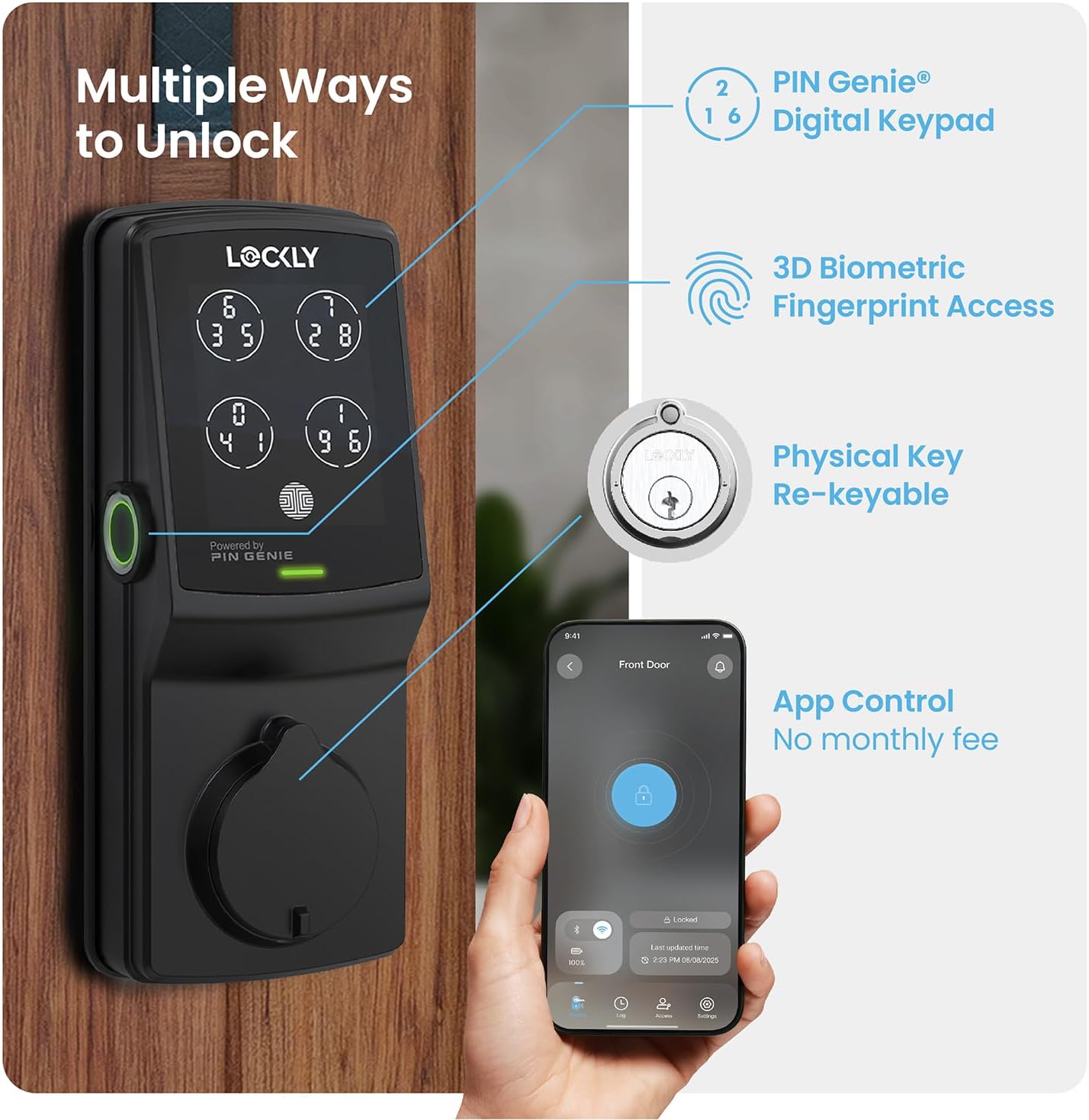
Зураг: Дууслааview of multiple unlocking methods.
- PIN Genie Digital Keypad: Enter your secure PIN code on the patented keypad. The numbers on the four virtual buttons dynamically shuffle after each use, making it difficult for onlookers to guess your code.
- 3D Biometric Fingerprint Sensor: Place your registered finger on the sensor for quick access. The sensor recognizes fingerprints in less than 0.3 seconds and opens the lock in under 0.5 seconds.
- Ухаалаг гар утасны програмын удирдлага: Use the Lockly App to remotely lock or unlock your door from anywhere. The app also provides real-time monitoring and access history.
- Дуут удирдлага: Integrate with Amazon Alexa or Hey Google to unlock, lock, or check the status of your door using voice commands.
- Физик түлхүүр: Two backup physical keys are included for manual access in case of power failure or other issues. The lock also features rekeying capability.

Image: PIN Genie keypad in operation.

Image: Using the 3D biometric fingerprint sensor.

Image: Lockly App interface for remote control.

Image: Voice control and physical key backup.
Нарийвчилсан шинж чанарууд
- Programmable Auto-Lock: Customize the auto-lock duration (5 to 300 seconds) to ensure your door is always secured after closing.
- eKeys & eBadges: Grant and revoke access to family, friends, or visitors directly through the Lockly app.
- Offline Access Codes: Generate temporary or permanent access codes that can be used even when the lock is not connected to Wi-Fi.

Image: Programmable auto-lock feature.
Засвар үйлчилгээ
Батерейны удирдлага
The Lockly Secure Pro operates on four AA batteries, providing up to 8 months of battery life. The Lockly app will send real-time notifications for low battery alerts. In case of complete battery depletion, an external 9V battery can be used for emergency power supply.

Image: Battery and emergency power supply details.
Cleaning and Durability
Цоожны гадна талыг зөөлөн, damp cloth. Avoid abrasive cleaners or solvents. The Lockly Secure Pro features a durable, weather-resistant design (IP54 rated) to withstand various outdoor conditions.

Image: Lockly Secure Pro demonstrating weather resistance.

Image: Durability and weather resistance specifications.
Дахин түлхүүрдэх
The lock cylinder can be rekeyed by a professional locksmith without needing to replace the entire lock, using a standard rekey kit.

Image: Rekeyable cylinder feature.
Алдааг олж засварлах
If you encounter issues with your Lockly Secure Pro, please refer to the following common solutions:
- Түгжээ хариу өгөхгүй байна: Check battery levels. Replace batteries if low. Ensure the lock is properly installed and all cables are connected.
- Хурууны хээ танигдаагүй: Хуруугаа цэвэр, хуурай байлгаарай. Хэрэв таних асуудал үргэлжилсээр байвал хурууны хээгээ дахин бүртгүүлнэ үү.
- PIN Code Issues: Verify the correct PIN is being entered. Remember the PIN Genie keypad shuffles digits; ensure you are pressing the correct virtual button for each digit.
- Апп холболтын асуудал: Ensure your Wi-Fi hub is powered on and within range of the lock. Check your home Wi-Fi network status. Restart the Lockly app or your smartphone.
- Auto-Lock Not Engaging: Verify the auto-lock feature is enabled and configured with the desired delay in the Lockly app.
For further assistance, consult the Lockly app's help section or contact customer support.
Үзүүлэлтүүд
| Онцлог | Дэлгэрэнгүй |
|---|---|
| Брэнд | Түгжигдсэн |
| Загварын нэр | Lockly Secure Pro |
| Загварын дугаар | PGD728WYMB |
| Түгжээний төрөл | Ухаалаг түгжээ, түгжээний түгжээ |
| Материал | Цайр |
| Өнгө | Матт хар |
| Төгсгөлийн төрөл | Сойзтой |
| Хэмжээ (L x W x H) | 7.4 x 3.15 x 4.5 инч |
| Зүйлийн жин | 3.8 фунт |
| Эрчим хүчний эх үүсвэр | 4 х АА шүлтлэг зай |
| Онцгой байдлын эрчим хүч | 9V батерейны порт |
| Холболтын протокол | Bluetooth, Wi-Fi (via included hub) |
| Хяналтын арга | Апп, Алсын удирдлага, Мэдрэгч, Дуу хоолой |
| Хянагчийн төрөл | Amazon Alexa, Google туслах |
| Онцлог шинж чанарууд | App Control, Auto-Lock, Left Fingerprint Reader, Voice Control, Waterproof (IP54) |
| UPC | 810055600656 |
Баталгаат хугацааны мэдээлэл
The Lockly Secure Pro comes with a limited 5-year mechanical and finish warranty ба а Цахилгаан барааны 2 жилийн баталгаа. Баталгаат заргад зориулж худалдан авалтаа нотлох баримтаа үлдээнэ үү.
Хэрэглэгчийн дэмжлэг
Lockly provides lifetime technical support for all its products. For assistance with installation, operation, or troubleshooting, please contact Lockly customer support through their official website or the contact information provided in the Lockly app.


